Ransom.Win64.ANOBSIDI.THLBBBE

Win64:MalwareX-gen [Ransom] (AVAST)
Windows




マルウェアタイプ:
身代金要求型不正プログラム(ランサムウェア)
破壊活動の有無:
なし
暗号化:
なし
感染報告の有無 :
はい
概要
マルウェアは、他のマルウェアに作成されるか、悪意あるWebサイトからユーザが誤ってダウンロードすることによりコンピュータに侵入します。
ただし、情報公開日現在、このWebサイトにはアクセスできません。
特定のフォルダ内のファイルを暗号化します。 以下のファイル拡張子を持つファイルは暗号化しません。
詳細
侵入方法
マルウェアは、他のマルウェアに作成されるか、悪意あるWebサイトからユーザが誤ってダウンロードすることによりコンピュータに侵入します。
インストール
マルウェアは、以下のフォルダを追加します。
- %AppDataLocal%\com.ahadu.pikachu-gamestar
- %AppDataLocal%\com.ahadu.pikachu-gamestar\EBWebView → Contains files for web content
(註:%AppDataLocal%フォルダは、ローカルアプリケーションデータフォルダです。Windows 2000(32-bit)、XP、Server 2003(32-bit)の場合、通常 "C:\Documents and Settings\<ユーザ名>\Local Settings\Application Data" です。また、Windows Vista、7、8、8.1、2008(64-bit)、2012(64-bit)、10(64-bit)の場合、通常 "C:\Users\<ユーザ名>\AppData\Local" です。)
マルウェアは、以下のプロセスを追加します。
- "%Program Files%\Microsoft\EdgeWebView\Application\{version}\msedgewebview2.exe" --embedded-browser-webview=1 --webview-exe-name={malware name}.exe --webview-exe-version={version} --user-data-dir="%AppDataLocal%\com.ahadu.pikachu-gamestar\EBWebView" --noerrdialogs --embedded-browser-webview-dpi-awareness={default} --autoplay-policy=no-user-gesture-required --disable-features={disabled features} --lang=en-US --mojo-named-platform-channel-pipe={mojo handle}
- "%Program Files%\Microsoft\EdgeWebView\Application\{version}\msedgewebview2.exe" --type=crashpad-handler --user-data-dir=%AppDataLocal%\com.ahadu.pikachu-gamestar\EBWebView /prefetch:4 --monitor-self-annotation=ptype=crashpad-handler --database=%AppDataLocal%\com.ahadu.pikachu-gamestar\EBWebView\Crashpad --annotation=IsOfficialBuild=1 --annotation=channel= --annotation=chromium-version={version} "--annotation=exe=%Program Files%\Microsoft\EdgeWebView\Application\{version}\msedgewebview2.exe" --annotation=plat=Win64 "--annotation=prod=Edge WebView2" --annotation=ver={version} --initial-client-data={default}
- "%Program Files%\Microsoft\EdgeWebView\Application\{version}\msedgewebview2.exe" --type=gpu-process --noerrdialogs --user-data-dir="%AppDataLocal%\com.ahadu.pikachu-gamestar\EBWebView" --webview-exe-name={malware name}.exe --webview-exe-version={version} --embedded-browser-webview={default} --embedded-browser-webview-dpi-awareness={default} --no-pre-read-main-dll --gpu-preferences={gpu settings}--startup-read-main-dll --metrics-shmem-handle={default} --field-trial-handle={default} --enable-features={enabled features} --disable-features={disabled features} --variations-seed-version --mojo-platform-channel-handle={mojo handle} /prefetch:2
- "%Program Files%\Microsoft\EdgeWebView\Application\{version}\msedgewebview2.exe" --type=utility --utility-sub-type=network.mojom.NetworkService --lang=en-US --service-sandbox-type=none --noerrdialogs --user-data-dir="%AppDataLocal%\com.ahadu.pikachu-gamestar\EBWebView" --webview-exe-name={malware name}.exe --webview-exe-version={version} --embedded-browser-webview={default} --embedded-browser-webview-dpi-awareness={default} --no-pre-read-main-dll --startup-read-main-dll --metrics-shmem-handle={default} --field-trial-handle={default} --enable-features={enabled features} --disable-features={disabled features} --variations-seed-version --mojo-platform-channel-handle={mojo handle} /prefetch:3
- "%Program Files%\Microsoft\EdgeWebView\Application\{version}\msedgewebview2.exe" --type=utility --utility-sub-type=storage.mojom.StorageService --lang=en-US --service-sandbox-type=service --noerrdialogs --user-data-dir="%AppDataLocal%\com.ahadu.pikachu-gamestar\EBWebView" --webview-exe-name={malware name}.exe --webview-exe-version={version} --embedded-browser-webview={default} --embedded-browser-webview-dpi-awareness={default} --no-pre-read-main-dll --startup-read-main-dll --metrics-shmem-handle={default} --field-trial-handle={default} --enable-features={enabled features} --disable-features={disabled features} --variations-seed-version --mojo-platform-channel-handle={mojo handle} /prefetch:8
- "%Program Files%\Microsoft\EdgeWebView\Application\{version}\msedgewebview2.exe" --type=renderer --noerrdialogs --user-data-dir="%AppDataLocal%\com.ahadu.pikachu-gamestar\EBWebView" --webview-exe-name={malware name}.exe --webview-exe-version={version} --embedded-browser-webview={default} --embedded-browser-webview-dpi-awareness={default} --no-pre-read-main-dll --autoplay-policy=no-user-gesture-required --video-capture-use-gpu-memory-buffer --lang=en-US --device-scale-factor=1 --num-raster-threads=2 --enable-main-frame-before-activation --renderer-client-id=5 --js-flags="--expose-gc --ms-user-locale=" --time-ticks-at-unix-epoch={default} --launch-time-ticks=3758916019 --ssd-no-pressure-read-main-dll --metrics-shmem-handle={default} --field-trial-handle={default} --enable-features={enabled features} --disable-features={disabled features} --variations-seed-version --mojo-platform-channel-handle={mojo handle} /prefetch:1
- "%Program Files%\Microsoft\EdgeWebView\Application\{version}\msedgewebview2.exe" --type=gpu-process --disable-gpu-sandbox --use-gl=disabled --gpu-vendor-id={id} --gpu-device-id={id} --gpu-sub-system-id={id} --gpu-revision=0 --gpu-driver-version={version} --noerrdialogs --user-data-dir="%AppDataLocal%\com.ahadu.pikachu-gamestar\EBWebView" --webview-exe-name={malware name}.exe --webview-exe-version={version} --embedded-browser-webview={default} --embedded-browser-webview-dpi-awareness={default} --no-pre-read-main-dll --gpu-preferences={default} --ssd-no-pressure-read-main-dll --metrics-shmem-handle={default} --field-trial-handle={default} --enable-features={enabled features} --disable-features={disabled features} --variations-seed-version --mojo-platform-channel-handle={mojo handle} /prefetch:8
(註:%AppDataLocal%フォルダは、ローカルアプリケーションデータフォルダです。Windows 2000(32-bit)、XP、Server 2003(32-bit)の場合、通常 "C:\Documents and Settings\<ユーザ名>\Local Settings\Application Data" です。また、Windows Vista、7、8、8.1、2008(64-bit)、2012(64-bit)、10(64-bit)の場合、通常 "C:\Users\<ユーザ名>\AppData\Local" です。)
情報漏えい
マルウェアは、以下の情報を収集します。
- HWID → hardware identification
- Game ID
- Game name
情報収集
マルウェアは、HTTPポスト を介して、収集した情報を以下のURLに送信します。
- https://api.{BLOCKED}.org/bot8590616982:AAExi_dyOLmb_J7FTIr5LZZeAaTs2AOlHPg/sendMessage → telegram bot exfiltration
その他
マルウェアは、以下の不正なWebサイトにアクセスします。
- http://{BLOCKED}.33:3009/api/checkkey
- http://{BLOCKED}.33:3009/api/updateversion
- http://{BLOCKED}.33:3009/api/announcements
- http://{BLOCKED}.33:3009/api/checkremaining
- http://{BLOCKED}.33:3009/api/loginhwid
- http://{BLOCKED}0.r2.dev/GAMEID.zip
- http://{BLOCKED}m.com.tr:3009
マルウェアは、以下を実行します。
- It shows the following GUI with the window title "Pikachu Gamestar" using Microsoft Edge WebView2 to display the ransom note:
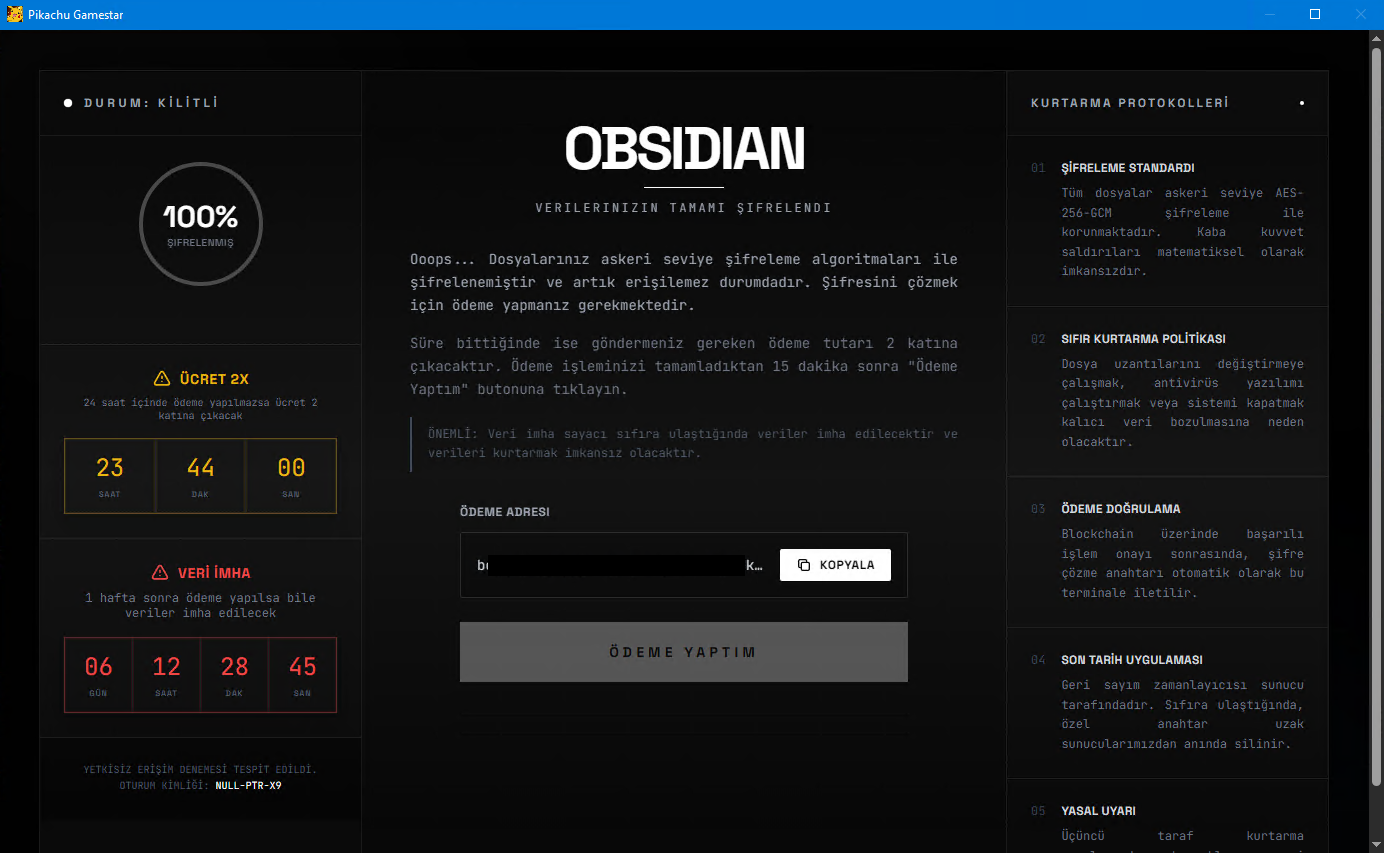
- It uses the following icon to trick users into thinking that it is a legitimate game or software:

ただし、情報公開日現在、このWebサイトにはアクセスできません。
ランサムウェアの不正活動
マルウェアは、以下のディレクトリ内で確認されたファイルを暗号化します。
- %Desktop%
(註:%Desktop%フォルダは、現在ログオンしているユーザのデスクトップです。Windows 2000(32-bit)、XP、Server 2003(32-bit)の場合、通常 "C:\Documents and Settings\<ユーザ名>\Desktop" です。また、Windows Vista、7、8、8.1、2008(64-bit)、2012(64-bit)、10(64-bit)の場合、通常 "C:\Users\<ユーザ名>\Desktop" です。)
マルウェアは、暗号化されたファイルのファイル名に以下の拡張子を追加します。
- .encrypted
以下のファイル拡張子を持つファイルについては暗号化しません:
- .encrypted
対応方法
手順 1
Windows 7、Windows 8、Windows 8.1、および Windows 10 のユーザは、コンピュータからマルウェアもしくはアドウェア等を完全に削除するために、ウイルス検索の実行前には必ず「システムの復元」を無効にしてください。
手順 2
このマルウェアもしくはアドウェア等の実行により、手順中に記載されたすべてのファイル、フォルダおよびレジストリキーや値がコンピュータにインストールされるとは限りません。インストールが不完全である場合の他、オペレーティングシステム(OS)の条件によりインストールがされない場合が考えられます。手順中に記載されたファイル/フォルダ/レジストリ情報が確認されない場合、該当の手順の操作は不要ですので、次の手順に進んでください。
手順 3
以下のフォルダを検索し削除します。
- %AppDataLocal%\com.ahadu.pikachu-gamestar
手順 4
最新のバージョン(エンジン、パターンファイル)を導入したウイルス対策製品を用い、ウイルス検索を実行してください。「Ransom.Win64.ANOBSIDI.THLBBBE」と検出したファイルはすべて削除してください。 検出されたファイルが、弊社ウイルス対策製品により既に駆除、隔離またはファイル削除の処理が実行された場合、ウイルスの処理は完了しており、他の削除手順は特にありません。
手順 5
暗号化されたファイルをバックアップから復元します。
ご利用はいかがでしたか? アンケートにご協力ください