Ransom.Win64.LOCKBIT.YXFIOZ

Ransom:Win64/LockBit.MZZ!MTB (MICROSOFT), Trojan-Ransom.LockBit (IKARUS), Ransom.LockBit (NAI)
Windows





Threat Type: Ransomware
Destructiveness: No
Encrypted:
In the wild: Yes
OVERVIEW
This Ransomware arrives on a system as a file dropped by other malware or as a file downloaded unknowingly by users when visiting malicious sites.
It deletes the initially executed copy of itself.
It drops files as ransom note.
TECHNICAL DETAILS
Arrival Details
This Ransomware arrives on a system as a file dropped by other malware or as a file downloaded unknowingly by users when visiting malicious sites.
Other Details
This Ransomware connects to the following possibly malicious URL:
- 92.{BLOCKED}:80
It does the following:
- It terminates itself if the affected machine's language settings or geolocation is Russia.
- It clears all event logs using the EvtClearLog API after encryption completion.
- It patches the EtwEventWrite API by overwriting it with a 0xC3 (return) instruction, disabling Windows Event Tracing capabilities.
- It checks all the services running in the system by hashing the service name and comparing it with its hardcoded list. Service names that match are then terminated.
- It launches %System%\Defrag.exe in a suspended state. Then, it uses process hollowing to inject the decrypted ransomware payload.
(Note: %System% is the Windows system folder, where it usually is C:\Windows\System32 on all Windows operating system versions.)
It deletes the initially executed copy of itself.
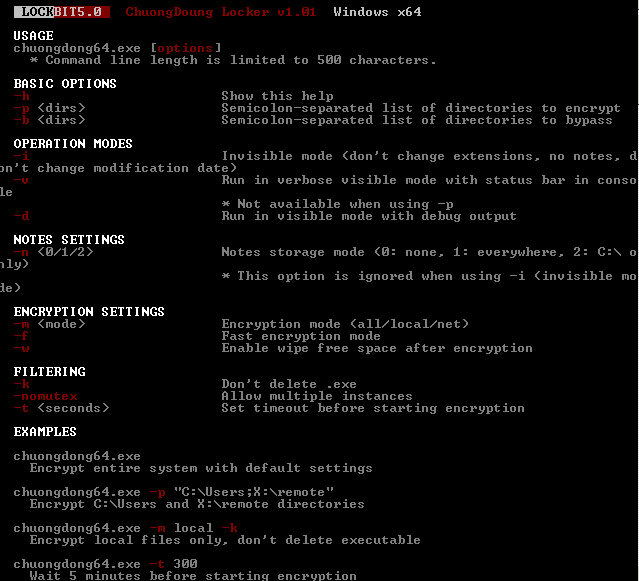
It accepts the following parameters:
- Basic Options
- -h → Show help
- -d {dirs} → Semicolon-separated list of directories to encrypt
- -b {dirs} → Semicolon-separated list of directories to bypass
- Operation Modes
- -i → Invisible mode (don't change extensions, no notes, don't change modification date)
- -p → Run in verbose visible mode with status bar in console (not available when using -i)
- -v → Run in visible mode with debug output
- Notes Settings
- -n <0/1/2> → Notes storage mode: 0: None, 1: Everywhere, 2: C:\ only. This option is ignored when using -i (invisible mode)
- Encryption Settings
- -m {mode} → Encryption mode (all/local/net)
- -f → Fast encryption mode
- -w → Enable wipe free space after encryption
- Filtering
- -k → Don't delete .exe files
- -nomutex → Allow multiple instances
- -t {seconds} → Set timeout before starting encryption
Ransomware Routine
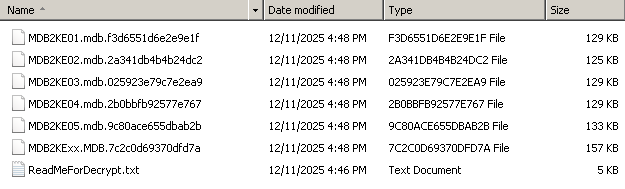
This Ransomware appends the following extension to the file name of the encrypted files:
- .{random 16 characters}
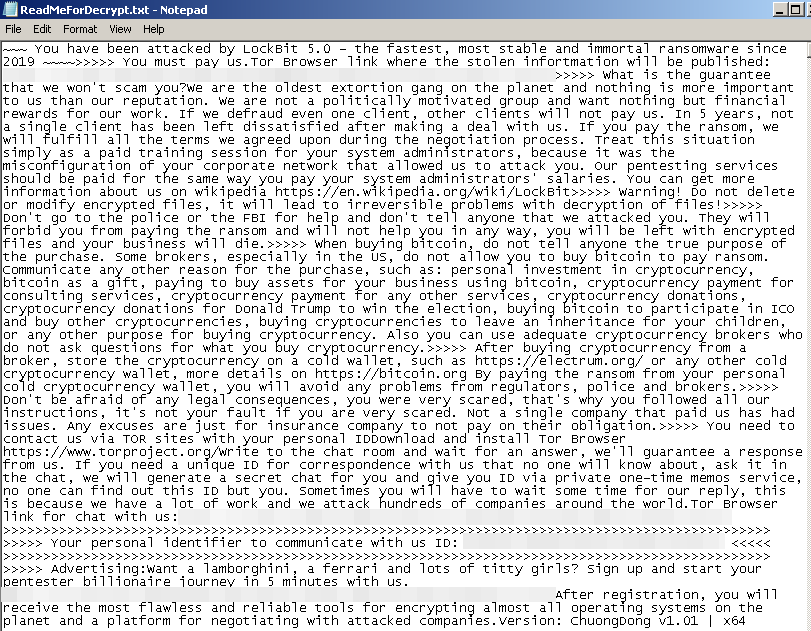
It drops the following file(s) as ransom note:
- {Drive Letter}:\ReadMeForDecrypt.txt
- {Directory with Encrypted Files}\ReadMeForDecrypt.txt
- %Desktop%\ReadMeForDecrypt.txt
SOLUTION
Step 1
Before doing any scans, Windows 7, Windows 8, Windows 8.1, and Windows 10 users must disable System Restore to allow full scanning of their computers.
Step 2
Note that not all files, folders, and registry keys and entries are installed on your computer during this malware's/spyware's/grayware's execution. This may be due to incomplete installation or other operating system conditions. If you do not find the same files/folders/registry information, please proceed to the next step.
Step 3
Search and delete these files
- {Drive Letter}:\ReadMeForDecrypt.txt
- {Directory with Encrypted Files}\ReadMeForDecrypt.txt
- %Desktop%\ReadMeForDecrypt.txt
Step 4
Scan your computer with your Trend Micro product to delete files detected as Ransom.Win64.LOCKBIT.YXFIOZ. If the detected files have already been cleaned, deleted, or quarantined by your Trend Micro product, no further step is required. You may opt to simply delete the quarantined files. Please check the following Trend Micro Support pages for more information:
Step 5
Restore encrypted files from backup.
Did this description help? Tell us how we did.