Ransom.Win64.EXITIUM.B

Gen:Heur.Ransom.Imps.1 (BITDEFENDER)
Windows




Threat Type: Ransomware
Destructiveness: No
Encrypted: No
In the wild: Yes
OVERVIEW
This Ransomware arrives on a system as a file dropped by other malware or as a file downloaded unknowingly by users when visiting malicious sites. It may be dropped by other malware.
It enumerates drives A-Z of the affected system.
It does not have any backdoor routine.
It does not have any information-stealing capability.
It drops files as ransom note. It avoids encrypting files with the following file extensions.
TECHNICAL DETAILS
Arrival Details
This Ransomware arrives on a system as a file dropped by other malware or as a file downloaded unknowingly by users when visiting malicious sites.
It may be dropped by the following malware:
Installation
This Ransomware adds the following processes:
- cmd.exe /c vssadmin delete shadows /all /quiet >nul 2>&1 → Deletes all Volume Shadow Copies
- cmd.exe /c vssadmin resize shadowstorage /for={Drive}: /on={Drive}: /maxsize=320MB >nul 2>&1 → Shrinks shadow storage to purge previous restore snapshots
- cmd.exe /c wmic shadowcopy delete /quiet >nul 2>&1 → Secondary Volume Shadow Copy deletion via WMI
- cmd.exe /c net stop {service} /y >nul 2>&1 → Stops database and backup services
- cmd.exe /c sc stop {service} >nul 2>&1 → Stops target services via Service Control Manager
- cmd.exe /C ping 1{BLOCKED}.1 -n 6 > nul && del /f /q "{malware path}\{malware name}.exe" → Post-execution self-deletion routine to eliminate the loader binary
Other System Modifications
This Ransomware modifies the following registry entries:
HKEY_CURRENT_USER\Software\Microsoft\
Windows\CurrentVersion\Policies\
System
DisableTaskMgr = 1
(Note: The default value data of the said registry entry is 0 (1 disables Windows Task Manager).)
HKEY_CURRENT_USER\Software\Microsoft\
Windows\CurrentVersion\Policies\
System
DisableRegistryTools = 1
(Note: The default value data of the said registry entry is 0 (1 disables Registry Editor (`regedit.exe`)).)
HKEY_USERS\.DEFAULT\Software\
Microsoft\Windows\CurrentVersion\
Policies\System
DisableTaskMgr = 1
(Note: The default value data of the said registry entry is 0 (1 disables Windows Task Manager).)
HKEY_USERS\.DEFAULT\Software\
Microsoft\Windows\CurrentVersion\
Policies\System
DisableRegistryTools = 1
(Note: The default value data of the said registry entry is 0 (1 disables Registry Editor (`regedit.exe`)).)
Propagation
This Ransomware enumerates drives A-Z of the affected system.
Active Directory GPO Propagation (`--gpo`):
- When run on a Domain Controller or with domain administrative privileges, it connects to Active Directory via `LDAP://`, creates a GPO named `Payload Deploy Policy`, copies the ransomware binary to the domain `SYSVOL` share, stages it to `%Public%` on all endpoints via `Files.xml`, and configures an `ImmediateTaskV2` scheduled task to execute domain-wide.
(Note: %Public% is the folder that serves as a repository of files or folders common to all users, which is usually C:\Users\Public in Windows Vista, 7, and 8.)
Backdoor Routine
This Ransomware does not have any backdoor routine.
Rootkit Capabilities
This Ransomware does not have rootkit capabilities.
Process Termination
This Ransomware terminates the following services if found on the affected system:
- `acronis_agent`
- `backup`
- `mssqlserver`
- `mysql`
- `shadowprotectsvc`
- `sql`
- `sqlexpress`
- `veeam`
- `veeamcatalogsvc`
- `wbengine`
It terminates the following processes if found running in the affected system's memory:
- AGENTSVC.exe
- AVAGENT.exe
- AVSCS.exe
- BEDBH.exe
- BENETNS.exe
- BENGIEN.exe
- BESERVER.exe
- CAGSERVICE.exe
- CVD.exe
- CVFWD.exe
- CVMOUNTD.exe
- CVODS.exe
- DBENG50.exe
- DBSNMP.exe
- DELLSYSTEMDETECT.exe
- ENCSVC.exe
- ENTERPRISECLIENT.exe
- EXCEL.exe
- FIREFOX.exe
- INFOPATH.exe
- ISQLPLUSSERVICE.exe
- MSACCESS.exe
- MSPUB.exe
- MVDESKTOPSERVICE.exe
- MYDESKTOPQOS.exe
- MYDESKTOPSERVICE.exe
- NOTEPAD.exe
- OCAUTOUPDS.exe
- OCOMM.exe
- OCSSD.exe
- ONENOTE.exe
- ORACLE.exe
- OUTLOOK.exe
- POWERPNT.exe
- PVLSVR.exe
- QBCFMONITORSERVICE.exe
- QBDBMGRN.exe
- QBIDPSERVICE.exe
- RAW_AGENT_SVC.exe
- SAP.exe
- SAPHOSTEXEC.exe
- SAPOSCOL.exe
- SAPSTARTSRV.exe
- SQBCORESERVICE.exe
- SQL.exe
- STEAM.exe
- SYNCTIME.exe
- TBIRDCONFIG.exe
- TEAMVIEWER.exe
- TEAMVIEWER_SERVICE.exe
- THEBAT.exe
- THUNDERBIRD.exe
- TV_W32.exe
- TV_X64.exe
- VEEAMDEPLOYMENTSVC.exe
- VEEAMNFSSVC.exe
- VEEAMTRANSPORTSVC.exe
- VISIO.exe
- VMCOMPUTE.exe
- VMMS.exe
- VMWP.exe
- VSNAPVSS.exe
- VXMON.exe
- WINWORD.exe
- WORDPAD.exe
- XFSSVCCON.exe
Information Theft
This Ransomware does not have any information-stealing capability.
Other Details
This Ransomware does the following:
- It creates and starts the following service:
- Service Name: wbobongl
- Display Name: wbobongl
- Type: SERVICE_WIN32_OWN_PROCESS
- Start Type: SERVICE_AUTO_START
- Binary Path: {malware path}\{loader executable}
It accepts the following parameters:
- `--fast` → Accelerates encryption by directly applying partial header encryption
- `--gpo` → Creates and deploys an Active Directory Group Policy Object (GPO) to execute the ransomware as SYSTEM across domain-joined machines
- `--local` → Restricts encryption routine strictly to local fixed drives
- `--net` → Enables subnet sweeps for port 445 (SMB) and enumerates remote network shares for encryption
- `--quiet` → Executes silently in the background without console logging or UI indicators
- `--readme` → Drops the ransom note YOU ARE UNDER ATTACK!.html across target directories without encrypting files
- `{Path}` → Targets the specified directory path for encryption
It does not exploit any vulnerability.
Ransomware Routine
This Ransomware appends the following extension to the file name of the encrypted files:
- .NcWIq
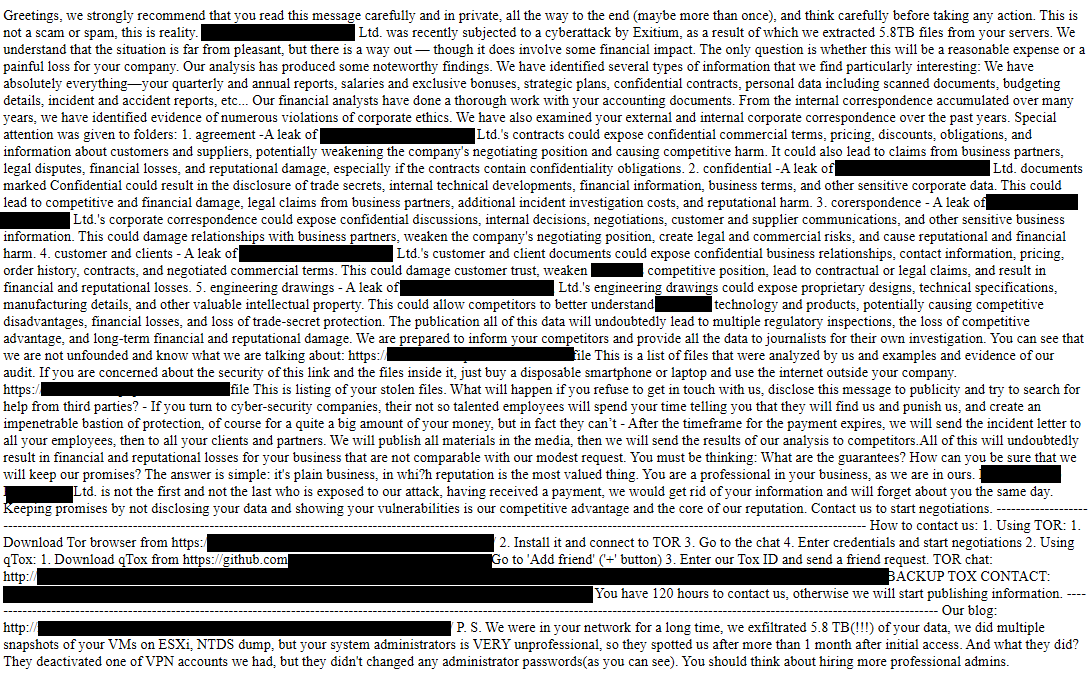
It drops the following file(s) as ransom note:
- {Encrypted Directory}\YOU ARE UNDER ATTACK!.html
It avoids encrypting files with the following file extensions:
- .386
- .adv
- .ani
- .bat
- .bin
- .cmd
- .com
- .cpl
- .cur
- .deskthemepack
- .diagcab
- .diagcfg
- .diapkg
- .dll
- .drv
- .exe
- .hta
- .icl
- .ico
- .ics
- .idx
- .key
- .lnk
- .lock
- .log
- .mod
- .mpa
- .msc
- .msi
- .msp
- .msstyles
- .msu
- .NcWIq
- .nls
- .nomedia
- .ocx
- .prf
- .ps1
- .rtp
- .scr
- .shs
- .spl
- .sys
- .theme
- .themepack
It avoids encrypting the following files and directories:
- $recycle.bin
- $windows.~bt
- $windows.~ws
- admin$
- appdata
- application data
- autorun.inf
- autorun.ini
- boot
- boot.ini
- bootfont.bin
- bootmgfw.efi
- bootmgr
- bootmgr.efi
- bootsect.bak
- config.msi
- desktop.ini
- iconcache.db
- intel
- ipc$
- mozilla
- msocache
- netlogon
- ntldr
- ntuser.dat
- ntuser.dat.log
- ntuser.ini
- perflogs
- programdata
- system volume information
- sysvol
- thumbs.db
- tor browser
- windows
- windows.old
- YOU ARE UNDER ATTACK!.html
It prioritizes files with the following extensions for full encryption:
- .4dd
- .4dl
- .abs
- .abx
- .accdb
- .accdc
- .accde
- .accdr
- .accdt
- .accft
- .act
- .adb
- .ade
- .adf
- .adp
- .al
- .alf
- .arc
- .ask
- .avhdx
- .backup
- .bak
- .bay
- .bcd
- .bdf
- .bin
- .bkf
- .bkp
- .bld
- .bmp
- .bpk
- .btr
- .bz2
- .bzip2
- .c
- .cad
- .cat
- .cdb
- .cdr
- .cer
- .cfg
- .ckp
- .cma
- .config
- .contact
- .cpd
- .cpi
- .cpp
- .crt
- .crw
- .cs
- .css
- .csv
- .dacpac
- .dad
- .dadiagrams
- .daschema
- .db
- .db-shm
- .db-wal
- .db3
- .dbc
- .dbf
- .dbs
- .dbt
- .dbv
- .dbx
- .dcb
- .der
- .dif
- .dip
- .disk
- .djv
- .djvu
- .dng
- .doc
- .docb
- .docm
- .docx
- .dot
- .dotm
- .dotx
- .dp1
- .dwg
- .dxf
- .eco
- .edb
- .eml
- .epim
- .eps
- .erf
- .fdb
- .fic
- .fla
- .flv
- .fmp
- .fmp12
- .fmpsl
- .fol
- .fp3
- .fp4
- .fp5
- .fp7
- .fpt
- .fzb
- .fzv
- .gdb
- .gif
- .gpg
- .gwi
- .gz
- .gzip
- .h
- .hdb
- .hdx
- .his
- .hp
- .hpp
- .htm
- .html
- .ib
- .ibd
- .idb
- .ihx
- .iso
- .itdb
- .itw
- .jar
- .java
- .jet
- .jpeg
- .jpg
- .js
- .json
- .jtx
- .kdb
- .kdbx
- .kexi
- .kexic
- .kexis
- .key
- .lgc
- .log
- .lwx
- .m3u
- .m4a
- .maf
- .mar
- .mdf
- .mdn
- .mdt
- .mep
- .mid
- .midi
- .mkv
- .mov
- .mp3
- .mp4
- .mpeg
- .mpg
- .mrg
- .msg
- .mud
- .mwb
- .myd
- .myi
- .ndf
- .nef
- .nnt
- .nrmlib
- .nrw
- .ns2
- .ns3
- .ns4
- .nsf
- .nv
- .nv2
- .nwdb
- .nyf
- .odb
- .odc
- .odm
- .odp
- .ods
- .odt
- .ogg
- .oil
- .oqy
- .ora
- .orf
- .ost
- .otg
- .oth
- .otp
- .ots
- .ott
- .owc
- .p12
- .p7b
- .p7c
- .p96
- .p97
- .pak
- .pan
- .pas
- .pdb
- .pdm
- .pfx
- .php
- .pl
- .png
- .pnz
- .pot
- .potm
- .potx
- .ppam
- .pps
- .ppsm
- .ppsx
- .ppt
- .pptm
- .pptx
- .ps
- .psd
- .pst
- .ptx
- .pwm
- .py
- .qba
- .qbb
- .qbm
- .qbr
- .qbw
- .qbx
- .qby
- .qry
- .qvd
- .r3d
- .raf
- .rar
- .raw
- .rb
- .rctd
- .rdb
- .rpd
- .rsd
- .rtf
- .rw2
- .rwl
- .safe
- .sav
- .sbf
- .sbr
- .schema
- .sdb
- .sdf
- .sh
- .sln
- .spq
- .sql
- .sqlite
- .sqlite3
- .sqlitedb
- .sr2
- .srf
- .srw
- .suo
- .svg
- .swf
- .tar
- .tbk
- .teachers
- .tgz
- .tif
- .tiff
- .tmd
- .trn
- .txt
- .ude
- .uop
- .uot
- .usr
- .v12
- .vb
- .vbox
- .vbs
- .vdi
- .vhd
- .vhdx
- .vis
- .vmdk
- .vmx
- .vob
- .vpd
- .vsd
- .vsdx
- .vue
- .vvv
- .wallet
- .wav
- .wb2
- .wbk
- .wdb
- .wma
- .wmdb
- .wmv
- .wpd
- .wpe
- .wps
- .wrk
- .x11
- .x3f
- .xdb
- .xla
- .xlam
- .xld
- .xlk
- .xll
- .xlm
- .xls
- .xlsb
- .xlsm
- .xlsx
- .xlt
- .xltm
- .xltx
- .xlw
- .xml
- .xmlff
- .ycbcra
- .yuv
- .zip
However, because of the program's logic, it was only able to partially encrypt the first 1 MB content of files that are more than 3 MB in size. If the file is equal or less than 3MB in size, then it only changes the file extension of the file and no encryption is made. This applies to all file extensions not included in the exclusion list.
It encrypts files found in the following drives:
- Fixed Drives
- Removable Drives
- Network Share Drives
SOLUTION
Step 1
Trend Micro Predictive Machine Learning detects and blocks malware at the first sign of its existence, before it executes on your system. When enabled, your Trend Micro product detects this malware under the following machine learning name:
-
Ransom.Win32.TRX.XXPE50FFF110
Step 2
Before doing any scans, Windows 7, Windows 8, Windows 8.1, and Windows 10 users must disable System Restore to allow full scanning of their computers.
Step 3
Note that not all files, folders, and registry keys and entries are installed on your computer during this malware's/spyware's/grayware's execution. This may be due to incomplete installation or other operating system conditions. If you do not find the same files/folders/registry information, please proceed to the next step.
Step 4
Search and delete these files
- {Encrypted Directory}\YOU ARE UNDER ATTACK!.html
Step 5
Restore this modified registry value
Important: Editing the Windows Registry incorrectly can lead to irreversible system malfunction. Please do this step only if you know how or you can ask assistance from your system administrator. Else, check this Microsoft article first before modifying your computer's registry.
- In HKEY_CURRENT_USER\Software\Microsoft\Windows\CurrentVersion\Policies\System
- DisableTaskMgr = 1
- DisableTaskMgr = 1
- In HKEY_CURRENT_USER\Software\Microsoft\Windows\CurrentVersion\Policies\System
- DisableRegistryTools = 1
- DisableRegistryTools = 1
- In HKEY_USERS\.DEFAULT\Software\Microsoft\Windows\CurrentVersion\Policies\System
- DisableTaskMgr = 1
- DisableTaskMgr = 1
- In HKEY_USERS\.DEFAULT\Software\Microsoft\Windows\CurrentVersion\Policies\System
- DisableRegistryTools = 1
- DisableRegistryTools = 1
Step 6
Scan your computer with your Trend Micro product to delete files detected as Ransom.Win64.EXITIUM.B. If the detected files have already been cleaned, deleted, or quarantined by your Trend Micro product, no further step is required. You may opt to simply delete the quarantined files. Please check the following Trend Micro Support pages for more information:
Step 7
Restore encrypted files from backup.
Did this description help? Tell us how we did.