Ransom.Win64.DIAVOL.YEBJL

a variant of Win64/Filecoder.Diavol.A trojan(NOD32)
Windows




Threat Type: Ransomware
Destructiveness: No
Encrypted: No
In the wild: Yes
OVERVIEW
This Ransomware arrives on a system as a file dropped by other malware or as a file downloaded unknowingly by users when visiting malicious sites.
It connects to certain websites to send and receive information.
It drops files as ransom note. It avoids encrypting files with the following file extensions.
TECHNICAL DETAILS
Arrival Details
This Ransomware arrives on a system as a file dropped by other malware or as a file downloaded unknowingly by users when visiting malicious sites.
Process Termination
This Ransomware terminates the following services if found on the affected system:
- DefWatch
- ccEvtMgr
- ccSetMgr
- SavRoam
- dbsrv12
- sqlservr
- sqlagent
- Intuit.QuickBooks.FCS
- dbeng8
- QBIDPService
- Culserver
- RTVscan
- vmware-usbarbitator64
- vmware-converter
- VMAuthdService
- VMnetDHCP
- VMUSBArbService
- VMwareHostd
- SQLADHLP
- msmdsrv
- tomcat6
- QBCFMonitorService
- Acronis VSS Provider
- SQL Backups
- SQLsafe Backup Service
- SQLsafe Filter Service
- Symantec System Recovery
- Veeam Backup Catalog Data Service
- Zoolz 2 Service
- AcrSch2Svc
- BackupExecAgentAccelerator
- BackupExecAgentBrowser
- BackupExecDeviceMediaService
- BackupExecJobEngine
- BackupExecManagementService
- BackupExecRPCService
- BackupExecVSSProvider
- bedbg
- mozyprobackup
- ntrtscan
- PDVFSService
- SDRSVC
- SQLWriter
- VeeamBackupSvc
- VeeamBrokerSvc
- VeeamCatalogSvc
- VeeamCloudSvc
- VeeamDeploymentService
- VeeamDeploySvc
- VeeamEnterpriseManagerSvc
- VeeamHvIntegrationSvc
- VeeamMountSvc
- VeeamNFSSvc
- VeeamRESTSvc
- VeeamTransportSvc
- sms_site_sql_backup
- MsDtsServer
- MsDtsServer1
- MsDtsServer11
- msftesql$PROD
- MSOLAP$SQL_2
- MSOLAP$SYSTEM_BGC
- MSOLAP$TPS
- MSOLAP$TPSAMA
- MSSQL$BKUPEXEC
- MSSQL$ECWDB2
- MSSQL$PRACTICEMGT
- MSSQL$PRACTTICEBGC
- MSSQL$PROD
- MSSQL$PROFXENGAGEMENT
- MSSQL$SBSMONITORING
- MSSQL$SHAREPOINT
- MSSQL$SQL_2
- MSSQL$SQLEXPRESS
- MSSQL$SYSTEM_BGC
- MSSQL$TPS
- MSSQL$TPSAMA
- MSSQL$VEEAMSQL2
- MSSQL$VEEAMSQL2
- MSSQLFDLauncher
- MSSQLFDLauncher$PROFXENGAGEMENT
- MSSQLFDLauncher$SBSMONITORING
- MSSQLFDLauncher$SHAREPOINT
- MSSQLFDLauncher$SQL_2
- MSSQLFDLauncher$SYSTEM_BGC
- MSSQLFDLauncher$TPS
- MSSQLFDLauncher$TPSAMA
- MSSQLSERVER
- MSSQLServerADHelper
- MSSQLServerADHelper1
- MSSQLServerOLAPService
- MySQL57
- MySQL8
- OracleClientCache8
- ReportServer$SQL_2
- RESvc
- SQLAgent$BKUPEXEC
- SQLAgent$CITRIX_METAFRAME
- SQLAgent$CXDB
- SQLAgent$ECWDB2
- SQLAgent$PRACTTICEBGC
- SQLAgent$PRACTTICEMGT
- SQLAgent$PROD
- SQLAgent$PROFXENGAGEMENT
- SQLAgent$SBSMONITORING
- SQLAgent$SHAREPOINT
- SQLAgent$SQL_2
- SQLAgent$SQLEXPRESS
- SQLAgent$SYSTEM_BGC
- SQLAgent$TPS
- SQLAgent$TPSAMA
- SQLAgent$VEEAMSQL2
- SQLAgent$VEEAMSQL2
- SQLBrowser
- SQLSafeOLRService
- SQLSERVERAGENT
- SQLTELEMETRY
- SQLTELEMETRY$ECWDB2
- mssql$vim_sqlexp
- IISAdmin
- NetMsmqActivator
- POP3Svc
- SstpSvc
- UI
- W3Svc
- aphidmonitorservice
- intel(r) proset monitoring service
- unistoresvc_1af4
- audioendpointbuilder
- MSExchangeES
- MSExchangeIS
- MSExchangeMGMT
- MSExchangeMTA
- MSExchangeSA
- MSExchangeSRS
- msexchangeadtopology
- msexchangeimap4
- Sophos Agent
- Sophos AutoUpdate Service
- Sophos Clean Service
- Sophos Device Control Service
- Sophos File Scanner Service
- Sophos Health Service
- Sophos MCS Agent
- Sophos MCS Client
- Sophos Message Router
- Sophos Safestore Service
- Sophos System Protection Service
- Sophos Web Control Service
- AcronisAgent
- Antivirus
- DCAgent
- EhttpSrv
- EPSecurityService
- EPUpdateService
- EsgShKernel
- ESHASRV
- FA_Scheduler
- IMAP4Svc
- KAVFS
- KAVFSGT
- kavfsslp
- klnagent
- macmnsvc
- masvc
- MBAMService
- MBEndpointAgent
- McAfeeEngineService
- McAfeeFramework
- McAfeeFrameworkMcAfeeFramework
- McShield
- McTaskManager
- mfefire
- mfemms
- mfevtp
- MSSQL$SOPHOS
- sacsvr
- SAVAdminService
- SAVService
- SepMasterService
- ShMonitor
- Smcinst
- SmcService
- SntpService
- sophossps
- SQLAgent$SOPHsvcGenericHost
- swi_filter
- swi_service
- swi_update
- swi_update_64
- TmCCSF
- tmlisten
- TrueKey
- TrueKeyScheduler
- TrueKeyServiceHelWRSVC
- vapiendpoint
It terminates the following processes if found running in the affected system's memory:
- iexplore.exe
- msedge.exe
- chrome.exe
- opera.exe
- firefox.exe
- savfmsesp.exe
- zoolz.exe
- firefoxconfig.exe
- tbirdconfig.exe
- thunderbird.exe
- agntsvc.exe
- dbeng50.exe
- dbsnmp.exe
- isqlplussvc.exe
- msaccess.exe
- msftesql.exe
- mydesktopqos.exe
- mydesktopservice.exe
- mysqld-nt.exe
- mysqld-opt.exe
- mysqld.exe
- ocautoupds.exe
- ocssd.exe
- oracle.exe
- sqlagent.exe
- synctime.exe
- thebat.exe
- thebat64.exe
- encsvc.exe
- ocomm.exe
- xfssvccon.exe
- excel.exe
- infopath.exe
- mspub.exe
- onenote.exe
- outlook.exe
- powerpnt.exe
- visio.exe
- wordpad.exe
- cntaosmgr.exe
- mbamtray.exe
- ntrtscpccntmon.exe
- tmlisten.exe
- sqlmangr.exe
- ragui.exe
- qbcfmonitorservice.exe
- supervise.exe
- fdhost.exe
- culture.exe
- rtvscan.exe
- defwatch.exe
- wxserverview.exe
- gdscan.exe
- qbw32.exe
- qbdbmgr.exe
- qbupdate.exe
- axlbridge.exe
- 360se.exe
- 360doctor.exe
- qbidpservice.exe
- wxserver.exe
- httpd.exe
- fdlauncher.exe
- msdtsrvr.exe
- tomcat6.exe
- java.exe
- wdswfsafe.exe
Information Theft
This Ransomware gathers the following data:
- Computer Name
- User Name
- OS Information
Stolen Information
This Ransomware sends the gathered information via HTTP POST to the following URL:
- http://{Server Address}/{BLOCKED}pQwtjCA/register → if the -s {Server Address} command line parameter is used the address will be specified. If -s command line parameter is not used, the default address will be 127.0.0.1(localhost).
Other Details
This Ransomware connects to the following website to send and receive information:
- http://{BLOCKED}.{BLOCKED}.146.118/Bnyar8RsK04ug/{GUID} → will only send a HTTP GET request to the server if the register request returns a data.
It accepts the following parameters:
- -p: path to a file with a list of paths to scan first for files
- -log: path to a log file
- -m: mode: net or local
- net - encrypt network shares only
- local - encrypt local drives only and ignore network shares
- -h: path to a file that contains specific hosts (names and IPs) to enumerate for shares
- -s: IP address that the initial register message will be sent to.
Ransomware Routine
This Ransomware avoids encrypting files with the following strings in their file name:
- readme_for_decrypt.txt
- locker.txt
- unlocker.txt
It avoids encrypting files found in the following folders:
- %Windows%
- %Program Files%
- %User Temp%
(Note: %Windows% is the Windows folder, where it usually is C:\Windows on all Windows operating system versions.. %Program Files% is the default Program Files folder, usually C:\Program Files in Windows 2000(32-bit), Server 2003(32-bit), XP, Vista(64-bit), 7, 8, 8.1, 2008(64-bit), 2012(64-bit) and 10(64-bit) , or C:\Program Files (x86) in Windows XP(64-bit), Vista(64-bit), 7(64-bit), 8(64-bit), 8.1(64-bit), 2008(64-bit), 2012(64-bit) and 10(64-bit).. %User Temp% is the current user's Temp folder, which is usually C:\Documents and Settings\{user name}\Local Settings\Temp on Windows 2000(32-bit), XP, and Server 2003(32-bit), or C:\Users\{user name}\AppData\Local\Temp on Windows Vista, 7, 8, 8.1, 2008(64-bit), 2012(64-bit) and 10(64-bit).)
It appends the following extension to the file name of the encrypted files:
- .lock64
It drops the following file(s) as ransom note:
- {Infected Directory}\README_FOR_DECRYPT.txt
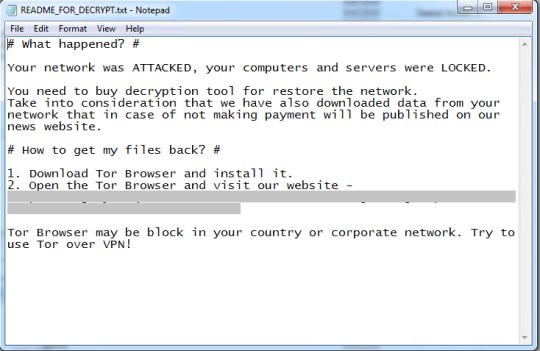
It avoids encrypting files with the following file extensions:
- .exe
- .sys
- .dll
- .lock64
SOLUTION
Step 1
Trend Micro Predictive Machine Learning detects and blocks malware at the first sign of its existence, before it executes on your system. When enabled, your Trend Micro product detects this malware under the following machine learning name:
- Troj.Win32.TRX.XXPE50FFF049
Step 2
Before doing any scans, Windows 7, Windows 8, Windows 8.1, and Windows 10 users must disable System Restore to allow full scanning of their computers.
Step 3
Note that not all files, folders, and registry keys and entries are installed on your computer during this malware's/spyware's/grayware's execution. This may be due to incomplete installation or other operating system conditions. If you do not find the same files/folders/registry information, please proceed to the next step.
Step 4
Search and delete these files
- {Infected Directory}\README_FOR_DECRYPT.txt
Step 5
Scan your computer with your Trend Micro product to delete files detected as Ransom.Win64.DIAVOL.YEBJL. If the detected files have already been cleaned, deleted, or quarantined by your Trend Micro product, no further step is required. You may opt to simply delete the quarantined files. Please check the following Trend Micro Support pages for more information:
Step 6
Restore encrypted files from backup.
Did this description help? Tell us how we did.