Ransom.Win32.ZEOTICUS.C

Ransom:Win32/Zeoticus.PA!MTB (MICROSOFT); Packed.Win32.Krap.b (KASPERSKY)
Windows





Threat Type: Ransomware
Destructiveness: No
Encrypted: No
In the wild: Yes
OVERVIEW
This Ransomware arrives on a system as a file dropped by other malware or as a file downloaded unknowingly by users when visiting malicious sites.
It drops files as ransom note.
TECHNICAL DETAILS
Arrival Details
This Ransomware arrives on a system as a file dropped by other malware or as a file downloaded unknowingly by users when visiting malicious sites.
Installation
This Ransomware drops the following copies of itself into the affected system and executes them:
- %Windows%\{Malware Filename}.exe
(Note: %Windows% is the Windows folder, where it usually is C:\Windows on all Windows operating system versions.)
It drops the following files:
- {Drive Letter}:\{Value 1}{Value 2}{Value3}{Value4}.zeoticus2
Where:- {Value1} is {Volume Serial Number} XORed to {Year} and 0x6
- {Value2} is {Volume Serial Number} XORed to {Month} and 0x5
- {Value3} is {Day of Week} XORed to 0x7
- {Value4} is {Day of Month} XORed to 0x8
- %User Temp%\{Numbers}.jpg → Wallpaper
(Note: %User Temp% is the current user's Temp folder, which is usually C:\Documents and Settings\{user name}\Local Settings\Temp on Windows 2000(32-bit), XP, and Server 2003(32-bit), or C:\Users\{user name}\AppData\Local\Temp on Windows Vista, 7, 8, 8.1, 2008(64-bit), 2012(64-bit) and 10(64-bit).)
It adds the following processes:
- %Windows%\{Malware Filename}.exe {p r i v e t | p r i v e t1 | p r i v e t2}
- cmd.exe /c ping localhost -n 3 > nul & del {Malware Filepath}\{Malware Filename}.exe → delete original exe
- wbadmin delete catalog -quiet → deletes backup catalog
- vssadmin.exe delete shadows /all /quiet → deletes shadow copies
- bcdedit.exe /set {current} nx AlwaysOff → Disable Data Execution Prevention
- wmic SHADOWCOPY DELETE → deletes shadow copies
(Note: %Windows% is the Windows folder, where it usually is C:\Windows on all Windows operating system versions.)
It adds the following mutexes to ensure that only one of its copies runs at any one time:
- {Numbers}
Autostart Technique
This Ransomware adds the following registry entries to enable its automatic execution at every system startup:
HKEY_CURRENT_USER\Software\Microsoft\
Windows\CurrentVersion\Run
{Malware Filename}.exe = %Windows%\{Malware Filename}.exe
Other System Modifications
This Ransomware adds the following registry entries:
HKEY_CURRENT_USER\Software\Microsoft\
Windows\CurrentVersion
deusVult = {Encrypted String}
HKEY_CURRENT_USER\Software\Microsoft\
Windows\CurrentVersion
deusEx = {Encrypted String}
It changes the desktop wallpaper by modifying the following registry entries:
HKEY_CURRENT_USER\Control Panel\Desktop
Wallpaper = %User Temp%\{Numbers}.jpg
It sets the system's desktop wallpaper to the following image:
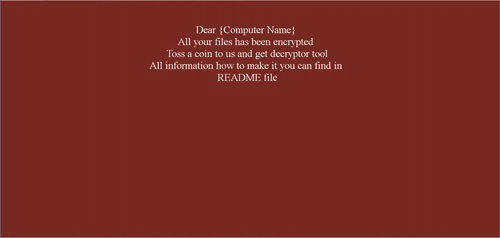
Process Termination
This Ransomware terminates the following processes if found running in the affected system's memory:
- agntsvc.exe
- dbeng50.exe
- dbsnmp.exe
- encsvc.exe
- excel.exe
- firefoxconfig.exe
- infopath.exe
- isqlplussvc.exe
- msaccess.exe
- msftesql.exe
- mspub.exe
- mydesktopqos.exe
- mydesktopservice.exe
- mysqld.exe
- mysqld-nt.exe
- mysqld-opt.exe
- ocautoupds.exe
- ocomm.exe
- ocssd.exe
- onenote.exe
- oracle.exe
- outlook.exe
- powerpnt.exe
- sqbcoreservice.exe
- sqlagent.exe
- sqlbrowser.exe
- sqlservr.exe
- sqlservr.exe
- sqlwriter.exe
- synctime.exe
- tbirdconfig.exe
- thebat64.exe
- thunderbird.exe
- winword.exe
- wordpad.exe
- xfssvccon.exe
Information Theft
This Ransomware gathers the following data:
- Computer Name
- Computer Locale
- Operating System Name
Other Details
This Ransomware does the following:
- It encrypts files located in the following drive types:
- Removable
- Fixed
- Network (Remote)
Ransomware Routine
This Ransomware avoids encrypting files with the following strings in their file path:
- Tor Browser
- Windows
It renames encrypted files using the following names:
- {Original Filename}.{Original File Extension}.{Numbers}.{BLOCKED}se@{BLOCKED}ta.com.2020END
It drops the following file(s) as ransom note:
- {Drive Letter}:\README.html
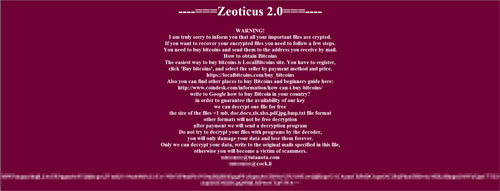
SOLUTION
Step 1
Trend Micro Predictive Machine Learning detects and blocks malware at the first sign of its existence, before it executes on your system. When enabled, your Trend Micro product detects this malware under the following machine learning name:
- Troj.Win32.TRX.XXPE50FFF039
Step 2
Before doing any scans, Windows 7, Windows 8, Windows 8.1, and Windows 10 users must disable System Restore to allow full scanning of their computers.
Step 3
Note that not all files, folders, and registry keys and entries are installed on your computer during this malware's/spyware's/grayware's execution. This may be due to incomplete installation or other operating system conditions. If you do not find the same files/folders/registry information, please proceed to the next step.
Step 4
Delete this registry value
Important: Editing the Windows Registry incorrectly can lead to irreversible system malfunction. Please do this step only if you know how or you can ask assistance from your system administrator. Else, check this Microsoft article first before modifying your computer's registry.
- In HKEY_CURRENT_USER\Software\Microsoft\Windows\CurrentVersion\Run
- {Malware Filename}.exe = %Windows%\{Malware Filename}.exe
- {Malware Filename}.exe = %Windows%\{Malware Filename}.exe
- In HKEY_CURRENT_USER\Software\Microsoft\Windows\CurrentVersion
- deusEx = {Encrypted String}
- deusEx = {Encrypted String}
- In HKEY_CURRENT_USER\Software\Microsoft\Windows\CurrentVersion
- deusVult = {Encrypted String}
- deusVult = {Encrypted String}
Step 5
Search and delete this file
- %User Temp%\{Numbers}.jpg
- {Drive Letter}:\README.html
Step 6
Scan your computer with your Trend Micro product to delete files detected as Ransom.Win32.ZEOTICUS.C. If the detected files have already been cleaned, deleted, or quarantined by your Trend Micro product, no further step is required. You may opt to simply delete the quarantined files. Please check the following Trend Micro Support pages for more information:
Step 7
Reset your Desktop properties
Step 8
Restore encrypted files from backup.
Did this description help? Tell us how we did.