Ransom.Win32.CONTI.FAIN

Trojan:Win32/Mansabo!MTB (MICROSOFT); Trojan-Ransom.Win32.Cryptor.eay (KASPERSKY)
Windows




Threat Type: Ransomware
Destructiveness: No
Encrypted: Yes
In the wild: Yes
OVERVIEW
This Ransomware arrives on a system as a file dropped by other malware or as a file downloaded unknowingly by users when visiting malicious sites.
It drops files as ransom note. It avoids encrypting files with the following file extensions.
TECHNICAL DETAILS
Arrival Details
This Ransomware arrives on a system as a file dropped by other malware or as a file downloaded unknowingly by users when visiting malicious sites.
Installation
This Ransomware drops the following files:
- {Log File Path}\{Log Filename} → If -log argument is used
It adds the following processes:
- cmd.exe /c %System%\wbem\WMIC.exe shadowcopy where "ID={Shadowcopy ID}" delete → It will repeat this process depending on the number of shadow copies.
- {Malware Full Path}
(Note: %System% is the Windows system folder, where it usually is C:\Windows\System32 on all Windows operating system versions.)
It adds the following mutexes to ensure that only one of its copies runs at any one time:
- hsfjuukjzloqu28oajh727190
It injects codes into the following process(es):
- {Malware Full Path}
Other Details
This Ransomware does the following:
- It uses the Windows Restart Manager to unlock files it will encrypt.
- When encrypting network shares it will check if the IP address starts with the following to ensure that it is encrypting local, non-Internet, systems:
- 172.
- 192.168.
- 10.
- 169.
It accepts the following parameters:
- -m {all|local|net|backups}
- all - combination of net and local
- local - delete backups and encrypt only locally found drives
- net - delete backups and encrypt only network shares
- backups - delete backups
- -p {Directory} - Will encrypt first the folders in the list before proceeding to the others
- -log {Log File Path} - Log output to {Log File Path}
- -nomutex - Creates no mutex allowing multiple process
- -size {chunk mode}
Ransomware Routine
This Ransomware avoids encrypting files with the following strings in their file name:
- readme.txt
- CONTI_LOG.txt
It avoids encrypting files with the following strings in their file path:
- tmp
- winnt
- temp
- thumb
- $Recycle.Bin
- $RECYCLE.BIN
- System Volume Information
- Boot
- Windows
- Trend Micro
- Perflogs
It appends the following extension to the file name of the encrypted files:
- .ODMUA
It drops the following file(s) as ransom note:
- {Encrypted Directory}\readme.txt
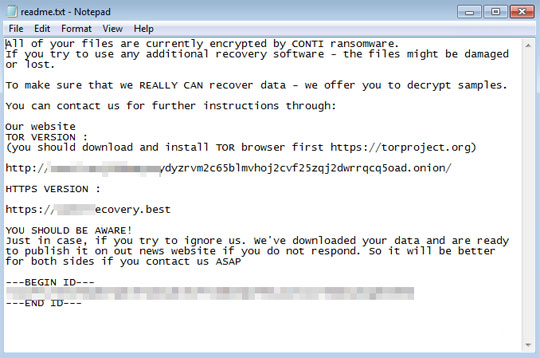
It avoids encrypting files with the following file extensions:
- .bat
- .exe
- .dll
- .lnk
- .sys
- .msi
- .ODMUA
SOLUTION
Step 1
Trend Micro Predictive Machine Learning detects and blocks malware at the first sign of its existence, before it executes on your system. When enabled, your Trend Micro product detects this malware under the following machine learning name:
- Troj.Win32.TRX.XXPE50FFF041
Step 2
Before doing any scans, Windows 7, Windows 8, Windows 8.1, and Windows 10 users must disable System Restore to allow full scanning of their computers.
Step 3
Note that not all files, folders, and registry keys and entries are installed on your computer during this malware's/spyware's/grayware's execution. This may be due to incomplete installation or other operating system conditions. If you do not find the same files/folders/registry information, please proceed to the next step.
Step 4
Restart in Safe Mode
Step 5
Search and delete these files
- {Log File Path}\{Log Filename}
- {Encrypted Directory}\readme.txt
Step 6
Restart in normal mode and scan your computer with your Trend Micro product for files detected as Ransom.Win32.CONTI.FAIN. If the detected files have already been cleaned, deleted, or quarantined by your Trend Micro product, no further step is required. You may opt to simply delete the quarantined files. Please check this Knowledge Base page for more information.
Step 7
Restore encrypted files from backup.
Did this description help? Tell us how we did.