Ransom.Win32.AGENDA.SMYXFFE

Win32:MalwareX-gen [Ransom] (AVAST); Gen:Variant.Ransom.Qilin.3 (BITDEFENDER); Ransom:Win32/Qilin!pz (MICROSOFT)
Windows




Threat Type: Ransomware
Destructiveness: No
Encrypted:
In the wild: Yes
OVERVIEW
This Ransomware arrives on a system as a file dropped by other malware or as a file downloaded unknowingly by users when visiting malicious sites.
It does not have any backdoor routine.
It does not have any information-stealing capability.
It drops files as ransom note. It avoids encrypting files with the following file extensions.
TECHNICAL DETAILS
Arrival Details
This Ransomware arrives on a system as a file dropped by other malware or as a file downloaded unknowingly by users when visiting malicious sites.
Installation
This Ransomware adds the following folders:
- %User Temp%\QLOG
(Note: %User Temp% is the current user's Temp folder, which is usually C:\Documents and Settings\{user name}\Local Settings\Temp on Windows 2000(32-bit), XP, and Server 2003(32-bit), or C:\Users\{user name}\AppData\Local\Temp on Windows Vista, 7, 8, 8.1, 2008(64-bit), 2012(64-bit) and 10(64-bit).)
It drops the following files:
- %User Temp%\QLOG\ThreadId({number}).LOG → runtime log for thread {number}
- %User Temp%\QLOGS.zip → compressed archive of execution activity logs
- %User Temp%\{Random}.exe → dropped copy of embedded Sysinternals PsExec v2.43 used for lateral movement
- %Windows%\psexesvc.exe → dropped copy of embedded Sysinternals PsExec service executable
(Note: %User Temp% is the current user's Temp folder, which is usually C:\Documents and Settings\{user name}\Local Settings\Temp on Windows 2000(32-bit), XP, and Server 2003(32-bit), or C:\Users\{user name}\AppData\Local\Temp on Windows Vista, 7, 8, 8.1, 2008(64-bit), 2012(64-bit) and 10(64-bit).. %Windows% is the Windows folder, where it usually is C:\Windows on all Windows operating system versions.)
It adds the following processes:
- "cmd" /C fsutil behavior set SymlinkEvaluation R2R:1 → enables remote-to-remote symlink evaluation to traverse remote network shares
- "cmd" /C fsutil behavior set SymlinkEvaluation R2L:1 → enables remote-to-local symlink evaluation to access host-local targets through network pathways
- "cmd" /C net use → enumerates active network connections and mapped network drives
- "cmd" /C wmic service where name='vss' call ChangeStartMode Manual → alters Volume Shadow Copy service startup mode to Manual
- "cmd" /C net start vss → starts the Volume Shadow Copy service prior to purging
- "cmd" /C vssadmin.exe delete shadows /all /quiet → silently purges all volume shadow copies to prevent file restoration
- "cmd" /C net stop vss → stops the Volume Shadow Copy service after deletion
- "cmd" /C wmic service where name='vss' call ChangeStartMode Disabled → disables the Volume Shadow Copy service to prevent shadow recreation
- BCDEdit.exe /set {current} safeboot network → configures Windows boot configuration to restart the host in Safe Mode with Networking
- "powershell" $logs = Get-WinEvent -ListLog * | Where-Object {$_.RecordCount} | Select-Object -ExpandProperty LogName ; ForEach ( $l in $logs | Sort | Get-Unique ) {[System.Diagnostics.Eventing.Reader.EventLogSession]::GlobalSession.ClearLog($l)} → periodically purges all Windows event logs in a continuous background loop
- "powershell" -Command "Import-Module ActiveDirectory ; Get-ADComputer -Filter * | Select-Object -ExpandProperty DNSHostName" → queries Active Directory domain controllers to harvest all domain endpoint hostnames for lateral spreading
- "powershell" -Command "ServerManagerCmd.exe -i RSAT-AD-PowerShell ; Install-WindowsFeature RSAT-AD-PowerShell ; Add-WindowsCapability -Online -Name 'RSAT.ActiveDirectory.DS-LDS.Tools~~~~0.0.1.0'" → dynamically installs the Active Directory Remote Server Administration Tools (RSAT) module if missing, enabling domain controller harvesting across various Windows versions
- powershell.exe -NoProfile -ExecutionPolicy Bypass -Command ... → executes embedded PowerCLI and Posh-SSH script for vCenter/ESXi enumeration and deployment
- powershell.exe -Command "Get-Printer | Format-List Name,DriverName" → enumerates connected network and local printers to print ransom notes physically
It adds the following mutexes to ensure that only one of its copies runs at any one time:
- 1aa0d702c25ca25de60a35c5d634f81398399864899d56e3026f1fadfc54b387
Autostart Technique
This Ransomware modifies the following registry entries to ensure it automatic execution at every system startup:
HKEY_LOCAL_MACHINE\SOFTWARE\Microsoft\
Windows\CurrentVersion\Run
*{Random String} = "{malware path}\{malware name}" --password {password} --no-admin
HKEY_LOCAL_MACHINE\SOFTWARE\Microsoft\
Windows NT\CurrentVersion\Winlogon
AutoAdminLogon = 1 → When the `--safe` flag is supplied, it automates administrative login upon reboot by configuring Winlogon registry entries
HKEY_LOCAL_MACHINE\SOFTWARE\Microsoft\
Windows NT\CurrentVersion\Winlogon
DefaultUserName = {Username} → When the `--safe` flag is supplied, it automates administrative login upon reboot by configuring Winlogon registry entries
HKEY_LOCAL_MACHINE\SOFTWARE\Microsoft\
Windows NT\CurrentVersion\Winlogon
DefaultPassword = {NewPassword} → When the `--safe` flag is supplied, it automates administrative login upon reboot by configuring Winlogon registry entries
Other System Modifications
This Ransomware modifies the following registry entries:
HKEY_LOCAL_MACHINE\System\CurrentControlSet\
Control\FileSystem
SymlinkRemoteToRemoteEvaluation = 1
(Note: The default value data of the said registry entry is 0 (Enabling this setting permits traversal of remote symbolic links to other remote shares.).)
HKEY_LOCAL_MACHINE\System\CurrentControlSet\
Control\FileSystem
SymlinkRemoteToLocalEvaluation = 1
(Note: The default value data of the said registry entry is 0 (Enabling this setting permits traversal of remote symbolic links targeting local drives).)
HKEY_LOCAL_MACHINE\SOFTWARE\Microsoft\
Windows\CurrentVersion\Policies\
System
EnableLinkedConnections = 1
(Note: The default value data of the said registry entry is 0 (Enabling linked connections allows elevated processes to access network shares mapped under standard user tokens.).)
HKEY_LOCAL_MACHINE\SYSTEM\CurrentControlSet\
Services\LanmanServer\Parameters
MaxMpxCt = 65535
(Note: The default value data of the said registry entry is 50 (Increasing this parameter raises maximum concurrent SMB requests to accelerate remote file encryption.).)
Propagation
This Ransomware is capable of active directory & PsExec spreading when `--spread` parameter is supplied:
- It drops PsExec into `%User Temp%`, accepts operator-provided host credentials in `host:user:pass` format, and remotely executes copies of itself across target endpoints.
(Note: %User Temp% is the current user's Temp folder, which is usually C:\Documents and Settings\{user name}\Local Settings\Temp on Windows 2000(32-bit), XP, and Server 2003(32-bit), or C:\Users\{user name}\AppData\Local\Temp on Windows Vista, 7, 8, 8.1, 2008(64-bit), 2012(64-bit) and 10(64-bit).)
Backdoor Routine
This Ransomware does not have any backdoor routine.
Rootkit Capabilities
This Ransomware does not have rootkit capabilities.
Process Termination
This Ransomware terminates the following processes if found running in the affected system's memory:
- AGNTSVC.exe
- AVAGENT.exe
- AVSCC.exe
- BEDBH.exe
- BENETNS.exe
- BENGIEN.exe
- BESERVER.exe
- CAGSERVICE.exe
- CVD.exe
- CVFWD.exe
- CVMOUNTD.exe
- CVODS.exe
- DBENG50.exe
- DBSNMP.exe
- DELLSYSTEMDETECT.exe
- ENCSVC.exe
- ENTERPRISECLIENT.exe
- EXCEL.exe
- FIREFOX.exe
- INFOPATH.exe
- ISQLPLUSPVC.exe
- MSACCESS.exe
- MSPUB.exe
- MVDESTOPSERVICE.exe
- MYDESKTOPQOS.exe
- MYDESKTOPSERVICE.exe
- NOTEPAD.exe
- OCAUTOUPDS.exe
- OCOMM.exe
- OCSSD.exe
- ONENOTE.exe
- ORACLE.exe
- OUTLOOK.exe
- POWERPNT.exe
- PVLSVR.exe
- QBCFMONITORSERVICE.exe
- QBDBMGRN.exe
- QBIDPSERVICE.exe
- RAW_AGENT_SVC.exe
- SAP.exe
- SAPHOSTEXEC.exe
- SAPOSCOL.exe
- SAPSTARTSRV.exe
- SQBCORESERVICE.exe
- SQL.exe
- STEAM.exe
- SYNCTIME.exe
- TBIRDCONFIG.exe
- TEAMVIEWER.exe
- TEAMVIEWER_SERVICE.exe
- THEBAT.exe
- THUNDERBIRD.exe
- TV_W32.exe
- TV_X64.exe
- VEEAMDEPLOYMENTSVC.exe
- VEEAMNFSSVC.exe
- VEEAMTRANSPORTSVC.exe
- VISIO.exe
- VMCOMPUTE.exe
- VMMS.exe
- VMWP.exe
- VSNAPVSS.exe
- VXMON.exe
- WINWORD.exe
- WORDPAD.exe
- XFSSVCCON.exe
It terminates processes or services that contain any of the following strings if found running in the affected system's memory:
- `acronisagent`
- `acrsch2svc`
- `backup`
- `backupexecagentaccelerator`
- `backupexecagentbrowser`
- `backupexecdivecimediaservice`
- `backupexecjobengine`
- `backupexecmanagementservice`
- `backupexecrpcservice`
- `backupexecvssprovider`
- `gxblr`
- `gxcimgr`
- `gxclmgrs`
- `gxcvd`
- `gxfwd`
- `gxmmm`
- `gxvss`
- `gxvsshwprov`
- `memtas`
- `mepocs`
- `msexchange`
- `msexchange$`
- `mvarmor`
- `mvarmor64`
- `pdvfsservice`
- `qbcfmonitorservice`
- `qbdbmgrn`
- `qbidpservice`
- `sap`
- `sap$`
- `sapd$`
- `saphostcontrol`
- `saphostexec`
- `sapservice`
- `sophos`
- `sql`
- `veeam`
- `veeamdeploymentservice`
- `veeamnfssvc`
- `veeamtransportsvc`
- `vmms`
- `vsnapvss`
- `vss`
- `wsbexchange`
Information Theft
This Ransomware does not have any information-stealing capability.
Other Details
This Ransomware does the following:
- It enables the following privileges to allow access to restricted actions in the system:
- SeDebugPrivilege
- SeImpersonatePrivilege
- SeIncreaseBasePriorityPrivilege
- It repeatedly clears all event logs in the system.
- It retrieves the DNS hostnames of all computers in an Active Directory domain before encrypting them.
- It deletes all shadow copies and disables automatic startup of Volume Shadow Copy Service
- It requires the correct password to proceed in its intended routine.
- It encrypts local and shared/network drives.
- It logs its activities in a console.
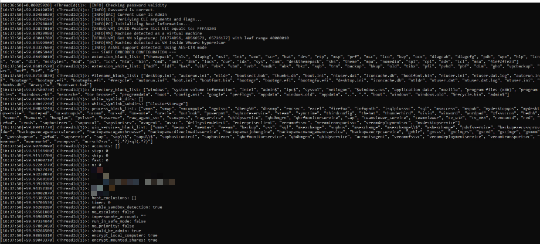
It accepts the following parameters:
- --debug → enables debugging mode
- --dry-run → tests file traversal and encryption routines without modifying files on disk
- --escalated → indicates that the process is executing with elevated privileges
- --exclude {Host to Exclude} → excludes specified host(s) from network enumeration and lateral spreading
- --fde → enables Full Disk Encryption mode against volume blocks
- --force → forces execution and suppresses confirmation prompts
- --impersonate {Account} → executes operations by impersonating the specified user account
- --ips {IP Addresses} → targets specific host IP addresses for remote encryption
- --kill-cluster → terminates and disables Microsoft failover clusters (Stop-Cluster -Force)
- --logs → enables detailed file logging into %User Temp%\QLOG and compresses logs into %User Temp%\QLOGS.zip
- --no-admin → disables administrator privilege requirement, permitting unprivileged execution
- --no-autostart → disables establishing persistence in HKLM\SOFTWARE\Microsoft\Windows\CurrentVersion\Run
- --no-delete → disables deletion of original files or temporary operational directories
- --no-destruct → disables self-destruction routine (timeout /T 10 & Del "{malware path}\{malware name}")
- --no-df → disables directory filtering (directory_black_list)
- --no-domain → disables scanning and encrypting domain network shares and domain hosts
- --no-ef → disables extension filtering (extension_black_list and extension_white_list)
- --no-escalate → disables attempting privilege escalation
- --no-extension → disables appending the ransomware extension (.41efZfTe23) to encrypted files
- --no-ff → disables filename filtering (filename_black_list)
- --no-local → disables encrypting local fixed disks and partitions
- --no-logs → disables logging output
- --no-mounted → disables encrypting mounted and mapped network drives
- --no-network → disables encrypting discovered network shares
- --no-note → disables dropping the ransom note (README-RECOVER-41efZfTe23.txt)
- --no-priority → disables prioritized encryption of high-value database and backup file extensions
- --no-proc → disables process termination routine (process_black_list)
- --no-sandbox → disables anti-analysis and virtual machine hypervisor detection checks
- --no-services → disables stopping Windows services (win_services_black_list)
- --no-vm → disables killing virtual machine processes (vmms, vmwp, vmcompute)
- --no-wallpaper → disables setting the desktop wallpaper and system lockscreen
- --no-zero → disables zero-wiping free disk space after encryption
- --parent-sid {SID} → passes the security identifier (SID) of the parent process user account
- --password {Password} → specifies the required authentication password to proceed with its intended routine
- --paths {Directories} → restricts file encryption to specified directory paths
- --print-delay {Seconds} → specifies the delay time in seconds before sending print jobs
- --print-image → sends ransom note image to local and network printers
- --safe → reboots the system into Safe Mode with Networking before encrypting files
- --spread → enables lateral movement across Active Directory endpoints using embedded PsExec
- --spread-process → indicates the process was spawned as part of lateral propagation
- --spread-vcenter → enables automated lateral propagation targeting VMware vCenter / ESXi hypervisors
- --timer {Seconds} → sets an execution sleep timer in seconds before commencing operations
(Note: %User Temp% is the current user's Temp folder, which is usually C:\Documents and Settings\{user name}\Local Settings\Temp on Windows 2000(32-bit), XP, and Server 2003(32-bit), or C:\Users\{user name}\AppData\Local\Temp on Windows Vista, 7, 8, 8.1, 2008(64-bit), 2012(64-bit) and 10(64-bit).)
It does not exploit any vulnerability.
Ransomware Routine
This Ransomware avoids encrypting files with the following strings in their file name:
- #recycle
- autorun.inf
- autorun.ini
- boot.ini
- bootfont.bin
- bootmgfw.efi
- bootmgr
- bootmgr.efi
- bootsect.bak
- desktop.ini
- iconcache.db
- ntldr
- ntuser.dat
- ntuser.dat.log
- ntuser.ini
- thumbs.db
It avoids encrypting files found in the following folders:
- $recycle.bin
- $windows.~bt
- $windows.~ws
- admin$
- appdata
- application data
- boot
- config.msi
- intel
- ipc$
- mozilla
- msocache
- netlogon
- perflogs
- program files
- program files (x86)
- programdata
- system volume information
- sysvol
- tor browser
- windows
- windows.old
It appends the following extension to the file name of the encrypted files:
- .41efZfTe23
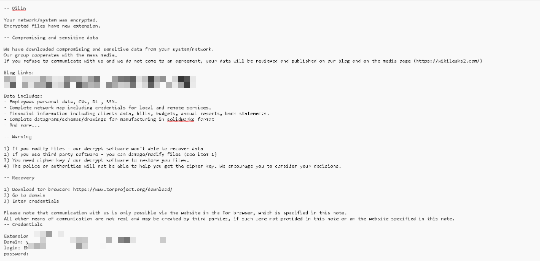
It drops the following file(s) as ransom note:
- {Encrypted Directory}\README-RECOVER-41efZfTe23.txt
It avoids encrypting files with the following file extensions:
- .386
- .41efZfTe23
- .adv
- .ani
- .bat
- .bin
- .cmd
- .com
- .cpl
- .cur
- .deskthemepack
- .diagcab
- .diagcfg
- .diapkg
- .dll
- .drv
- .exe
- .hlp
- .hta
- .icl
- .icns
- .ico
- .ics
- .idx
- .key
- .lnk
- .lock
- .mod
- .mpa
- .msc
- .msi
- .msp
- .msstyles
- .msu
- .nls
- .nomedia
- .ocx
- .pdb
- .prf
- .ps1
- .rom
- .rtp
- .scr
- .shs
- .spl
- .sys
- .theme
- .themepack
- .wpx
It specifically targets and prioritizes database, virtual machine disk, and backup archive file extensions.
- .abk
- .arc
- .bak
- .bkf
- .bkup
- .bkz
- .backup
- .dim
- .dr
- .gho
- .ldf
- .mdf
- .mtf
- .old
- .pbf
- .pfi
- .pvhd
- .sqb
- .tibx
- .trn
- .vbk
- .vbm
- .vib
- .vmdk
- .vpcbackup
- .vrb
SOLUTION
Step 1
Trend Micro Predictive Machine Learning detects and blocks malware at the first sign of its existence, before it executes on your system. When enabled, your Trend Micro product detects this malware under the following machine learning name:
-
Troj.Win32.TRX.XXPE50FFF110
Step 2
Before doing any scans, Windows 7, Windows 8, Windows 8.1, and Windows 10 users must disable System Restore to allow full scanning of their computers.
Step 3
Note that not all files, folders, and registry keys and entries are installed on your computer during this malware's/spyware's/grayware's execution. This may be due to incomplete installation or other operating system conditions. If you do not find the same files/folders/registry information, please proceed to the next step.
Step 4
Restart in Safe Mode
Step 5
Delete this registry key
Important: Editing the Windows Registry incorrectly can lead to irreversible system malfunction. Please do this step only if you know how or you can ask assistance from your system administrator. Else, check this Microsoft article first before modifying your computer's registry.
- In HKEY_LOCAL_MACHINE\SOFTWARE\Microsoft\Windows\CurrentVersion\Run
- *{Random String} = {malware path}\{malware name} --password {password} --no-admin
- *{Random String} = {malware path}\{malware name} --password {password} --no-admin
- In HKEY_LOCAL_MACHINE\SOFTWARE\Microsoft\Windows NT\CurrentVersion\Winlogon
- AutoAdminLogon = 1
- AutoAdminLogon = 1
- In HKEY_LOCAL_MACHINE\SOFTWARE\Microsoft\Windows NT\CurrentVersion\Winlogon
- DefaultUserName = {Username}
- DefaultUserName = {Username}
- In HKEY_LOCAL_MACHINE\SOFTWARE\Microsoft\Windows NT\CurrentVersion\Winlogon
- DefaultPassword = {NewPassword}
- DefaultPassword = {NewPassword}
Step 6
Restore this modified registry value
Important: Editing the Windows Registry incorrectly can lead to irreversible system malfunction. Please do this step only if you know how or you can ask assistance from your system administrator. Else, check this Microsoft article first before modifying your computer's registry.
- In HKEY_LOCAL_MACHINE\System\CurrentControlSet\Control\FileSystem
- SymlinkRemoteToRemoteEvaluation = 1
- SymlinkRemoteToRemoteEvaluation = 1
- In HKEY_LOCAL_MACHINE\System\CurrentControlSet\Control\FileSystem
- SymlinkRemoteToLocalEvaluation = 1
- SymlinkRemoteToLocalEvaluation = 1
- In HKEY_LOCAL_MACHINE\SOFTWARE\Microsoft\Windows\CurrentVersion\Policies\System
- EnableLinkedConnections = 1
- EnableLinkedConnections = 1
- In HKEY_LOCAL_MACHINE\SYSTEM\CurrentControlSet\Services\LanmanServer\Parameters
- MaxMpxCt = 65535
- MaxMpxCt = 65535
Step 7
Search and delete these files
*Note: Read the following Microsoft page if these steps do not work on Windows 7 and Server 2008 (R2).
Step 8
Search and delete this folder
- %User Temp%\QLOG
Step 9
Restart in normal mode and scan your computer with your Trend Micro product for files detected as Ransom.Win32.AGENDA.SMYXFFE. If the detected files have already been cleaned, deleted, or quarantined by your Trend Micro product, no further step is required. You may opt to simply delete the quarantined files. Please check this Knowledge Base page for more information.
Step 10
Restore encrypted files from backup.
Did this description help? Tell us how we did.