PUA.Win64.ProcHack.YACIU

HEUR:RiskTool.Win32.ProcHack.gen (KASPERSKY)
Windows



Threat Type: Potentially Unwanted Application
Destructiveness: No
Encrypted:
In the wild: Yes
OVERVIEW
This Potentially Unwanted Application arrives on a system as a file dropped by other malware or as a file downloaded unknowingly by users when visiting malicious sites.
It does not have any propagation routine.
It does not have any backdoor routine.
It does not have any information-stealing capability.
TECHNICAL DETAILS
Arrival Details
This Potentially Unwanted Application arrives on a system as a file dropped by other malware or as a file downloaded unknowingly by users when visiting malicious sites.
Propagation
This Potentially Unwanted Application does not have any propagation routine.
Backdoor Routine
This Potentially Unwanted Application does not have any backdoor routine.
Rootkit Capabilities
This Potentially Unwanted Application does not have rootkit capabilities.
Information Theft
This Potentially Unwanted Application does not have any information-stealing capability.
Other Details
This Potentially Unwanted Application does the following:
- It accepts the following parameters:
- -settings {filename of settings file} -> allows the user to specify the location of Process Hacker's settings file
- -nosettings -> sets the settings to their defaults at startup, and no settings are saved
- -noplugins -> disables plugins, even if the "Enable plugins" option is set
- -newinstance -> starts a new instance of Process Hacker, even if the "Allow only one instance" option is set
- -v -> forces Process Hacker's main window to be displayed at startup, even if the "Start hidden" option is enabled.
- -hide -> hides Process Hacker's main window at startup, even if the "Start hidden" option is disabled
- -elevate -> prompts for elevation if Process Hacker is not started with elevated privileges.
- -c -ctype objecttype -cobject object -caction action -cvalue value -> enables command mode
- Possible values of objecttype:
- process
- service
- thread
- Possible values of object:
- process ID
- service name
- thread ID
- Possible values of action:
- For process:
- terminate
- suspend
- resume
- priority
- iopriority
- pagepriority
- For service:
- start
- continue
- pause
- stop
- delete
- For thread:
- terminate
- suspend
- resume
- For process:
- Possible values of objecttype:
- -s -> enables silent mode, no error messages are displayed for command mode, -installkph and -uninstallkph
- -ras -> enters run-as-service mode
- -nokph -> disables KProcessHacker, Process Hacker will not attempt to load the driver or connect to it
- -installkph -> installs KProcessHacker as a System Start service
- -uninstallkph -> deletes the KProcessHacker service
- -debug -> shows the debug console early in the startup process
- -showoptions -hwnd parentwindow -point x,y -> displays the Advanced tab of the options window only. parentwindow specifies the parent window handle in hexadecimal and x,y specifies the location of the options window.
- -phsvc -> enters phsvc mode which exposes a LPC-based API currently used by Process Hacker for tasks that require elevation.
- -priority r|h|n|l -> sets the priority of Process Hacker to realtime (r), high (h), normal (n) or idle (l).
- -selectpid pid -> selects pid in a new or existing instance of Process Hacker.
- -sysinfo section -> opens the System Information window at startup, and optionally navigates to the specified section.
- It has the following display:
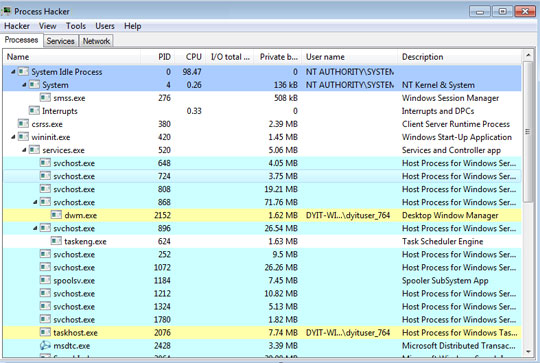
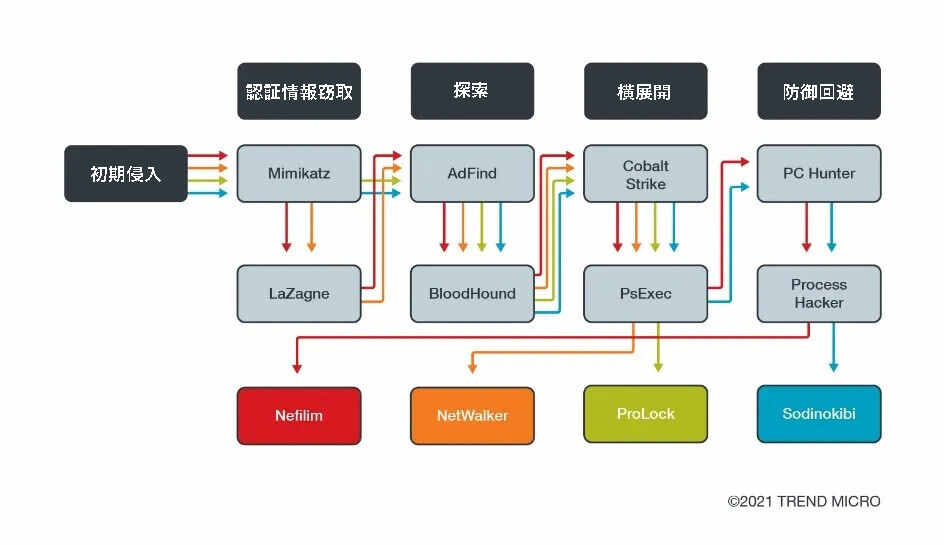
- Due to its side-loading vulnerability, this tool has been abused by other malware to kill security-related software by loading a stager DLL via DLL search order hijacking.
It does not exploit any vulnerability.
SOLUTION
Step 1
Before doing any scans, Windows 7, Windows 8, Windows 8.1, and Windows 10 users must disable System Restore to allow full scanning of their computers.
Step 2
Note that not all files, folders, and registry keys and entries are installed on your computer during this malware's/spyware's/grayware's execution. This may be due to incomplete installation or other operating system conditions. If you do not find the same files/folders/registry information, please proceed to the next step.
Step 3
Scan your computer with your Trend Micro product to delete files detected as PUA.Win64.ProcHack.YACIU. If the detected files have already been cleaned, deleted, or quarantined by your Trend Micro product, no further step is required. You may opt to simply delete the quarantined files. Please check the following Trend Micro Support pages for more information:
Did this description help? Tell us how we did.