HackTool.MSIL.PWDump.AG

HEUR:RiskTool.MSIL.PwDump.gen (KASPERSKY)
Windows



Threat Type: Hacking Tool
Destructiveness: No
Encrypted: No
In the wild: Yes
OVERVIEW
This Hacking Tool arrives on a system as a file dropped by other malware or as a file downloaded unknowingly by users when visiting malicious sites.
TECHNICAL DETAILS
Arrival Details
This Hacking Tool arrives on a system as a file dropped by other malware or as a file downloaded unknowingly by users when visiting malicious sites.
Information Theft
This Hacking Tool gathers the following data:
- User Credentials
- User Account Information
- List of Administrators (Local Group, Domain, Enterprise)
- Domain Information
- Active Directory List
Other Details
This Hacking Tool does the following:
- Enumerate Default Domain Password Policy
- Password History Length
- Password Age (days)
- Password Length
- Query Active Directory user objects and attributes
- Display Name
- Counts of Weak Passwords
- Date and Time of last logon
- Account Name
- Account Type
- Account Expiration
- Password Last Set
- SamAccountName
- Group Type
- User Account Control
- Users with Duplicate Passwords
- Query Active Directory computer objects and attributes
- Last Logon
- Last Logoff
- It may create a dump file based on the parameter used upon execution of the application
- This hacktool display the following screen for instructions:
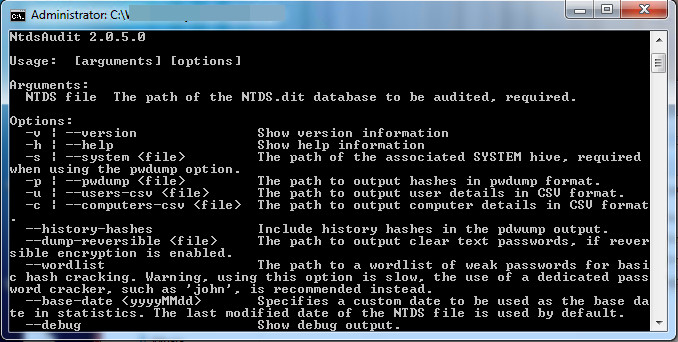
It accepts the following parameters:
- -v -> Show version information
- -h -> Show help information
- -s {File} -> The path of the associated SYSTEM hive (required when using the pwdump option)
- -p {File} -> The path to output password hashes in pwdump format
- -u {File} -> The path to output user details in CSV format
- -c {File} -> The path to output computer details in CSV format
- --history-hashes -> Include history hashes in the pwdump output
- --dump-reversible {File} ->The path to output clear text passwords (if reversible encryption is enabled)
- --wordlist -> The path to a wordlist of weak password for basic hash cracking
- --base-date
-> Specifies a custom date to be used - --debug -> Show debug output
SOLUTION
Step 1
Before doing any scans, Windows 7, Windows 8, Windows 8.1, and Windows 10 users must disable System Restore to allow full scanning of their computers.
Step 2
Note that not all files, folders, and registry keys and entries are installed on your computer during this malware's/spyware's/grayware's execution. This may be due to incomplete installation or other operating system conditions. If you do not find the same files/folders/registry information, please proceed to the next step.
Step 3
Scan your computer with your Trend Micro product to delete files detected as HackTool.MSIL.PWDump.AG. If the detected files have already been cleaned, deleted, or quarantined by your Trend Micro product, no further step is required. You may opt to simply delete the quarantined files. Please check the following Trend Micro Support pages for more information:
Did this description help? Tell us how we did.