Trojan.X97M.DEDEX.AFKC

TrojanDownloader:O97M/Donoff!MSR (Microsoft); HEUR:Trojan.MSOffice.SAgent.gen (Kaspersky)
Windows




Threat Type: Trojan
Destructiveness: No
Encrypted: Yes
In the wild: Yes
OVERVIEW
This Trojan arrives on a system as a file dropped by other malware or as a file downloaded unknowingly by users when visiting malicious sites.
TECHNICAL DETAILS
Arrival Details
This Trojan arrives on a system as a file dropped by other malware or as a file downloaded unknowingly by users when visiting malicious sites.
Installation
This Trojan adds the following folders:
- %System Root%\b4q6xwi\2x7O0w8
- %System Root%\b4q6xwi
(Note: %System Root% is the Windows root folder, where it usually is C:\ on all Windows operating system versions.)
It adds the following processes:
- %System Root%\b4q6xwi\2x7O0w8\74O0Y7v.EXE (if download is successful)
(Note: %System Root% is the Windows root folder, where it usually is C:\ on all Windows operating system versions.)
Download Routine
This Trojan connects to the following website(s) to download and execute a malicious file:
- http://{BLOCKED}iayocio.com/jqmapuowktbb/555555555555.png
It saves the files it downloads using the following names:
- %System Root%\b4q6xwi\2x7O0w8\74O0Y7v.EXE
(Note: %System Root% is the Windows root folder, where it usually is C:\ on all Windows operating system versions.)
Other Details
This Trojan does the following:
- It displays the following to lure users into enabling macro content:
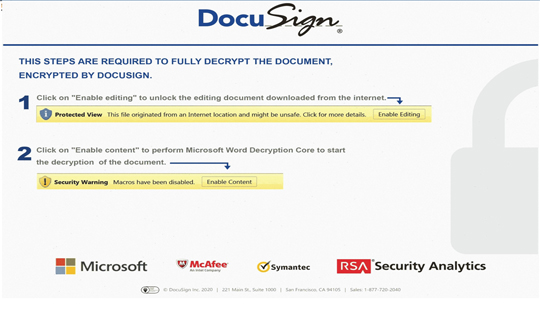
SOLUTION
Step 1
Before doing any scans, Windows 7, Windows 8, Windows 8.1, and Windows 10 users must disable System Restore to allow full scanning of their computers.
Step 2
Note that not all files, folders, and registry keys and entries are installed on your computer during this malware's/spyware's/grayware's execution. This may be due to incomplete installation or other operating system conditions. If you do not find the same files/folders/registry information, please proceed to the next step.
Step 3
Search and delete these files
- %System Root%\b4q6xwi\2x7O0w8\74O0Y7v.EXE
Step 4
Search and delete this folder
- %System Root%\b4q6xwi\2x7O0w8
- %System Root%\b4q6xwi
Step 5
Scan your computer with your Trend Micro product to delete files detected as Trojan.X97M.DEDEX.AFKC. If the detected files have already been cleaned, deleted, or quarantined by your Trend Micro product, no further step is required. You may opt to simply delete the quarantined files. Please check the following Trend Micro Support pages for more information:
Step 6
Enable the macro virus protection in Microsoft Office Applications
Did this description help? Tell us how we did.