Trojan.Win32.VALLEYRAT.K

Win32:MalwareX-gen [Misc] (AVAST); Gen:Variant.Yogi.84870 (BITDEFENDER); Trojan.Win32.Crypt (IKARUS)
Windows




Threat Type: Trojan
Destructiveness: No
Encrypted:
In the wild: Yes
OVERVIEW
This Trojan arrives on a system as a file dropped by other malware or as a file downloaded unknowingly by users when visiting malicious sites.
It does not have any information-stealing capability.
TECHNICAL DETAILS
Arrival Details
This Trojan arrives on a system as a file dropped by other malware or as a file downloaded unknowingly by users when visiting malicious sites.
Installation
This Trojan adds the following folders:
- %Public%\WindowsApps\{random}
- %ProgramData%\{random}
(Note: %Public% is the folder that serves as a repository of files or folders common to all users, which is usually C:\Users\Public in Windows Vista, 7, and 8.. %ProgramData% is a version of the Program Files folder where any user on a multi-user computer can make changes to programs. This contains application data for all users. This is usually C:\ProgramData on Windows Vista, 7, 8, 8.1, 2008(64-bit), 2012(64-bit) and 10(64-bit), or C:\Documents and Settings\All Users on Windows Server 2003(32-bit), 2000(32-bit) and XP.)
It drops the following files:
- %Public%\WindowsApps\{random}\PdFcoRE8.dLL → self-copy
- %Public%\WindowsApps\{random}\Microsoft.BingSearch.exe → copy of the legitimate host binary renamed and used to execute the side-loaded PdFcoRE8.dLL
- %Public%\WindowsApps\{random}\{random}.{random} → vulnerable 64-bit kernel driver (ardrv.sys / OPSWAT AppRemover Driver) extracted from resource EULA_es to perform kernel-level BYOVD process termination
- %ProgramData%\{random}\pdfcorE8.Dll.rtf → temporary intermediate file created during staging; deleted afterwards
- %ProgramData%\{random}\pdfcorE8.Dll → decrypted core Remote Access Trojan (RAT) payload staged for elevated side-loading (attributes set to Hidden and Read-Only; detected as Backdoor.Win32.VALLEYRAT.J )
- %ProgramData%\{random}\{random}.exe → copy of the host binary dropped into ProgramData and invoked during the second UAC elevation bypass routine (attributes set to Hidden and Read-Only)
- %ProgramData%\{Machine-SID}.admx → persistent configuration and beacon cache file derived from the victim host's Machine SID, disguised with an Administrative Template extension (.admx)
- %User Temp%\Direct ErrorLog.txt → decoy error log file created to simulate legitimate application logging and mask side-loading
- %User Temp%\CMD.EXE → temporary copy of the Windows command processor used to spawn ComputerDefaults.exe; deleted afterwards
- %User Temp%\{random}.EXE → temporary staging executable wrapper used for background execution
It adds the following processes:
- {host loader}.exe → initial non-elevated host process; executes side-loaded PdFcoRE8.dLL, stages %Public%\WindowsApps\{random}\, hijacks ms-settings, executes ComputerDefaults.exe to launch Microsoft.BingSearch.exe, and exits
- "%Public%\WindowsApps\{random}\Microsoft.BingSearch.exe" → elevated intermediate host process launched via the first ComputerDefaults.exe invocation; drops and registers the ardrv driver, drops %ProgramData%\{Machine-SID}.admx, stages ProgramData files, re-configures the ms-settings UAC hijack to point to the ProgramData executable, and executes ComputerDefaults.exe again via CMD.EXE
- "%System%\cmd.exe" /c "%System%\ComputerDefaults.exe" → command processor command line used to launch ComputerDefaults.exe in the background
- "%System%\ComputerDefaults.exe" → auto-elevating Windows utility abused twice in the chain (first by {host loader}.exe to launch Microsoft.BingSearch.exe, and second by Microsoft.BingSearch.exe to launch %ProgramData%\{random}\{random}.exe) without prompting the user for UAC consent
- "%ProgramData%\{random}\{random}.exe" → persistent host process launched via the second ComputerDefaults.exe invocation; executes with elevated privileges, side-loads pdfcorE8.Dll (detected as Backdoor.Win32.VALLEYRAT.J)
Other System Modifications
This Trojan adds the following registry keys:
HKEY_CURRENT_USER\Software\{Machine-SID}\
{Machine-SID}
(Default) = {Hex-encoded configuration string}
HKEY_CURRENT_USER\Software\Classes\
ms-settings\Shell\open\
command
(Default) = {path to binary} → launches `ComputerDefaults.exe` to trigger automatic elevation, running the specified binary with elevated administrative privileges without displaying a UAC prompt. It subsequently deletes the `ms-settings` key structure to remove indicators of compromise
Propagation
This Trojan drops copies of itself in the following drives:
- %Public%\WindowsApps\{random}
(Note: %Public% is the folder that serves as a repository of files or folders common to all users, which is usually C:\Users\Public in Windows Vista, 7, and 8.)
Rootkit Capabilities
This Trojan does not have rootkit capabilities.
Information Theft
This Trojan does not have any information-stealing capability.
Other Details
This Trojan does the following:
- It employs Bring Your Own Vulnerable Driver (BYOVD) capabilities by extracting an encrypted vulnerable 64-bit kernel driver (`ardrv.sys) and dropping it with a randomized filename and extension into `%Public%\WindowsApps\{random}\{random}.{random}`. It registers the file as a kernel driver service with the following details:
- Service Name: ardrv
- Display Name: ardrv
- Type: Kernel Driver (SERVICE_KERNEL_DRIVER)
- Start Type: Demand Start (SERVICE_DEMAND_START)
- Binary Path: `%Public%\WindowsApps\{random}\{random}.{random}`
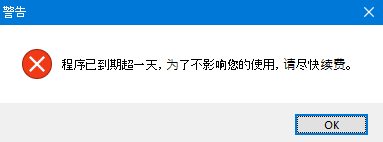
- Validates the local system date of the affected machine against an embedded campaign expiration threshold (`$@2026-09-24#`) upon initial DLL load. It only proceeds with execution if the local system date is on or before September 24, 2026; otherwise, it displays the following:
SOLUTION
Step 1
Trend Micro Predictive Machine Learning detects and blocks malware at the first sign of its existence, before it executes on your system. When enabled, your Trend Micro product detects this malware under the following machine learning name:
-
Ransom.Win32.TRX.XXPE50FFF110
Step 2
Before doing any scans, Windows 7, Windows 8, Windows 8.1, and Windows 10 users must disable System Restore to allow full scanning of their computers.
Step 3
Note that not all files, folders, and registry keys and entries are installed on your computer during this malware's/spyware's/grayware's execution. This may be due to incomplete installation or other operating system conditions. If you do not find the same files/folders/registry information, please proceed to the next step.
Step 4
Restart in Safe Mode
Step 5
Delete this registry key
Important: Editing the Windows Registry incorrectly can lead to irreversible system malfunction. Please do this step only if you know how or you can ask assistance from your system administrator. Else, check this Microsoft article first before modifying your computer's registry.
- In HKEY_CURRENT_USER\Software\{Machine-SID}\
- {Machine-SID}
- {Machine-SID}
- In HKEY_CURRENT_USER\Software\Classes\ms-settings\Shell\open\
- command
- command
- In HKEY_LOCAL_MACHINE\SYSTEM\CurrentControlSet\Services\
- ardrv
- ardrv
Step 6
Search and delete this file
- %Public%\WindowsApps\{random}\PdFcoRE8.dLL
- %Public%\WindowsApps\{random}\Microsoft.BingSearch.exe
- %Public%\WindowsApps\{random}\{random}.{random}
- %ProgramData%\{random}\pdfcorE8.Dll.rtf
- %ProgramData%\{random}\pdfcorE8.Dll
- %ProgramData%\{random}\{random}.exe
- %ProgramData%\{Machine-SID}.admx
- %User Temp%\Direct ErrorLog.txt
- %User Temp%\CMD.EXE
- %User Temp%\{random}.EXE
Step 7
Search and delete this folder
- %Public%\WindowsApps\{random}
- %ProgramData%\{random}
Step 8
Restart in normal mode and scan your computer with your Trend Micro product for files detected as Trojan.Win32.VALLEYRAT.K. If the detected files have already been cleaned, deleted, or quarantined by your Trend Micro product, no further step is required. You may opt to simply delete the quarantined files. Please check this Knowledge Base page for more information.
Did this description help? Tell us how we did.