Ransom.Win64.TENGU.TCLRYNAA.go

Windows




Threat Type: Ransomware
Destructiveness: No
Encrypted: No
In the wild: Yes
OVERVIEW
This Ransomware arrives on a system as a file dropped by other malware or as a file downloaded unknowingly by users when visiting malicious sites.
It does not have any propagation routine.
It does not have any backdoor routine.
It does not have any information-stealing capability.
It drops files as ransom note. It avoids encrypting files with the following file extensions.
TECHNICAL DETAILS
Arrival Details
This Ransomware arrives on a system as a file dropped by other malware or as a file downloaded unknowingly by users when visiting malicious sites.
Installation
This Ransomware drops the following files:
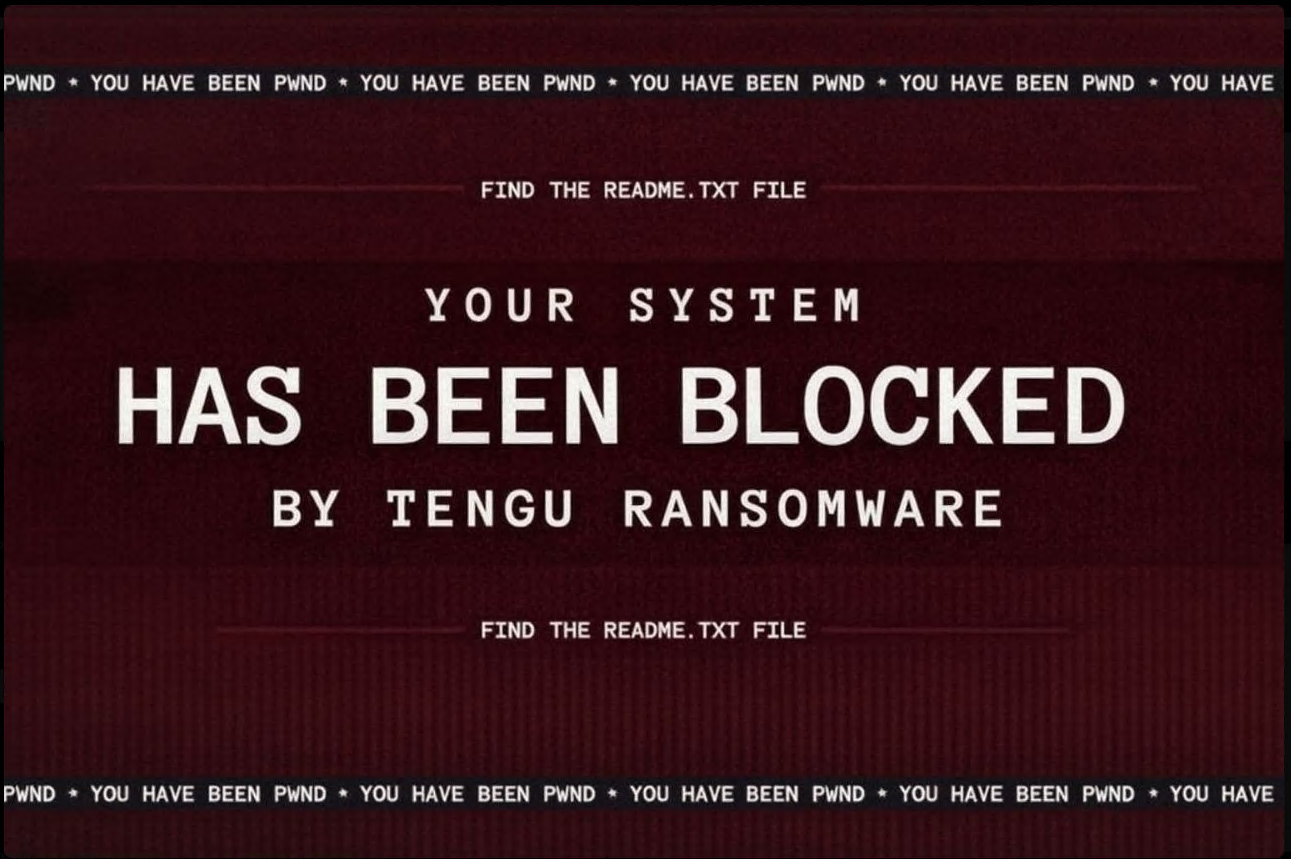
- %User Temp%\Wallpaper.png → Embedded ransom wallpaper (deleted after applying to desktop/lock screen)
It adds the following processes:
- wmic shadowcopy delete
- wmic service where name='vss' call ChangeStartMode Disabled
- net stop vss
It adds the following mutexes to ensure that only one of its copies runs at any one time:
- locker_mutex.lock
Other System Modifications
This Ransomware adds the following registry entries:
HKEY_LOCAL_MACHINE\SOFTWARE\Microsoft\
Windows\CurrentVersion\PersonalizationCSP
LockScreenImagePath = %User Temp%\Wallpaper.png
HKEY_LOCAL_MACHINE\SOFTWARE\Microsoft\
Windows\CurrentVersion\PersonalizationCSP
LockScreenImageStatus = 1
HKEY_LOCAL_MACHINE\SOFTWARE\Policies\
Microsoft\Windows\Personalization
LockScreenImage = %User Temp%\Wallpaper.png
It modifies the following registry entries:
HKEY_LOCAL_MACHINE\SOFTWARE\Microsoft\
Windows\CurrentVersion\Authentication\
LogonUI\Background
OEMBackground = 1
(Note: The default value data of the said registry entry is 0.)
HKEY_CURRENT_USER\Control Panel\Desktop
Wallpaper = %User Temp%\Wallpaper.png
(Note: The default value data of the said registry entry is {Default wallpaper image}.)
Propagation
This Ransomware does not have any propagation routine.
Backdoor Routine
This Ransomware does not have any backdoor routine.
Rootkit Capabilities
This Ransomware does not have rootkit capabilities.
Process Termination
This Ransomware terminates the following services if found on the affected system:
- vss
- sql
- svc$
- memtas
- mepocs
- msexchange
- sophos
- veeam
- backup
- GxVss
- GxBlr
- GxFWD
- GxCVD
- GxCIMgr
It terminates the following processes if found running in the affected system's memory:
- sql
- oracle
- ocssd
- dbsnmp
- synctime
- agntsvc
- isqlplussvc
- xfssvccon
- mydesktopservice
- ocautoupds
- encsvc
- firefox
- tbirdconfig
- mydesktopqos
- ocomm
- dbeng50
- sqbcoreservice
- excel
- infopath
- msaccess
- mspub
- onenote
- outlook
- powerpnt
- steam
- thebat
- thunderbird
- visio
- winword
- wordpad
- notepad
- calc
- wuauclt
- onedrive
Information Theft
This Ransomware does not have any information-stealing capability.
Other Details
This Ransomware does the following:
- Disables Windows Spotlight feature to ensure ransom note wallpaper persistence.
It accepts the following parameters:
- --spread {file} → Enable lateral movement with host list file
- --paths → Colon-separated list of specific paths to encrypt
- --ips → Target IP addresses for network propagation
- --logs → Log file path for operator debugging
- --no-wallpaper → Suppress wallpaper and lock screen modifications
- -no-admin → Skip administrator privilege checks
- bg → Launch background worker mode for scripted deployment
It does not exploit any vulnerability.
Ransomware Routine
This Ransomware avoids encrypting files with the following strings in their file name:
- autoexec.bat
- bootfont.bin
- bootsect.bak
- iconcache.db
- d3d9caps.dat
- desktop.ini
- autorun.inf
- config.sys
- ntuser.dat
- ntuser.ini
- config.msi
- boot.ini
- logs.txt
- thumbs.db
It avoids encrypting files found in the following folders:
- $recycle.bin
- $windows.~bt
- $windows.~ws
- programdata
- windows.old
- tor browser
- system32
- perflogs
- msocache
- public
- .nuget
- msys64
- x64dbg
It appends the following extension to the file name of the encrypted files:
- .TENGU
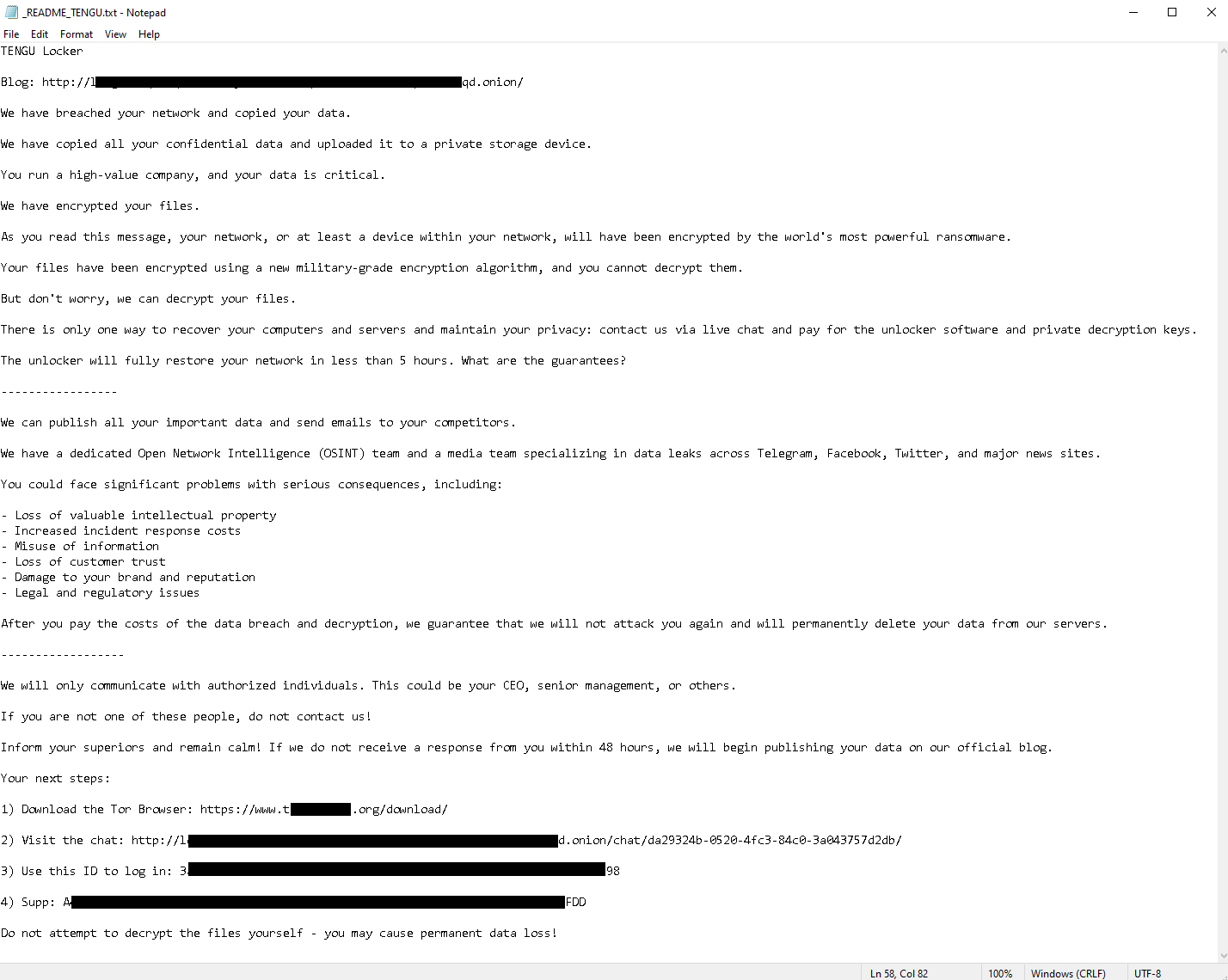
It drops the following file(s) as ransom note:
- {Encrypted Directory}\_README_TENGU.txt
It avoids encrypting files with the following file extensions:
- .sys
- .dll
- .com
- .scr
- .bat
- .vbs
- .ps1
- .lnk
- .inf
- .reg
- .msi
- .ini
- .386
- .adv
- .ani
- .bin
- .cab
- .cmd
- .cpl
- .cur
- .drv
- .hlp
- .icl
- .ico
- .ics
- .idx
- .ldf
- .mod
- .mpa
- .msc
- .msp
- .msu
- .nls
- .ocx
- .prf
- .rom
- .rtp
- .shs
- .spl
- .wpx
- .key
- .hta
- .pdb
- .lock
- .icns
- .theme
- .themepack
- .search-ms
- .diagcab
- .diagcfg
- .diagpkg
- .nomedia
SOLUTION
Step 1
Trend Micro Predictive Machine Learning detects and blocks malware at the first sign of its existence, before it executes on your system. When enabled, your Trend Micro product detects this malware under the following machine learning name:
- Troj.Win32.TRX.XXPE50FFF100
Step 2
Before doing any scans, Windows 7, Windows 8, Windows 8.1, and Windows 10 users must disable System Restore to allow full scanning of their computers.
Step 3
Note that not all files, folders, and registry keys and entries are installed on your computer during this malware's/spyware's/grayware's execution. This may be due to incomplete installation or other operating system conditions. If you do not find the same files/folders/registry information, please proceed to the next step.
Step 4
Delete this registry value
Important: Editing the Windows Registry incorrectly can lead to irreversible system malfunction. Please do this step only if you know how or you can ask assistance from your system administrator. Else, check this Microsoft article first before modifying your computer's registry.
- In HKEY_LOCAL_MACHINE\SOFTWARE\Microsoft\Windows\CurrentVersion\PersonalizationCSP
- LockScreenImagePath = %User Temp%\Wallpaper.png
- LockScreenImagePath = %User Temp%\Wallpaper.png
- In HKEY_LOCAL_MACHINE\SOFTWARE\Microsoft\Windows\CurrentVersion\PersonalizationCSP
- LockScreenImageStatus = 1
- LockScreenImageStatus = 1
- In HKEY_LOCAL_MACHINE\SOFTWARE\Policies\Microsoft\Windows\Personalization
- LockScreenImage = %User Temp%\Wallpaper.png
- LockScreenImage = %User Temp%\Wallpaper.png
Step 5
Restore this modified registry value
Important: Editing the Windows Registry incorrectly can lead to irreversible system malfunction. Please do this step only if you know how or you can ask assistance from your system administrator. Else, check this Microsoft article first before modifying your computer's registry.
- In HKEY_LOCAL_MACHINE\SOFTWARE\Microsoft\Windows\CurrentVersion\Authentication\LogonUI\Background
- OEMBackground = 1
- OEMBackground = 1
- In HKEY_CURRENT_USER\Control Panel\Desktop
- Wallpaper = %User Temp%\Wallpaper.png
- Wallpaper = %User Temp%\Wallpaper.png
Step 6
Search and delete these files
- %User Temp%\Wallpaper.png
- {Encrypted Directory}\_README_TENGU.txt
Step 7
Scan your computer with your Trend Micro product to delete files detected as Ransom.Win64.TENGU.TCLRYNAA.go. If the detected files have already been cleaned, deleted, or quarantined by your Trend Micro product, no further step is required. You may opt to simply delete the quarantined files. Please check the following Trend Micro Support pages for more information:
Step 8
Restore encrypted files from backup.
Did this description help? Tell us how we did.