HackTool.Win32.NetScan.AE

Windows



Threat Type: Hacking Tool
Destructiveness: No
Encrypted: No
In the wild: Yes
OVERVIEW
This Hacking Tool arrives on a system as a file dropped by other malware or as a file downloaded unknowingly by users when visiting malicious sites.
TECHNICAL DETAILS
Arrival Details
This Hacking Tool arrives on a system as a file dropped by other malware or as a file downloaded unknowingly by users when visiting malicious sites.
Installation
This Hacking Tool drops the following files:
- {Hacktool Directory}\netscan.lic
Other Details
This Hacking Tool does the following:
- It displays the following window:
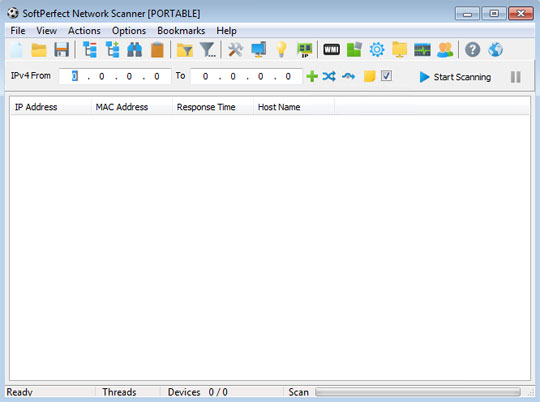
- It displays scanned live IP Addresses (IPv4 and IPv6) based on the range set to be scanned.
- It displays the MAC Addresses and Hostnames of the Scanned IP Addresses.
- It displays writable and hidden shared folders of the Scanned IP Addresses.
- It can scan for listening TCP ports, select UDP ports, and SNMP services.
- It can retrieve and display any system information from the scanned IP Addresses via the following methods:
- WMI Queries
- Registry Queries
- File System Queries
- Service Manager Queries
- Group and User Queries
- Performance Queries
- It supports Wake-On-LAN, remote shutdown/reboot/suspend and sending network messages to scanned IP Addresses.
- It supports remote command execution via the following methods:
- SSH
- PowerShell
- VBScript
- JScript
- It is capable of allowing the user to connect to a scanned IP address via the following protocols:
- HTTP
- HTTPS
- FTP
- Telnet
- RDP
- It can import and export data in the following formats:
- .json
- .html
- .xml
- .txt
- .csv
- This tool has been abused by other malware to perform network scanning on compromised networks.
SOLUTION
Step 1
Before doing any scans, Windows 7, Windows 8, Windows 8.1, and Windows 10 users must disable System Restore to allow full scanning of their computers.
Step 2
Note that not all files, folders, and registry keys and entries are installed on your computer during this malware's/spyware's/grayware's execution. This may be due to incomplete installation or other operating system conditions. If you do not find the same files/folders/registry information, please proceed to the next step.
Step 3
Search and delete this file
- {Hacktool Directory}\netscan.lic
Step 4
Scan your computer with your Trend Micro product to delete files detected as HackTool.Win32.NetScan.AE. If the detected files have already been cleaned, deleted, or quarantined by your Trend Micro product, no further step is required. You may opt to simply delete the quarantined files. Please check the following Trend Micro Support pages for more information:
Did this description help? Tell us how we did.