Coinminer.Win64.MALXMR.L

Gen:Variant.Application.XMRig.2 (BITDEFENDER), Riskware/CoinMiner (FORTINET)
Windows





Threat Type: Coinminer
Destructiveness: No
Encrypted: No
In the wild: Yes
OVERVIEW
This Coinminer arrives on a system as a file dropped by other malware or as a file downloaded unknowingly by users when visiting malicious sites. It may be dropped by other malware.
It does not have any propagation routine.
It does not have any backdoor routine.
It connects to certain websites to send and receive information. It uses the system's central processing unit (CPU) and/or graphical processing unit (GPU) resources to mine cryptocurrency.
TECHNICAL DETAILS
Arrival Details
This Coinminer arrives on a system as a file dropped by other malware or as a file downloaded unknowingly by users when visiting malicious sites.
It may be dropped by the following malware:
Propagation
This Coinminer does not have any propagation routine.
Backdoor Routine
This Coinminer does not have any backdoor routine.
Rootkit Capabilities
This Coinminer does not have rootkit capabilities.
Information Theft
This Coinminer gathers the following data:
- Public IP Address
- CPU vendor, features, model, and specifications
- Number of CPU cores/threads
- L1/L2/L3 cache sizes
- NUMA topology
- Available RAM
- GPU specifications (if OpenCL/CUDA enabled)
- DMI/SMBIOS system information
- Kernel/OS version
- User active/inactive status
Other Details
This Coinminer connects to the following website to send and receive information:
- stratum+ssl://{BLOCKED}x.xmrig.com:443
- donate.ssl.{BLOCKED}g.com
- donate.v2.{BLOCKED}g.com
- https://api.{BLOCKED}g.com
- https://{BLOCKED}g.com/benchmark/%s
- https://{BLOCKED}g.com/wizard
- https://{BLOCKED}g.com/docs/algorithms
It does the following:
- It references the following configuration files:
- %Program Files%\Hola\app\config.json
- %User Profile%\.xmrig.json
- %User Profile%\.config\xmrig.json
- When run via the command-line, it accepts the following parameters:
- -o, --url=URL → URL of mining pool
- -a, --algo=ALGO → Mining algorithm (e.g., rx/0, cn/r, argon2)
- -u, --user=USERNAME → Username/wallet address for mining pool
- -p, --pass=PASSWORD → Password for mining pool
- -O, --userpass=U:P → Username:password pair
- -x, --proxy=HOST:PORT → Connect through SOCKS5 proxy
- -k, --keepalive → Send keepalive packets to prevent timeout
- --coin=COIN → Specify cryptocurrency to mine
- --rig-id=ID → Rig identifier for pool
- --tls → Enable TLS/SSL for pool connection
- --tls-fingerprint=HEX → Pool TLS certificate fingerprint
- --dns-ttl=N → DNS cache TTL in seconds
- --dns-ipv6 → Prefer IPv6 for DNS
- -r, --retries=N → Retry count before switch to backup server
- -R, --retry-pause=N → Pause between retries in seconds
- --nicehash → Enable NiceHash compatibility mode
- --daemon → Use daemon RPC instead of pool
- --daemon-poll-interval=N → Daemon poll interval in milliseconds
- --self-select=URL → Self-select block templates URL
- --submit-to-origin → Submit shares to both pool and daemon
- -t, --threads=N → Number of CPU mining threads
- --cpu-affinity=N → Set CPU affinity bitmask
- --cpu-priority=N → Process priority (0=idle, 5=highest)
- --cpu-max-threads-hint=N → Max CPU threads percentage (0-100)
- --cpu-memory-pool=N → Persistent memory pool size in KB
- --cpu-no-yield → Prefer maximum hashrate over system response
- --no-huge-pages → Disable huge pages support
- --huge-pages-jit → Enable huge pages for JIT code
- --asm=ASM → ASM optimization (auto/none/intel/ryzen/bulldozer)
- --av=N → Algorithm variation (0-auto)
- --no-cpu → Disable CPU backend entirely
- --randomx-init=N → Number of threads for dataset init
- --randomx-no-numa → Disable NUMA support for RandomX
- --randomx-mode=MODE → RandomX mode (auto/fast/light)
- --randomx-1gb-pages → Use 1GB huge pages for RandomX dataset
- --randomx-wrmsr=N → MSR mod for Ryzen (0-15, -1 to disable)
- --randomx-no-rdmsr → Disable MSR reads
- --randomx-cache-qos → Enable cache QoS
- --opencl → Enable OpenCL GPU mining
- --opencl-devices=N → Comma-separated list of GPU devices
- --opencl-platform=N → OpenCL platform index
- --opencl-loader=PATH → Path to OpenCL library
- --opencl-no-cache → Disable OpenCL kernel cache
- --cuda → Enable CUDA GPU mining
- --cuda-loader=PATH → Path to CUDA plugin (xmrig-cuda.dll)
- --cuda-devices=N → Comma-separated list of CUDA devices
- --cuda-bfactor-hint=N → Bfactor hint for CUDA
- --cuda-bsleep-hint=N → Bsleep hint for CUDA
- --no-nvml → Disable NVML GPU stats
- --api-worker-id=ID → Worker ID for API
- --api-id=ID → Instance ID for API
- --http-enabled → Enable HTTP API
- --http-host=HOST → HTTP API bind host
- --http-port=N → HTTP API port
- --http-access-token=TOKEN → HTTP API access token
- --http-no-restricted → Enable full remote access to HTTP API
- -l, --log-file=FILE → Log output to file
- -S, --syslog → Use syslog for output
- --print-time=N → Print hashrate every N seconds
- --no-color → Disable colored output
- --verbose → Verbose/debug output
- -c, --config=FILE → Load config from JSON file
- -B, --background → Run in background (daemon mode)
- -V, --version → Print version and exit
- -h, --help → Print help and exit
- --dry-run → Test configuration without mining
- --bench=N → Run benchmark for N hashes
- --stress → Run stress test
- --donate-level=N → Donation level percentage (0-100)
- --donate-over-proxy=N → Control donation routing through proxy
- --pause-on-battery → Pause mining on battery power
- --pause-on-active=N → Pause mining when user active for N seconds
- --no-watch → Disable config file watching
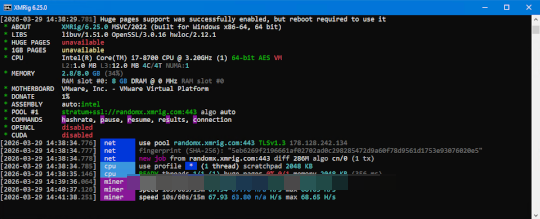
- When run via the command-line, it shows the following GUI:
- Attempts to modify the following system settings:
- Enables large/huge pages for memory optimization
- May write to MSR (Model-Specific Registers) via WinRing0 driver
- Sets process/thread priority for mining optimization
- Supports optional WinRing0 kernel driver for MSR-based CPU optimization to improve mining performance
It does not exploit any vulnerability.
It uses the system's central processing unit (CPU) and/or graphical processing unit (GPU) resources to mine cryptocurrency. This behavior makes the system run abnormally slow.
SOLUTION
Step 1
Trend Micro Predictive Machine Learning detects and blocks malware at the first sign of its existence, before it executes on your system. When enabled, your Trend Micro product detects this malware under the following machine learning name:
-
Troj.Win32.TRX.XXPE50FFF103
Step 2
Before doing any scans, Windows 7, Windows 8, Windows 8.1, and Windows 10 users must disable System Restore to allow full scanning of their computers.
Step 3
Note that not all files, folders, and registry keys and entries are installed on your computer during this malware's/spyware's/grayware's execution. This may be due to incomplete installation or other operating system conditions. If you do not find the same files/folders/registry information, please proceed to the next step.
Step 4
Search and delete these files
- %Program Files%\Hola\app\config.json
- %User Profile%\.xmrig.json
- %User Profile%\.config\xmrig.json
Step 5
Scan your computer with your Trend Micro product to delete files detected as Coinminer.Win64.MALXMR.L. If the detected files have already been cleaned, deleted, or quarantined by your Trend Micro product, no further step is required. You may opt to simply delete the quarantined files. Please check the following Trend Micro Support pages for more information:
Did this description help? Tell us how we did.