Cyberbedrohungen
From Misconfigured Spring Boot Actuator to SharePoint Exfiltration: How Stolen Credentials Bypass MFA
Not every cloud breach starts with malware or a zero-day. In this incident, attackers discovered an exposed Spring Boot Actuator endpoint, harvested credentials from leaked configuration data, then used the OAuth2 Resource Owner Password Credentials (ROPC) flow to authenticate without MFA.


Save to Folio
Key takeaways
- Exposed Spring Boot Actuator “/env” data can leak secrets (for example, passwords and client secrets) that enable immediate, authenticated access.
- The OAuth2 ROPC flow enables password-only sign-ins and can bypass MFA, making stolen credentials far more dangerous.
- Reducing blast radius requires hardening both app config (restrict Actuator, remove secrets) and identity controls (disable ROPC, enforce Conditional Access/least privilege).
- TrendAI Vision One™ Cyber Risk Exposure Management (CREM) is a highly valuable line of defense, especially in this case. Cyber Risk Exposure Management analyzes all risks and arranges them in a correlated manner, giving security teams a more comprehensive view.
Introduction
Many cybersecurity incidents don’t begin with sophisticated malware or advanced exploits. Instead, they often start with simple misconfigurations and poor credential practices. When these weaknesses combine, attackers can move from reconnaissance to full data compromise surprisingly quickly.
This case study walks through an incident that involves:
- An exposed Spring Boot Actuator endpoint
- Plaintext credentials stored in a spreadsheet
- A risky authentication method (ROPC)
These weaknesses ultimately allowed attackers to compromise a SharePoint service account of the target organization and exfiltrate data from SharePoint Online.
Phase 1: Exposed Spring Boot Actuator
Spring Boot is a Java framework designed to make building production-ready web applications and microservices fast and simple. On the other hand, Spring Boot Actuator is a built-in module that shows operational information (for example, /health, /heapdump, /env, and /configprops) about a running Spring Boot application.
In this incident, Spring Boot Actuator endpoints were exposed without authentication. The requests returned an HTTP 200 status code and revealed sensitive information.

Although no plaintext credentials were revealed, the /configprops endpoint exposed valuable information, including a configuration block related to SharePoint integration.
The exposed configuration revealed the following:
- The username of the SharePoint service account
- The SharePoint host URL
- Site name: Dynamic365
- Configuration source: application.yml
- Password field: masked (******)
Even though the password was masked, the threat actor learned that a valid account existed and that the credentials were stored in application.yml. This was valuable reconnaissance information that narrowed their attack surface.
Phase 2: Plaintext secrets in a spreadsheet
In our investigation, analysts discovered that sensitive secrets for an internal application were stored in plaintext in a spreadsheet. The spreadsheet contained credentials related to the internal Azure AD application, which we will refer to as "[REDACTED]-2024" in this entry, specifically the following values:
- client-id
- client-secret
- secret-id
These values corresponded to the authentication credentials used by [REDACTED]-2024 to request tokens from Azure AD. Application secrets function similarly to passwords: anyone who possesses the client ID and client secret of an application can attempt to authenticate as that application and request tokens from Azure AD.
Because these secrets were stored in a spreadsheet:
- They could be easily copied or leaked.
- They can be used to bypass any centralized secret management controls.
- Anyone with access to the file could impersonate the application.
This is a common operational security issue when development or testing credentials are documented informally for convenience.
Phase 3: Authentication abuse – ROPC login
ROPC allows an application to sign in the user by directly handling their password. Instead of redirecting the user to a login page, the application collects the credentials and sends them to the identity provider.
Typical ROPC Flow
1. An application sends to the identity provider (Azure AD/Entra ID) a request containing the:
- client-id
- client-secret
- username
- password
2. The identity provider validates the credentials.
3. If valid, it returns an access token.
4. The application uses the token to access APIs, such as:
- Microsoft Graph
- SharePoint Online
- OneDrive
The threat actor’s first two attempts to authenticate resulted in an error due to a missing client_assertion or client secret. The first attempt was via Dynamics 365 Finance and Operations Service – Dev, while the second was via the internal Azure AD application [REDACTED]-2024.
They were likely testing multiple applications in the tenant to determine which one can successfully request tokens. During an intrusion, seeing this error before a successful login is not unusual, since attackers often trial-and-error OAuth requests while figuring out the correct authentication parameters to supply. In this attack, the timestamps of the attempts were nearly identical, suggesting that the threat actors were automating token requests.


Shortly after, the client_secret obtained from the spreadsheet was supplied, resulting in a successful authentication.

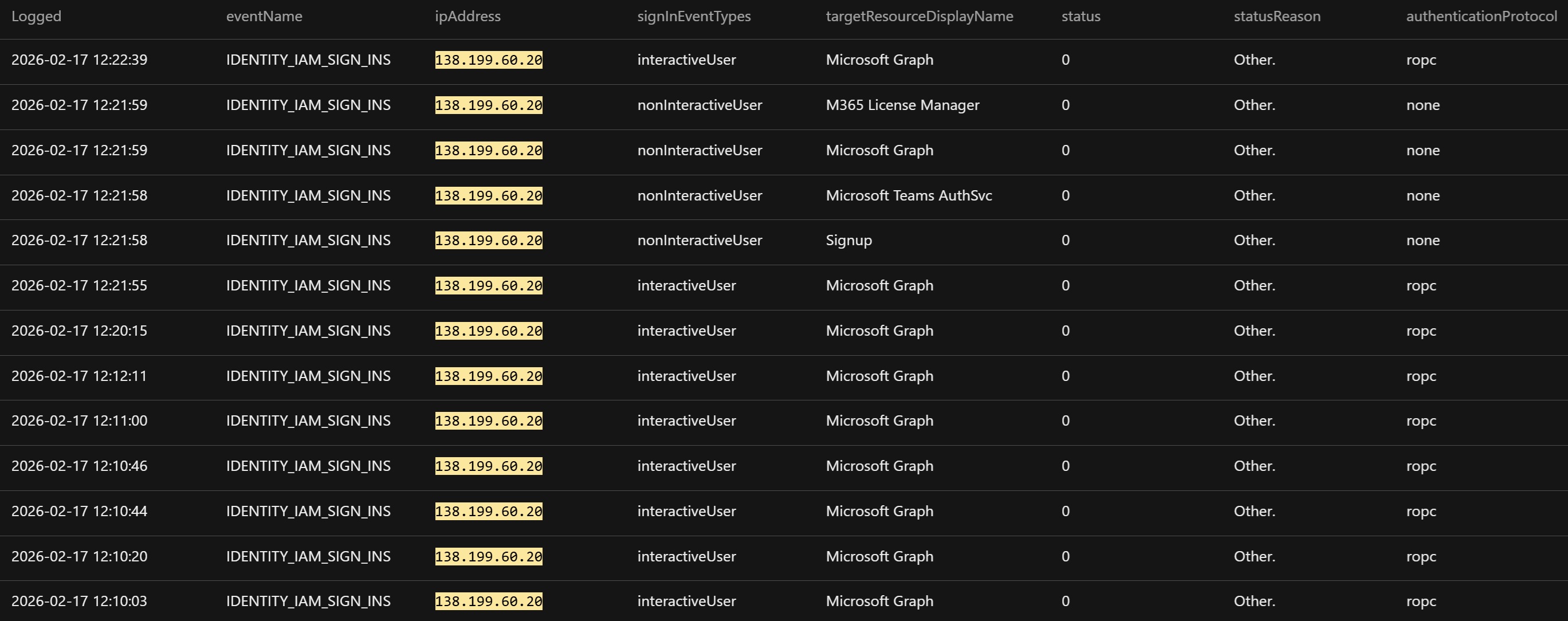
To summarize, the threat actor sent an ROPC authentication request to Azure AD using two pieces of stolen information: (1) the plaintext client secret for the internal Azure AD application [REDACTED]-2024, obtained from a spreadsheet, and (2) the password for the SharePoint service account, obtained from application.yml.
The request was submitted via the [REDACTED]-2024 test/dev application. After Azure AD successfully authenticated the credentials, it issued a Microsoft Graph access token that the threat actor used to access and interact with SharePoint.
Here are the following reasons why ROPC can be considered as unsecure:
- ROPC requires the application to collect and transmit the user’s password, which creates risks, such as storing secrets in configuration files or intercepting poorly secured applications.
- ROPC does not work well with modern authentication controls, such as MFA. If threat actors obtain credentials, they can often authenticate access without triggering additional security challenges.
- ROPC is fully programmatic; thus, attackers can easily script it.
- Logins via ROPC occur silently via API requests and users may never realize their account was used.
Phase 4: SharePoint data exfiltration
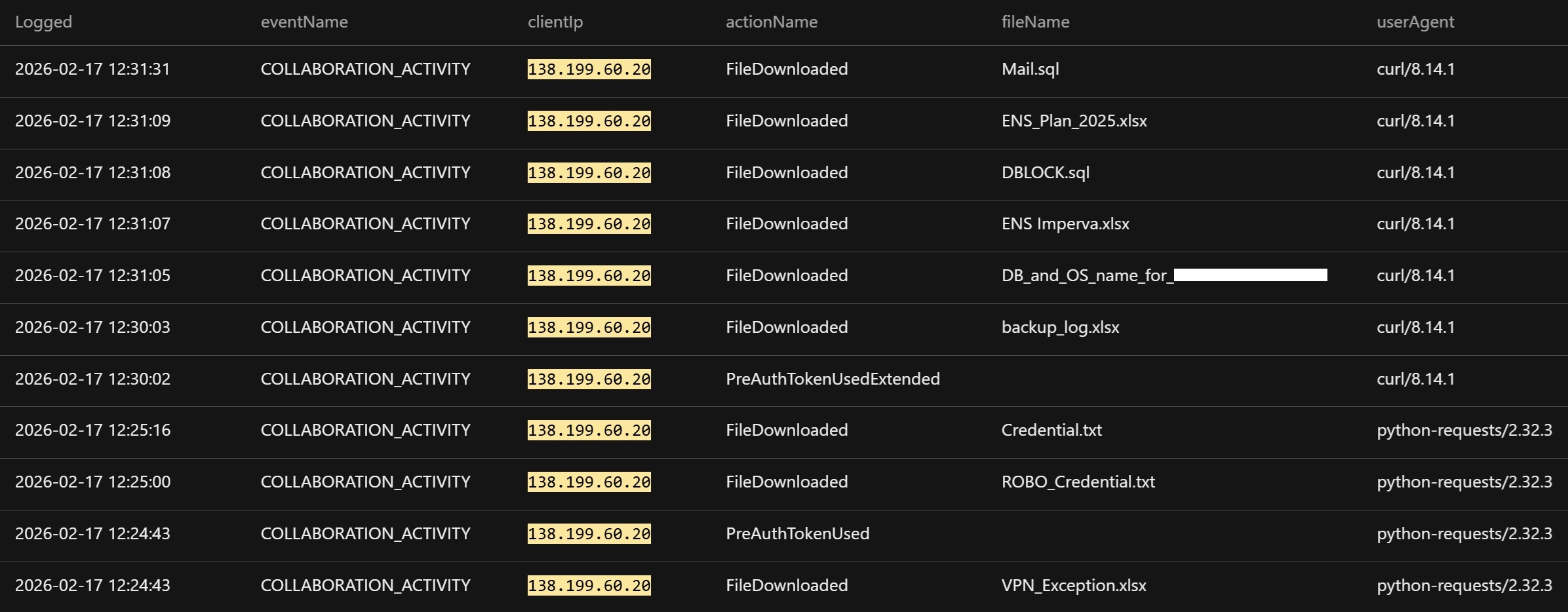
Using the issued token, the attacker accessed SharePoint resources through Microsoft Graph. Logs showed activity consistent with SharePoint site access, document library enumeration, and file downloads that resulted in SharePoint data exfiltration from the environment. Importantly, this stage did not involve malware or exploitation; the attacker simply used valid credentials and API access.
Tactical mitigations
Security teams should expedite the prevention of similar incidents. The following are some recommendations:
1. Disable public access to Actuator endpoints using:
- IP allowlists
- Reverse proxy protections
- Requirement of a valid authenticated user
Moreover, in production environments, endpoints like /env and /configprops should never be publicly accessible.
2. Remove plaintext credentials and audit the environment for credentials stored in:
- Spreadsheets
- Shared drives
- Documentations
- Configuration files
Thereafter, teams should immediately rotate any exposed credentials.
3. Disable ROPC authentication.
- If ROPC is not required, it should be disabled.
- Organizations should prioritize modern authentication flows that enforce stronger security controls.
Conclusion
The investigation identified a SharePoint data exfiltration incident resulting from the misuse of valid credentials, with no evidence of malware deployment or software exploitation. The threat actor successfully authenticated to Entra ID using ROPC, obtained an access token, and leveraged it to interact with SharePoint Online, enabling unauthorized access to data.
Overall, the incident was enabled by three specific security weaknesses: the public exposure of Spring Boot Actuator endpoints that revealed internal application configurations, the storage of sensitive secrets for an internal application in a spreadsheet, and the use of ROPC.
Our investigation underscores the fact that modern cloud breaches often occur through legitimate access rather than technical exploits, emphasizing the need to focus defensive strategies on limiting what attackers can do once authenticated.
TrendAI Vision One™ Cyber Risk Exposure Management (CREM) as a strategic preventive solution
This incident highlighted an increasingly common security challenge: the gap in exposure management across identity, application configuration, and cloud authentication flows. The attack leveraged misconfigurations and legacy authentication mechanisms that were permitted within the environment, instead of relying on malware or software vulnerability.
A preventive line of defense, such as TrendAI Vision One™ Cyber Risk Exposure Management (CREM), can help organizations identify and prioritize these types of risks before they can be exploited. Rather than focusing solely on active threats, Cyber Risk Exposure Management continuously evaluates an organization’s attack surface and highlights exposures that could enable an attacker to move from initial access to sensitive data.
For this incident, Cyber Risk Exposure Management could surface risk indicators, such as:
- Internet-exposed application services that reveal sensitive configuration metadata
- Applications and service accounts using legacy OAuth 2.0 authentication flows, such as ROPC
- Accounts that lack MFA enforcement or Conditional Access protections
- Applications relying on long-lived static client secrets for authentication
- Potential attack paths, such as SharePoint Online, that link exposed services, identity weaknesses, and access to sensitive cloud data
Cyber Risk Exposure Management does not evaluate risks in isolation. Instead, it correlates exposures across identities, cloud services, and external attack surfaces to identify complete attack paths. A single issue may appear moderate on its own; however, when combined with other exposures, it can create a viable route from external access to sensitive enterprise data.
By continuously mapping identity posture, authentication methods, and cloud application exposure, Cyber Risk Exposure Management enables organizations to move from reactive detection toward proactive risk reduction. In scenarios similar to this attack, addressing legacy authentication usage and strengthening identity security controls could significantly reduce the likelihood of credential abuse and unauthorized data access.