
By Yash Verma (Senior Threat Researcher, TrendAI™ Research), Ranjitha Raj (Senior Product Manager, TrendAI™), Fernando Cardoso (Vice President of Product Management – AI and Cloud Security, TrendAI™), Sunil Bharti (Senior Threat Researcher, TrendAI™ Research)
Key takeaways
- Activity on the Azure control plane is a primary target for attackers, as administrative operations can be abused to escalate privileges, change configurations, and disrupt services.
- Azure administrative activity logs provide critical visibility into management actions, making them essential for detecting privilege abuse, monitoring evasion, and risky configuration changes.
- Control plane attacks often follow a life cycle starting from privilege escalation and moving on to exposure and eventual service disruption. This chain requires continuous monitoring and governance enforcement.
- TrendAI Vision One™ strengthens detection by ingesting Azure administrative events from Azure, helping security teams identify and respond to control plane threats faster.
Azure control plane overview
The Azure control plane is the central management layer responsible for authorizing, validating, and executing all management operations across Microsoft Azure cloud resources. This means that any action that creates, modifies, configures, or deletes a resource is processed through the control plane. For example, when a virtual machine is created, resized, or deleted, or when a Network Security Group (NSG) rule or storage account configuration is updated, the Azure control plane validates the request, applies governance rules, and executes the change across the target Azure resources.
The Azure control plane is implemented through Azure Resource Manager (ARM), which acts as the single entry point for all Azure management requests. Whether actions are initiated via the Azure Portal, CLI, PowerShell, or APIs, they are uniformly handled by ARM to ensure consistent enforcement and auditing. All control plane requests are sent to the global Azure management endpoint.
For every request, the control plane:
- Authenticates the caller using Microsoft Entra ID.
- Authorizes the action using Azure role-based access control (RBAC).
- Enforces governance through Azure Policy and management locks.
- Routes the request to the appropriate Azure resource provider.
- Records the operation in the Azure activity log.
The control plane governs resource life cycle, access control, configuration state, and governance enforcement across subscriptions and tenants as it mediates all administrative actions and logs them centrally.
Azure control plane logging
Every interaction with Azure resources through the Azure control plane, whether performed via the Azure Portal, CLI, PowerShell, REST APIs, or SDKs, is logged. Control plane logs provide visibility into who did what, when, and from where across subscriptions and management scopes. Logs are critical for security monitoring, incident investigation, compliance auditing, and threat detection, as they capture changes to configurations, permissions, and resource states rather than runtime data traffic.
Azure activity logs are grouped into several categories that provide visibility into different types of management operations and platform events:
- Administrative logs: Capture all create, update, and delete operations made through the control plane on Azure resources across subscriptions and resource groups.
- Security logs: Record security-related management actions, including RBAC role assignments and access control changes.
- Policy logs: Track Azure Policy evaluations and enforcement actions, including compliance and deny/audit events.
- Service health logs: Report Azure platform incidents, outages, and planned maintenance events.
- Resource health logs: Track the availability and health state of individual Azure resources.
- Alert logs: Capture events generated whenever Azure Monitor alerts are triggered or resolved.
- Autoscale logs: Record automatic scale-in and -out operations for supported Azure services.
Azure activity logs can be viewed either directly from Azure Monitor using the native activity log schema (administrative category) or via storage accounts or event hubs using the export schema. The event content remains consistent, but the schemas differ based on the access method. Direct access uses the Azure Monitor activity log format, whereas logs exported via storage account or event hub are optimized for streaming and external ingestion.
Among the activity log categories, administrative logs are the most valuable for Azure control plane visibility and security. In this article, we discuss administrative logs and their importance from a threat detection standpoint.
Azure administrative logs
Azure administrative logs record all management operations that modify Azure resources through the control plane. These logs operate at the subscription level and provide a centralized audit trail of configuration changes, making them essential for security monitoring, forensic investigation, and compliance validation. Administrative logs capture:
- Resource creation, modification, and deletion.
- RBAC role assignments and permission changes.
- Changes to networking, identity, compute, and storage configurations.
- Updates to security controls and service settings.
- Management actions initiated by users, service principals, or managed identities.
Administrative logs represent the single most important telemetry source for detecting Azure control plane threats. Unlike service or health logs, administrative logs capture intent and authority by showing who made what change and under which scope.
Azure control plane threats
Threats to the Azure control plane center on unauthorized or malicious administrative actions performed against Azure resources. Attackers often exploit legitimate management operations, such as modifying access roles, altering security configurations, disabling monitoring, and deleting resources, to gain control over environments. These threats are particularly dangerous because they often appear as valid administrative activities, allowing attackers to escalate privileges, evade detection, expose sensitive data, or disrupt critical services. Figure 1 illustrates how an attacker can carry out an attack based on administrative abuses across an Azure environment.
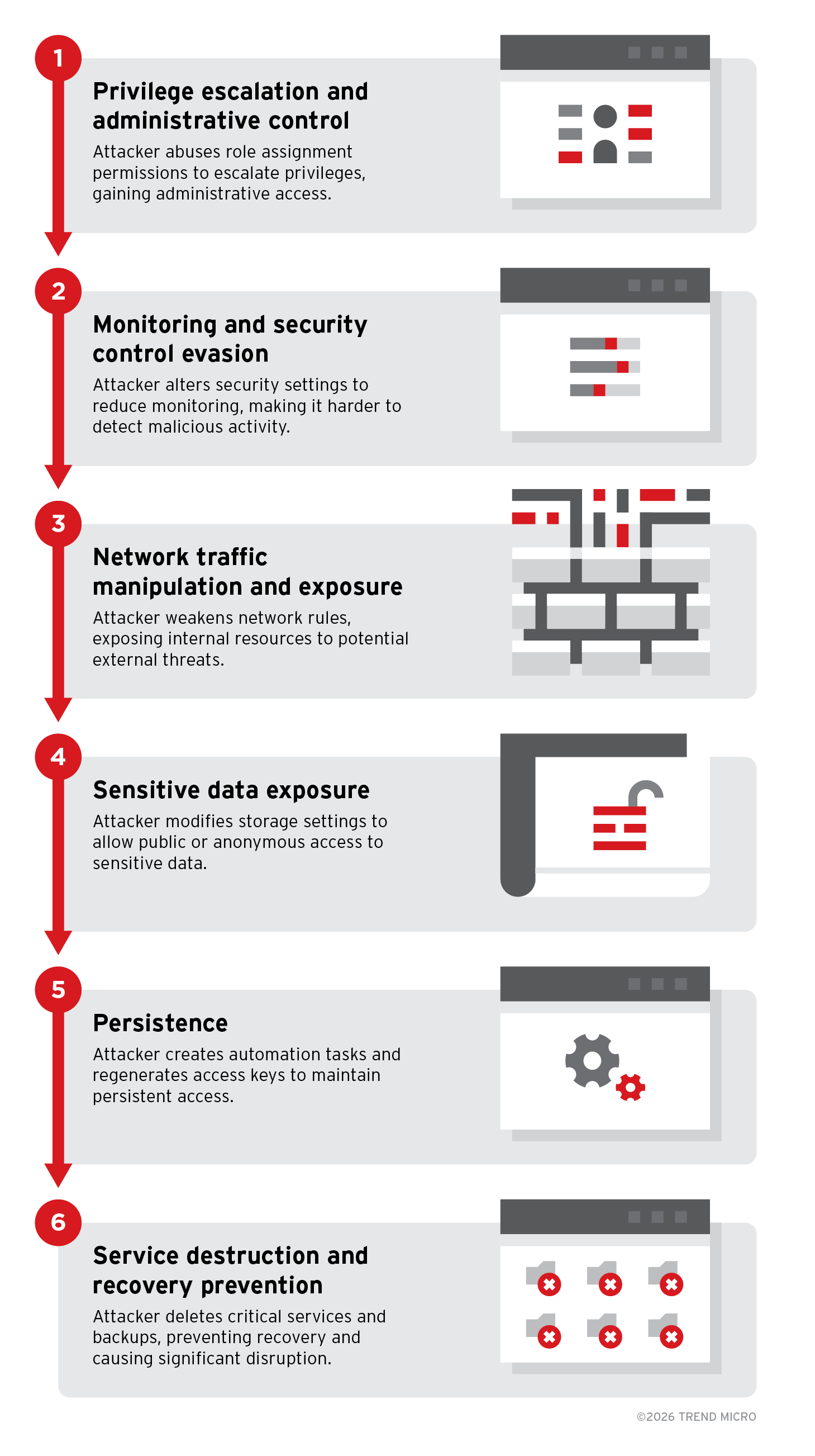
Figure 1. Example of an Azure control plane attack chain
The incident begins when an attacker gains access to a low-privileged Azure identity, such as a compromised developer account or service principal. Rather than triggering immediate disruption, the attacker establishes a foothold and prepares to expand influence within the environment by abusing existing permissions and configuration weaknesses. This initial access sets the foundation for privilege escalation, security control evasion, and eventual operational impact.
Stage 1: Privilege escalation and administrative control
After obtaining a foothold, the attacker elevates privileges by abusing excessive role-assignment permissions. Using roles, such as User Access Administrator, they assign highly privileged roles, such as Contributor or similar administrative access, to their controlled identity. This provides broad control over resource configurations, access permissions, and governance settings across the subscription or management scope.
Stage 2: Monitoring and security control evasion
With administrative privileges established, the attacker attempts to reduce visibility and weaken governance controls. Actions might include modifying diagnostic settings, altering policy assignments, changing compliance configurations, or disabling logging destinations. By degrading monitoring coverage early, subsequent malicious changes become harder to detect.
Stage 3: Network traffic manipulation and exposure
The attacker modifies network configurations to expose internal workloads. NSG rules might be changed to allow inbound traffic from any source, making previously restricted virtual machines reachable from the internet. Firewall rules, routing settings, or DNS configurations might also be altered to weaken traffic filtering and enable unauthorized access paths.
Stage 4: Sensitive data exposure
To access or leak data, the attacker changes storage account settings to allow public or anonymous access. They might also modify replication or access configurations to move data outside organizational boundaries, significantly increasing the risk of data exposure.
Stage 5: Persistence
To maintain long-term control, the attacker establishes persistence through control plane actions. This might include creating automation runbooks, scheduled tasks, or additional identities that can reapply malicious configurations if removed. Regenerating storage account access keys or secrets can also lock out legitimate users while preserving attacker access.
Stage 6: Service destruction and recovery prevention
In the final phase, the attacker maximizes impact by deleting or modifying critical infrastructure components, such as virtual machines, backups, restore points, and recovery services. Removing recovery options limits the organization’s ability to restore operations quickly and increases overall disruption.
Best practices for securing Azure control plane
Protecting the Azure control plane requires strong identity governance, strict access control, and continuous monitoring of administrative actions. Since attackers often abuse legitimate management operations, organizations must focus on reducing excessive privileges, maintaining visibility, and enforcing secure configurations across resources:
- Identity and access governance: Enforce multifactor authentication (MFA), conditional access, and least-privilege RBAC to minimize the risk of compromised accounts being used to escalate privileges or modify critical resources.
- Monitoring and logging protection: Maintain centralized activity logging and security monitoring to detect suspicious administrative behavior and prevent attackers from disabling visibility controls.
- Policy-driven governance: Use Azure Policy and Microsoft Defender for Cloud recommendations to enforce secure configurations, restrict risky changes, and maintain compliance at scale.
- Network and resource exposure control: Limit public access to resources, apply secure network configurations, and monitor changes to firewall, NSG, and DNS settings to reduce exposure risks.
- Backup and recovery protection: Secure recovery services, enable safeguards (such as soft delete), and monitor destructive actions to ensure business continuity during ransomware or disruptive attacks.
TrendAI Vision One™ Azure detections
TrendAI Vision One™ provides detections for malicious or suspicious administrative activity in the Azure control plane, helping security teams quickly identify and respond to potential attacks.
Setup
TrendAI Vision One™ now supports Azure administrative log ingestion and detections. To enable this feature, follow the steps outlined in the installation guide.
Workbench detections
The following are detections associated with the stages outlined in the earlier attack scenario:
Stage 1: Privilege escalation and administrative control
- Azure IAM Over Privileged Contributor Role Assigned To A User
- Azure IAM Over Privileged Key Vault Administrator Role Assigned To A User
- Azure IAM Over Privileged Owner Role Assigned To A User
- Azure IAM Over Privileged RBAC Administrator Role Assigned To A User
- Azure IAM Over Privileged User Access Administrator Role Successfully Assigned To A User
- Azure Privileged Elevate Access Operation Started
Stage 2: Monitoring and security control evasion
- Azure Activity Log Alert Filter Deleted
- Azure Monitor Diagnostics Configuration Successfully Deleted
- Azure Network Watcher NSG Flow Logs Disable
- Azure Security Solution Successfully Deleted
- Azure Event Hub Successfully Deleted
- Azure Firewall Policy Successfully Deleted
- Azure Network Watcher Successfully Deleted
Stage 3: Network traffic manipulation and exposure
- Azure NSG Successfully Updated With Inbound Rule Allowing Any IP
- Azure DNS Zone Modified or Deleted
- Azure Application Gateway Modified Or Deleted
- Azure Application Security Group Modified Or Deleted
- Azure Firewall Policy Successfully Deleted
Stage 4: Sensitive data exposure
- Azure Storage Account Successful Creation Or Update With Public Access
- Azure Storage Account Successful Creation Or Update With Anonymous Access To Blob Containers
- Azure Storage Account Cross-Tenant Object Replication Successfully Enabled
Stage 5: Persistence
- Azure Storage Account Key Successfully Regenerated
- Azure Automation Runbook Successful Creation Or Modification
Stage 6: Service destruction and recovery prevention
- Azure Virtual Machine Successfully Deleted
- Azure Virtual Machine Snapshot Successfully Deleted
- Azure Compute Restore Point Collections Successfully Deleted
- Azure Recovery Services Resource Deleted
- Azure Resource Group Successfully Deleted
- Azure Resource Lock Successfully Deleted
- Azure Storage Account Successfully Deleted
Like it? Add this infographic to your site:
1. Click on the box below. 2. Press Ctrl+A to select all. 3. Press Ctrl+C to copy. 4. Paste the code into your page (Ctrl+V).
Image will appear the same size as you see above.
Artículos Recientes
- TrendAI™ 2026 Cyber Risk Report
- The Hidden Risk in Your AI Rollout: Your Endpoints
- When AI Becomes a Zero-Day Machine: What Public Sector Organizations Need to Know
- A Data-Driven View of Cyber Risk Structure: How Attack Pressure and Exposure Shape Damage
- Hunt Them All: An AI-Powered Vulnerability Sweep of 19,000 MCP Servers
 Fault Lines in the AI Ecosystem: TrendAI™ State of AI Security Report
 It’s By Design: The Use-After-Free of Azure Cloud
 TrendAI™ 2026 Cyber Risk Report
 Guarding LLMs With a Layered Prompt Injection Representation