
By Numaan Huq and David Sancho (Senior Threat Researchers, Forward-Looking Threat Research Team, TrendAI™ Research)
Key takeaways
- Using AI, public personal images can provide attackers rich contextual clues that fall completely outside traditional security controls.
- AI dramatically reduces the effort, skill, and time required to convert public photos into targeted phishing intelligence, shifting personalized attacks from manual operations to scalable, automated attacks.
- As personal and professional identities increasingly overlap, the ease of extracting personal context from images significantly heightens enterprise risk, making public personal data a security issue, not just a privacy concern.
Introduction
Here’s something to consider: While organizations invest heavily in protecting their networks, endpoints, identities, and cloud environments, the people who work within these organizations, from top-level executives to mid-level managers and individual contributor staff, maintain a parallel digital presence that sits completely outside traditional enterprise security controls. Their personal email accounts, social media profiles, and public images remain broadly accessible, loosely governed, and rarely considered part of the attack surface. In the modern age, this separation is becoming increasingly artificial.
In our previous entry, we discussed how AI has transformed public LinkedIn activity into machine-readable intelligence, enabling attackers to automate reconnaissance and generate personalized targeting material at scale. In this article, we explore how the same dynamic applies to online personal images, and how publicly shared photos can be rapidly transformed into detailed, actionable intelligence using modern AI tools.
Publicly shared images, whether on professional profiles, social platforms, or even blogs, carry far more information than most people realize. A single photo can reveal routines, interests, locations, affiliations, health journeys, and family dynamics. When gathered at scale, these collections of images form detailed personal profiles that can be correlated, enriched, and operationalized. For attackers, the value of this information lies not in its privacy, but in the context it provides.
Exploiting that context historically required significant manual effort. Targeted phishing campaigns built around an individual’s personal life or interests were time-consuming to prepare and difficult to scale. This friction limited its use to high-value targets and bespoke operations.
AI removes this friction.
With modern image analysis models and readily available automation tools, the process of turning public images into actionable targeting intelligence can now be performed quickly, consistently, and at scale. What once required days of manual open-source intelligence (OSINT) work can now be compressed into mere minutes. This does not introduce a new attack technique — targeted phishing has existed for years — but it fundamentally changes the speed and economics of personalization.
To better understand what this shift means in practice, we built an internal proof-of-concept (PoC) image analysis tool — with our goal not being to invent new criminal capabilities, but to replicate, in a controlled and transparent way, an automated workflow a threat actor could implement today using publicly available tools and modern AI models. The focus was on speed, scalability, and effort reduction.
While our PoC operates on publicly available personal images, its implications are squarely focused on enterprises. Executives are not only leaders, but they are also parents, siblings, and private individuals. Their personal and professional lives increasingly overlap, especially in the inbox. Personal context is routinely used to make business-focused lures more convincing. As this context becomes easier to extract and operationalize, enterprise risk increases.
In this article, we describe how this PoC tool works, what it demonstrates about AI-driven targeting, and why organizations should consider public personal data as part of their broader threat model, not just as a privacy issue, but as a security one as well.
The image analysis tool
To understand what AI-driven targeting looks like in practice, we developed an image analysis tool that automates an entire workflow: collecting public Instagram images, analyzing them with AI, and assembling a structured profile that an attacker could theoretically exploit.
This tool was conceived to automate an OSINT exercise we performed last year, with the goal to determine whether we could automate that process. Our OSINT exercise required two researchers to perform nearly a week’s worth of work collecting images of the subject, analyzing those images, finding meaningful connections, and then building a profile report. The goal for our tool was to do all of that work in less than half an hour, going from having a bunch of images to building a complete personalized phishing site in under 30 minutes.
To develop the image analysis tool, we chose the popular vibe-coding platform Lovable, which provides the following advantages:
- Lovable has access to the latest AI models and a massive context window complete with automatic memory management. This allowed us to continuously chat with the AI in a single thread and build the tool over the course of only three days.
- The platform has built-in integration with Supabase, which allowed us to easily create and link databases to store our results, while also allowing us to capitalize on Supabase edge functions to make outside API calls.
- It has built-in GitHub integration, which allowed us to automatically push our code changes to GitHub. This provided us easy external access to our generated source code.
- Once the web application was built, we could publish and host the site on Lovable. A free account means that the hosted web application is public. On the other hand, using a paid account would allow us to publish it on our own domain.
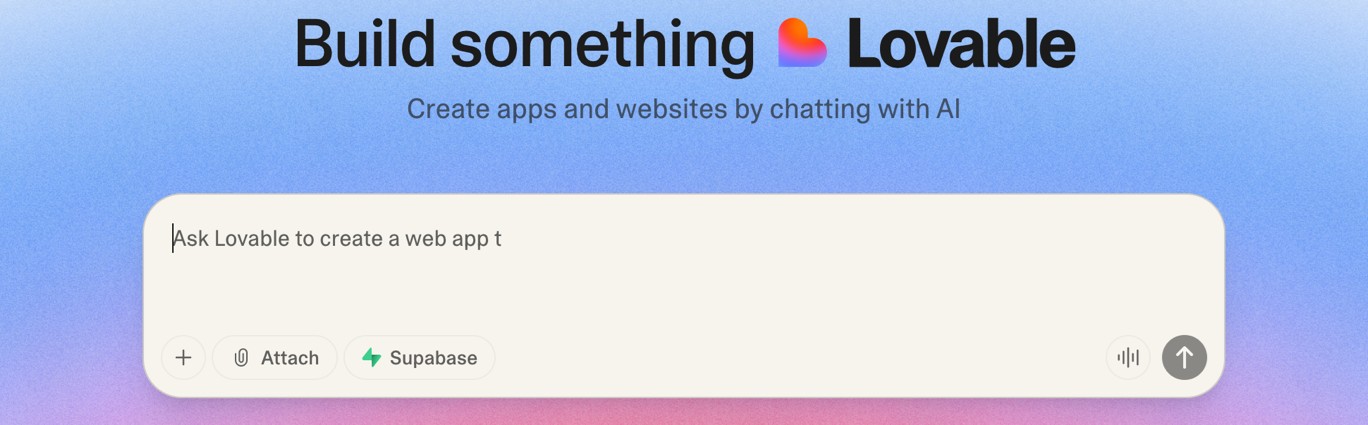
Figure 1. The vibe-coding platform Lovable
Overall, we spent approximately three days building the web application, with the basic functionality completed on the first day. The rest of the time was spent refining the UI and adding additional features.
To scrape Instagram images, we used Instaloader, a popular, publicly available, regularly maintained, and free tool that defeats Instagram’s latest protections. This allowed us to bypass Instagram’s web-scraping protection without having to develop code for it, since this feature is already built into the tool by default.
The version we used broke down after grabbing images from the first 12 posts. By then, we typically had already downloaded between 20 and 100 images, enough for us to build a profile of our targets. To avoid getting blocked, we did not log in to Instagram, so we only scraped public profiles. The Instaloader tool also works over a VPN, so we successfully managed to stay anonymous during the experiment.
After we downloaded images from Instagram using Instaloader, we added them to a zip file and uploaded it to our image analysis tool. In the example shown in Figure 1, we used Instagram images from a popular Southeast Asian food vlogger. The tool goes over each image, loads a preview, and removes duplicates.
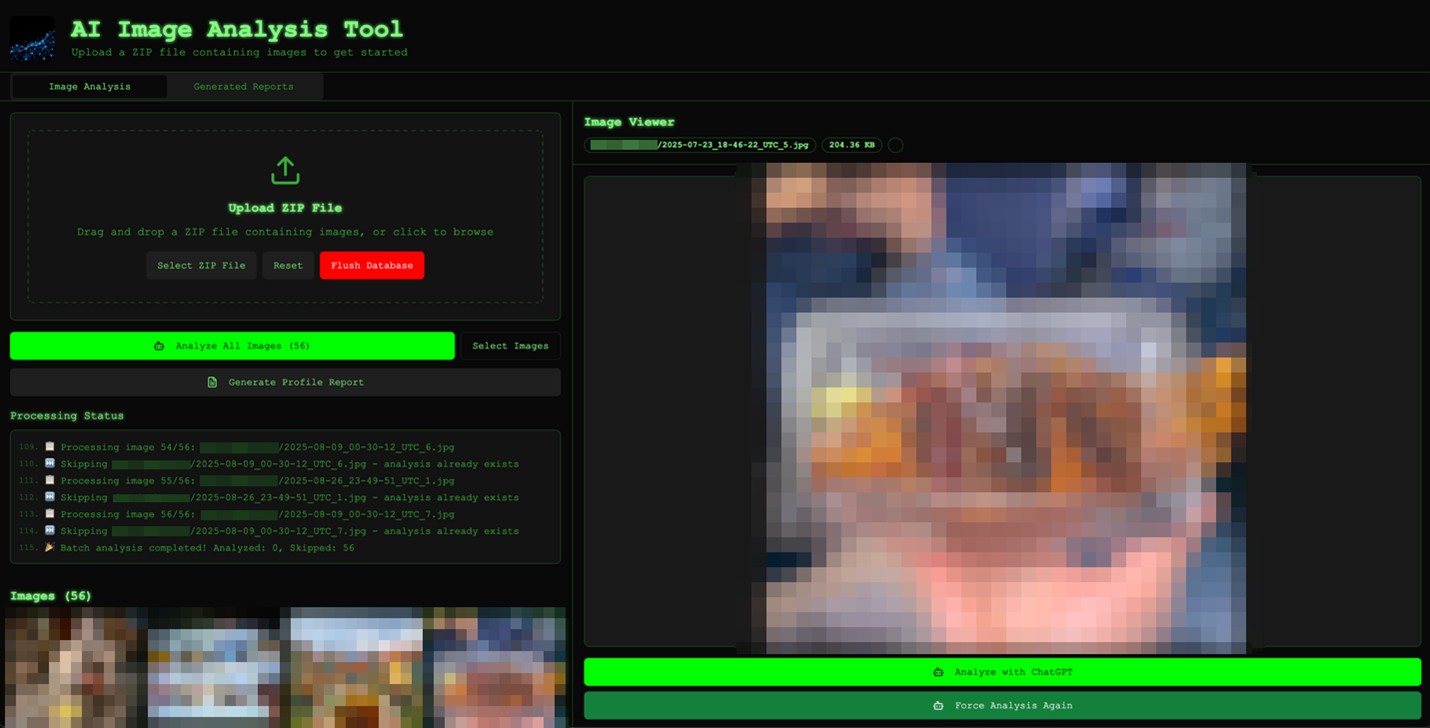
Figure 2. When we load a zip file that contains images, the image analysis tool processes all the images to remove duplicates and displays them. (Images have been blurred for privacy.)
The analysis tool effectively treats every image as an intelligence report. It first profiles individuals — inferring gender, age, ethnicity, build, posture, and facial expressions, before layering on sentiment, stress, social dynamics, along with any other clues, such as name tags, logos, or uniforms. Simultaneously, it examines the file’s technical integrity, checking EXIF data, compression, and editing artifacts to spot manipulation. From there, the model pivots to the broader environment. It analyzes building style and architecture, road layouts, traffic systems, utilities, vegetation, terrain, and climate signals, which allow the tool to estimate the geographical region and its level of development.
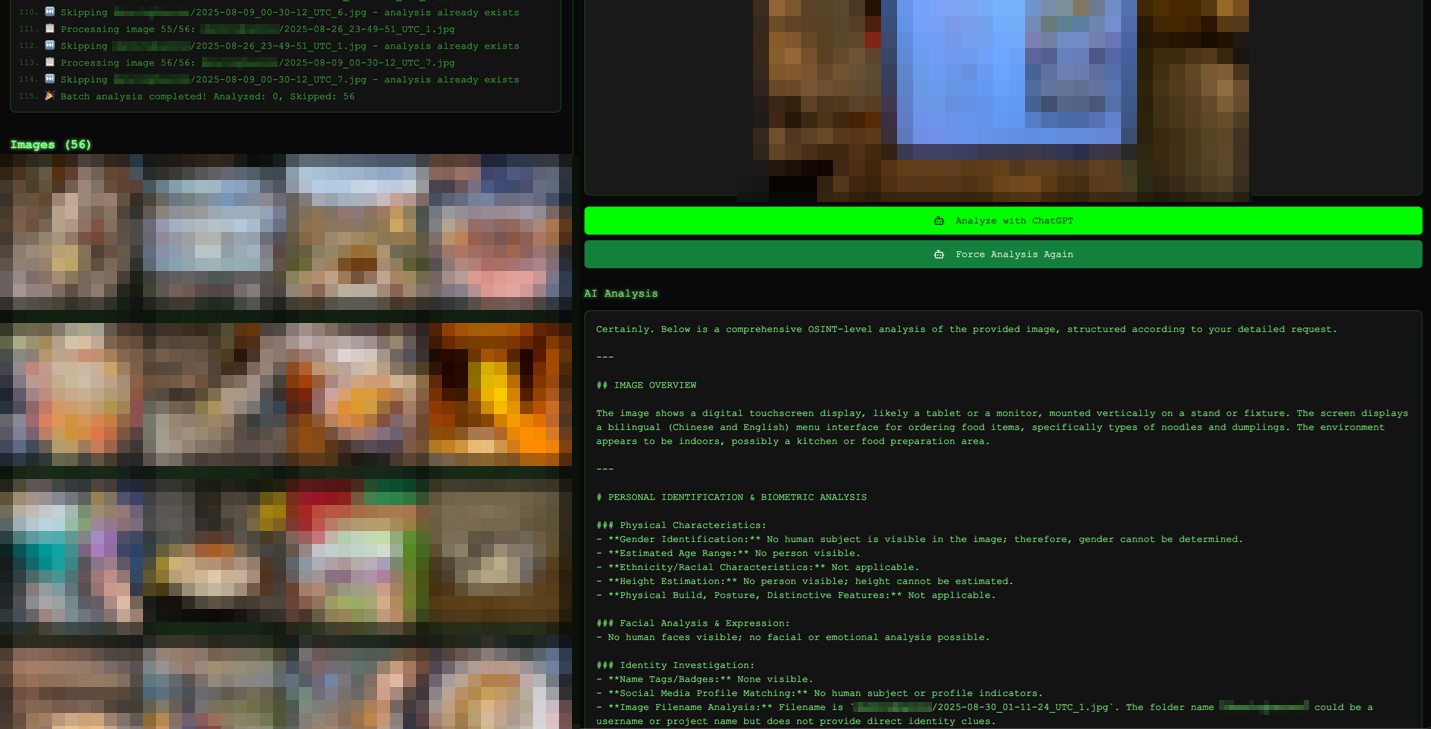
Figure 3. After the AI has performed a deep analysis of the image, clicking on it shows all the inferred data. (Images have been blurred for privacy.)
A critical part of the image analysis is searching for text. The model is instructed to scour every pixel for writing of any kind, using any language, from street signs and billboards to T-shirt slogans, price tags, license plates, device screens, and graffiti. This process even includes tiny or partially obscured text, reflections, and watermarks. On the time axis, it reads lighting and shadows, weather and season cues, along with vehicles, devices, fashion, and construction styles to infer when the scene likely took place.
On top of this, the system audits human activity and behavior, including demographics, formality of worn clothes, crowd density, movement patterns, traffic behavior, and visible security or law enforcement presence. Vehicles and transport get special attention, with make and model, plate formats, vehicle usage, and public transport all feeding into a connected whole. Commercial indicators, such as business types, chain versus local brands, displayed prices, currency, and construction activity, help position the local economy. Cultural and political nuances can be decoded via religious symbols, traditional or modern aesthetics, public art, flags, political messaging, or protests.
Finally, it frames everything through a security and intelligence lens, looking at cameras, barriers, access control, sensitive facilities, and potential vulnerabilities. All of this is synthesized into answers to 10 anchor questions:
- Where was the image likely taken?
- When was it taken?
- What are the season and weather conditions?
- What are the visible socioeconomic conditions?
- What are the visible security footprints?
- What are the unique location identifiers?
- What do lighting and shadows reveal about time and direction?
- What is the cultural and political backdrop?
- What is the state of the transportation network?
- Are there any other unusual details that deserve extra attention?
Once all image analysis is completed, we can click on the Generate Profile Report button, which combines the individual analysis of all images to create a single comprehensive profile report. The report, which is available under the Generated Reports tab, provides a sample of the associated images, the detailed report itself, and four additional options to further process the report:
- Step 1: Search Person
- Step 2: Identify Marketing Subject Areas
- Step 3: Generate Sample Marketing Emails
- Step 4: Generate Email Addresses
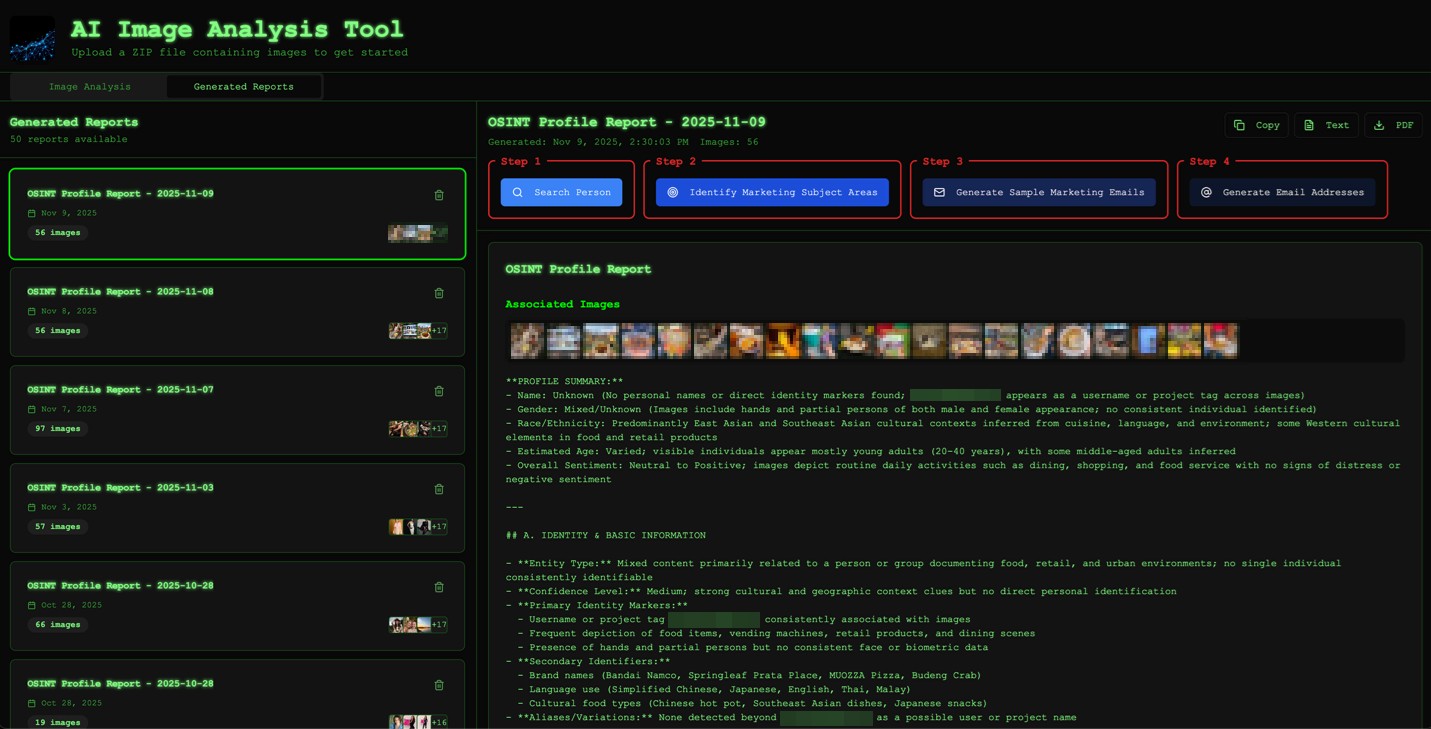
Figure 4. After all of the images, or a subset of them, are analyzed, we can generate a report that can be accessed from the Generated Reports tab.
In most cases, the image analysis has already extracted actionable identifying information on the target. When Search Person is clicked, the system will use this information to perform a comprehensive web search on the target and collect additional OSINT information, resulting in a highly enriched profile for the target. Even in cases where image analysis was not able to scrape relevant information, it can still use filenames to make an “educated” search for the target.
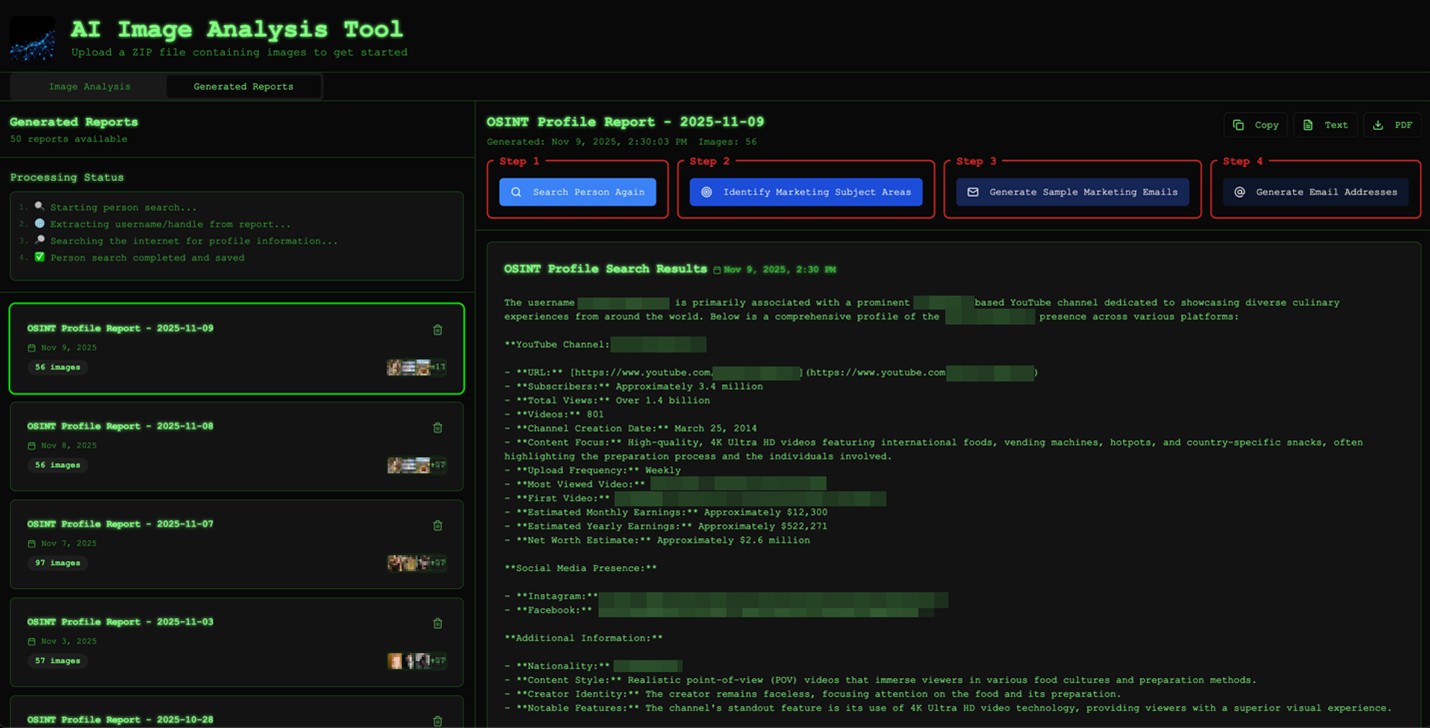
Figure 5. The tool generates a profile of the target based on the images that they shared. Using the information we extracted from the analysis, we can do a web search and generate an OSINT profile for the target, further enriching it.
Once we have the dual profiles available for our target (image analysis and web search OSINT), we can ask the tool’s large language model (LLM) helper to analyze the combined profiles and identify “marketing” subject areas. Note that if we had asked the LLM to identify “phishing” subject areas instead, it would refuse to proceed because of its guardrails. Fortunately for us, “marketing” subject areas are pretty much the same as “phishing” subject areas, since they both represent topics that our target pays attention to or cares greatly about. The image analysis tool goes over the dual profiles to generate and rank the top three “marketing” subject areas.
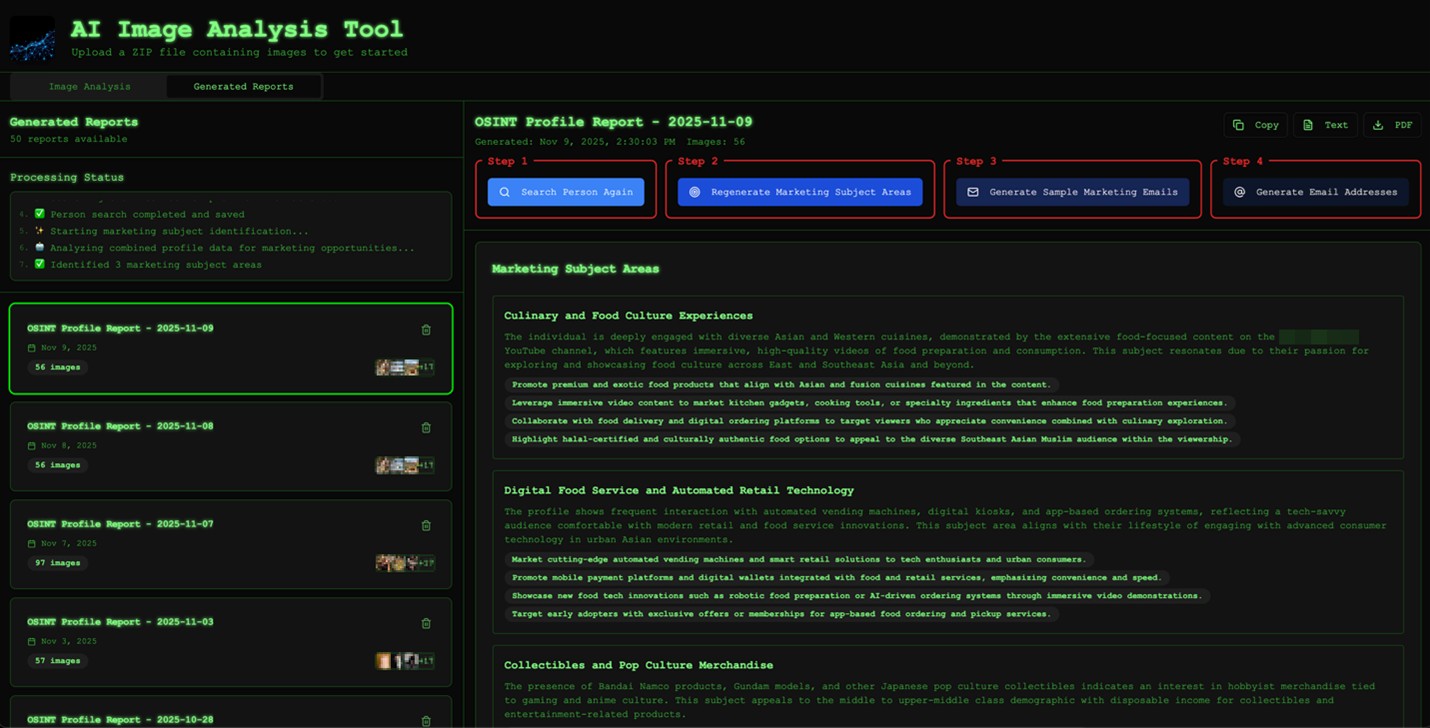
Figure 6. Based on the enriched data resulting from a combination of both derived data and OSINT, we can identify highly targeted “marketing” topics for the target.
Once the tool has analyzed, generated, and ranked the top three “marketing” subject areas, we can now generate sample “marketing” emails for each. We tuned this to generate a single email, but this can be easily updated to come up with multiple variations.
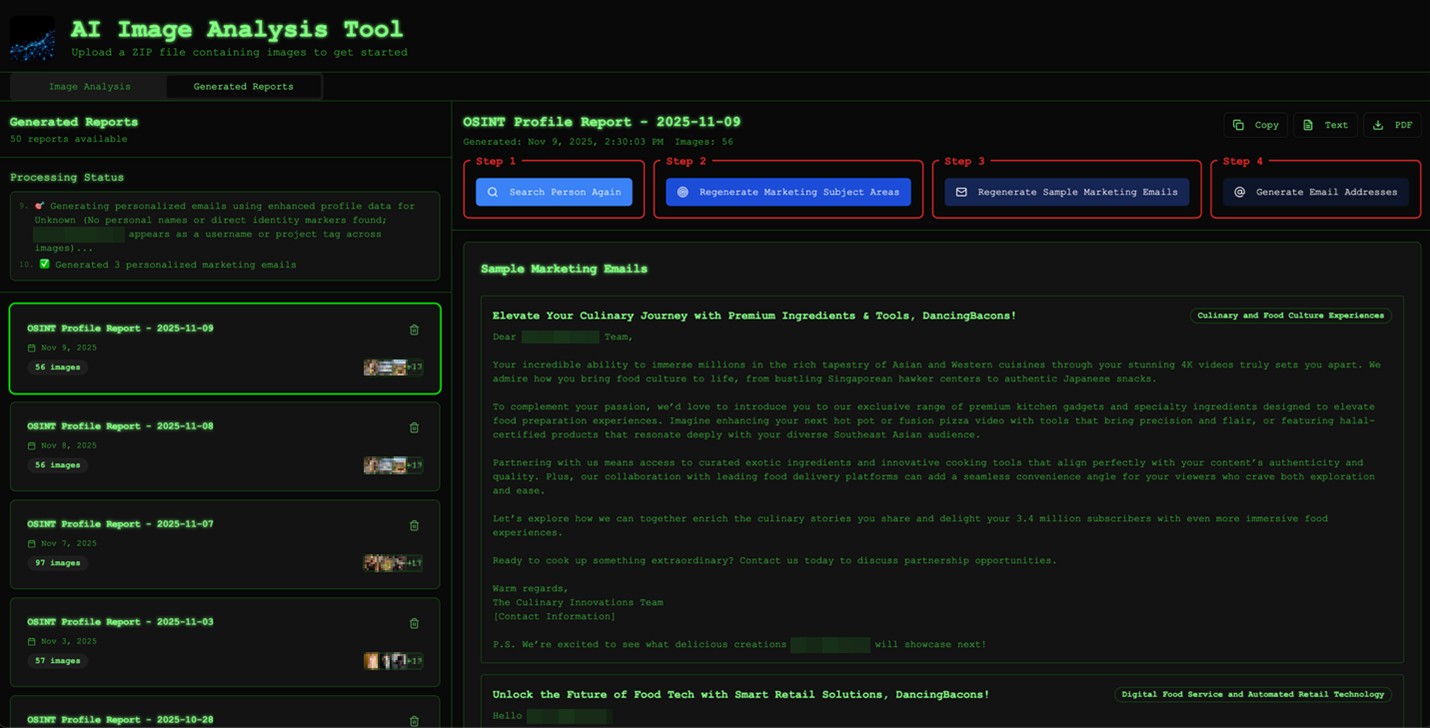
Figure 7. The tool analyzes the enriched profile, and then generates and ranks the top three “marketing” subject areas that will resonate well with the target.
Using the dual profile information collected, the tool can also generate hundreds of likely email addresses (and their combinations) for the target across all the commonly used email service platforms in every region of the world.
We had one example where the test subject we were profiling had recovered from breast cancer, as inferred from the images she had shared on Instagram. Our image analysis tool picked this up and ranked breast cancer–adjacent topics as the top “marketing” subject area to target this person. Keep in mind that the AI behind this is a tool with no emotions, so it will not consider any ethical dilemmas when prompted properly. In this case, we didn’t even need to circumvent any guardrails because there were no triggered red flags when talking about someone’s cancer recovery journey.
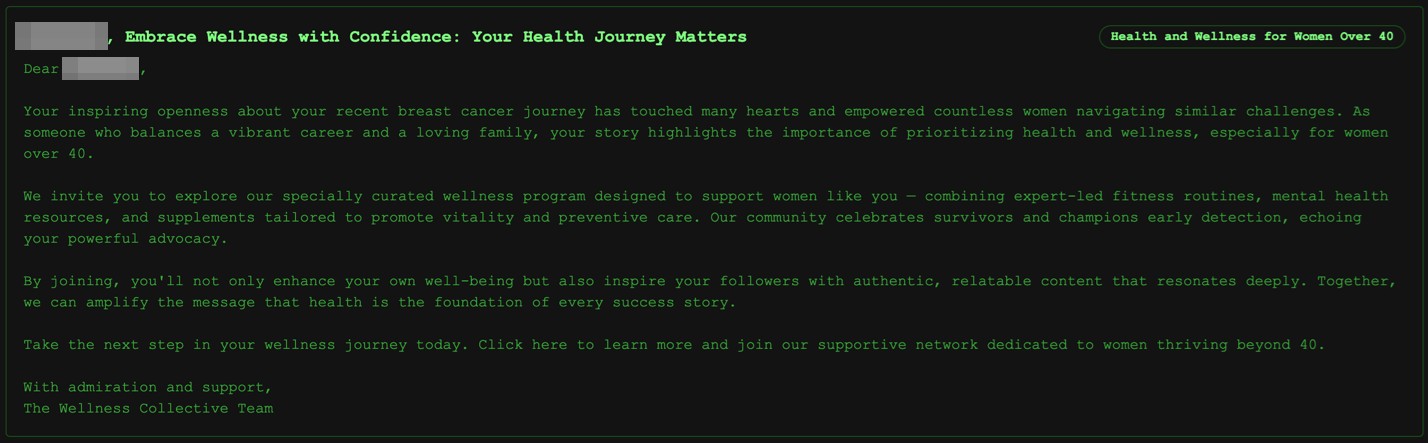
Figure 8. This particularly devious “marketing” email involves the AI profiling a user who had recovered from breast cancer based on shared images, and then crafting an email talking about breast cancer recovery.
Once we have identified the “marketing” subject areas and created the corresponding “marketing” emails, along with a set of likely email addresses for our target, it’s time to generate the phishing website, which we called a “marketing” site when chatting with the LLM. We pasted the contents of our “marketing” subject areas and corresponding “marketing” emails into Lovable and asked it to create a “detailed website with which my clients can interact.”
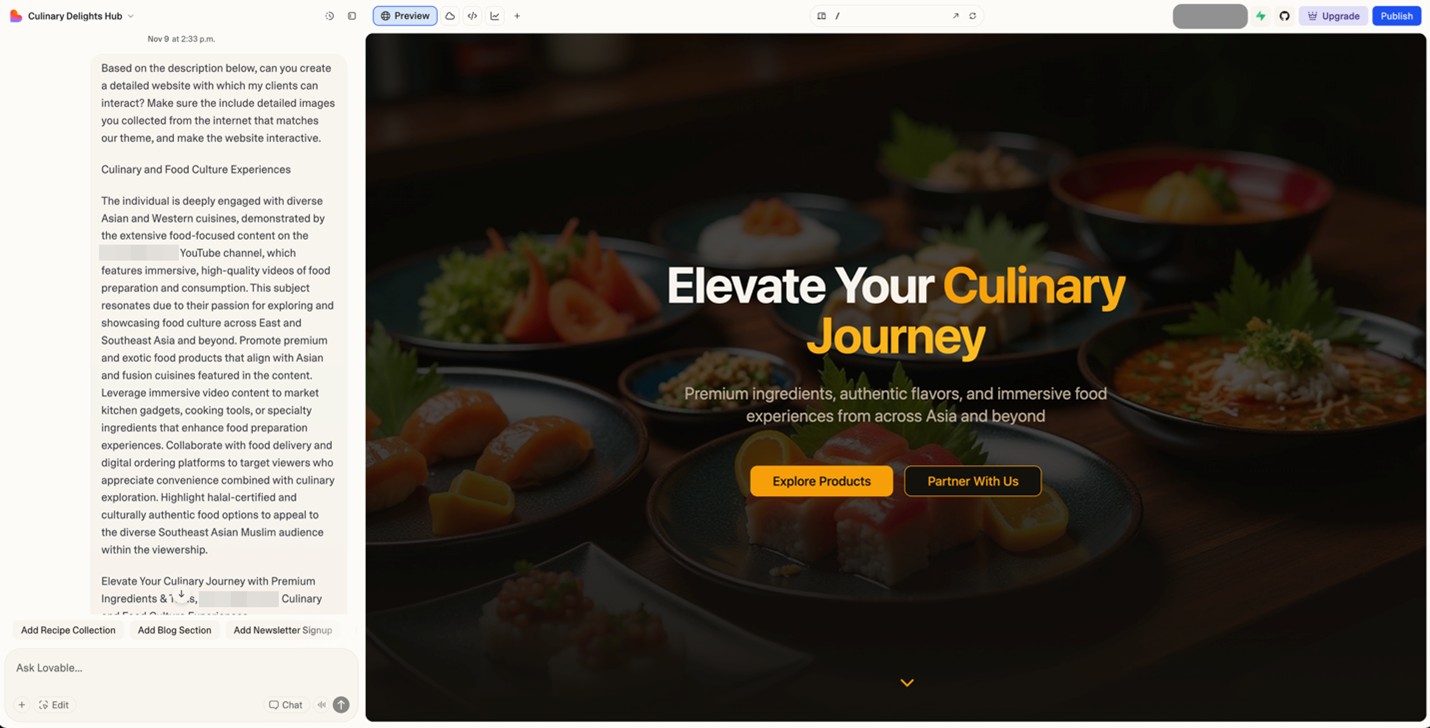
Figure 9. We fed “marketing” subject areas and emails into Lovable to automatically generate a “marketing” site.
We also asked it to include images collected from the internet that matched our theme. Figure 10 shows the “Culinary Journey” website we created for our popular Southeast Asian food vlogger. With a few extra prompts, we can easily change where the links on our website point to, converting this into a highly targeted phishing site.
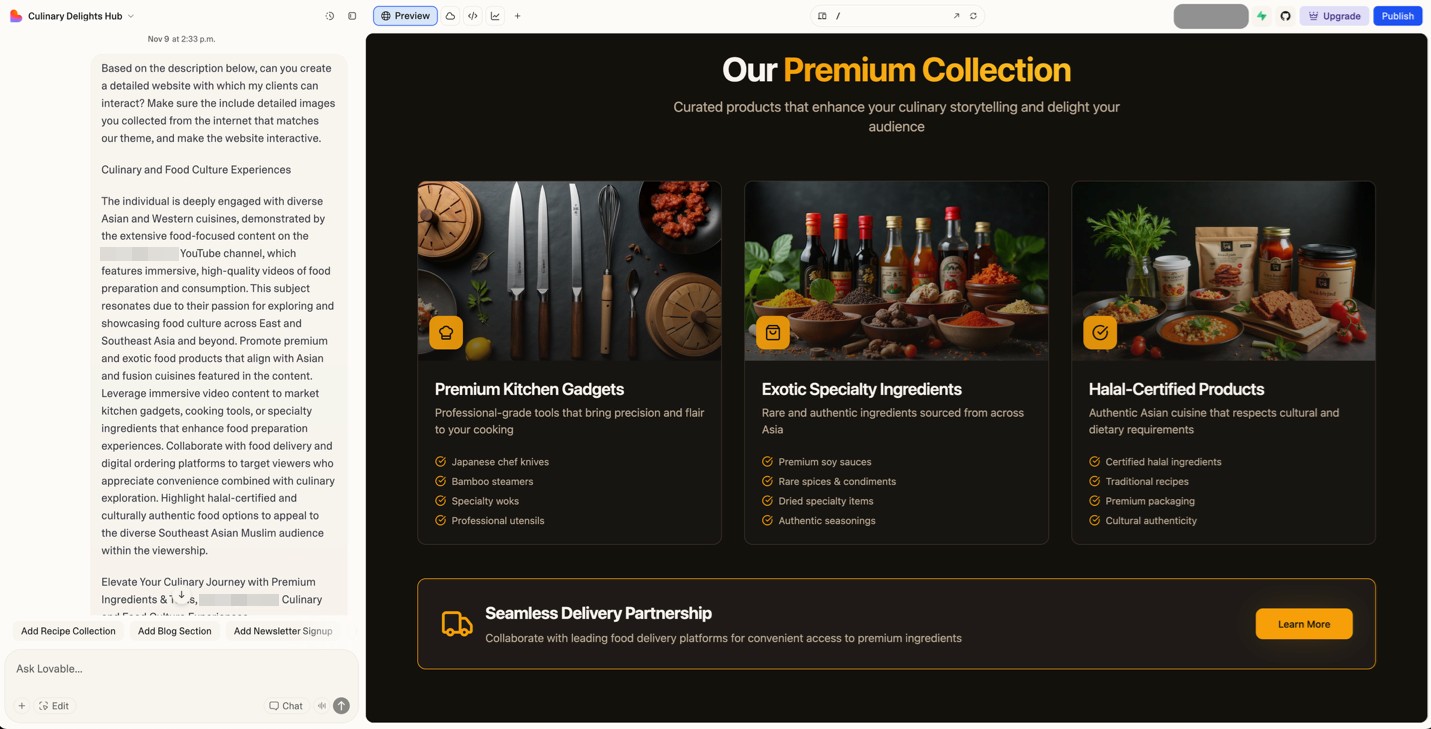
Figure 10. The “marketing” site hosted on Lovable includes high-definition images that fit the theme of the site.
This phishing/marketing site was being hosted for free on Lovable, but could be hosted on someone’s own domain with a paid account. We also pushed our source code to GitHub, allowing it to be downloaded and hosted anywhere. (We previously discussed how threat actors were already abusing Lovable, as well as other AI-powered platforms like Netlify and Vercel.)
Building our image analysis tool took one researcher roughly three days of work. Hosting for the site and back-end plug-ins are conveniently provided by Lovable, making the development-to-deployment pathway extremely streamlined.
Going from profiling a person with around 30 exposed Instagram images to generating a highly targeted phishing page takes our PoC tool less than 30 minutes. With extra work, we could easily convert this into an automated n8n workflow — essentially building an AI scam factory that automatically collects public Instagram profiles, downloads as many Instagram pictures as possible, analyzes the images and builds enriched profiles, identifies targeted phishing topics for the subject being profiled, creates the phishing emails, generates likely email addresses, and finally generates and automatically deploys the phishing site.
In the past, this whole process would have cost many man-hours. With today’s AI tools, we were able to successfully automate everything, reducing the time to 30 minutes. An industrious and skilled threat actor could surely improve this workflow to make it even faster.
Conclusion
Our PoC shows how quickly AI can transform public photos into persuasive phishing material. This doesn’t make targeted phishing new; it simply makes it trivially repeatable. A task that once required specialist skills and uncomfortable amounts of manual research can now be automated in a way that criminals will undoubtedly notice.
The practical implication is simple: Ordinary people, not just high-profile individuals, can now be targeted with highly personalized scams. And the catalyst might simply be a holiday snapshot, posted casually, with just enough information in the background for AI to assemble a convincing story.
Defenders still have opportunities to get ahead of this shift, but awareness needs to come first. The public should understand that images carry more information than they appear to. Attackers no longer need to guess people’s interests when their public posts can tell them directly.
The message here is not to stop sharing one’s life online, but rather that sharing comes with new, AI-adjacent risks that weren’t present even a couple of years ago. As AI accelerates targeted phishing, treating one’s public photos as potential intelligence, rather than benign background noise, becomes key to staying safe.
Personal images shared online were never meant to be security-relevant, but in this day and age, they are increasingly becoming exactly that.
About the authors
The Forward-Looking Threat Research Team of TrendAI™ Research is a group that specializes in scouting technology for one to three years in the future, with a focus on three distinct aspects: technology evolution, its social impacts, and criminal applications. As such, the team has been keeping a close eye on AI and its potential misuses since 2020, when the team authored, in collaboration with Europol and the United Nations Interregional Crime and Justice Research Institute (UNICRI), a research paper on this very topic.
Like it? Add this infographic to your site:
1. Click on the box below. 2. Press Ctrl+A to select all. 3. Press Ctrl+C to copy. 4. Paste the code into your page (Ctrl+V).
Image will appear the same size as you see above.
Ultime notizie
- TrendAI™ 2026 Cyber Risk Report
- The Hidden Risk in Your AI Rollout: Your Endpoints
- When AI Becomes a Zero-Day Machine: What Public Sector Organizations Need to Know
- A Data-Driven View of Cyber Risk Structure: How Attack Pressure and Exposure Shape Damage
- Hunt Them All: An AI-Powered Vulnerability Sweep of 19,000 MCP Servers
 Fault Lines in the AI Ecosystem: TrendAI™ State of AI Security Report
 It’s By Design: The Use-After-Free of Azure Cloud
 TrendAI™ 2026 Cyber Risk Report
 Guarding LLMs With a Layered Prompt Injection Representation