Cyberprzestępczość
13M+ Emails Sent in Tech Support Scam Targeting Users, Organizations in Japan
We analyzed a sustained tech support scam campaign that sent more than 13 million emails to Japanese addresses, with workplace-themed lures suggesting a possible expansion toward enterprise targets.


Save to Folio
- We uncovered a large-scale tech support scam campaign that has expanded beyond the more commonly observed use of malvertising to include sustained email distribution. The campaign used spoofed senders, rapidly rotating fake alert sites, globally distributed delivery infrastructure, and legitimate hosting and remote access services to move victims from deceptive emails to fraudulent support calls.
- More than 13 million emails were observed over 165 days, with 94% sent to addresses using Japan’s “.jp” top-level domain. The campaign involved more than 240,000 IP addresses and over 33,000 disposable landing sites.
- The appearance of lures involving performance reviews, salary revisions, security audits, and other internal notices indicates a shift toward social engineering designed to attract individuals in workplace settings. This might reflect an effort to reach organizational accounts and pursue larger financial payouts.
- Users should avoid links and phone numbers presented in unsolicited messages, close fake warning screens without engaging, and verify alerts through official channels. Organizations should strengthen email authentication and filtering, restrict unauthorized remote-access software, monitor suspicious international calls, and train employees to recognize and report tech support scams.
From mid-December 2025 through May 2026, we observed and analyzed a large-scale and sustained tech support scam campaign, luring victims to fake security alert websites via email. Over roughly five and a half months (165 days), we confirmed that more than 13 million emails were delivered from over 240,000 IP addresses, with more than 33,000 disposable fake alert sites serving as landing pages. Our analysis found that the campaign combined high-volume distribution, globally dispersed delivery infrastructure, rapidly rotating landing sites, and an expanding focus that appeared to include individuals within organizations:
- Of the more than 13 million emails we’ve analyzed over 165 days, 94% were sent to emails using Japan’s “.jp” top-level domain.
- Emails were sent or relayed from roughly 240,000 IP addresses distributed around the world.
- The sites linked from the emails were built and discarded in quick succession, with more than 33,000 sites observed.
- From May onward, we also observed emails that appear to target individuals within organizations.
What is a tech support scam?
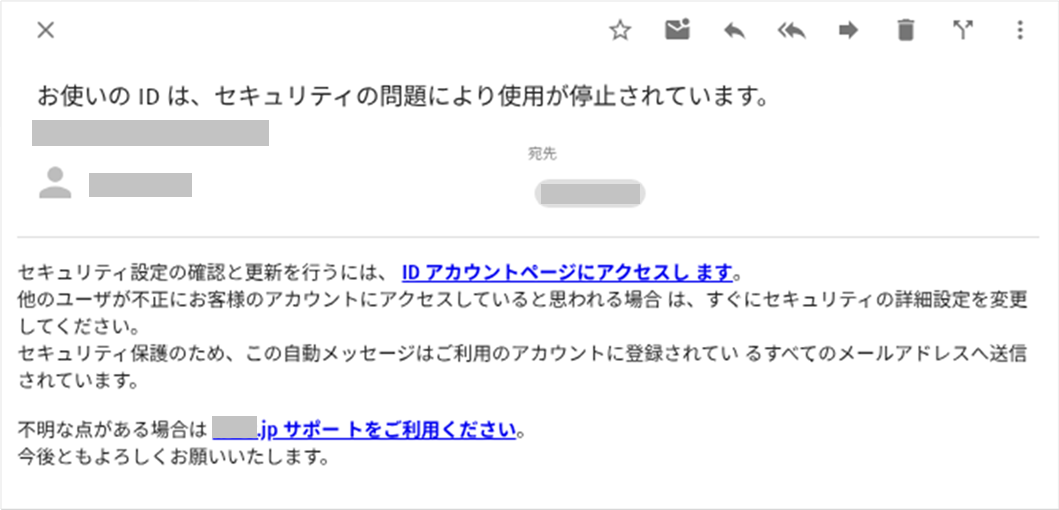
A tech support scam is a fraud scheme that displays fake security warnings on a PC or smartphone, such as “your device is infected” and “your account has been compromised,” to steer victims toward a bogus technical support line and trick them into paying fraudulent support fees. Threat actors take the victims’ money in three stages:
- Lure users to a fake security alert site.
- Remotely control the device while posing as tech support staff.
- Extract money through fraudulent support fees or wire transfers.
Our previous research identified tech support scams as one of the largest threats facing consumers in Japan. For example, in 2023, we detected and blocked more than 9 million visits to Japanese-language tech support scam sites among Windows users, a scale indicating that roughly 10% encountered such site in some form.
According to the Japanese National Police Agency’s report on special fraud and social media-based (SNS) investment and romance scams (dated May 22, 2026, which covers data from 2025) “support-pretext” billing fraud (the category corresponding to tech support scams) accounted for 1,048 reported cases (down 31.2% from 2024) and 1.49 billion yen in losses (up 48.1% from 2024). While reported cases are trending downward, the average loss per case has roughly doubled.
In recent years, malvertising in web ads has been the dominant method of steering victims to fake alert sites. However, since mid-December 2025, we have observed a shift toward large-scale email distribution.
This article lays out the full picture of this campaign, including how the threat actors abused legitimate tools and services. Their inclusion does not indicate that the products or services mentioned contain vulnerabilities or security flaws.
Scale and trend of the email campaign
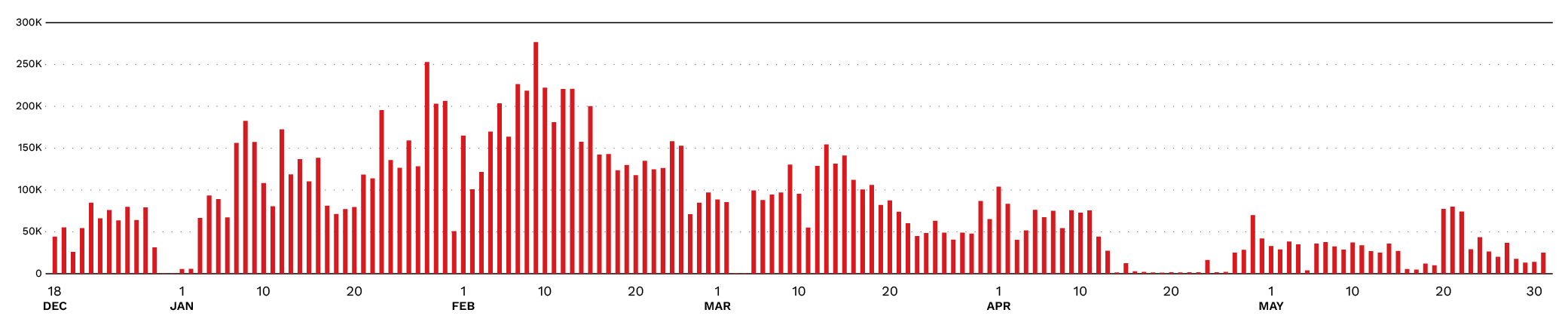
The campaign has been observed continuously since mid-December 2025, with approximately 13.38 million emails (a daily average of about 81,000) observed over 165 days. About 94% of the emails we observed were addressed to .jp domains, that is, Japanese email addresses.
As shown in Figure 2, email volume peaked in February 2026 (about 4.45 million emails, or a daily average of about 160,000) and has declined since, but as of May, an average of about 30,000 emails per day were still being delivered.
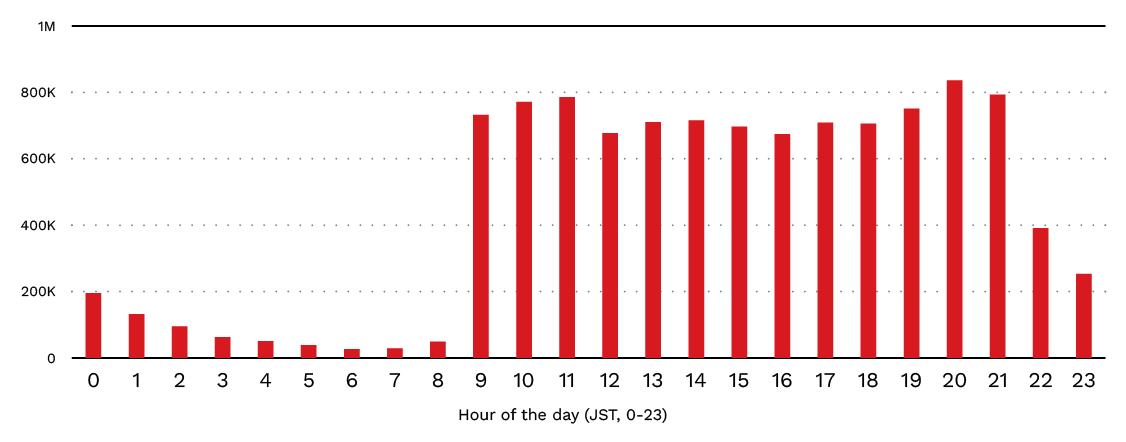
The emails’ arrival times concentrate between 9:00 and 21:00 Japan Standard Time (JST), indicating that the delivery schedule is operated to match active hours in Japan.
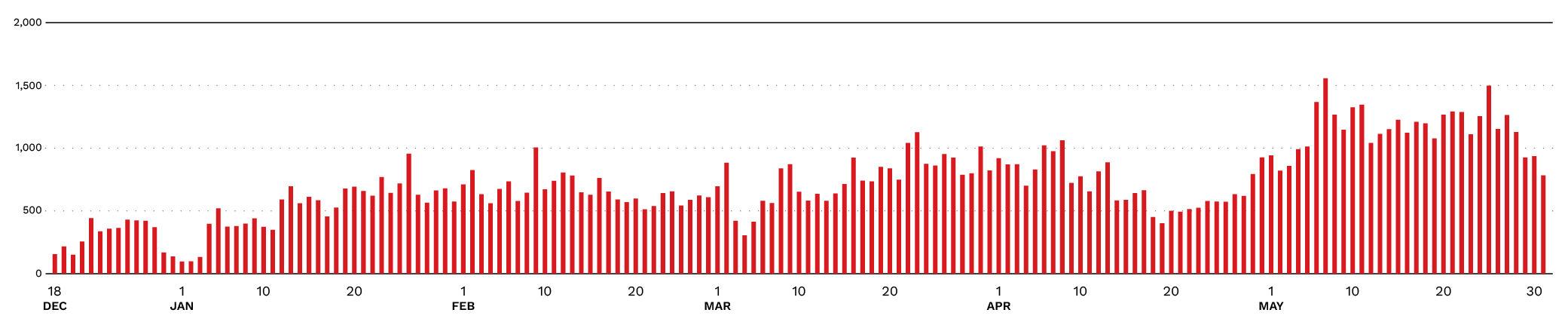
The fake security alert sites used as landing pages numbered more than 33,000 over the 165 days. More than 100 sites per day were observed from the campaign’s early phase, and 400 – 1,000 per day almost every day since January. By treating large numbers of websites (URLs) as disposable, the threat actors attempt to evade detection by security products. While email volume has declined since the February peak, the number of unique landing sites has remained largely unchanged.
The scam emails’ characteristics
We categorized the emails into the following:
- Fake warnings: Purporting to alert the recipient to a security or account problem
- Adult/pornographic content: Using sexually explicit text to draw interest
- Impersonation of specific organizations: Posing as legitimate organizations, such as major e-commerce sites, public agencies, and security vendors
- Emails targeting individuals within organizations: Disguised as internal corporate notices (e.g., performance reviews, salary revisions)
The first two categories have been observed throughout the campaign since its early days and account for the majority of the emails.
Impersonation emails began appearing in mid-April 2026 and include messages posing as major e-commerce sites, transportation and financial institutions, the National Tax Agency (using unpaid tax reminders as a lure), and job listings.
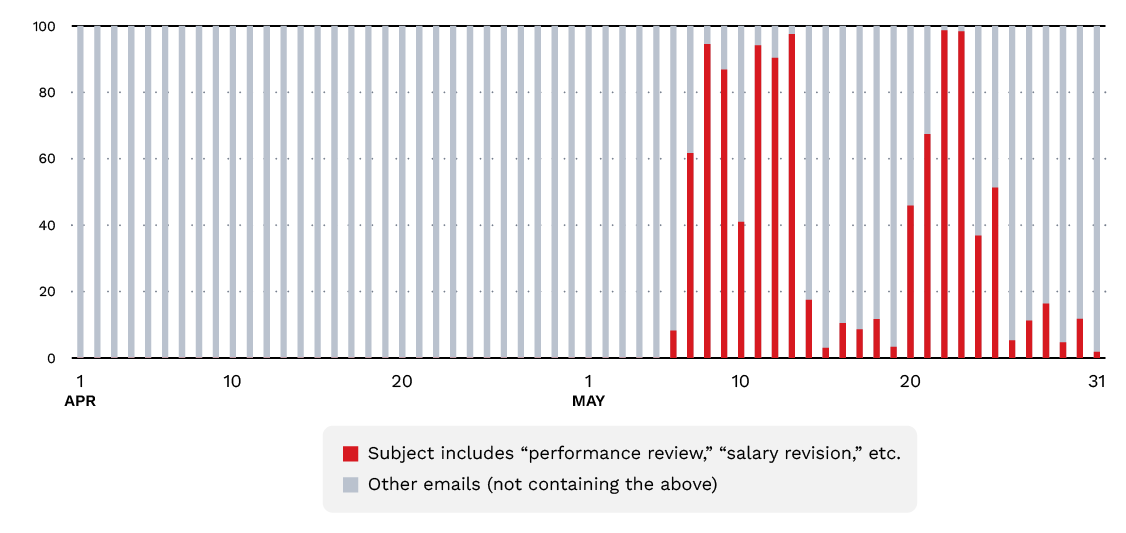
The last category began appearing in May 2026. This included emails about “performance reviews,” which were designed to lure individuals inside companies and other organizations to fake alert sites.
While tech support scams primarily target individual users, organizations have also suffered losses. In confirmed cases, the victims were directed to access their online banking accounts while the threat actors remotely controlled their devices, resulting in substantial financial losses. This suggests that the threat actors might be pursuing larger payouts from businesses.
Figure 5 shows the daily percentage of emails whose subject lines contain keywords such as “performance review” (人事評価) and “salary revision” (給与改定). Their appearance indicates a shift toward themes designed to attract individuals in workplace settings.
Among the emails observed in May 2026 that target organizations, we observed the following subject lines (translated from Japanese):
- [Urgent] Internal network security audit: Request to verify suspicious device activity and logs
- [Confidential] Advance release of the H2 FY2026 performance evaluations and promotion candidate list
- [Important / All employees] Confirmation of H2 FY2026 salary revisions and evaluation feedback (ID: HR-SYS-{number})
- [Employee benefits] Notice: Digital Amazon gift cards for all employees to mark the company anniversary
- [Important notice] Changes to commuting expense reimbursement rules and re-application procedures
- [Advance release] Great work this term! Your evaluation and some good news (upcoming promotion list)
- [Notice] Fact-finding regarding a compliance violation (complaint) addressed to {company domain}
- [Important] Re-registration of emergency contacts and the safety confirmation system
- [Important] Request to test login and verify settings ahead of company-wide system maintenance
- [Urgent] Request for confirmation regarding the flat-rate tax cut and refund procedures for overpaid taxes
More than 90% of the sender addresses were spoofed to match the recipient’s own address or the address of a legitimate service, with the intent of convincing recipients that the message came from their organization’s system administrator or a genuine service. In emails posing as specific organizations, we also confirmed spoofing of the very addresses those organizations actually use to send email to their users.
While sender address spoofing makes recipients easier to deceive, sender domain authentication standards, such as Sender Policy Framework (SPF), DomainKeys Identified Mail (DKIM), and Domain-based Message Authentication, Reporting, and Conformance (DMARC), can help detect many of these attacks.
Email delivery infrastructure
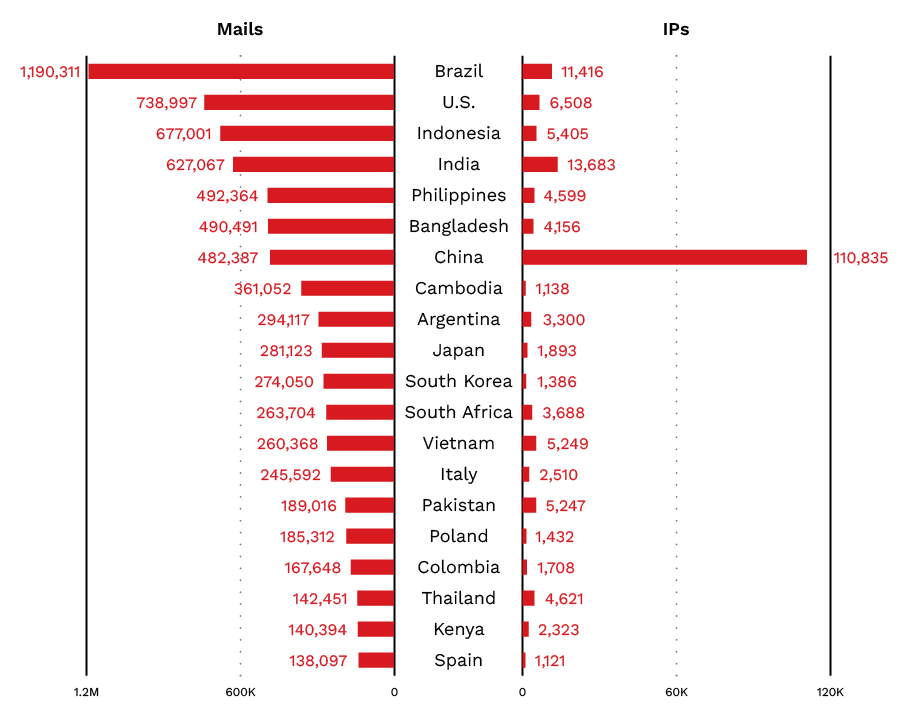
More than 240,000 IP addresses distributed around the world were observed sending or relaying the emails. Brazil accounted for the largest email volume, while China had the largest number of unique sending/relaying IP addresses.
One likely explanation for this enormous number of IP addresses is that legitimate internet-of-things (IoT) devices and similar equipment have been hijacked by the threat actors and abused as email delivery infrastructure. We have also observed telltale behaviors that appear to stem from the delivery infrastructure, such as consistent offsets between the timestamps recorded in email headers and the actual receipt times.
We analyzed the top 10,000 sending IP addresses by send-event count against the information recorded in Shodan, a search engine for internet-connected systems and services. For 5,940 of them, no running service could be confirmed. For the remaining 4,060, some service was confirmed to be running.
Of these, 3,231 IP addresses were running services that appear to operate on MikroTik devices, and on 2,657 of those IP addresses, TCP port 2000 was reachable from the internet. Many of these IP addresses have been observed as sources of attack-like traffic, such as port scanning and spam delivery, suggesting they are in a state where some form of malicious activity is possible. After MikroTik devices, the most common services running on these IP addresses were OpenSSH (284), nginx (184), and Apache (144), confirming that IoT devices, web servers, and similar systems were in operation.
Attack chain of the fake security alert sites
Clicking the link in the email opens a fake site that displays a bogus warning message. The fake warnings on these landing sites are nearly identical to those seen in tech support scams to date, falsely claiming that a security problem has occurred on the device.
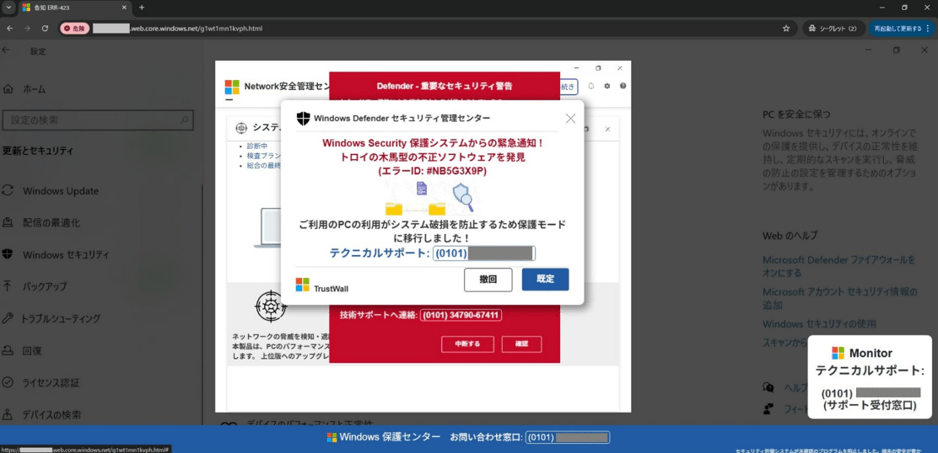
The fake alert sites are built on the static website hosting feature of Microsoft Azure Blob Storage. Abusing legitimate hosting services in this way appears advantageous to threat actors because HTML/JS files placed in storage can easily be published over HTTPS, which has become a standard tactic in tech support scams.
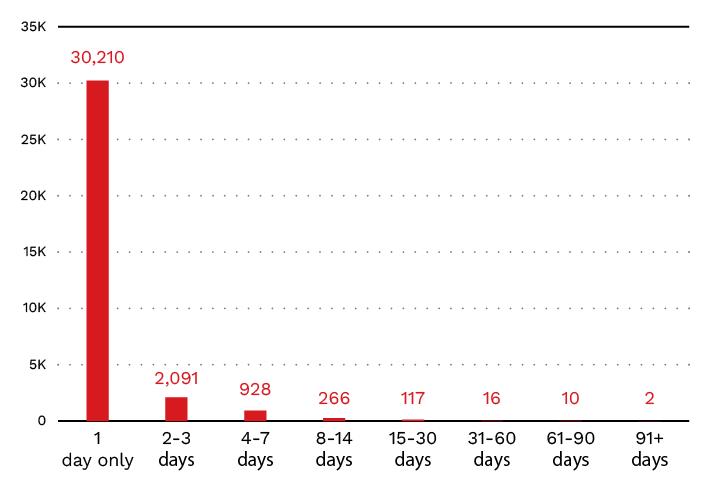
Roughly 90% of the approximately 33,000 sites were used as email links for only a single day. The threat actors abuse cloud services to build and discard sites in a disposable fashion, attempting to evade detection by security products.
The fake alert sites employ techniques, such as content encryption, to evade analysis. Barracuda Networks has published a detailed analysis of sites with the same structure.
Phone numbers used in the tech support scam
The fake alert pages that the emails lead to display phone numbers that connect to the scam’s call centers.
Figure 9 shows the daily count of phone numbers displayed on tech support scam sites, collected and verified since late February 2026. All of the observed numbers were international numbers used primarily in North America. While the fake alert sites are used for only about a day, most of the scam phone numbers remain in use for comparatively long periods of a week or more.
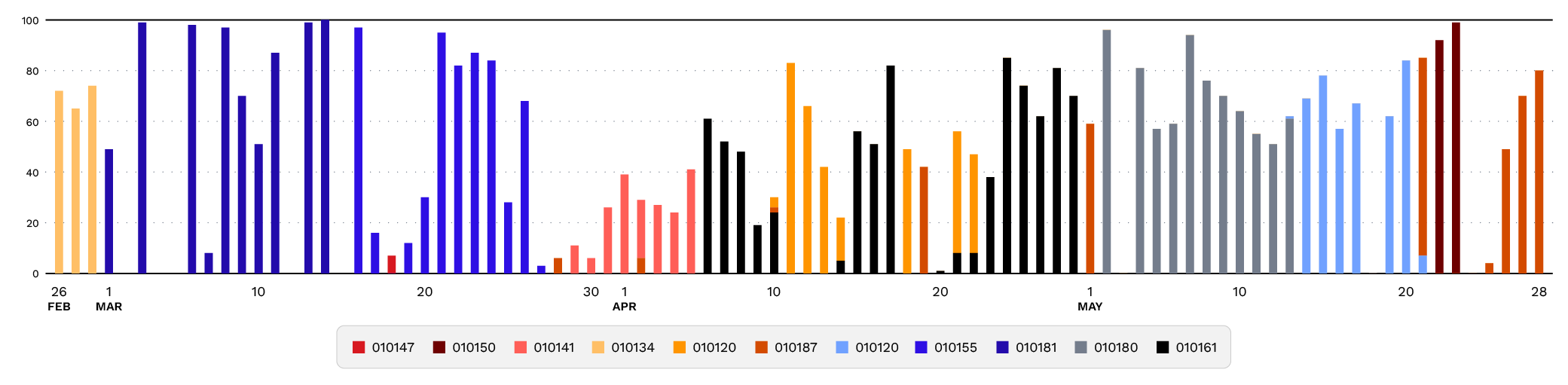
Over roughly three months (February 26 – May 31, 2026), we confirmed 4,721 fake alert sites but only 11 distinct phone numbers displayed on them. A single number is reused across hundreds of sites. Blocking known scam phone numbers, or alerting users before a call is placed, can help disrupt the campaign by cutting off its primary path to victim engagement.
Conclusion and security best practices
Tech support scams work by stoking the victims’ anxiety and fear to degrade their judgment, robbing them of time to think and opportunity to consult others. This campaign is no exception, combining multiple forms of psychological manipulation, including subject lines and warning screens engineered for urgency, disguising senders as legitimate services, and using fear like screen locking and alarm sounds.
Once users understand how the scam works, it becomes much easier to respond appropriately Users and organizations should adopt the following security best practices to recognize the warning signs, avoid engagement, and reduce the risk of financial loss:
- Treat any message demanding an immediate decision as a likely scam. Common to phishing as well as tech support scams, warnings that stoke urgency is a classic social engineering technique for robbing victims of their calm judgment.
- Separate a legitimate service’s “name” from its “actual contact channels”. Legitimate vendors as well as security products and platforms never display a phone number on a warning screen. Do not use phone numbers shown on screen or links inside emails, and always open the official website from your bookmarks to verify.
- Pause before taking action. Alarm sounds, screen locks, and seemingly urgent messages are theatrics designed to strip victims of their composure. Even if the screen appears frozen, calmly closing the web browser (or terminating it from Task Manager if necessary) resolves most cases.
- Identify trusted contacts in advance. Regularly discuss how tech support scams operate with family, colleagues, and trusted friends, and establish reliable points of contact, such as legitimate support desks, consumer affairs centers, or the organization’s security team. For users who might be especially vulnerable, such as an elderly family member, share information that can help them recognize warning signs.
- Focus on response, not blame. Scammers use highly convincing tactics and anyone can fall victim. If an incident occurs, the priority should be to contact the police, a consumer affairs center, or the relevant financial institution as soon as possible. Sharing the experience can also help prevent others from falling for the same tactics.
Because tech support scams rely on several points of engagement, users and organizations can reduce risk by blocking malicious emails and sites, avoiding suspicious links, limiting unauthorized remote access, and preparing people to recognize and report scam activity.
The following measures can help users:
- Use security products. Deploy products with features that block scam emails, sites, and phone numbers, which shut off the entry points automatically.
- Do not click links in emails directly. The more urgently an email presses users to take action, the more should they avoid clicking its links.
- Learn how to handle fake warning screens. Know how to exit a browser’s full-screen mode, such as long-pressing the Esc key or keying in Ctrl + Alt + Del.
Organizations and system administrators should adopt the following:
- Enforce sender domain authentication. SPF, DKIM, and DMARC can dramatically reduce the sender-address spoofing that is this campaign’s primary technique.
- Strengthen the email security gateway. Deploy security products that inspect message bodies, attachments, and URLs in multiple layers, and continuously update filters for brand-impersonation emails and phishing URLs.
- Restrict and monitor remote access software. Threat actors abuse legitimate remote-access software such as LogMeIn, UltraViewer, ScreenConnect, RustDesk, AnyDesk, and TeamViewer. Restrain unnecessary use through application control and monitor with extended detection and response (XDR).
- Monitor outbound international calls. Restricting or flagging outbound international calls at the private branch exchange (PBX) or similar telephone systems is an effective way to cut off the attack’s final stage.
- Regularly conduct employee education and phishing drills. Regularly share tech support scam tactics and real-world campaigns to help employees recognize and respond to threats. Build an open organizational culture where problems can be reported.
We will continuously observe and detect the emails, landing sites, and phone-number lures associated with this campaign.
Solution recommendations
TrendLife ScamCheck, an anti-scam mobile app, combines AI technologies to protect users from increasingly sophisticated scam threats. Its web threat protection blocks access to malicious websites including scam sites, while its scam call protection displays warnings for — and blocks — incoming and outgoing scam calls and international calls.
TrendLife Maximum Security blocks scam emails with its anti-scam email protection and blocks access to malicious websites with its web threat protection.
For enterprises, two effective measures are blocking the inflow of these suspicious emails and restraining the execution of unnecessary applications. On the email side, the correlated intelligence capability of TrendAI Vision One™ Email and Collaboration Security can reduce the inflow of malicious email through rules that weigh multiple conditions, such as how recently a URL’s domain was created, how rarely it has been observed, and whether the message body is written in Japanese. To restrain application execution, the application control capability of TrendAI Vision One™ Endpoint Security can suppress specific remote-access software by specifying the certificates that legitimate remote-access tools use.
Indicators of Compromise (IoCs)
The following is a list of phone numbers confirmed on tech support scam sites (as of June 12, 2026), with “010” as the international call prefix and also written as “+”. Note that the URLs for the sites are not included, as they are disposable and change frequently, making them of low value from a defensive standpoint:
- 01014788127410
- 01015015011324
- 01014156258206
- 01013479067411
- 01012076149424
- 01018774704156
- 01012083617998
- 01015513872525
- 01018146214182
- 01018082580290
- 01016189348316
- 01018444862853
Research Contributions
- Yuya Sato (Senior Incident Response Consultant, Advanced Cyber Defense Group)
- Yoshiki Kawada (Principal Threat Researcher)