
HackTool.MSIL.PWDump.AG
HEUR:RiskTool.MSIL.PwDump.gen (KASPERSKY)
Windows


- マルウェアタイプ: ハッキングツール
- 破壊活動の有無: なし
- 暗号化: なし
- 感染報告の有無: はい
概要
プログラムは、他のマルウェアに作成されるか、悪意あるWebサイトからユーザが誤ってダウンロードすることによりコンピュータに侵入します。
詳細
侵入方法
プログラムは、他のマルウェアに作成されるか、悪意あるWebサイトからユーザが誤ってダウンロードすることによりコンピュータに侵入します。
情報漏えい
プログラムは、以下の情報を収集します。
- User Credentials
- User Account Information
- List of Administrators (Local Group, Domain, Enterprise)
- Domain Information
- Active Directory List
その他
プログラムは、以下を実行します。
- Enumerate Default Domain Password Policy
- Password History Length
- Password Age (days)
- Password Length
- Query Active Directory user objects and attributes
- Display Name
- Counts of Weak Passwords
- Date and Time of last logon
- Account Name
- Account Type
- Account Expiration
- Password Last Set
- SamAccountName
- Group Type
- User Account Control
- Users with Duplicate Passwords
- Query Active Directory computer objects and attributes
- Last Logon
- Last Logoff
- It may create a dump file based on the parameter used upon execution of the application
- This hacktool display the following screen for instructions:
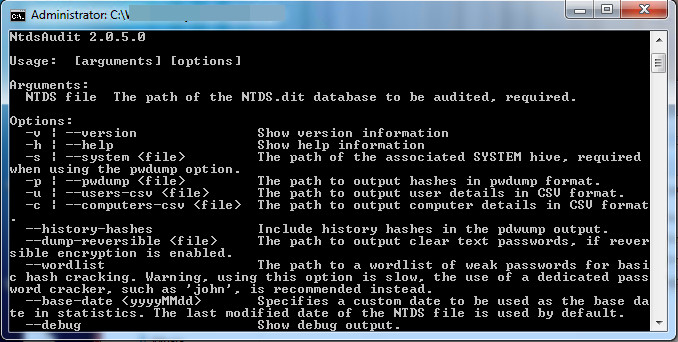
マルウェアは、以下のパラメータを受け取ります。
- -v -> Show version information
- -h -> Show help information
- -s {File} -> The path of the associated SYSTEM hive (required when using the pwdump option)
- -p {File} -> The path to output password hashes in pwdump format
- -u {File} -> The path to output user details in CSV format
- -c {File} -> The path to output computer details in CSV format
- --history-hashes -> Include history hashes in the pwdump output
- --dump-reversible {File} ->The path to output clear text passwords (if reversible encryption is enabled)
- --wordlist -> The path to a wordlist of weak password for basic hash cracking
- --base-date
-> Specifies a custom date to be used - --debug -> Show debug output
対応方法
手順 1
Windows 7、Windows 8、Windows 8.1、および Windows 10 のユーザは、コンピュータからマルウェアもしくはアドウェア等を完全に削除するために、ウイルス検索の実行前には必ず「システムの復元」を無効にしてください。
手順 2
このマルウェアもしくはアドウェア等の実行により、手順中に記載されたすべてのファイル、フォルダおよびレジストリキーや値がコンピュータにインストールされるとは限りません。インストールが不完全である場合の他、オペレーティングシステム(OS)の条件によりインストールがされない場合が考えられます。手順中に記載されたファイル/フォルダ/レジストリ情報が確認されない場合、該当の手順の操作は不要ですので、次の手順に進んでください。
手順 3
最新のバージョン(エンジン、パターンファイル)を導入したウイルス対策製品を用い、ウイルス検索を実行してください。「HackTool.MSIL.PWDump.AG」と検出したファイルはすべて削除してください。 検出されたファイルが、弊社ウイルス対策製品により既に駆除、隔離またはファイル削除の処理が実行された場合、ウイルスの処理は完了しており、他の削除手順は特にありません。
ご利用はいかがでしたか? アンケートにご協力ください