
HackTool.Linux.NetSpy.A
Application.Linux.Generic.12830 (BITDEFENDER); a variant of Linux/Riskware.NetSpy.A application (NOD32); LINUX/Siggen.rxfpz (ANTIVIR)
Linux


- マルウェアタイプ: ハッキングツール
- 破壊活動の有無: なし
- 暗号化:
- 感染報告の有無: はい
概要
プログラムは、他のマルウェアに作成されるか、悪意あるWebサイトからユーザが誤ってダウンロードすることによりコンピュータに侵入します。
プログラムは、ワーム活動の機能を備えていません。
プログラムは、バックドア活動の機能を備えていません。
プログラムは、情報収集する機能を備えていません。
詳細
侵入方法
プログラムは、他のマルウェアに作成されるか、悪意あるWebサイトからユーザが誤ってダウンロードすることによりコンピュータに侵入します。
インストール
プログラムは、以下のファイルを作成します。
- {malware or user path}/alive.txt → list of responsive alive IP addresses and merged CIDR network blocks
感染活動
プログラムは、ワーム活動の機能を備えていません。
バックドア活動
プログラムは、バックドア活動の機能を備えていません。
ルートキット機能
プログラムは、ルートキット機能を備えていません。
情報漏えい
プログラムは、情報収集する機能を備えていません。
その他
プログラムは、以下を実行します。
- Automatically enumerates all private `/24` subnets across RFC 1918 address spaces (`10.0.0.0/8`, `172.16.0.0/12`, and `192.168.0.0/16`) when the special intranet mode (`-i`) is enabled.
- Performs sparse IP sampling within each target `/24` subnet by generating probe targets consisting of fixed host ending digits (by default `.1`, `.254`, `.2`, and `.255`) and one randomized ending digit (default: 1) to quickly determine active subnets without exhaustive full-range sweeps.
- Probes target IP addresses using one of five selectable protocol engines:
- ARP Mode (`arpspy` / `as`)
- ICMP Mode (`icmpspy` / `is`)
- Ping Mode (`pingspy` / `ps`)
- TCP Mode (`tcpspy` / `ts`)
- UDP Mode (`udpspy` / `us`)
- Distributes network reconnaissance across a configurable pool of concurrent Go goroutine workers
- Consolidates discovered active host addresses and automatically merges adjacent responsive `/24` subnets into unified CIDR supernet blocks.
- It uses the following version of netspy:
- netspy v0.0.5
- It displays the list of parameters that can be used when executed without parameters in a console:
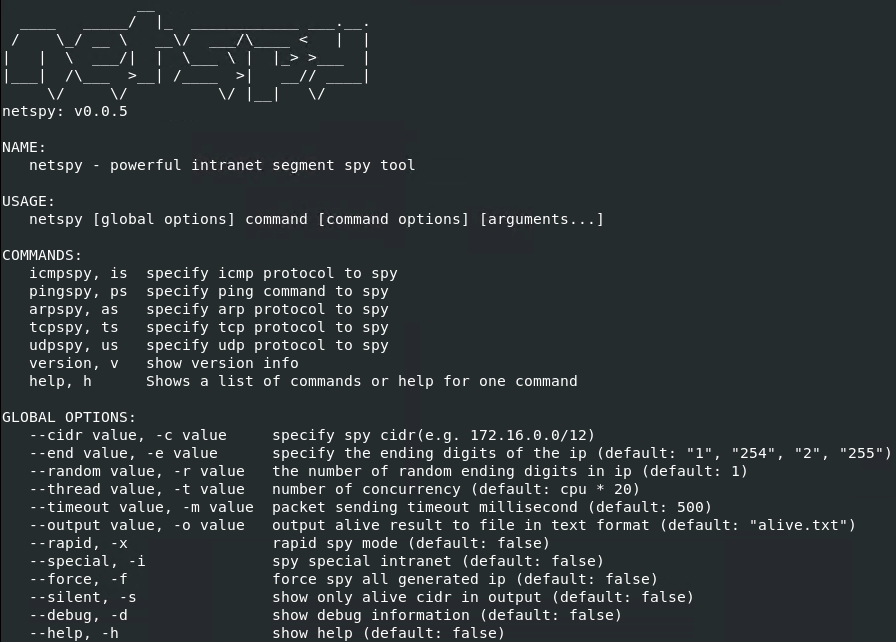
マルウェアは、以下のパラメータを受け取ります。
- -c {CIDR}, --cidr {CIDR} → used to specify the target CIDR network range to probe (eg, 1721600/12)
- -d, --debug → used to show diagnostic debug information
- -e {Digits}, --end {Digits} → used to specify the ending host digits of the IP addresses to probe (default: "1", "254", "2", "255")
- -f, --force → used to force probing of all generated IP addresses
- -h, --help → used to display help menu
- -i, --special → used to spy special intranet ranges (automatically scans all RFC 1918 private subnets 10000/8, 1721600/12, and 19216800/16)
- -m {Milliseconds}, --timeout {Milliseconds} → used to specify packet sending timeout in milliseconds (default: 500)
- -o {File Path}, --output {File Path} → used to output responsive alive host results to a file in text format (default: "alivetxt")
- -p {Ports}, --port {Ports} → used to specify TCP or UDP destination ports to probe when using tcpspy or udpspy
- -r {Integer}, --random {Integer} → used to specify the number of randomized ending digits in IP addresses to probe (default: 1)
- -s, --silent → used to display only responsive alive CIDRs in output
- -t {Integer}, --thread {Integer} → used to specify the number of concurrent worker threads (default: cpu * 20)
- -x, --rapid → used to enable rapid spy mode
- arpspy, as → used to specify raw Ethernet ARP protocol mode to spy
- help, h → used to display a list of commands or help for a specific command
- icmpspy, is → used to specify raw ICMP protocol mode to spy
- pingspy, ps → used to specify system ping command mode to spy
- tcpspy, ts → used to specify TCP protocol mode to spy
- udpspy, us → used to specify UDP protocol mode to spy
- version, v → used to display version information
マルウェアは、脆弱性を利用した感染活動を行いません。
対応方法
手順 1
Windows 7、Windows 8、Windows 8.1、および Windows 10 のユーザは、コンピュータからマルウェアもしくはアドウェア等を完全に削除するために、ウイルス検索の実行前には必ず「システムの復元」を無効にしてください。
手順 2
以下のファイルを検索し削除します。
- {malware or user path}/alive.txt
手順 3
最新のバージョン(エンジン、パターンファイル)を導入したウイルス対策製品を用い、ウイルス検索を実行してください。「HackTool.Linux.NetSpy.A」と検出したファイルはすべて削除してください。 検出されたファイルが、弊社ウイルス対策製品により既に駆除、隔離またはファイル削除の処理が実行された場合、ウイルスの処理は完了しており、他の削除手順は特にありません。
ご利用はいかがでしたか? アンケートにご協力ください